ecwid_team

Forum Replies Created
-
Forum: Fixing WordPress
In reply to: Problem accessing my wordpress website dashboardHello,
It’s Mary from the Ecwid Customer Care team.
I’m sorry to hear that there is an issue with logging in to your WordPress dashboard.Can you, please, give us more details on the issue so we could investigate this on our side:
– Do you see an error message when you try to log in?
– Can you send us a screenshot of what you see?
– What web browser do you use?
– Did you try logging in in some other web browsers?
– Do you have any browser extensions installed?
– Can you send us a HAR file?
– Just in case, here is instruction on how to record one: https://support.ecwid.com/hc/en-us/articles/360000686640-Checklist-for-troubleshooting-store-issues#step-5-report-an-issue-to-ecwid-0-4As soon as we have more info, we will be happy to investigate this for you.
Hi pirh!
Ecwid team is here =] Many thanks for your feedback. We are so glad that you are satisfied with our service. Our team is working hard on making our users’ lives easier: we constantly release new features and updates to deliver you the best experience. And there’s more to come! It’s cool that our efforts are appreciated.
Thanks for choosing Ecwid! ❤
If you need to make any adjustments and you are not sure how to do it, feel free to сontact our support team via our contact form. We are always glad to help.
Forum: Reviews
In reply to: [Ecwid by Lightspeed Ecommerce Shopping Cart] No real SEOHi there!
This is Daria from the Ecwid team. Thanks a lot for your feedback, I’m really sorry you have such impression about our product. Let’s try to sort that out.
Ecwid plugin for WordPress has all SEO features as built-in functionalities, which allow Ecwid product and category pages to be natively indexed by search engines. The plugin inculdes the SEO-friendly URLs for Ecwid pages, generates the meta tags and produce microdata markups (SEO-friendly format recommended by Google) for product and category pages, so all of the Ecwid products in our plugin are marked up according to Google requirements right in the source code of the page. If you visit any product page of Ecwid store and inspect the code, you will see that the all information is presented there, for instance: image, price, stock, availability, etc. As an example you can check out the following Ecwid store on WordPress site to be sure the data for each product is out there: https://www.thecookiedoughcafe.com/store/
Ecwid’s content is delivered to the pages of the website dynamically by means of JavaScript, so that users can browse the store without the page reloading. Usually, services that use JavaScript have hashbangs (#!) in their links. Here, in Ecwid, we found a solution to display all store links as clean and understandable—with our plugin SEO-friendly URLs are available to you out of the box.
The meta tags are generated according to the product and category details: the product name is added to the title tag, the product description is included to the meta description. Ecwid also allows adding custom <title> and <description> tags. This can be done right in Ecwid Control panel > Catalog > Products > click “Edit Product”.
We automatically generate ALT-tags (from product titles) for images to explain images to search engines. There are so-called og-tags like og:locale, og:site_name, og:type, og:title, og:description, og:url. These tags make your store content more “attractive” for the search engine crawlers as well.
With our plugin there is also an option to generate the Sitemap for the store which is added to a WordPress website. This can be done with the help of special plugins such as Google XML Sitemaps or Yoast SEO. All the store pages will be included to the sitemap and then it can be successfully added to the Google Search Console.
So, all essential things necessary for SEO optimization are included in our plugin for WordPress and all this works out of the box. As a result, all Ecwid stores are indexed by search engines as good as other e-commerce plugins for WordPress.
As for our multilingual feature. Ecwid storefront is professionally translated into 50 languages. When you use our plugin, your WordPress website sets the default language the store is displayed on. If you’d like your store to be translated to different languages automatically, your WordPress site itself should support multiple languages. You can create a multilingual WordPress site and add a language switcher to it using one of the popular plugins, e.g. WPML or Polylang plugins (Ecwid is compatible with any of them and other plugins)—their language switcher changes language not only for the site, but for your multilingual Ecwid store within it, too. Your Ecwid pages will have different URLs based on the language, Ecwid will add the necessary ‘hreflang’ tags to the source code of each page, thus Google will recognize all language versions. As a result your customers will shop with you in their preferred language and Google will index your store pages accordingly.
Hope this clarifies. If you have any issues with the indexation of Ecwid store on your WordPress site, please, let us now the URL of your store. We’ll carefully analyze the SEO of your website and provide you with all possible solutions. Feel free to contact us directly at support@ecwid.com. Our Customer Care team will be happy to help you with any requests you may have. Thank you!
Forum: Plugins
In reply to: [Ecwid by Lightspeed Ecommerce Shopping Cart] Console errorsFrank, thank you for the tip!
@ezcomputing, I’ve checked your site again and now I see the errors in the browser console which were caused by Ecwid plugin.
We need to get deep into the research and we need more details from you.
Can we get in touch with you using your Ecwid account email st***************inic@gmail.com ?
If this is not the best email for contact, please drop us a line at support@ecwid.com and we’ll be happy to help you further with it.
Thank you!
Wendy,
Ecwid customer care teamForum: Plugins
In reply to: [Ecwid by Lightspeed Ecommerce Shopping Cart] Console errorsThank you for sharing the link!
I’ve checked your Ecwid store added to this page https://stevecampbellremedialmassage.com/store/ and I didn’t see the errors in the browser console.
As I can see, the errors you are referring to appear when you load the home page of your site https://stevecampbellremedialmassage.com/
These errors are caused by “Autoptimize” plugin for WordPress. Do you have this plugin installed on your site? If yes, please deactivate it temporarily and check if this makes the difference.
If the errors disappear once you deactivate the plugin, I’d recommend you to get in touch with the customer service of “Autoptimize”. You can do it using this link: https://wordpress.org/support/plugin/autoptimize/
If you have any further questions or need assistance, don’t hesitate to ask!
Wendy,
Ecwid customer care teamForum: Plugins
In reply to: [Ecwid by Lightspeed Ecommerce Shopping Cart] Console errorsHi there,
This is Ecwid team. My name is Wendy. I’m sorry to learn you faced this.
Please post here a link to your website with Ecwid store. We’ll look into this issue and find a solution for you.
Thank you!
Forum: Plugins
In reply to: [Ecwid by Lightspeed Ecommerce Shopping Cart] Downloadable productsHello there! It’s Ecwid Care Team.
Glad to tell you that we have a special built-in feature with help of which you can add digital (downloadable) products to your store. You can upload a file that will be delivered to customers automatically via unique download links after they make a purchase. Due to the unique link you will avoid sharing of a downloadable product. Please follow the link to get more information about Digital Products in Ecwid
Please note, that following feature is available at our Venture plans and higher. To check out Ecwid plans and features, please follow the link.
Hope that will help! Feel free to contact us directly by using this form https://support.ecwid.com/hc/en-us/requests/new if you have any other questions, we’ll be glad to help!
Hi!
Thanks for your question!
I’ve run several tests and here are my findings:
1. WordPress itself generates the following structure for <title> – Subpage title | Page – Site name (in your example it’s Rock Salt Products | Store – Rock Salt Lamps).
2. Initially, titles generated by WordPress look like this:
<title>Rock Salt Products – Store – Rock Salt Lamps</title>
Yoast SEO optimizes this title so it looks like it does now in your site’s source code.3. If you want to customize the SEO title for all the store pages, Yoast SEO allows doing it. However, since WordPress generates the title structure like this, there’s no option to remove the suffix ‘| Store – Rock Salt Lamps’.
4. Still, you can customize it and replace ‘Store – Rock Salt Lamps’ with anything else so the title will look like this: *Category Name* | *Your custom text*. Based on your example, it will be ‘<title>Rock Salt Products | *Custom text*</title>
If you’d like to give it a shot, please, follow the steps:
– Go to WordPress Dashboard > Pages > All pages;
– Find the store page and click on ‘Edit’;
– In the page editor, scroll down and disclose the Yoast SEO tab;
– Find Snippet Preview, disclose it and hit the Edit snippet button;
– Erase the SEO title field, then click on Insert snippet variable and choose Primary category.
– Add one more variable or some custom text after this variable (it will replace the ‘Store – Rock Salt Lamps’ part);
– Update the page.Once done, the title will be updated in the source code and in the Google Snippet.
__________________________________________________________________________________In case if you wanted to make it with another purpose, can you, please, tell us what your idea was? Why would you like to customize this title and remove the suffix?
Please, share your thoughts with us and we’ll be happy to look up better workarounds for you. Thanks!
__________________________________________________________________________________
As for meta title and description for categories, Google takes title and description that you specify for your categories. So, if you want to SEO-optimize them, you can change your current ones.Google itself determines the best data for indexing and SEO-fields where they are used, work as a recommendation on what to index.
I hope this information helps!
So, please, share your feedback with us and we’ll be happy to assist!
Forum: Plugins
In reply to: [Ecwid by Lightspeed Ecommerce Shopping Cart] ebooksHello there!
This is Ecwid Care Team. We are glad to help!
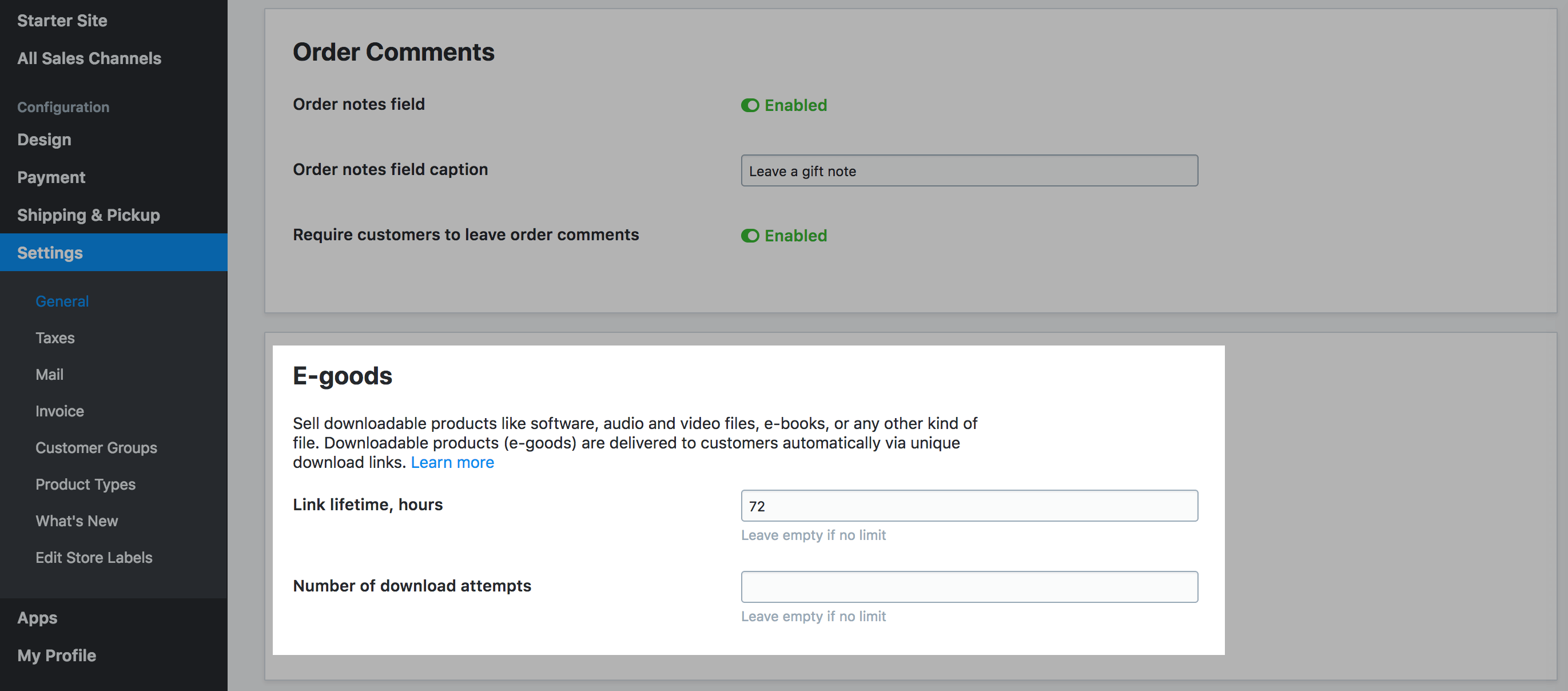
Yes, with Ecwid plugin you can sell digital items such as e-books, photos, music etc. You can upload a file that will be delivered to customers automatically via unique download links after they make a purchase. Due to the unique link you will avoid sharing of a downloadable product. Please, follow the instructions on adding a Digital Product to your store to set it up!
In addition, you can protect your E-goods by setting up expiration time and adding and limited number of downloads. You can find that feature in your Ecwid Control Panel > Settings > General > Cart & Checkout Tab > E-Goods block. Please, refer to the screenshot : https://support.ecwid.com/hc/article_attachments/360000035580/dig_4.png
Please note, that following feature is available at our Venture plans and higher. To check out Ecwid plans and features, please follow the link.
Hope that will help! Feel free to contact us directly by using this form https://support.ecwid.com/hc/en-us/requests/new if you have any other questions, we’ll be glad to help!
- This reply was modified 6 years, 7 months ago by ecwid_team.
Hi!
Thanks for your question!
As far as I know, Yoast SEO doesn’t have options to set a custom SEO title and description for product categories.
Still, if you want to change the SEO title for your store pages that will appear in Google Search snippets, you can do that with the help of Yoast SEO.
Here are the steps to set it up:
1. Install Yoast SEO. Just in case, here’s the link: Yoast SEO
2. Go to WordPress Dashboard > Pages, find the one with the store and edit it;
3. You will see the Yoast SEO tab below. Click there to disclose it;
4. Find “SEO Title” and modify it as you wish.
5. Add a meta description if you need to.
Once done, all the changes will be reflected in Google and in the browser tab (please, note it will take some time for Google to recrawl your site to update the info about your site).
I hope it helps!
If you have any questions, feel free to post in this thread. We’ll be happy to help!
Forum: Reviews
In reply to: [Ecwid by Lightspeed Ecommerce Shopping Cart] SEO is badHello!
We’ve reviewed the SEO features of Ecwid and we think it’s necessary to add some more information about it to this thread.
As for meta data for categories, Ecwid automatically generates the meta title tags and meta description for the categories according to the titles and descriptions that you set up, so they are based on the category title and description.
Among the other SEO improvements we made, there are so-called og-tags like og:locale, og:site_name, og:type, og:title, og:description, og:url. These tags make your store content more “attractive” for the search engine crawlers.
____________
Finally, to improve your store SEO, we recommend verifying your website ownership in Google Search Console. This way, Google will be more likely to suggest your site to customers.
I hope this information helps!
If you have any questions, feel free to post in this thread. We’ll be happy to help!
Hello!
I’ve just reviewed the information I provided and I think that I need to add some more details on this.
Even though we don’t have the option to set up meta titles and descriptions for categories, we took care of SEO in this case as well: Ecwid automatically generates the title tags and meta description for the categories according to the titles and descriptions that you set up. In other words, these tags are based on the category title and description.
Among the other SEO improvements we made, there are so-called og-tags like og:locale, og:site_name, og:type, og:title, og:description, og:url. These tags make your store content more “attractive” for the search engine crawlers.
Additionally, we added structured data to the Ecwid markup which brings the so-called rich snippets on search engines like Google.
We automatically generate ALT-tags for images to explain images to search engines. Ecwid creates ALT-tags for images automatically with the same text as the product title.
____________Finally, to improve your store SEO, we recommend verifying your website ownership in Google Search Console. This way, Google will be more likely to suggest your site to customers.
I hope this information helps!
If you have any questions, feel free to post in this thread. We’ll be happy to help!
Forum: Reviews
In reply to: [Ecwid by Lightspeed Ecommerce Shopping Cart] SEO is badHello,
Thank you very much for your feedback! We’re glad to hear that you think that Ecwid is a good platform for creating online stores and integrating them with WordPress sites.
You’re right, it’s currently possible to write the meta tags (title and description) for the products only. We understand that it’s also important for SEO to write the meta tags for the categories as well. We have plans to add such a possibility in the future.
We’ve added the link to this topic to this feature waiting list. We’ll update you here once it’s released.
Thank you!
Hello,
It’s Dexter with Ecwid team. Thanks for your message!
At the moment, it’s possible to set the SEO field for products only. There’s no option to set it for categories. I’m sorry about that!
Still, we have plans to implement it in the future and I’ve added your request to the mailing list. As soon as it’s released, we’ll post an update in this topic.
Thanks for bringing our attention to it!
Please, stay tuned!
Joe, thanks a lot for the details!
I’d like to let you know we contacted you via email to get more details on the custom solutions you are talking about.
Waiting to hear from you, thanks!