WP Folio Team

Forum Replies Created
-
Forum: Plugins
In reply to: [PPWP - Password Protect Pages] Temporary passwordHello @magen1 ,
Thank you for reaching our support! I’d be glad to help you with your concerns in any way I can!
After further review of your query, we provide a couple of options:
- The first option is our Access Links Feature to have your users access content without needing a password.
- The Access Links Feature allows you to give access to the site without needing a password of the site, minimizing the security risks of leaking passwords. Also, you can automatically have these links expire after a given time or a number of clicks to restrict your content access.
- The second option is our Smart Restriction Extension.
- Our SR extension allows you to start counting the expiration time after the first use instead of a fixed password expiry date.
Thanks again for reaching out to our support and let us know if you have any more questions. For a faster and more customized response from our team, please feel free to drop us an email at hello(at)preventdirectaccess.com!
Cheers,
Muhammad
Forum: Plugins
In reply to: [Prevent Direct Access - Protect WordPress Files] Doesn’t workHello Paul,
Thank you for reaching our support! I’d be glad to help you with your concerns in any way I can! I would appreciate it if you can please let me know if you have activated the Plugin by going to the Plugin.
I would appreciate it if you also want to drop us an email at hello(at)preventdirectaccess.com so that our team can provide support promptly, @pawelszroeder.
Cheers,
MuhammadForum: Plugins
In reply to: [PPWP - Password Protect Pages] PWA cache issueHello there,
Thank you for reaching our support! I’d be glad to help you with your concerns in any way I can!
To assist you better, can you please confirm if you are referring to this Plugin <https://wordpress.org/plugins/pwa-for-wp/>?
Cheers,
MuhammadForum: Plugins
In reply to: [PPWP - Password Protect Pages] Wrong passwordHi @stickleback,
Thanks for reaching out! To assist you further, do you mind sharing a sample URL and password so we can see the issue in action?
We understand that a public forum may not be the best place to share this information. For faster and more custom response from our team, please reach out to us at hello(at)preventdirectaccess.com. (:Hi @tantares,
Thanks for reaching out. We’d love to see this issue in action and give you more custom support here.So that your sensitive data isn’t shared in a public forum (like sample URLs and passwords) would you mind dropping us an email at hello(at)preventdirectaccess.com so we can work through this together?
Forum: Plugins
In reply to: [PPWP - Password Protect Pages] Password works only for authenticated usersHi @catalinoprea99,
Thanks for reaching out. If possible, we’d love to see the issue in action. Is there any way that you can provide us with a sample URL and password so we can see this happening on your site?
We understand that a public forum is not the place to share that information. Please drop us an email at hello(at)preventdirectaccess.com for faster response from our team.Hi @grantmahy,
No problem! If you decide to come back, we’re here to help.Hi @chocotaco,
Thanks for reaching out to us.
Don’t worry. We’ve always got your back.
At first glance, it could be something to do with your server configurations. We can’t reproduce the issue on our end…
To assist you better, could you please provide us with the following information?
- An actual file URL.
- Some screenshots/screencasts showing the issue on your end.
You might want to send these details to our support email – hello(at)preventdirectaccess.com so that our team can support you faster.
Great! We’re so happy to hear that you were able to find your previously protected posts.
If you ever decide to try our plugins again and have any issues at all, please reach out to us at hello(at)preventdirectaccess.com 🙂
Hi Sharron,
We understand your frustration. When you deactivated PPWP Lite, there was a warning pop up that should have recommended that you restore all your previously created passwords before deactivating to avoid protected pages and posts becoming public:
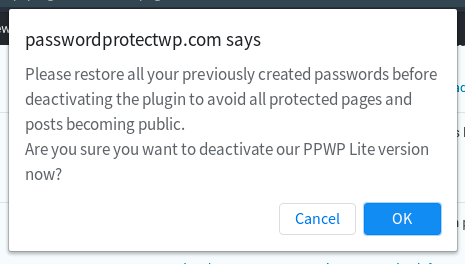
Fortunately, you can retroactively restore these passwords by following our steps that we’ve outlined in a previous post:
- Re-install our PPWP Lite (Free) plugin on your site.
- Restore default WordPress passwords using our function.
- Deactivate our PPWP Lite plugin if you’d like to.
If you are still having issues, please don’t hesitate to send us an email at hello(at)preventdirectaccess.com where you’ll receive a quicker and more streamlined response.
Hi Stijn,
Thanks for reaching out to us.
Yes, it’s possible with our plugins.
To assist you better, could you please provide us with the following information?
- Some screenshots showing your setup in the backend.
- A sample form URL for us to submit a test.
- Your license key or order ID.
You might want to send these details to our support email – hello(at)preventdirectaccess.com so that our team can support you faster, @sgfoxx.
Forum: Reviews
In reply to: [PPWP - Password Protect Pages] Impressive!Hi @dsl225,
Thank you for this amazing review! We really appreciate your support and are happy to hear that the plugin is working well for you. (:
Best,
Melanie from BWPSJust an update, the issue was resolved with the user via email.
As a reference for other users, our PDA plugins help you protect your files against unauthorized users.
- PDA Lite version allows you to grant protected file access to admin users and/or file authors.
- PDA Gold version enables you to grant all logged-in users and even custom roles access to your protected files.
Only users who log in with the correct permission, e.g. admin users, can view your protected files. Unauthorized users will be redirected to a 404 not found page by default.
To allow non-logged-in users to view your protected files while protecting their original file URLs, you’ll need our Referrals function.
Hope it helps.
- This reply was modified 3 years, 5 months ago by WP Folio Team.
Hi @tanohex,
Thanks for reaching out to us.
Yes, we can reproduce the issue on our end.
So far, we’ve noticed that disabling “Prevent Image Hotlinking” option under PDA settings page can get the issue resolved.
Could you please try and let us know if it works for you too?
You might also want to drop us an email at hello(at)preventdirectaccess.com so that our team can support you faster.
Forum: Plugins
In reply to: [Prevent Direct Access - Protect WordPress Files] PHP 8 CompatibilityHi @tanohex,
Thanks for reaching out to us last night.
Our team has tried to reproduce the issue on our testing sites without success.
May we know which specific PHP version you’re using now, @tanohex?
You might also want to drop us an email at hello(at)preventdirectaccess.com so that our team can update you on the checking progress faster & easier.