WP Folio Team

Forum Replies Created
-
Forum: Plugins
In reply to: [PPWP - Password Protect Pages] WordFence File Change Error.Hi @artdavis,
Have you uninstalled and reinstalled the latest version of the PPWP Lite plugin to check if the issue has been resolved?
I believe Wordfence clearly recommends, “If you see a lot of changed files in a plugin that have been made by the author, then try uninstalling and reinstalling the plugin to force an upgrade.”
If you don’t cooperate with us, there’s little we can do to resolve the situation.
Awaiting your reply.
Forum: Reviews
In reply to: [Prevent Direct Access - Protect WordPress Files] Hoping to get this to workHello @birdyaz,
Thank you for contacting us!We have reviewed your email, and we apologize for any inconvenience and delay you may have experienced. Our support team member encountered difficulties accessing your account, prompting us to escalate your request to our development team. They will promptly investigate your website and assist in activating the license.
We sincerely appreciate your patience regarding this matter. If you require further assistance or have any additional concerns, please do not hesitate to inform us.
Forum: Plugins
In reply to: [Prevent Direct Access - Protect WordPress Files] request on methodHello @mrosfy,
We are sorry too! Feel free to reach back should you need further assistance.
Thank you!
Forum: Plugins
In reply to: [Prevent Direct Access - Protect WordPress Files] request on methodHi @mrosfy,
Sorry for the late response, I need the confrim from our dev team.
Our plugin mainly works by rewriting all the URLs, or moving the files and codes into protected folders (therefore changing all the paths).
So it may not be suitable for your case.
However, you can try our PDA Free plugin first to see if it meets your needs.
Alternatively, you may want to consider purchasing our PDA Gold plugin. If it doesn’t work for you, we offer a full refund within 30 days.
We look forward to your response.
Forum: Plugins
In reply to: [PPWP - Password Protect Pages] Wrong redirect page after enter passwordHi @kiky1991,
Thank you for reaching out to us.
To assist you better, could you please provide us some information in more deitals please?
- A screenshot/screencast about the issue you are facing for us to take a look and reproduce the issue.
- Which hosting server and cache server are you using? Did you temporarily disable the cache while checking?
- What PPWP Lite and Pro version you’re using?
Awaiting your reply.
Forum: Plugins
In reply to: [PPWP - Password Protect Pages] Navigating back to a protected pageHi @jhesse,
Thank you for reaching out to us.
Yes, you can set up Cookie Expiration Time to determines how long your visitors can access the protected content without having to re-enter the password.

By default, if users don’t reload/refresh the page, they will still be able to access protected content even after the cookie has expired.
References: https://passwordprotectwp.com/docs/settings/#cookies
Awaiting your reply.
Forum: Plugins
In reply to: [Prevent Direct Access - Protect WordPress Files] Ask Pre Purchase Questions?Hi @eac2015,
>>>I have hundreds of posts with photos I need to show online (plus thousands in the media library that are not associated with posts and should be hidden from the public). Is there a fast way to tell PDA to let all published posts show the pictures on them? Like “all published posts” can show the photos within the page? I can’t imagine how long it will take to fix them one by one.
- I’m not sure I understand your mean.
- Are you looking for a way to protect multiple/all files in the Media File and Search & Replace all the pages/posts?
>>>Images visible if they’re loaded as part of another content (post, table, etc.) and Images not visible if a visitor tries to access them directly
- Do you mean that authorized users are only able to see your image on the page or post but cannot view the image if they copy the image URL?
Awaiting your reply.
Forum: Plugins
In reply to: [Prevent Direct Access - Protect WordPress Files] request on methodHi @mrosfy,
Thank you for reaching out to us.
Yes, it was a long thread, and I’m not entirely confident that I understood you correctly. Allow me to summarize it here. Please feel free to inform me if there are any wrong.
You’re looking for a protection method (protect folder) that doesn’t change the URL or move the file.
If it’s correct, I think our plugin (Folder Protection feature) can meet your requirements.
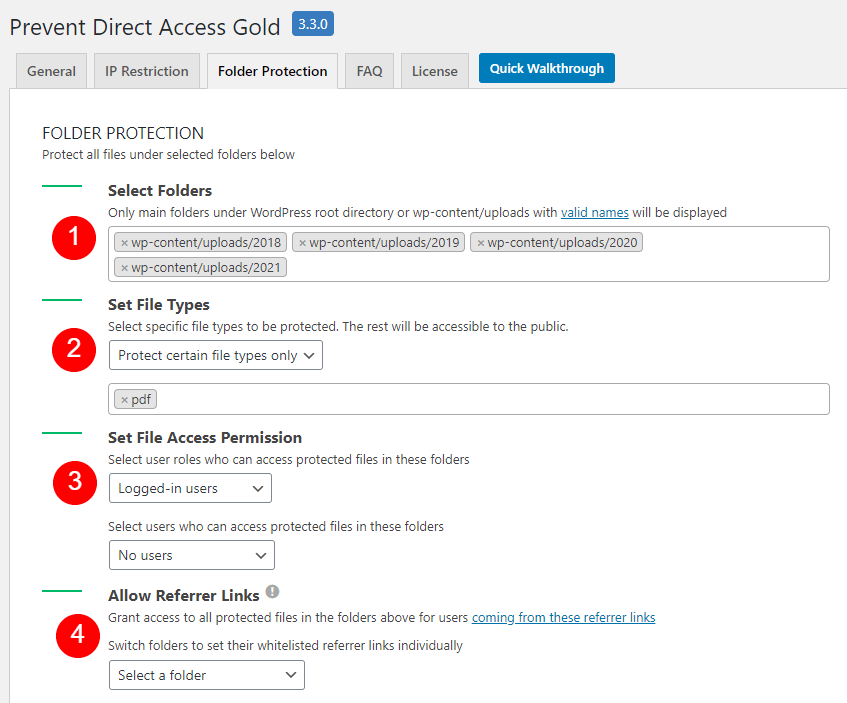
You will need our PDA Gold plugin and PDA Access Restriction (AR) extension to use the Folder Protection feature.
I also recommend cloning your site to a staging environment for testing purposes to ensure everything works properly before implementing it on the live site.
We also have a great dev team to help you if you meet any issue.
Awaiting your reply.
Forum: Plugins
In reply to: [PPWP - Password Protect Pages] Master Login PageHi @jimtome13,
Thank you for reaching out to us.
Could you please help check if this is what you’re looking for?
References: How to List all Quick Access Links for Users
This will list all protected pages and passwords based on the username.

Awaiting your reply.
Forum: Plugins
In reply to: [Prevent Direct Access - Protect WordPress Files] Ask Pre Purchase Questions?You’re always welcome, @eac2015!
>>>does this require REST API?
We utilize the Rest API in the code, but it’s important to note that the Rest API plugin is not a mandatory requirement.
Awaiting your rply.
Forum: Plugins
In reply to: [Prevent Direct Access - Protect WordPress Files] Ask Pre Purchase Questions?Hi @eac2015,
Yes, our plugin is exactly what you need.
To clarify, once a file is protected by Prevent Direct Access (PDA) Gold, its URL is actually changed as we move the file into our protected folder, i.e. _pda. So if you protect media files already embedded in your content, those images or documents (URL) will go missing. That’s why it stopped all your photos from showing on posts.
Here are the steps how to set up our PDA Gold:
1. Protect your files with our PDA Gold plugin2. Under your WordPress admin dashboard, click on “Prevent Direct Access Gold” menu to set up your file permission (3).

3. Enable Search and Replace option (5) (if you have media files already embedded in your content) and add which pages or posts you want to replace unprotected file URLs in content.)
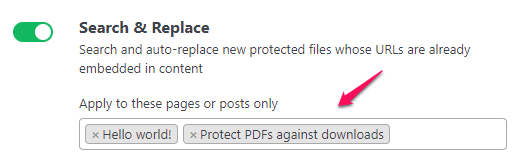
If you want to Search and replace the unprotected links in a custom post type or select the entire post/page, you need to use some custom codes. (feel free to ask us if you have any questions).
References:
https://preventdirectaccess.com/docs/original-vs-private-download-links/
https://preventdirectaccess.com/docs/replace-unprotected-urls-in-wordpress-content/
https://preventdirectaccess.com/docs/settings/
Awaiting your reply.
Forum: Plugins
In reply to: [Prevent Direct Access - Protect WordPress Files] Ask Pre Purchase Questions?Hello @eac2015,
Thank you for reaching out.
You can post your questions here or send us a support email. We’d be happy to answer any questions.
Forum: Plugins
In reply to: [PPWP - Password Protect Pages] Possible to integrate LDAP with PPWPHello @stefanizl,
Thank you for reaching out to us.
At the moment, we have Passwordless Authentication extension (along with PPWP Pro plugin) that can help you protect your content with reCAPTCHA only.
Users just need to verify reCAPTCHA or fill in a form to access your protected content without entering passwords.So far, we’ve supported this function for whole (individual) page protection, not for partial and sitewide ones.
Let us know if that works for you.
Forum: Plugins
In reply to: [PPWP - Password Protect Pages] Site crashes after page refreshHi @bypangea,
Glad to hear that you able to fix the crashing issue.
>>>Since I have password protected the entire site, when I enter https://lake2forest.de/ it does not accept password entry for the first time. He accepts it the second time he logs in. Same problem on different devices on different computers.
It looks like a cache issue. Your website still show the cached version of your protected page, i.e. with the login form instead of the private content.
Could you help to exclude cookies and exclude password protected page URLs from caching servers and check if it works please?
References: https://passwordprotectwp.com/docs/caching-plugins-cache-servers-integration/
Awaiting your reply.
Forum: Plugins
In reply to: [PPWP - Password Protect Pages] PHP ErrorsHi @casperblackwell,
Thank you for reaching out to us.
It could be conflict somewhere.
You can use the Health Check plugin to do some troubleshooting here.
Once you’ve installed and activated the plugin, you can go to *Dashboard* → *Health Check* to see various details about your site and server. Select the *Troubleshooting* tab and then click **Enable Troubleshooting** to automatically disable all plugins and add a new *Troubleshooting Menu* item in the toolbar at the top of the wp-admin dashboard.
From here, you can enable and disable plugins and change the theme for you, but without affecting normal visitors to your site.
Could you try to use the Health Check plugin to enable only PPWP Lite and then run that test again? If those errors are clear, then we’ll know that a conflict with another plugin is causing this.
Awaiting your reply.