WP Folio Team

Forum Replies Created
-
Forum: Plugins
In reply to: [PPWP - Password Protect Pages] Site crashes after page refreshHi @bypangea,
I’ve checked but didn’t encounter the issue you mentioned.
Could you please provide a screenshot or screencast of the issue on your end for us to investigate further?
Awaiting your reply.
Forum: Plugins
In reply to: [PPWP - Password Protect Pages] Site crashes after page refreshHi @bypangea,
Thank you for reaching out to us.
We can watch the video you provided, it said the video be deleted.
To assist you better, could you please:
- Provide us a sample protected page and password for us to take a look.
- Enable WP_Debug and provide the log for us to review.
- Temporarily disable cache of the hosting server and cache server and check if it works.
- Negative to Tools > Site Health > Info and check if there is anything causes the issue.
Awaiting your reply.
Forum: Plugins
In reply to: [PPWP - Password Protect Pages] Purchase WooCommerceHello @mobos,
There may be an issue with the demo setup. You can go ahead and purchase our plugin, if you experience any issues, you can always reach out to us and we’d be happy to answer any questions.
Thank you!
Forum: Plugins
In reply to: [PPWP - Password Protect Pages] Purchase WooCommerceHello @mobos,
Thanks for reaching out to us.
Yes, you’ve come to the right place. Our plugins are what you’re looking for.
Our plugins allow you to sell online courses via WooCommerce:
- Automatically generate and send unique passwords/Quick Access Links (QALs) to customers after WooCommerce purchases
- Set password expiration time
You can also:
- Include passwords in custom messages
- Set usage limit and/or expiration date based on the product quantity
- Set expiration date after the first QAL click or password usage
We have a detailed tutorial on how to sell protected content via WooCommerce here:
https://passwordprotectwp.com/docs/send-quick-access-links-after-woocommerce-purchase/Here is a demo for you to see our functions in action: https://passwordprotectwp.com/demo/product/sell-pdf-files/
Is this what you’re looking for?
Awaiting your reply.
Forum: Plugins
In reply to: [PPWP - Password Protect Pages] Have to refresh to see imagesHello @apilmm,
Thank you for reaching out to us!
Please check if you have turned on the “Unlock Protected Content without Page Refresh” option.
You will find this option in the PPWP “Advanced” settings.
Let us know if it works for you.
Hi @mstudioil,
If you wish to restrict access to wp-content/uploads/2024/02/sample.mp4 while still enabling customers to view the video, you’ll require PDA Gold plugin and PDA Protect WordPress Videos & Audios.
This will allow anyone to watch the protected video but can’t download it.
References: https://preventdirectaccess.com/docs/prevent-direct-access-gold-vs-protect-videos-extension/
Awaiting your reply.
Hi @mstudioil,
Thank you for reaching out to us.
>>>Do the plugin prevent users from copy the link like
site.com/clip.mp4and paste it and see the content? If I adding the clip to page in the site will be shown?- When you protect your “clip.mp4” using our PDA Gold plugin, only authorized users can access the content. This includes specific categories of users such as administrators only, logged-in users, or custom-defined user.
- Even if unauthorized customer obtain the link, they won’t be able to access the content.
>>>Do the plugin prevent the right click so users can see the code?
Yes, our plugin has the option “Disable Right Click” on PDA setting.
References: https://preventdirectaccess.com/docs/settings/
Forum: Plugins
In reply to: [PPWP - Password Protect Pages] WordFence File Change Error.Hi @artdavis,
Thank you for reaching out to us.
Could you help to uninstall and re-install the PPWP Lite plugin and check if the issue is solved please?
Awaiting your reply.
Forum: Plugins
In reply to: [PPWP - Password Protect Pages] Version: 1.9.0 – Critical Error on SiteHello again,
We apologize for the inconvenience caused.
Could you please consider re-downloading the new version 1.9.0 of the plugin and reinstalling it to ensure a smooth and error-free experience?
Then let us know if it works.
Forum: Plugins
In reply to: [PPWP - Password Protect Pages] Version: 1.9.0 – Critical Error on SiteHi @angelamac,
Thank you for reaching out to us and the feedback.
Glad to hear that you were able to upload the previous version to fix the issue.
I have asked our dev team to check and will fix it ASAP. We will keep you updated.
Hi @tony8028,
Thank you for the feedback, we truly appreciate it.
We understand your feelings about our price.
Not only the password protection function, but we also prioritize the development of other features for the future and their seamless integration with other plugins, themes, and other things.
Additionally, we maintain a dedicated support team to promptly and effectively assist our customers.
Should you need any further support. please feel free to contact us.
Forum: Plugins
In reply to: [PPWP - Password Protect Pages] Avada theme do not work shortcodesHi @tamosukas,
Thank you for reaching out to us.
Our PPWP Pro plugin is compatible with AVADA Themes.
For references, you can check: https://passwordprotectwp.com/docs/compatible-wordpress-plugins/#themes
Could you help to go to Password Protect WordPress >> Partial Protection submenu from your admin dashboard. Then enable “Use Shortcode within Page Builder” option and check if it works please?
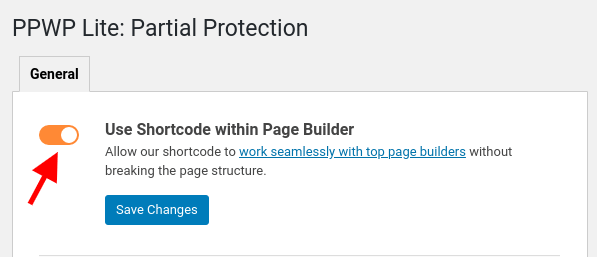
Awaiting your reply.
Forum: Plugins
In reply to: [PPWP - Password Protect Pages] PW protected section in divi shows shortcodeHi @tommyfalk,
Thank you for reaching out to us.
As you’re using Divi Builder, could you help to navigate to Password Protect WordPress > Partial Protection under your admin dashboard and turn off “Use Shortcode within Page Builder” option under our settings page and check if it works please?
Awaiting your reply.
Hi @kmp2,
Thank you for reaching out to us.
Yes, our PDA Gold plugin can hide protected files from On-site Search by simply add the following code snippet to your (child) theme functions.php file or plugins like Code Snippets.
Get the code here: https://preventdirectaccess.com/docs/hide-protected-files-from-search/
Please note that the selected user roles can search all protected files on your site on the custom codes regardless of file access permission.
>>>Is there a way to use your plugin to prevent only IMAGE files from coming up at all in search results? For example, if I installed something like Filebird, and used that to “isolate” all image files, could I then use your plugin to target that folder to prevent the images from coming up in search results?
Yes, you can use our Folder Protection to protect the folder that isolated all image files by Filebird.
To use this feature, you will need the PDA Gold plugin and an additional PDA AR extension.
Awaiting your reply.
Hi @aovivo,
Yes, your understanding is correct.
PDA Gold is used to protect your audio files, and the PDA Protect Video extension allows clients to play the protected files.
You can consider using our newest plugin https://S3MediaVault.com . It has a “Streaming” option which disallows people from downloading your videos/audios.
See the demo at https://s3mediavault.com/demo/streaming-video-demo/For S3MediaVault, audios/videos needs to be stored on AWS S3.
Awaiting your reply.
- This reply was modified 2 years, 3 months ago by WP Folio Team.