WP Folio Team

Forum Replies Created
-
Forum: Plugins
In reply to: [PPWP - Password Protect Pages] Page backgroundHi @nvh65 ,
Apologies for the delayed response.
It appears that there is padding present in both the header and body sections for an unknown reason and the password works fine. This issue is likely related to the theme.
Could you confirm if you have applied any custom CSS to your site?
Would you be able to switch to another theme temporarily to see if the problem persists?
If switching themes resolves the issue, it would be beneficial to reach out to the customer support team of the Astra theme. They will be able to advise on the specific CSS adjustments needed to resolve this issue.
Awaiting your reply.
Forum: Plugins
In reply to: [PPWP - Password Protect Pages] Enter Password 3 timesHi @kjf127 ,
Thank you for reaching out to us.
It looks like your page is cached somewhere.
Could you help to:
- Add the following cookies to the Exclude Cache option in your hosting server’s account as the image below.

As you are using PPWP Free version, please use the code below:
pda_protect_password
wp-postpass-role_*
ppw_cat-*
2. Exclude password-protected page URLs as the example image below:
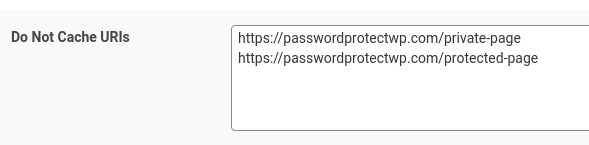
3. Remember clear all the cache after you finish the step 1 and step 2.
References: https://passwordprotectwp.com/docs/caching-plugins-cache-servers-integration/
Awaiting your reply.
Forum: Plugins
In reply to: [PPWP - Password Protect Pages] Not working after WordPress 6.5.2We aren’t using the Partial Content Protection (PCP), we’re using Single Protection.
Could you help to enable “Unlock Protected Content without Page Refresh” and check if it works please?

>>>Are there any known plugins to have compatibility issues with the PPWP?
Since it’s functioning properly on our demo site, I believe the issue lies solely in the configuration.
Awaiting your reply.
Forum: Plugins
In reply to: [PPWP - Password Protect Pages] Not working after WordPress 6.5.2Could you help to navigating to TranslatePress Advanced Settings -> Advanced -> Troubleshooting tab and enabling the options:
- Fix missing dynamic content
- Disable dynamic translation
Then Save Changes check if it works please?

Here’s our demo page for you to try out:
https://preventdirectaccess.com/demo/demo-intergration-with-translatepress-plugin/
Password: 661cefd25d7b8Let us know if it works.
Forum: Plugins
In reply to: [PPWP - Password Protect Pages] Not working after WordPress 6.5.2Thank you for reaching out to us.
Could you help to take a screenshot of how you protect your page by using our plugin please?
In the meantime, could you try to use [ppwp] shortcode and check if it works please?
For example: [ppwp passwords=”password1 password2″ whitelisted_roles=”administrator, editor”] Your protected content [/ppwp]
References: https://passwordprotectwp.com/docs/shortcodes/
Awaiting your reply.
Forum: Plugins
In reply to: [PPWP - Password Protect Pages] Page backgroundHi @nvh65,
Thank you for reaching out to us.
We go to the page you provided and check but it looks like we have to login to see the issue. We only see a login form without header and footer.
To assist you better, could you please:
- Provide us a screenshot\screencast the issue youre facing
- Provide us a sample password for us to take a look.
- What kind of password you’re using? E.g: Single protection, Sitewide protection, Partial Content Protection.
{offforum contact offer cleaned}
Hi @blackawxs,
Thank you for reaching out to us.
Yes, our plugin primarily depend on .htaccess rules to protect WordPress media files. Without .htaccess rules, the expected protection may not be fully achieved on shared hosting sites.
However, since the Nginx server lacks .htaccess-type capability, you can still utilize our plugin by employing our Raw URLs, albeit with certain limitations via the two ways below:
To better assist you, could you please provide us with information about the hosting server and cache server you’re using?
We eagerly await your reply.
Hi,
We’re glad to hear that you were able to figure out the reason.
If you need any further support, please don’t hesitate to contact us.
Hello @timkey,
Thank you for reaching out to us!
We have tested on our end on the Safari browser using an iPhone and it seemed to work well. We are unable to reproduce the issue.
Could you please let us know what issue are you experiencing?
Awaiting your response.
Hi @simonvw,
Thank you for the advice.
Following the review by our development team, we have confirmed that they will be updating the screen check method in the next PDA Gold version.
Your information is much appreciated.
Forum: Plugins
In reply to: [Prevent Direct Access - Protect WordPress Files] Change right click messageHi @cyle77,
Thank you for reaching out to us.
You can change the message by adding the above code in child themes functions.php file or can use snippet plugin to add custom code.
function custom_disable_right_click_message($message)
{
           // Change the message as per your requirement
            $custom_message = "Right-click is currently disabled.";
            return $custom_message;
}
// Hook the custom function into the filter
add_filter('pda_disable_right_click_message', 'custom_disable_right_click_message');
Let us know if it works.
Hello @klewis,
Thank you for reaching out to us!
Yes, that looks possible with our plugin. You can set file access permission under the Settings of our plugin. You can set the permission for roles such as admins and subscribers to be able to view the file.
Unauthorized users will require to enter a password.
Is that what you require?
Awaiting your response.
Forum: Plugins
In reply to: [PPWP - Password Protect Pages] Wrong redirect page after enter passwordHi @kiky1991,
Thank you for the information.
The issue occurs only when you use the ‘action=ppw_postpass’ parameter or enter the incorrect password initially and then enter the correct one on the second attempt. It doesn’t occur if the ‘action=ppw_postpass’ parameter isn’t displayed.
And the problem will be resolved if you disable the Theme My Login plugin, is that correct?
Could you please provide us with a sample password and the corresponding URL for testing purposes?
If you are utilizing the redirection feature of the Theme My Login plugin, could you kindly share with us how you have configured it?
Awaiting your reply.
Forum: Plugins
In reply to: [PPWP - Password Protect Pages] Avada theme no login windowHi @tamosukas,
We sent the reply to your email but haven’t heard back from you yet.
Could you help to double check please?
Awaiting your reply.
Forum: Plugins
In reply to: [PPWP - Password Protect Pages] Whitelisted roles not selectableHello @kitka,
Thank you for reaching out to us!
To allow access to custom user roles, you will need to purchase the Access Restriction extension. The extension allows specific users or user roles to access your private images and documents.
You may refer to this article – How to Restrict Individual File Access to Specific Users & RolesLet us know if you have additional questions.