WP Folio Team

Forum Replies Created
-
Hi @snapbackcap ,
Thank you for the information.
Our dev team is checking on it. We will fix and release a new PDA Free version today.
We will keep you updated. Thank you for your patience.
Forum: Plugins
In reply to: [PPWP - Password Protect Pages] Show passwordHello @mikedc001,
Unfortunately, it is not possible to have the “show password” checkbox to always be ticked. For that, you would typically need to use JavaScript.Feel free to reach back should you need any further help.
Forum: Plugins
In reply to: [PPWP - Password Protect Pages] Show passwordHi @mikedc001 ,
Thank you for reaching out to us.
Yes, it possible.
- Go to Appearance >> Customize in your WordPress dashboard.
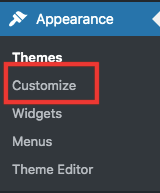
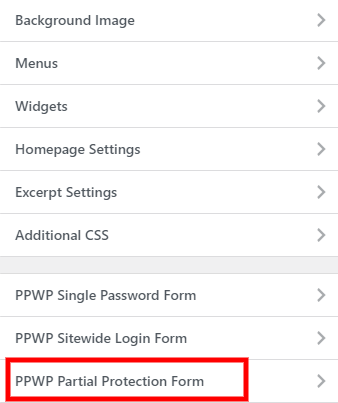
2. Choose PPWP Partial Protection Form in the left-hand sidebar.
3. Select “Password Form”
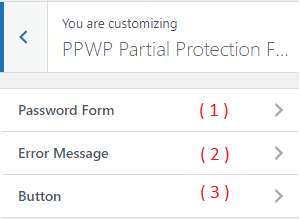
4. Find the “Show Password” and enable this option to display “Show password” checkbox, which allows users to see what they are typing.

References: https://passwordprotectwp.com/docs/customize-pcp-form-wordpress-customizer/#reveal-button
Let us know if it works.
Hi @bluepixeldesign ,
If you set ‘WP_DEBUG_DISPLAY’ to true, you will be able to see the error in more details when publishing the page.
Could you please provide a screenshot or screencast when you encounter the issue for us to take a look?
If you are still unable to locate the debug.log file, could you kindly contact your hosting server’s support for assistance in finding it? Without the debug.log file, we won’t be able to assist you effectively.
Awaiting your reply.
Forum: Plugins
In reply to: [PPWP - Password Protect Pages] Can’t remove PPWPHi @hannington200 ,
Thank you for reaching out to us.
As we’ve checked, your page seems to be cached somewhere.
You can verify this by adding the following parameter to your URL: /?=123123 (random number). By including this parameter, it will simulate your first-time access to this URL, bypassing any cached data.
Example: http://myfootballpt.co.uk/?=123123
You’ll notice that the password form doesn’t appear.
Could you please help clear all of your cache, or alternatively, ask your hosting server to clear it if the caching is being done at the server level?
Let us know if it works.
Forum: Plugins
In reply to: [PPWP - Password Protect Pages] Enter Password 3 timesYou’re always welcome, @kjf127 .
Should you need any further support, please feel free to contact us.
Hi @bluepixeldesign .
No, it doesn’t.
Could you please refresh the page and check the /wp-content/ directory to see if you see it?
Additionally, you can set define( ‘WP_DEBUG_DISPLAY’, false ); to true, and then try saving the page to meet the issue again. This should reveal any errors that may occur during the process.
Awaiting your reply.
Hi @bluepixeldesign ,
Thank you for reaching out to us.
It could be conflict somewhere.
Could you help to:
- Log into your server via SSH or FTP.
- Edit the wp-config.php file using SSH or your FTP client. Near the bottom of the file, you’ll see the following: define(‘WP_DEBUG’, false);
- Adjust that line to these three lines:
define( 'WP_DEBUG', true );
define( 'WP_DEBUG_DISPLAY', false );
define( 'WP_DEBUG_LOG', true );
Then provide a screenshot of the debug.log file please? This file is located in your /wp-content/ directory.
Awaiting your reply.
Forum: Plugins
In reply to: [PPWP - Password Protect Pages] Enter Password 3 timesHi @kjf127,
If so, could you try to enable it and press the “Save change” button and check it work please?
Awaiting your reply.
Forum: Plugins
In reply to: [PPWP - Password Protect Pages] pasword works only on parent pageHi bernhardrobertscheurer,
It appears that you’re using the PPWP Lite version.
You can view the password on the edit page. However, based on the image you provided, it seems that the Password Protect WordPress tab is hidden for some reason.
Since you’re using Divi, could you temporarily deactivate it and navigate to the edit page to check if you can see the password or not, please? Alternatively, you can try using the original edit instead of using the Divi edit.
>>>all “protected” pages are marked as “public”. shouldn’t they be designated as “private”?
No, it shouldn’t. The protected page will retain the status ‘protected,’ but it will still be marked as ‘public.’
Awaiting your reply.
Forum: Plugins
In reply to: [PPWP - Password Protect Pages] pasword works only on parent pageThank you for reaching out to us.
Are you using other protection? Group password, Category password or just using Parent-Child page?
You can check out our demo page here. You can use the same password on either the parent page or the child page to unlock it.
Parent page: https://preventdirectaccess.com/demo/parent-page/
Child page: https://preventdirectaccess.com/demo/parent-page/child-page/
Password: testAwaiting your reply.
Forum: Plugins
In reply to: [PPWP - Password Protect Pages] Enter Password 3 timesHi @kjf127 ,
Are you using the option “Unlock Protected Content without Page Refresh”?

If yes, could you help to disable it and check if it works please?
Awaiting your reply.
Forum: Plugins
In reply to: [PPWP - Password Protect Pages] Enter Password 3 timesHi @kjf127,
Have you made any recent changes?
Would you mind creating a test password for the protected content and sharing it with us? This will allow us to examine it more closely. Once the issue is resolved, you can delete the test password.
Awaiting your reply.
Hi @michael_hartl ,
Thank you for reaching out to us.
>>>Is it possible with the free version or only with the payed one?
- It depend on which user role you want to set up. User roles options include:
- Admin users (by default) (PDA Free version)
- The file’s author (PDA Free version)
- Logged-in users (PDA Pro/Paid version)
- No one (means no person is allowed to access your private files) – (PDA Pro/Paid version)
- Anyone (means our plugin only blocks search indexing) – (PDA Pro/Paid version)
- Custom Roles – (PDA Pro/Paid version and PDA AR/PDA Membership extension)
>>>the link to the file would work for all logged in users with the correct role without any password – but all others would get a dialog to put in a password?
- the link to the file would work for all logged in users with the correct role without any password – but all others would get a dialog to put in a password?
Yes, the file will work for logged-in users (correct file permission) without any password.
All others will be redirected to the 404-not-found page or login page or custom page.

References: https://preventdirectaccess.com/docs/settings/#file-protection
Awaiting your reply.
Forum: Plugins
In reply to: [PPWP - Password Protect Pages] Enter Password 3 timesYou’re always welcome, @kjf127 .
Glad to hear that it’s the right direction.
Should you need any further support, please fee free to contact us.
Have a nice weekend.