wfmark

Forum Replies Created
-
Hi @superknjizara, Thank you for reaching out to us.
This error indicates that more memory needs to be allocated to PHP. PHP memory is cumulative meaning that the amount set in php.ini is shared between all plugins, themes, WordPress, and any other non-WordPress apps installed in the site folder. Normally, changing the Memory Limit in the php.ini file to 256M solves this problem but you already have this covered. Please see the recommendations below:
- Upgrade to PHP 7 or above since it introduced better memory handling.
- On your wp-config.php file, look for the wp_memory_limit and update it to 256M define(‘WP_MEMORY_LIMIT’, ‘256M’);
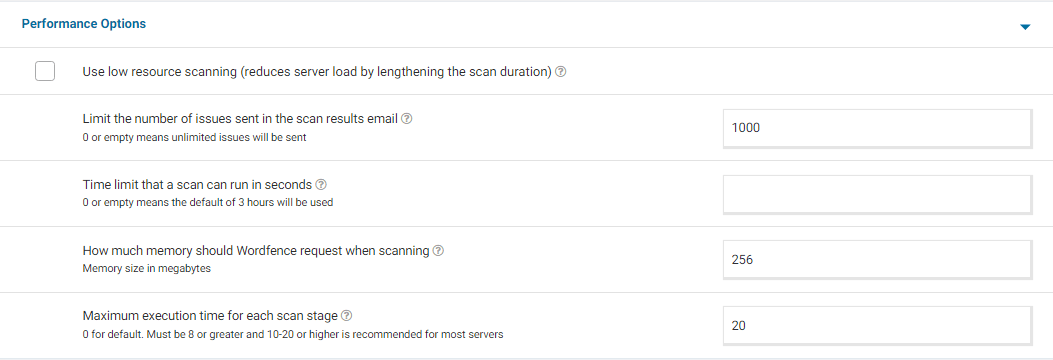
- Adjust the Wordfence performance options to the recommended settings. For a screenshot of my recommended Performance setting options – Click Here.
- Adjust the max_execution_time to 60. Sometimes, having a long execution time may cause the scan to timeout.
If the issue persists, please contact your site administrator or hosting provider and work with them to determine what is causing this issue since memory exhaustion may be occurring outside of PHP somewhere on the server.
Thanks,
Mark
Hi @guckmada, sorry to see you’re having problems with this.
The free version is still available. However, we made a few changes to the free license sign-up process. Existing free site keys created before the change will continue working, but all new installations require you to register for a new key.
You can see the reasoning behind why we changed the free signup process in the following blog post: https://www.wordfence.com/blog/2022/11/wordfence-7-8-0-announcement/
Please click on the Resume installation button on the site with issues and follow the instructions walkthrough video available on the links below that shows users how to install a free license, start to finish.
https://www.wordfence.com/help/api-key/#installing-your-free-license-key
Let me know in case you have any issues.
Thanks,
Mark.
Yes, you can request for a new license key. You can use the same email address to obtain license keys for all your sites. There’s no limit to the number of free sites a single email address can configure.
Thanks,
Mark.
Hi @jinzc, Thank you for reaching out to us.
Are you using a custom login page by any chance? Please note that our 2FA and reCAPTCHA features are only supported for the default WordPress/WooCommerce login and registration pages and may not work on custom versions of these pages created manually or by other plugins/themes.
If you’re not using a custom login page, please try accessing wp-admin while keeping a Browser Console open to see if you can detect any JavaScript errors or files that fail to load. If you see any red text in the console, please take a screenshot and send it to me.
Additionally, can you please send a diagnostic report to wftest@wordfence.com? You can find the link to do so at the top of the Wordfence > Tools > Diagnostics page. Then click on “Send Report by Email”. Please add your forum username where indicated and respond here after you have sent it.
NOTE: It should look as follows – Screenshot of Tools > Diagnostic > Send by Email
Thanks,
Mark.
Hi @qwik3r, Thank you for reaching out to us.
Is the user still having trouble logging in?
If you can’t see the IP address of the user under the blocking page, it is possible that the block has already expired. Blocks normally expire after the amount of time set under WordFence> Firewall> Manage Brute Force Protection > Amount of time a user is locked out.
If the user is still locked out, navigate to Wordfence>Tools>Live Traffic and filter out the user’s IP address. If there are any entries that match their IP address, expand the result and share a screenshot of the Live Traffic entry along with a screenshot of the blocking page they see when they log in.
Thanks,Mark
Hi @jeremyvtx, sorry to see you’re having problems with this.
We have seen possible issues installing keys automatically more than 24 hours after generation. Additionally, if you are in a different browser than the one used when requesting your Free Wordfence license, you will be unable to automatically install it. In those cases you will need to manually copy and paste the key from the email to complete the activation of Wordfence Security.
Aside from verifying that you did not inadvertently copy only part of the license key, I would check whether you can install the license when Wordfence is the only active plugin on your site. There could be a Javascript conflict with another plugin potentially stopping the code executing the verification check.
If nothing above seems to help, let me know as we may need to obtain some further diagnostic information to take a look.Thanks,
Mark.
@djwilko12, thanks for getting back
Wordfence loads a script for logged-in admins that monitors background requests that get blocked by the firewall, to alert you if something was blocked that might not need to be blocked. The option “Monitor Background Requests for False Positives” allows you to disable this script if you like, by unchecking either or both checkboxes. One is for the front-end of your site and the other for the administration section of your site. Disabling the monitoring script does not affect the firewall’s protection, but may make it harder to notice false positives (blocking actions that are not actually malicious).
Thanks,
Mark.
Hi @florismk, Thank you for getting back to us and sending the files.
Our team will look into them and get back to you in case of any issues.
Good to hear that your plugins are up to date. For versions below 1.8, WP Super Cache had a known vulnerability that has since been patched for versions 1.9 and above as documented here:
Should you need any further assistance, please create a new topic and we will be happy to help.
Thanks,
Mark.
Hey @vidishp, and sorry for the delayed response.
You mentioned earlier that changing the theme to a default one resolved the issue and disabling WooCommerce solved the issue. Which is why I suspected it may be a conflict with your theme as WooCommerce is widely used and we haven’t seen any issues.
If the issue is still persistent, please try disabling all other plugins except for Wordfence, then trying again as it’s likely a plugin conflict issue. If it works as expected, then reenable your plugins one by one until the issue recurs to help find the cause.
Let me know how it goes.
Thanks,
Mark
Hi @dimalifragis, thanks for the update.
I was not able to replicate the issue on my end, but I will try on a different test site.
If you need any further assistance, please create a new topic and we will be happy to help.
Thanks,
Mark.
Hi @luisdesousa, Thank you for reaching out to us.
The username appears to be suspicious. I suspect a breach may have already taken place prior to the login attempt using an exploitable way in – such as a vulnerable plugin, compromised admin password, etc.
I would recommend that you follow our site cleaning steps below:
https://www.wordfence.com/docs/how-to-clean-a-hacked-wordpress-site-using-wordfence/Make sure to get all your plugins and themes updated and update the WordPress core, too. As a rule, any time I think someone’s site has been compromised, I also tell them to update their passwords for their hosting control panel, FTP, WordPress admin users, and database. Make sure to do this because attack vectors around your hosting or database environments are outside of Wordfence’s influence as an endpoint firewall.
We recommend using long, unique passwords along with 2FA for your administrative accounts. This might assist if the attackers are using an existing compromised admin account to create this user and elevate the privileges.
You might also find the WordPress Malware Removal section in our Learning Center helpful: https://wordfence.com/learn/If you’re unable to clean this up on your own, there are paid services that will do it for you. Wordfence offers one, and there are others. Per the forum rules, we’re not allowed to discuss Premium here, but please reach out to us at presales@wordfence.com if you have any questions about it.
Regardless, if you choose to clean it yourself or let someone else do so, we recommend that you make a full backup of the site beforehand.
Thanks,
Mark
Hi @kinosurf, Thank you for reaching out.
From previous cases, it appears that the click & build WordPress installation from IONOS does cause these files to be created. Ideally, the folders should be left unchanged, hence why Wordfence is flagging their presence.
You should be able to select “Ignore” for the results in the Wordfence > Scan page so that it does not appear in subsequent scans under the “Results Found” tab. It will appear under the “Ignored Results” tab instead.
Alternatively, you can contact IONOs if you believe the file should be removed.
Thanks,
Mark
Hi @oneoption, Thank you for reaching out.
In most cases, this is caused by permission issues.
Since permissions are set correctly on your site, in your FTP or hosting file manager, navigate to your wp-content/wflogs folder. You should be able to delete the wflogs folder or its contents entirely and Wordfence should try to repopulate it within 30 minutes. This may resolve the issue.
If you have persistent problems with file-writing permissions, you can bypass Wordfence’s requirements entirely by setting logs to use the MySQLi storage engine: https://www.wordfence.com/help/firewall/mysqli-storage-engine/Thanks,
Mark.
Hi @forusak, Thank you for reaching out.
I have added your request to an existing feature request for this functionality. We can’t provide ongoing updates here on the forums or comment on possible delivery dates but any features we do add will appear in our changelog when new versions of the plugin are released.
Thanks,
Mark.
Hi @raju427, thanks for your question.
Per forum rules, we are not allowed to discuss the premium version on this forum. You can see our guide below on purchases and email us at presales@wordfence.com for further information on the feature.
https://www.wordfence.com/help/wordfence-premium/
Thanks,Mark.