wfmark

Forum Replies Created
-
Hi @giorgos_d2, Thank you for reaching out.
A user-agent is a way for an internet browser to send information about itself to a web server. These are blocks for user-agents that are fake and account for a lot of malicious traffic. Wordfence blocks common malicious user agents that frequently perform attacks on WordPress sites.
The requested URLs in your case are https://mysite//wp-config.phpb and https://mysite//wp-config.php_original which is very suspicious as they are looking to access the wp-config.php file for your site. This explains why these requests were blocked.
While it’s alarming to see these attacks, there’s nothing more for you to do since Wordfence is already blocking
Thanks,
Mark.
Hi @psypat, Thank you for reaching out.
At the moment,the only way you can customize block pages is by adding a custom message using the option Custom text shown on block pages found in the Brute Force Protection section on the All Options page.
I have added your feedback to the feature request for this as we have had many requests for this,we can’t provide ongoing updates here on the forums or comment on possible delivery dates but any features we do add will appear in our changelog when new versions of the plugin are released.
Thanks,
Mark.
@megunticook, Thank you for sending the scan log.
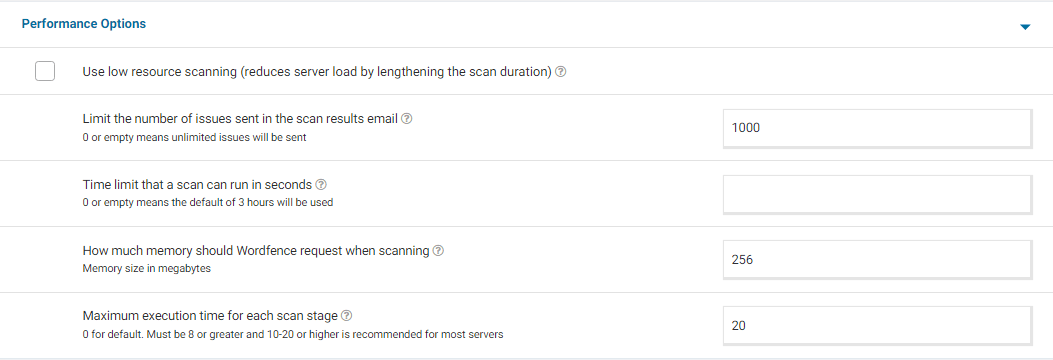
From your screenshot, I noticed you don’t have some performance options set. For a screenshot of my recommended Performance setting options – Click Here.
Adding “20” for the “Maximum execution time for each scan stage” tells the scan to pause every 20 seconds and start again where it left off, which makes the scan more performance-friendly for some servers.
I also noticed that you are using Wordfence Premium. If the issue persists, I recommend opening a support ticket at https://support.wordfence.com . They will be able to assist you faster and more efficiently.
Thanks again,
Mark.Hi @antonyhak, Thank you for sending the diagnostic.
Everything looks good on the report.
Go to Wordfence > Scan > Scan Options and Scheduling and check to see if the bottom two options in General Options are disabled. It would be best to have those disabled for now (Scan files outside your WordPress installation, Scan images, binary, and other files as if they were executable)
Additionally, please confirm that the Scan Option is set to Standard. Be sure to save your changes in case you make any changes here.
Once done, please try running scan and let me know whether you have any issues.
Thanks,
Mark.
Hi @nige-mcilwaine, Thank you for reaching out.
This sounds pretty uncommon, so I’d suggest clearing cache (site plugins and local browser) and disabling all other plugins except for Wordfence, then trying again to see if there’s a plugin or theme conflict causing the issue. You could also revert to a default theme, such as Twenty Twenty-Three.
If the issue persists, please try optimizing the firewall while keeping a Browser Console open to see if you can detect any JavaScript errors or files that fail to load. If you see any red text in the console, please take a screenshot and send it to me.
Additionally, can you please send a diagnostic report to wftest@wordfence.com? You can find the link to do so at the top of the Wordfence > Tools > Diagnostics page. Then click on “Send Report by Email”. Please add your forum username where indicated and respond here after you have sent it.
NOTE: It should look as follows – Screenshot of Tools > Diagnostic > Send by Email
Thanks,
Mark.
Hi@djwilko12, thank you for reaching out.
The AJAX watcher is only for admins, to check for false positives during requests, so disabling it doesn’t remove any protection.
This can be turned off by unchecking the checkbox Front-end Website under Monitor background requests from an administrator’s web browser for false positives at the bottom of the Wordfence > Firewall > All Firewall Options page.
You can read more about it here: https://www.wordfence.com/help/firewall/options/#monitor-background-requests
Let me know whether this makes a difference.
Thanks,
Mark.
Hi @shashisingh123, thanks for your question.
We are not allowed to discuss the premium version on this forum. You can see our guide below and if you have any further questions please email us at presales@wordfence.com
https://www.wordfence.com/help/wordfence-premium/
You could also set up Wordfence Central for free so you can manage security across all sites you’re responsible for in one dashboard. That’s just optional, but thought I’d mention it.
Many thanks,
Mark.
Hi @iadeso, Thank you for reaching out to us.
We are not allowed to discuss the premium version on this forum. Please reach out to billing@wordfence.com with a description of your issue. You can add screenshots if need be.
We will be happy to assist you.
Thanks,
Mark.
Hi @florismk, Thanks for reaching out.
Are you using any caching plugins on the site? Can you please confirm the plugin and the version you’re on?
There is a high chance that this warning is legitimate as it has been detected by Wordfence. I suspect this may be due to an outdated plugin. Can you confirm that all your plugins are up to date? Sometimes backdoors are unsecured maintenance scripts accidentally left behind after authorized site maintenance.
You can download the files highlighted using FTP, or your host’s web-based file manager and send them to samples@wordfence.com where our team can inform you whether any action is necessary to resolve the issue. In your email, please include a link to this forum topic so that our team will know you had raised the issue with us.
Please note that when attaching files, ensure that you remove any database access credentials or keys/salts contained inside before sending.
Thanks,
Mark.
Hello @correctsurffit, and thanks for reaching out to us.
If you navigate to Wordfence > All Options > Email Alert Preferences, you will see a series of checkboxes titled “Email me when…”. and “Alert me when…“.
Could you please adjust the setting for “Alert me with scan results of this severity level or greater” to High. You can also set that Wordfence can send per hour under “Maximum email alerts to send per hour”. Don’t forget to press the SAVE button when done.
Let me know whether this makes a difference.
Thanks,
Mark
Hello @wildlife77, Thanks for reaching out and sharing the troubleshooting steps you have taken so far.
To rule out any caching issues, could you please try an incognito/private browsing window or a different browser than your default one?
If the above doesn’t make a difference, please send us a diagnostic to wftest@wordfence.com. You can find the link to do so at the top of the Wordfence Tools > Diagnostics page. Click on “Send Report by Email”. Please add your forum username where indicated and respond here after you have sent it.
Thanks,
Mark.
This looks like a conflict with your theme that breaks our Wordfence’s JavaScript causing Wordfence to not load correctly.
Are you able to contact the theme developer for assistance to see if a fix can be found?
Thanks,
Mark.
Hello @joshmacd, thanks for reaching out and sharing the troubleshooting steps you have taken so far.
If you could please do the following steps for me:
- Go to the Wordfence > Tools > Diagnostics page
- In the “Debugging Options” section check the circle “Enable debugging mode”
- Click to “Save Changes”.
- CANCEL any current scan and start a NEW scan
- Copy the last 20 lines from the Log (click the “Show Log” link) or so of the activity log once the scan finishes and paste them in this post.
Wordfence > Tools > Diagnostic > Debugging Screenshot
This will help me see exactly what is happening when the scan fails.
Additionally, can you please send a diagnostic report to wftest @ wordfence.com? You can find the link to do so at the top of the Wordfence > Tools > Diagnostics page. Then click on “Send Report by Email”. Please add your forum username where indicated and respond here after you have sent it.
NOTE: It should look as follows – Screenshot of Tools > Diagnostic > Send by Email
Thanks,
Mark.
Hello @antonyhak, thanks for reaching out and sharing the troubleshooting steps you have taken so far.
Have you already tried all of our troubleshooting tips centered around this type of error message? https://www.wordfence.com/help/scan/troubleshooting/#scan-process-ended-after-forking
If so, or following the above still doesn’t work, please send a diagnostic report to wftest@wordfence.com. You can find the link to do so at the top of the Wordfence > Tools > Diagnostics page. Then click on “Send Report by Email”. Please add your forum username where indicated and respond here after you have sent it.
NOTE: It should look as follows – Screenshot of Tools > Diagnostic > Send by Email
Thanks,
Mark.
Hi @dimalifragis, thanks for reaching out and for sharing the troubleshooting steps you have taken so far.
We have previously seen “Verification Required” messages when the “reCAPTCHA human/bot threshold score” setting in Wordfence > Login Security > Settings is too high causing users to fail to be confirmed as human by reCAPTCHA checks.
I was not able to reproduce the issue on my end. Do you mean the Count failures over what time period setting under Brute Force Protection?
Let me know.
Thanks,
Mark.