WP Folio Team

Forum Replies Created
-
Hi @59petals,
Hope you’re doing well as usual.
We’d like to clarify that our PDA plugin is designed to fully respect and protect personal information of its users.
We do not collect any information from our visitors and users without their consent.
Besides, no data is sent/shared to 3rd-parties or stored outside your WordPress database.
Hope it’s clearer.
Elena
Just an update, the issue was resolved with the user via email.
As a reference for other users, sorting exported posts is a new feature, which will be released soon in our upcoming version.
We’ll definitely keep you guys posted once it’s done.
Hope it helps.
Hi @zeynka,
Thanks for your kind words. It means a lot lot to our team. 🙂
Yes, you’re right. To grant all logged-in users access to your protected files, you’ll need our PDA Gold version.
To assist you better, do you mind sharing what your budget is and the pricing plan you’re interested in?
You might also want to send these details to our support email – hello(at)preventdirectaccess.com so that our team can support you faster.
Forum: Plugins
In reply to: [Prevent Direct Access - Protect WordPress Files] Bucket Folders Not ShowingHi @plisken,
Hope you’re doing well as usual.
We haven’t heard back from you for a while now. So we’d like to follow up wondering if we can be of any further assistance.
Have you managed to get the issue resolved yet, @plisken?
Please reply to this support thread or drop us an email at hello(at)preventdirectaccess.com so that we can assist you further.
Awaiting your reply.
Forum: Plugins
In reply to: [Prevent Direct Access - Protect WordPress Files] Cookie based or via PHP…Hi @wpwanderer,
Hope you’re doing well as usual.
We haven’t heard back from you for a while now. So we’d like to follow up and see how things are going.
Does our answer make sense to you?
Is there anything else that we can do to help, @wpwanderer?
Please reply to this support thread or drop us an email at hello(at)preventdirectaccess.com so that our team can support you faster.
We look forward to hearing from you soon.
Hi @59petals,
Thanks for reaching out to us.
Just to clarify, we might collect records of visitors to your site, e.g. usernames, location information, computers, or mobile devices.
We use the collected data to provide information, services, or products you purchased, e.g. reporting on who accessed and downloaded your protected files.
We are a business located in Singapore, so all collected data is stored in Singapore. However, the data we collect may be routed or transferred internationally by us or by our business partners.
But please don’t worry. Whenever we transfer the data, we always make sure that it remains secure and private as required by applicable law and our internal guidelines.
And yes, we have a published Privacy Policy here:
https://preventdirectaccess.com/privacy-policy/Does it make sense to you?
You might also want to go to our live chat or drop us an email at hello(at)preventdirectaccess.com so that our team can support you faster.
Hi @eliant,
Thanks for reaching out to us this early morning.
Yes, it looks possible with our Watermark WordPress Files plugin.
Our plugin provides you with a user-friendly UI to export your multiple pages into PDFs.
All you need to do is select which content you want to export and our plugin will handle all the hassle for you.
To assist you better, may we know:
- How many pages do you want to export?
- Why do you want to sort post titles in alphabetical order?
Are you using any of our products, by the way?
You might also want to send these details to our support email – hello(at)preventdirectaccess.com so that our team can support you faster.`
Forum: Plugins
In reply to: [Prevent Direct Access - Protect WordPress Files] Cookie based or via PHP…Hi @wpwanderer,
Thanks for reaching out to us last night. We hope you’ve had a great weekend so far.
Yes, our PDA plugin does authenticate file access permission via user accounts, which is much more secure than front-end cookies validation.
In fact, our plugins allow you to grant protected files access to authorized users, e.g. logged-in users only.
Unauthorized users will be redirected to your custom No Access page, which is set under our PDA settings page.
Does it make sense to you, @wpwanderer?
Anyway, could you please share with us what you want to achieve with our plugins in more detail, e.g. your use case, so that we can advise you better?
Have you had a chance to try out our PDA Lite (Free) version yet, by the way?
It offers key file protection features and the exact look and feel of our Gold version.You might also want to drop us an email at hello(at)preventdirectaccess.com so that our team can support you faster.
Hi @ursusmaritimus1,
Thanks for reaching out to us.
Don’t worry. We’ve always got your back.
At first glance, it could be something to do with your setup or server configurations.
To assist you better, could you please provide us with the following information?
- Both protected and private URLs of your protected file
- A screenshot of your .htaccess or Nginx config file
- Your hosting provider
Which caching plugins are you using, by the way?
You might also want to send these details to our support email – hello(at)preventdirectaccess.com so that our team can support you faster.
Hi @ajaffri,
Thanks for your compliment. It means a lot to us. 🙂
As for your question, our PDA Lite (Free) version allows you to grant protected file access to admin users and files’ authors only.
To grant subscribers and other custom roles access to your protected files, you’ll need our PDA Gold plugin.
Upon protection, only authorized users can view your private files. Unauthorized users will be redirected to “No Access” page, which can be set up under our PDA settings page.
Does it make sense to you, @ajaffri?
You might also want to drop us an email at hello(at)preventdirectaccess.com for faster assistance from our team.
Looking forward to hearing from you soon.
Forum: Plugins
In reply to: [PPWP - Password Protect Pages] Locked outHi @ronaki,
Thanks for getting back to us.
We hope you’re doing well as usual.
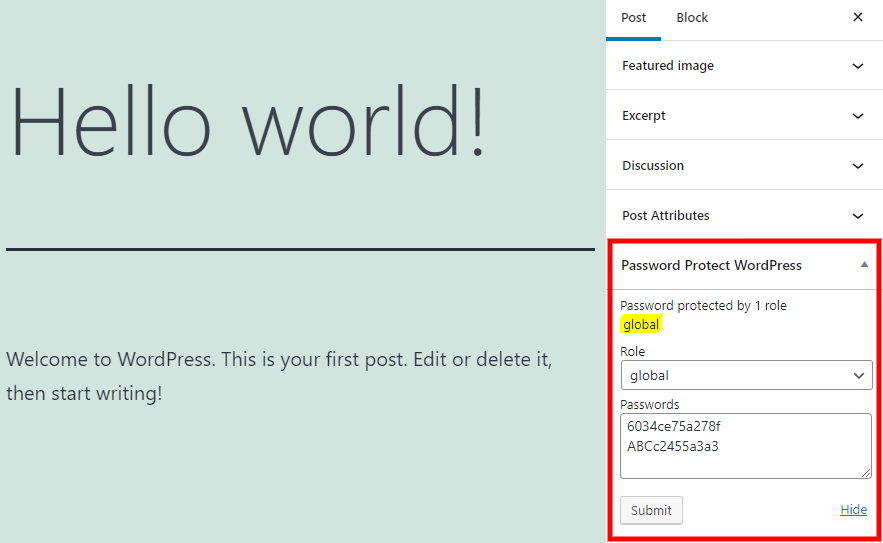
Just to clarify, with our PPWP Lite (free) version, passwords are managed under Edit page screen.
Do you see our Password Protect WordPress section there?
Please switch to Block Editor or Classic Editor if you’re using any other page builders such as Elementor or Divi.
You might also want to drop us an email at hello(at)preventdirectaccess with the following information so that we can assist you better:
- A full screenshot of your Edit page screen
- The normal password that you’re mentioned
We look forward to hearing from you.
Forum: Plugins
In reply to: [PPWP - Password Protect Pages] Locked outHi @ronaki,
Thanks for reaching out to us.
We hope you’ve had a great weekend.
Just to clarify, once PPWP Free is activated, the default WordPress password protection feature under Pages & Posts will be hidden to avoid potential conflicts.
If you have password-protected your content with WordPress built-in function, we will migrate these passwords to our Free version.
That means your content is still protected. In fact, our protection displays correctly on the attached protected page, so we aren’t sure what happened with other pages.
Could you please send us that ‘random page” to take a look at?
Also, Master passwords are used to unlock, not to protect content.
With the PPWP Lite/Free, Master passwords can unlock Posts only.
Regarding your questions, please find below our answers.
- Yes, as long as the protection is set up under Edit page’s screen. Users are required to enter correct individual passwords to unlock your content.
- As mentioned, Master passwords can unlock all protected pages on your site at once (PPWP Pro version is required)
- If that’s the case, you should protect and use individual content passwords instead.
Anyway, do you mind sharing with us what you want to achieve with our plugins, e.g. your use case, in more detail?
You might want to go to our chat support or drop us an email to hello(at)preventdirectaccess.com so that our team can support you faster.
Thanks for reaching out to us last night.
It looks like a cache issue as our PDA doesn’t require an .htaccess for each folder.
To assist you better, can you please send us a sample protected file URL & its private link to take a look at?
You might want to send these details to our support email – hello(at)preventdirectaccess.com so that our team can support you faster.
Forum: Plugins
In reply to: [Prevent Direct Access - Protect WordPress Files] Bucket Folders Not ShowingHi @plisken,
Thanks for reaching out to us.
Just to confirm, you’re using our WordPress Amazon S3 – Wasabi Smart File Uploads Plugin, aren’t you?
If so, it could be something to do with your setup configurations.
Don’t worry. We’re always here to help.
To assist you better, could you please provide us with the following information:
- A screenshot/screencast showing the full error message and your site URL
- A screenshot of your configuration in wp-config.php file
You might also want to drop us an email at hello(at)preventdirectaccess.com for faster assistance from our team.
We look forward to hearing from you, @plisken.
- This reply was modified 4 years, 4 months ago by WP Folio Team.
Happy new year, Devan 🙂
We replied to your support request via email on Nov 09, 2021, but haven’t heard back from you yet.
Could you please check our email, which was sent from hello(at)preventdirectaccess.com, so that we can assist you further, @devancadman?
We look forward to hearing from you.