WP Folio Team

Forum Replies Created
-
Forum: Plugins
In reply to: [PPWP - Password Protect Pages] Protect Child Pages automaticallyHi @cognisant,
Yes, they are features of PPWP Pro.
You can purchase our PPWP Pro here.
Should you need any further support, please feel free to contact us.
Forum: Plugins
In reply to: [PPWP - Password Protect Pages] Protect Child Pages automaticallyHi @cognisant_2000,
Thank you for reaching out to us.
We put the answers below:
>>>Single Login and New pages
- To achieve these above things, you can:
1. Navigate to Password Protect WordPress >> General tab from your admin dashboard and enable “Password Protect Child Pages” option.
2. Go back to Pages and protect a parent page. All its sub-pages will be protected automatically.
– Once entering the right password for the protected page, users will be able to access other protected child and parent pages without having to enter the password again.
References: https://passwordprotectwp.com/docs/password-protect-sub-pages-and-categories/#sub-pages
>>>Logged-in users
- Have you set up the Whitelisted Roles on PPWP Setting to logged-in user yet?
- When you set up Whitelisted Role to logged-in user. It will allow logged-in user roles to access your private content without entering passwords.
- References: https://passwordprotectwp.com/docs/settings/#whitelisted-roles
Note: You will need our PPWP Pro plugin to use these features.
For faster and more customized response from our team, please feel free to drop us an email at support(at)wpfolio.com!
- This reply was modified 2 years, 7 months ago by WP Folio Team.
Hello @hokua,
Thank you for letting us know- we’re glad that everything is working now.
Please feel free to reach us by email at support(at)wpfolio.com if you need further assistance.
Hi @hokua ,
Thank you for reaching out to us.
To assist you better, could you provide us some information please?
- A sample URL for us to take a look.
- To clarify, everyone can access the private download link. Its feature is to prevent access using Download limits or Downloads expiry.
References: https://preventdirectaccess.com/docs/original-vs-private-download-links/
Hello @mkarena,
Thank you for reaching our support!
Using the free(Lite) version of the plugin, you can only grant access to the Admin users and the file’s author (by default).
You can upgrade to our Gold version to grant your protected file access to:
- Logged-in users
- No one (means no person is allowed to access your private files)
- Anyone (means our plugin only blocks search indexing)
- Custom Roles
Feel free to reach back should you need further assistance. You can reach us by email at support(at)wpfolio.com for faster and more customized responses.
Forum: Plugins
In reply to: [PPWP - Password Protect Pages] Limit Login AttemptsHello @davecarpenter,
Thank you for reaching out to us!
Currently, we do not have such a feature that would block a user if the password is entered incorrectly a number of times. But, you can definitely limit password usage.
Feel free to contact us by email at support(at)wpfolio.com if you need further assistance.
Forum: Plugins
In reply to: [PPWP - Password Protect Pages] Headline Discrepancy?Hello @roseau,
You are most welcome!
Feel free to drop us an email at support(at)wpfolio.com if you need further assistance.
Forum: Plugins
In reply to: [PPWP - Password Protect Pages] Contact Form 7 conflictHello @fabioweb,
Thank you for reaching our support!
Could you please provide sample data to enter into the Contact Form? Also, please provide a sample URL to the password-protected content.
If you can also provide the screenshot in English, that would be great. Meanwhile, you can take a look at this Basic Troubleshooting guide.
It would be better if you drop us an email at support(at)wpfolio.com with the information.
Forum: Plugins
In reply to: [PPWP - Password Protect Pages] DDNS hostname supported in IP restriction?Hello @rexray,
We truly apologize for the delayed response as we missed your message.
Restricting access with DDNS hostnames is currently unsupported by Password Protect WordPress plugin.
We’ll consider that as a feature request.
However, we can’t say if or when the feature will be available as we consider several factors before implementation.
We hope that helps.
You can reach us at support(at)wpfolio.com for faster and more customized responses from our team.
Forum: Plugins
In reply to: [PPWP - Password Protect Pages] Aweful experienceHi @avviano ,
Thank you for bringing this to our attention, and we sincerely apologize for the disappointing experience you had with the plugin promoted by Elegant Themes. We take your feedback seriously and want to make sure we can help resolve any issues you encountered.
To assist you better, could you provide us some information in more details please?
- A sample protected URL for us to take a look.
- Are you using any Page Builder (Divi)? If yes, you can consider using the shortcode to avoid breaking the page structure created by the page builder.
Our plugin is compatible with Divi and another page builder, you can check the compatible here.
And yes, some customers have styling issues but it fixed after they contacted us.
I’m convinced if you allow us to help, everything will be sorted out very soon.
For faster and more customized response from our team, please feel free to drop us an email at support(at)wpfolio.com!
Forum: Reviews
In reply to: [PPWP - Password Protect Pages] Site Wide ProtectionHi @islandgrowers ,
Thank you for reaching out to us.
Don’t worry, we’re here to help you.
As it worked 10 days ago, it could be your page is cached somewhere.
Which hosting server, cache server that you are using? Could you help to temporary disable cache on hosting server and cache of cache service (if have) then clear all the cache and check if it works please?
In the meantime, could you provide a sample URL for us take a look please?
For faster and more customized response from our team, please feel free to drop us an email at support(at)wpfolio.com!
Hi @schmicho ,
Thank you for sharing your feedback with us.
We appreciate your input and understand your frustration regarding the limitations of the free version compared to the features showcased in the introduction video on the Plugin page.
We’re constantly working to improve our product, and your feedback helps us prioritize which features to consider for future updates.
While some features are exclusive to the paid version, we strive to strike a balance between offering valuable free features and providing additional functionality for our paid users.
Please stay tuned for any upcoming updates and enhancements, and feel free to reach out if you have any more suggestions or questions.
Forum: Plugins
In reply to: [Prevent Direct Access - Protect WordPress Files] PDA with sitemap xmlHello @melatihjiwa,
Thank you for contacting our support!
You can remove those URLs from Google searches via Google Search Console.
- Head over to your Google Search Console
- Open the Removals tool.
- Select the Temporary Removals tab.
- Click New Request.
- Select Temporarily remove URL.
Please follow the detailed instructions here:
https://support.google.com/webmasters/answer/9689846?hl=en
Let us know if it works for you. You can always email us at support(at)wpfolio.com for faster and convenient support.
Forum: Plugins
In reply to: [PPWP - Password Protect Pages] Headline Discrepancy?Hi @roseau ,
Thank you for reaching out to us.
Don’t worry, we’re here to help you.
To assist you better, can you provide a sample URL or the image about the headline that do you need to customize please?
In the meantime, could you help go to WP Customizing ▸ PPWP Sitewide Login Form -> Logo, then customize headline here?
Let us know if it works.
For faster and more customized response from our team, please feel free to drop us an email at support(at)wpfolio.com!
Forum: Plugins
In reply to: [PPWP - Password Protect Pages] PPWP Shortcodes not working in DiviHi Paul,
Thank you for reaching out to us.
Don’t worry, we’re here to help you.
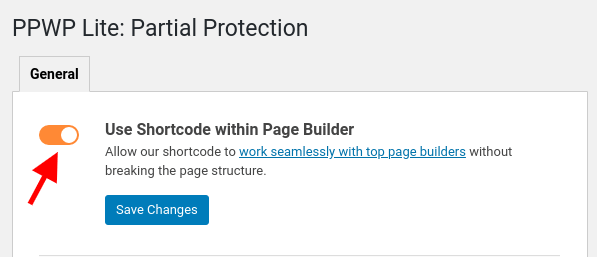
As you’re using Divi, have you gone to Partial Protection -> and enabled Use Shortcode within Page Builder option yet?
For faster and more customized response from our team, please feel free to drop us an email at support(at)wpfolio.com!
- To achieve these above things, you can: