wfmark

Forum Replies Created
-
@arturocivit, Thank you for reaching out.
I suspect that there might be a plugin conflict causing the issue, therefore, I would suggest disabling all other plugins except for Wordfence and Google Site Kit, then trying again. If that doesn’t work, you could also try to revert to a default theme, such as Twenty Twenty-Three, to confirm whether the google site kit works as expected.
If there’s a plugin or theme conflict, I would suggest changing the Wordfence Web Application Firewall into Learning Mode. From the Wordfence Dashboard, click on Manage WAF. Then you will see Basic Firewall Options > Web Application Firewall Status. Change the option to Learning Mode. Now confirm that the google site kit works as expected. Once done, switch the WAF from Learning Mode back to Enabled and Protecting and test to see whether it works well.
https://www.wordfence.com/help/firewall/learning-mode/ is an amazing resource for learning more about the WAF and learning mode.
Let me know in case the above doesn’t solve your issue.
Thanks,
Mark.
Hi@alex019, Thank you for reaching out.
I would suggest changing the Wordfence Web Application Firewall into Learning Mode. From the Wordfence Dashboard, click on Manage WAF. Then you will see Basic Firewall Options > Web Application Firewall Status. Change the option to Learning Mode. Now confirm that you are able to modify the theme. Once done, switch the WAF from Learning Mode back to Enabled and Protecting and test to see whether it works well.
https://www.wordfence.com/help/firewall/learning-mode/ is an amazing resource for learning more about the WAF and learning mode.
Additionally, please send us a diagnostic report to wftest@ wordfence.com. You can find the link to do so at the top of the Wordfence > Tools > Diagnostics page. There, click on “Send Report by Email”. Please add your forum username where indicated and respond here after you have sent it.
Thanks,
Mark.
Hi@stomalomalus, Thank you for reaching out.
You can tell for sure why this happened by looking at Wordfence > Live Traffic and filtering by Blocked or Locked Out. You should be able to see the reasons for the block being given there and adjust your settings accordingly if it’s due to an overly strict rule.
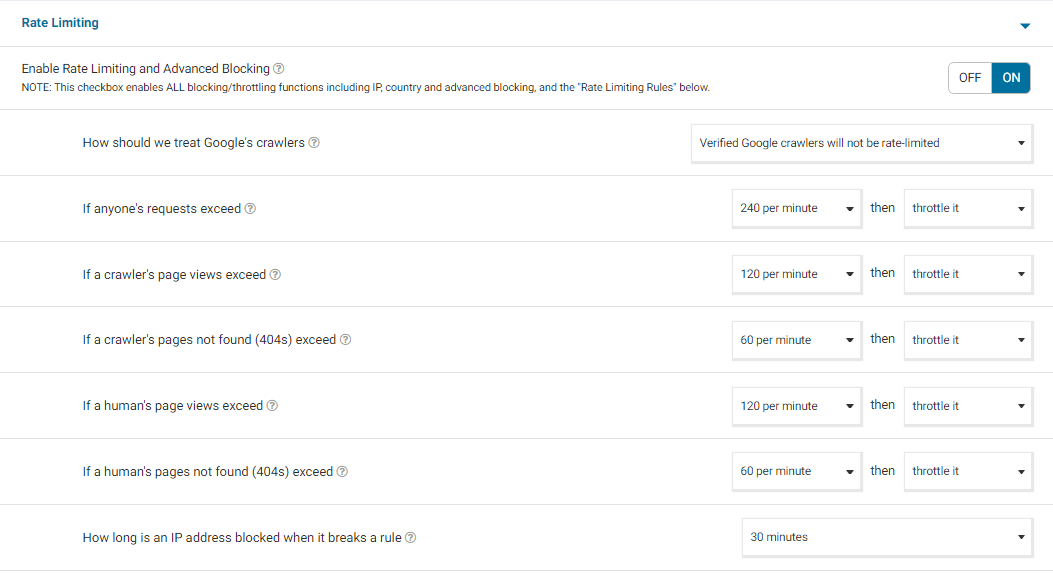
You generally limit the amount of traffic that attempts to hit your site with our Rate Limiting Rules on the Firewall Options page. This configures how crawlers and humans are treated.
I generally set my Rate Limiting Rules to these values to start with:
Rate Limiting Screenshot- If anyone’s requests exceed – 240 per minute
- If a crawler’s page views exceed – 120 per minute
- If a crawler’s pages not found (404s) exceed – 60 per minute
- If a human’s page views exceed – 120 per minute
- If a human’s pages not found (404s) exceed – 60 per minute
- How long is an IP address blocked when it breaks a rule – 30 minutes
I also always set the rule to Throttle instead of Block. Throttling is generally better than blocking because any good search engine understands what happened if it is mistakenly blocked and your site isn’t penalized because of it. Make sure and set your Rate Limiting Rules realistically and set the value for how long an IP is blocked to 30 minutes or so.
See if running with those settings help you out and let me know if issue recurs.
Thanks,
Mark.
Hi@berniesamui,
Thank you for reaching out to us.
Are the users seeing any error message when they log in? Could you please share the message with me? Send a screenshot if need be.
You should be able to see the blocks under Wordfence > Firewall > Blocking with a reason explaining why they were blocked.
If you can’t find the IP address of the blocked users on the Blocking page above, check the Live Traffic Page under Wordfence> Tools>Live Traffic and use the advanced filters to specify the IP address that is blocked. Expand the results using the view (eye) icon and share a screenshot of the Live Traffic entry with me so I can take a look.
Thanks,
Mark.
Hi @solventweb, thank you for reaching out.
Wordfence runs the wordfence_syncAttackData script to ensure malware signatures and rules are up-to-date with the latest ones we have released and to update the Live Traffic page. Usually, 403 or 503 blocks by the firewall trigger the need to sync, so seeing syncAttackData triggered with one of these HTTP error codes is expected.
If you start seeing these requests excessively, your server’s IP address may be blocked. I recommend checking your Wordfence > Tools > Diagnostics page to see if you’re getting any errors under the Connectivity section> Connecting back to this site.
Let me know what you find.
Thanks,
Mark.
Hi @drgonzo3000,
Thank you for reaching out to us.
Can you please provide more information about the issue? Are all the entries on Live Traffic showing the same IP address?
If so, it could be an issue with IP detection. Please find your public-facing IP address here – https://whatismyipaddress.com/. Then look at Wordfence > All Options > General Wordfence Options > How does Wordfence gets IPs and cycle through the options until it displays the IP address above. That will be the setting you need to use going forward, so click the Save button once you’re done.
Let me know in case this doesn’t solve your issue.
Thanks,
Mark
Hi @fguidiuydfsiuydsf, Thank you for reaching out to us.
We are not allowed to discuss the premium version on this forum. Please reach out to billing@wordfence.com with a description of your issue. You can add screenshots if need be.
We will be happy to assist you.
Thanks,
Mark.
Hi @davemspan, thank you for reaching out, and sorry to hear you’re having issues with your sites syncing on Central. Could you please provide more information to help us understand the issue?
Are you using Wordfence Central Templates or is each site configured separately?
Additonally, please send a diagnostic report and a screenshot of the issue you see on Central to wftest@wordfence.com. You can find the link to do so at the top of the Wordfence Tools > Diagnostics page. Then click on “Send Report by Email”. Please add your forum username where indicated and respond here after you have sent it.
Thanks,
Mark
Hi @jp5633, Thank you for reaching out.
When logged in to the site, could you please navigate to Wordfence> Tools> Live Traffic and confirm whether you see any Traffic entries of the blocked login attempts on this page?
Brute force login attacks are one of the most common attacks that we see and are normal. We see millions of brute force login attempts per hour on WordPress sites protected with Wordfence.
Wordfence does all of the important blocking for you automatically so you don’t have to, but if you wish to make your brute force or rate limiting rules a little stricter so that they can’t retry as frequently, for example reducing login failures to 3 or 5 instead of 20, you might find the following links useful to learn some more:
https://www.wordfence.com/help/firewall/brute-force/
https://www.wordfence.com/help/firewall/rate-limiting/
Thanks,
Mark
Hi @k1n7t6, thanks for reaching out to us!
An Allowed memory size of x bytes exhausted (tried to allocate x bytes), or Out of memory (allocated X) (tried to allocate X bytes) error is almost always memory exhaustion occurring outside of PHP somewhere on the server. The operating system log files and web server log files will likely show if memory is being exhausted somewhere outside of PHP and why. This is usually a job for your hosting company’s support channels as they have access to those logs, diagnose the source and potentially resolve the problem.
I’m inclined to think that this error is more likely to crop up on shared hosting where another site could be affecting the memory available for yours, but we have seen it in a number of environments.
For reference though, in case it helps, you could try altering memory_limit = 256M and checking whether your max_execution_time = 60 in php.ini. Next, ensure wp_memory_limit in wp-config.php is at least 256M to mirror the other change, as similar issues can be caused by timeouts or memory being maxed out during scans or periods of heavy activity on your site.
Thanks,
Mark.
Hi @qcode01, Thank you for reaching out.
I suspect this could be a plugin/theme conflict.
To rule out any plugin/theme conflict, I’d suggest disabling all other plugins except for Wordfence, then try to load your sites again to see if there’s a plugin or theme conflict causing the issue. You could also revert to a default theme, such as Twenty Twenty-Three. If you receive the same error, letting us know that it definitely only occurs when Wordfence is active would be helpful knowledge to have.
If there’s a plugin or theme conflict, I would suggest changing the Wordfence Web Application Firewall into Learning Mode. From the Wordfence Dashboard, click on Manage WAF. Then you will see Basic Firewall Options > Web Application Firewall Status. Change the option to Learning Mode. Now confirm that you can successfully load your sites. Once done, switch the WAF from Learning Mode back to Enabled and Protecting and test to see whether it works..
https://www.wordfence.com/help/firewall/learning-mode/ is an amazing resource for learning more about the WAF and learning mode.
Let me know in case the above doesn’t solve your issue.
Thanks,
Mark.
Hi @webdes2a, thanks for getting in touch!
If you’re not seeing permission failures to either your database or files reported on your Wordfence > Tools > Diagnostics page, I would try navigating to your wp-content/wflogs folder via FTP or file manager. You should be able to delete the wflogs folder or its contents entirely and Wordfence should try to repopulate it within 30 minutes.
It’s also worth checking that in addition to 755 permissions on your WordPress site’s directories, the process owner is also www-data.
If you experience persistent problems with the rules.php file, you can bypass this entirely by setting Wordfence to write to the MySQLi storage engine instead of a file: https://www.wordfence.com/help/firewall/mysqli-storage-engine/
Thanks,
Mark.Hi @emielb, Thank you for reaching out.
In order to assist you, please send a diagnostic report to wftest@wordfence.com for one of the sites with this issue. You can find the link to do so at the top of the Wordfence Tools > Diagnostics page. click on “Send Report by Email”. Please add your forum username where indicated and respond here after you have sent it.
Thanks,
Mark.
Hi @nige-mcilwaine, Thank you for reaching out to us.
This sounds pretty uncommon, so I’d suggest clearing cache (site plugins and local browser) and disabling all other plugins except for Wordfence, then trying again to see if there’s a plugin or theme conflict causing the issue. You could also revert to a default theme, such as Twenty Twenty-Three.
If it works as expected, then reenable your plugins and theme one by one until the issue recurs to help find the cause.
Also, can you send a diagnostic report to wftest @ wordfence.com? You can find the link to do so at the top of the Wordfence Tools > Diagnostics page. Then click on “Send Report by Email”. Please add your forum username where indicated and respond here after you have sent it.
Thanks,
Mark.
Hi @userweb,
Thank you for getting back to us.
Glad I could be of help.Do not hesitate to reach out in case you need further clarification.
Thanks,
Mark.