Matheus Martins

Forum Replies Created
-
Hi, @noobynoo.
I’m glad you reached out. I can certainly help you.
Email troubles are often hard to diagnose, so we wrote this article to try and help:
https://givewp.com/documentation/core/settings/emails/troubleshooting-common-email-problems/The short version is that you need to confirm WordPress is sending them, and then figure out why they aren’t being delivered.
Most of our users who walk through those steps are able to resolve email issues.
I’d recommend following all the steps there to see if it resolves things. If those steps don’t help, I’m more than happy to hop back in and try to diagnose things with you.
Hey, @um324.
Glad you reached out. I can clarify here.
1 – Currently, the Fee Recovery allows you to select which payment gateways should accept fee recovery. Here is a quick video to show how to do that for both v2 forms (legacy, classic and multi-step forms) and Visual Form Builder (VFB) forms: https://www.loom.com/share/e6ee02c40614459292424983f0f57a3d?sid=36825c7c-a9ee-4d9f-af51-8cb5da2d8179.
On the other hand, we do not have a way to disable the recurring option for offline donation. However, the good part of it is that if they select recurring and offline donations, it won’t be processed and an error will show up for the donor.
2 – You can enable the billing address collection under donations > settings > payment gateways > offline donations > collect billing details

3 – You can disable that email by clicking on the lock in the email settings page (donations > settings > emails > donor emails):

4 – It depends on the payment gateway you are using.
Please send along your System Info.
Navigate to Donations –> Tools –> System Info (tab) and click the button to “Get System Report” and copy/paste that in your reply here.
That will give me some more context to be able to help.
5 – This is likely happening because you are working locally. Can you try it online?
Feel free to reach out to us if you have any further inquiries or require additional assistance. We’re always happy to help!
Forum: Plugins
In reply to: [GiveWP Donation Widgets for Elementor] Display Errors with new Visual FormsHi, @goodkarmakid.
Glad you reached out.
We’ve investigated it and we found that you’ve uncovered an edge-case issue with our GiveWP Donation Widgets for Elementor add-on. What is happening is that it is not displaying the forms accordingly.
I’ve escalated this to our development team so they can work on a fix. You can follow up on the progress of the fix here: https://feedback.givewp.com/bug-reports/p/the-donation-widgets-for-elementor-should-work.
The workaround is to use the blocks or shortcodes.
While we work on a fix, feel free to message us if you have further questions or need any additional assistance!
Hi, @dgurcu.
Glad you reached out.
I’m happy to dig deeper to find out what is happening between GiveWP and Elementor. When you say you wanted to edit an Elementor page, and then GiveWP caused an issue, do you mean you cannot edit the page at all? Or did the issue happen when you tried to save the page? The more details you can give me about how to replicate the issue you are facing, including steps to replicate it, the easiest it for me to test it and report a bug to the development team if it comes to it.
Your success with online donations is our number one priority. Looking forward to helping you get to the bottom of this!
Hi, @cadfile.
When we designed our Visual Form Builder (VFB) forms, we decided that the best approach is to create a user on WordPress, too. This will page the way for future improvement we will make for GiveWP. Therefore, Visual Form Builder forms automatically create user accounts for donors.
Currently, we do not have a way to disable this setting.
If you cannot register donors on your site, then I’d suggest you use v2 forms (legacy, classic and multi-step forms) because they do not create user profiles.
I apologize for my slow turnaround on this one.
Feel free to reach out to us if you have any further inquiries or require additional assistance. We’re always happy to help!
Hi, @vela984.
Glad you reached out. I can help you.
Every time a database upgrade fails, GiveWP creates a new entry on the logs section on the dashboard that gives us further information on what is happening. Can you send me logs for when you try to upgrade the database and get the errors? You can find the logs under Donations > Tools > Logs.
Also, please send along your System Info.
Navigate to Donations –> Tools –> System Info (tab) and click the button to “Get System Report” and copy/paste that in your reply here.
That will give me some more context to be able to help.
Forum: Plugins
In reply to: [GiveWP - Donation Plugin and Fundraising Platform] Display commentsHi, @sdarnowsky.
Glad you reached out. I can clarify here.
The comments received when a donation is made are stored under donations > donations > click to view a specific donation. That’s where they should be. However, what would you like to do? Would you like to display it somewhere else? Can you clarify?
Looking forward to helping you get to the bottom of this!
Hi, @meembat.
I think this is related to the issue you were facing on the other ticket you raised. Can you test the donor wall block instead, and let me know how it goes?
Your success with online donations is our number one priority. Looking forward to helping you get to the bottom of this!
Hi, @meembat.
I’ve tested it and it looks like some shortcode attributes are not performing as they should. However, I tested the donor wall block and it worked as expected.
Putting myself in your shoes, I would use the block and not the shortcode for now. Here is the documentation covering how to use it: https://givewp.com/documentation/core/blocks/donor-wall-block/.
While we work on a fix, feel free to message us if you have further questions or need any additional assistance!
Hi, @estedog.
I’ve tested the Visual Form Builder (VFB) forms on a staging environment and I duplicated and published some forms. When I created a new page, I could see all the three forms there – the original one and the duplicated ones. At this point, it’s working on our end and unless we can reliably replicate the issue, we are relatively stuck.
I’ll be happy to test it again if you can give us steps or pointers to replicate the issue.
Feel free to reach out to us if you have any further inquiries or require additional assistance. We’re always happy to help!
Forum: Plugins
In reply to: [GiveWP - Donation Plugin and Fundraising Platform] Critical errorHi, @arndtk.
We would like to dig deeper to understand what is happening. Can you reach out to us via our contact form at https://givewp.com/contact-us/? Use the option that says “I am responding to a request to contact you.” Provide the link to this thread as context, your system info, etc. and we will happily help you.
I’m marking it as resolved here, and when a fix is provided, I’ll update this post.
Hi, @saifullah970.
I’m glad you reached out. I can certainly help you.
The error log says: “The statement descriptor cannot include ‘.”” What is likely happening is that you added a dot to the statement descriptor, and you need to remove it.
You can remove it under donations > settings > payment gateways > Stripe > manage accounts:
Feel free to reach out to us if you have any further inquiries or require additional assistance. We’re always happy to help!
Hi, @queerasyou.
I saw that my teammate Alex Coleman got back to you via Priority Support. If you need further help, you can message us via priority support and our team will happily help you.
Thanks for using GiveWP! Have a great day.
Forum: Plugins
In reply to: [GiveWP - Donation Plugin and Fundraising Platform] Klarna?Hi, @queerasyou.
Glad you reached out. I can clarify here.
From GiveWP 3.0 on, a new payment method will show up when you navigate to the payment gateway settings called Stripe – Payment Element. This payment method will only be visible in forms created using the Try the new form builder link. This new payment method accepts 40+ payment methods, validates input, and handles errors directly on your website.
As payment options we can list some of them:
- Apple Pay
- Google Pay
- ACH
- Cash App
And many more!
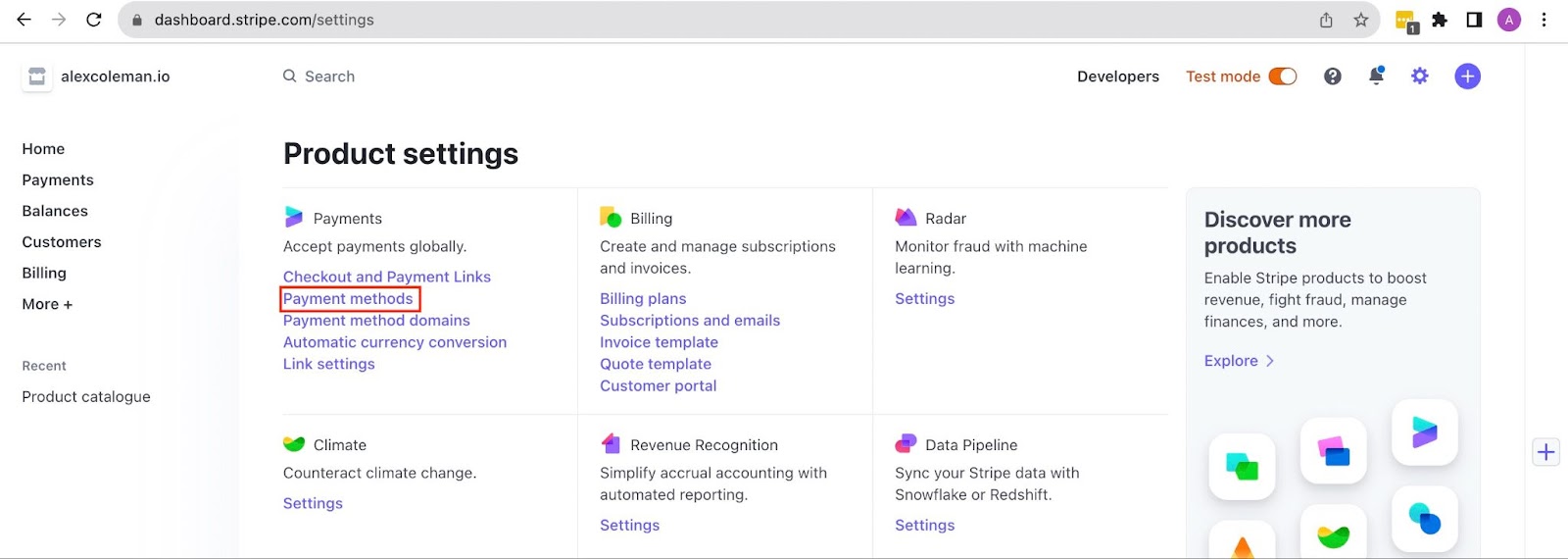
To use it, you need to activate those payment methods. In your Stripe dashboard navigate to the Payment Methods page from the Settings page:
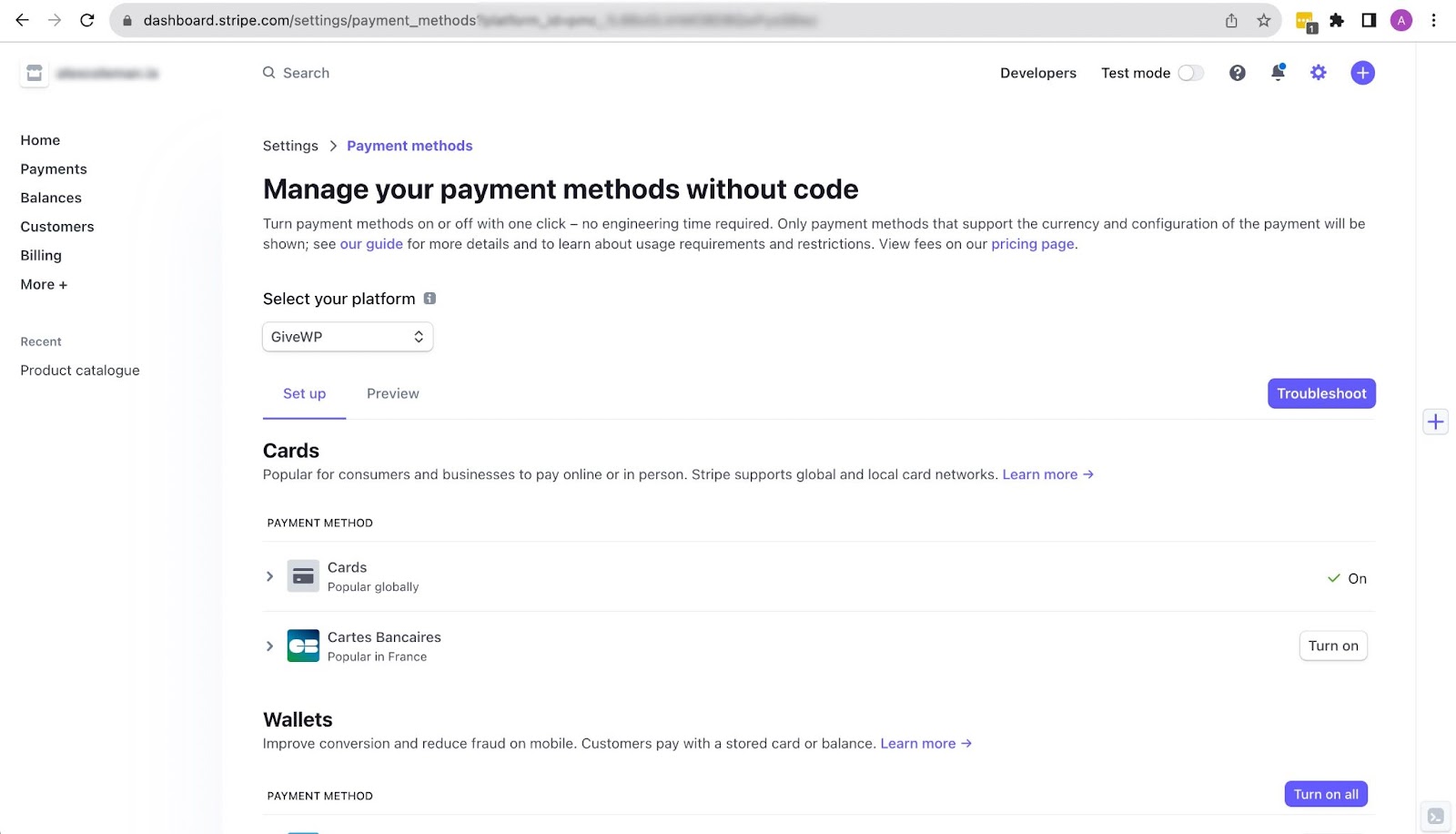
In the Payment Methods page choose GiveWP from the Select Your Platform dropdown. Payment methods will be presented below for you to configure. To preview what Stripe methods will be activated use the Preview link just below where you Select Your Platform.
Not all payment methods will be available to every Stripe account. It’s important to notice a thing. Stripe dynamically loads payment methods based on various factors such as donor location, browser, and device, which is critical to ensuring a seamless payment experience. While it’s true that Stripe makes these decisions after careful analysis, unfortunately, it’s beyond our control to manipulate these settings directly. So, if it does not display other options on your site, it could be due to donors’ setup or even your account.
Feel free to reach out to us if you have any further inquiries or require additional assistance. We’re always happy to help!
Hi, @monsieurclutch.
Glad you reached out. I can clarify here.
The featured image can be edited under the Design tab. Click on the Header tab and then you can upload an image. See it below:

On the other hand, adding tags and categories is a feature we are still going to develop. I added you as a voter for this feature here: https://feedback.givewp.com/feature-requests/p/v3-forms-should-support-form-categories-and-tags.
We are actively tracking user feedback to understand further the needs you all have. You can use the link to check in for updates or to provide additional details of your own. I would encourage you to comment on that post about the impact this would have on your organization. Information like that is always helpful for our teams to see. I’ve also linked your ticket internally, so if this feature request is developed, we can reach out to update you.
Give the post above a look, and let me know if there are any additional details you would like me to add. I want to ensure your need is as accurately reflected as possible, and I’m happy to include an internal note to our teams with any specific information you would like them to have.
Feel free to reach out to us if you have any further inquiries or require additional assistance. We’re always happy to help!