WP Folio Team

Forum Replies Created
-
Forum: Plugins
In reply to: [PPWP - Password Protect Pages] Missing password field!If so, could you please switch to the default theme and check if it resolves the issue?
By the way, which themes are you using?
Looking forward to your reply.
Forum: Plugins
In reply to: [PPWP - Password Protect Pages] Missing password field!Thank you for reaching out to us.
Are you using any custom CSS? As we checked, the password form will be displayed if we disable the following styles:
.pda-form-login form
{display: none !important;}
And
.ppw-swp-form
{ display: none !important;}
You can view the password form as it appears on our end when the styles above are disabled here: https://drive.google.com/file/d/1auqzn9bwfGt92peBv2lBUBQqi9HME7Ko/view?usp=sharing
Awaiting your reply.
Forum: Plugins
In reply to: [PPWP - Password Protect Pages] Plugin only refresh pageThank you for reaching out to us.
Could you please provide more details about what you mean by “the plugin only refreshes the page when entering the password”?
>if i use quotes after headline or description in the shortcode, they appear on the page
- Could you also share a screenshot or screencast showing how the quotes appear, along with the shortcode you are using? This will help us better understand the issue.
Additionally, could you confirm whether this issue occurred in previous versions of the plugin or if it has only started happening recently (new version)?
Awaiting your reply.
Forum: Plugins
In reply to: [PPWP - Password Protect Pages] Cookie Check Failed errorHi @wmasztakowska ,
Thank you for information.
Unfortunately, for the following reasons:
- Like you, we have been unable to reproduce the issue on our end, and it seems to occur only for some customers, making it challenging to identify a definitive solution.
- As this appears to be a caching issue, but WordPress.com currently doesn’t provide an option to exclude specific pages from the cache.
- I checked the WordPress.com forum, and there are many users reporting that they have to clear their browser cache to resolve the problem (e.g., editing a page and the changes not appearing).
So, at this time, we understand this isn’t ideal, but the best advice we can offer is:
- Try logging into your WordPress.com account and clearing the cache for your WordPress.com website. (If the plan you’re using don’t have this option, you can ask WordPress.com’s support to clear the cache for you).

2. Or inform your customers that if they encounter the “Cookies Check Failed” error, they can resolve it by clearing their browser cookies and cache or by using an incognito/private browsing mode to enter the password.
You can also check on debug.log if there is any information about the cookies error and provide it to us so that we can check it better.
Awaiting your reply.
Forum: Plugins
In reply to: [PPWP - Password Protect Pages] Cookie Check Failed errorHi @wmasztakowska ,
Thank you for reaching out to us.
As your customer have to clear their cookie to resolve the issue, it should be cache issue.
=> The cookies or cache issue may be related to your hosting server.
Could you please exclude cookies by adding the following cookies to the “Exclude Cache” option in your hosting server account? You also can contact your hosting server’s support to do it for you.

For PPWP Free version:
pda_protect_password
wp-postpass-role_*
ppw_cat-*
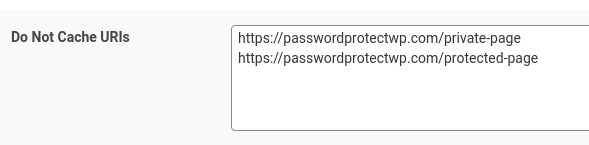
Excluding cookies from caching servers will prevent your entire site from being cached. (above). In case you just protect some pages in your site, the better solution is excluding your password protected page URLs only.
Thank you so much for your kind words! We’re glad the plugin is working perfectly for your needs and that our team could assist you effectively.
Let us know if you ever need any further support!
Hello @visualeight,
Thank you for reaching out to us.
Once your Gold license expires, the plugin will continue to function and protect your private media files.
These features will be disabled:
- Private Links: Customize and autogenerate new private links *
- IP Restriction: stop certain IP addresses from accessing private download links
- Shared Private Links (Private Magic Links extension): Update download expiry and limit for “shared private links” *
* All your existing private download links and “shared private link” won’t be affected.
If you are having issues with the existing links, let us know.
Forum: Reviews
In reply to: [Prevent Direct Access - Protect WordPress Files] Great supportThank you so much for your kind review! We’re glad to hear the plugin is working well for you. Our team is always happy to go the extra mile to help, even with advanced settings on your web host.
If you ever need more assistance, don’t hesitate to reach out!
Forum: Plugins
In reply to: [PPWP - Password Protect Pages] Can’t install plugin on WordPress 6.2.6Hi @geschwader,
Thank you for reaching out to us.
We tried installing and activating our PPWP Lite on our staging site, which is running WordPress 6.2.6, without any issues.
Could you please remove PPWP Lite, reinstall it, and check if it works?
You can also temporarily disable all other plugins and then activate it to check if it works. If it does, there might be a conflict with another plugin.
Awaiting your reply.
Forum: Reviews
In reply to: [PPWP - Password Protect Pages] Excellent PPWP Lite product & Great supportHi @sbdesh ,
Thank you so much for your kind words! We’re thrilled to hear that you’re happy with the simplicity and effectiveness of our product. Your satisfaction means a lot to us, especially knowing that it stands out compared to other products.
If there’s anything else we can do for you, please don’t hesitate to reach out.
Thanks again for taking the time to share your experience!
Forum: Plugins
In reply to: [PPWP - Password Protect Pages] Meta Query ImprovementsHello @sajib1223,
Thank you for sharing additional details and your workaround. We’ve forwarded this to our development team, and they’ll review the issue on our end. Any necessary changes to address this conflict will be included in the next release.
We appreciate your feedback and patience. Let us know if there’s anything else we can assist you with in the meantime!
Forum: Plugins
In reply to: [PPWP - Password Protect Pages] Meta Query ImprovementsHello @sajib1223,
Thank you for sharing this and your proposed solution. The
meta_queryadjustment is part of how PPWP handles content protection, but we’ll review your suggestion with our development team to assess possible improvements.We’ll update you once we have more details. Let us know if you’re facing specific issues related to this!
Forum: Reviews
In reply to: [Prevent Direct Access - Protect WordPress Files] Very helpful support teamHi @shahbaazem ,
Thank you so much for sharing your experience with PDA Gold and WPFolio Support! We’re truly grateful for your loyalty since 2021 and are thrilled to hear that our efforts have made a positive impact.
Your recommendation means a lot to us. If you ever need assistance, we’re here to help!
Forum: Reviews
In reply to: [PPWP - Password Protect Pages] Top SupportGerman version:
Vielen Dank für Ihre tolle Bewertung! 😊 Es freut uns sehr, dass wir das Problem lösen konnten und Sie mit unserem Support zufrieden sind. Wir wissen es sehr zu schätzen, dass Sie sich die Zeit genommen haben, uns Ihr Feedback zu geben. Wenn Sie in Zukunft weitere Unterstützung benötigen, stehen wir Ihnen gerne zur Verfügung!
Danke vielmals und alles Gute!
——————————————————————————————————————–
English version:Thank you so much for your wonderful review! 😊 We’re very glad we could resolve the issue and that you were satisfied with our support. We truly appreciate you taking the time to share your feedback. If you need any further assistance in the future, feel free to reach out—we’re always here to help!
Thank you again and all the best!
Thank you so much for your kind words and positive feedback! We’re thrilled to hear that you find our plugin useful and easy to use for protecting pages, posts, and categories. It’s always rewarding to know that our efforts are helping users like you.
If you ever have any questions, suggestions, or need assistance, don’t hesitate to reach out. Thank you once again for your support!