WPRuby

Forum Replies Created
-
Hello @alfecaesar
In your shipping zones, do you have Australia Post and Free Shipping methods in the same zone? If not, please add them in the same zone, this should fix the issue.Hello @bthsthrlnd
I’m glad that it is working for you know.If you encounter any issues in the future, please let us know, we’ll be glad to help.
Best wishes.
Hello @bthsthrlnd
Thanks for using the plugin.
Would you please go to the settings page, enable the Debug Mode, then go to the Cart page, you will see debugging messages displayed. Please, send these messages to me by opening a support ticket here: https://wpruby.com/submit-ticket/
Please, after that, do not forget to disable the Debug Mode.
Many Thanks,
WPRuby TeamForum: Plugins
In reply to: [Free Shipping Per Product for WooCommerce] Change label textHello @alvarobriz
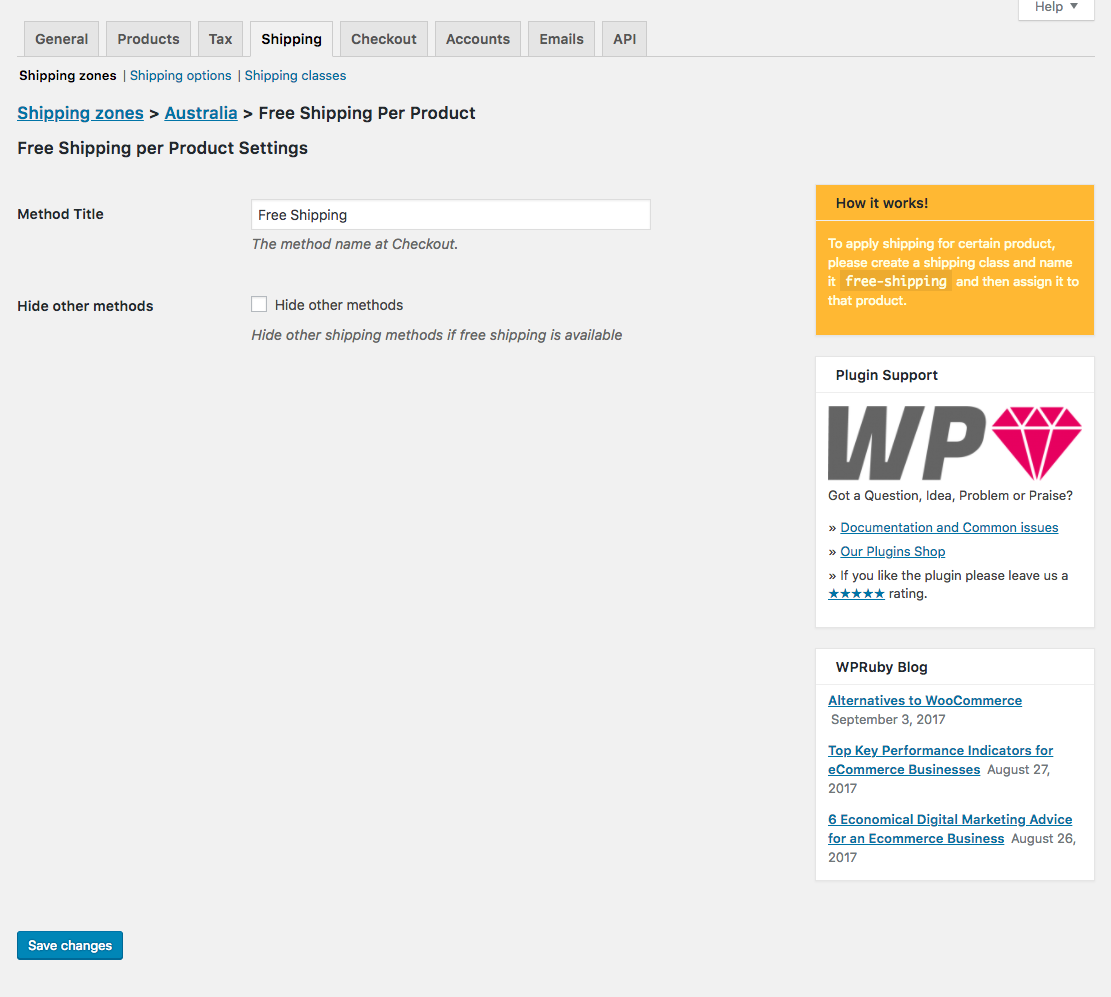
When you assign the shipping method to the zone, you can find the “Method Title” option among the settings page.You can see it here: https://ps.w.org/woo-free-shipping-per-product/assets/screenshot-1.png?rev=1839004
Hello @lightboxid
Shipping to Barbados is suspended from Australia Post due to the Coronavirus. There is no issue at all regarding international shipping in the plugin. Once Australia Post resumes the shipping operations to these countries, the plugin will start returning shipping prices immediately for these countries.
Please, refer to this page for more info: https://auspost.com.au/about-us/news-media/important-updates/coronavirus/coronavirus-international-updates#international
PS: This plugin does not have international shipping, only the Pro version does, so I assume that you are referring to the Pro version.
Forum: Plugins
In reply to: [Free Shipping Per Product for WooCommerce] Where is Documentation?Hello @thisistrue
All that you need to make it work is included in the plugin’s description and in the screenshot. I quote:
- Install and activate the plugin.
- Go to WooCommerce ⇒ Settings ⇒ Shipping ⇒ Shipping Zones.
- Assign Free Shipping Per Product to one or more of the shipping zones.
- At the method’s settings, you can choose if you want to hide other shipping methods at Checkout if the free shipping was available.
- To make a product eligible for free shipping, you can create a shipping class and name it
free-shippingthen, assign the class to any product you need
.
What is the issue that you have? We can solve it and add to the documentation. Please, let me know 🙂
Hello @kindrat
Can you please test your API key and the Merchant account name against making a test payment? You can use step3 curl command: https://docs.adyen.com/checkout/get-started#step-3-make-a-test-payment.
If you get an Unauthorized response, there might be a settings issue in the Adyen account. We are currently following up with another user regarding this issue, I’ll keep you updated.
Forum: Plugins
In reply to: [Payment Gateway for Adyen and WooCommerce] Fatal Error on activationHello @kindrat @tobaelectricbike
The issue should be fixed with the latest update of the plugin. Please, update the plugin, it should work now.
Please, let me know if you need any further help.
Hello @milettaluca
Thanks for using our plugin.
I do not think this is possible at the moment. And I’m not even aware that other shipping plugins can do it.Forum: Plugins
In reply to: [Australia Post WooCommerce Extension] pre sales questionHello @gkhatri
Thanks for using our plugin.If you would like a private conversation please open a support ticket at https://wpruby.com/submit-ticket/
Best Regards,
WPRuby TeamForum: Plugins
In reply to: [Australia Post WooCommerce Extension] Does free version do anything?make sure that you are triggering the shipping zone. and make sure that the zone has Australia in the regions options. An at checkout, make sure to add an Australian address.
Forum: Plugins
In reply to: [Australia Post WooCommerce Extension] Does free version do anything?@wealthy
Please, enable the Debug Mode from the plugin’s Settings page. And then go to the Checkout page and send me the debugging messages that you see. Thanks.Forum: Plugins
In reply to: [Australia Post WooCommerce Extension] Does free version do anything?Hi @acoggins
Sure, just activate the plugin, go to the Shipping Zones page, assign “Australia Post” to one of the zones, and then click on Australia Post, you will be redirected to the settings page. We will modify the documents to add this.@wealthy
No, you can test for one product that has weight and dimensions. But in order for the plugin to work for all products, yes, all of them needs weight and dimensions. Or you can use the default weight and dimensions to apply them for all products that do not have weight and dimensions.What if I use an item that only have weight
The plugin will use the default dimensions from the plugin’s Settings page.
Please, let us know if you have any other questions.
- This reply was modified 6 years, 4 months ago by WPRuby.
Forum: Plugins
In reply to: [Royal Mail Shipping Calculator for WooCommerce] Updated Postage CostsHello @creativemisfit
Please, open a support ticket at https://wpruby.com/submit-ticket/Forum: Plugins
In reply to: [Royal Mail Shipping Calculator for WooCommerce] Updated Postage CostsHello @sansaarkmp, @creativemisfit
We just updated the free and the pro plugins, please update your versions and let me know if you still get any prices that do not meet the 2019 Royal Mail prices. Before testing, please make sure to clear the shipping cache. Go to WooCommerce > System Status > Tools > WC Transients > Clear transients.Best Wishes,
Waseem