mev

Forum Replies Created
-
Forum: Plugins
In reply to: [Import Tweets as WP Posts] Automatically approve?Thanks for the quick reply.
I did find a way of doing this via ifttt – but was hoping for something entirely in WordPress.
If I deactivate everything, no errors.
Trying to deactivate a page, it seems to wait forever with a please wait message.
I haven’t done many customizations so may delete the entire plugin and then reinstall.
How can I find out the preceding version of a plugin?
I first installed the WordPress Mobile Pack when I set up the blog (~2015). I have accepted automatic updates that were made available including this latest one.
Forum: Reviews
In reply to: [Moon Phase Widget] Moon phase not always correct [updated]Thanks for your prompt attention to this. It works well now. I have updated my rating.
A shot in the dark but were you seeing similar issue I saw?
http://wordpress.org/support/topic/has-nextgen-gallery-memory-usage-increased-in-2040?replies=10Deleting all the
_displayed_gallery_*
_displayed_galleries_*
_transient_timeout_*
_transient_[0-9a-f]*
entries brings my wp_options table to only 529 entries and drops the amount of memory used (with NextGen 1.9.13) to be 27.62 MB or 31%. It also fixes symptoms I observed with SimplePie giving out of memory errors.I don’t know if 2.0.40 was where this started or whether WordPress 3.8 + 2.0.40 was what finally pushed things over the edge with all this junk inserted earlier in the 2.0.* release. However, will stay with 1.9.13 for now and mark this as resolved.
For what it is worth, changing over SimplePie caused the memory leak to reappear for fetching the WordPress News. However, I need to see if this still occurs if I have a sane sized wp_options table.
I am still copying over the web site to separate test domain.
However, in process of copying the database one thing very quickly jumps out:
– The text size of my “wp_options” table is 22MB of characters and has autoincremented to 3523730 entries. It is almost entirely filled with entries with the following types of names* displayed_gallery_rendering_<hash>
* _transient_timeout_<hash>
* displayed_galleries_<hash>
* _transient_<hash>In fast there are so many of these names that the table will not import in phpmyadmin (at least in one try).
So this leads me to a few questions:
1. What is the purpose of those entries?
2. Do I need all these entries for proper functioning of NextGen Gallery – or can I delete them all before bring in the table?
3. Is there an “options leak” where NextGen gallery is creating space in a MySQL table and never cleaning up?The hypothesis I am going on now is that NextGen has had some versions that “leaked” all these entries which polluted my wp_options table and consumed a huge amount of memory. I don’t know if this is still in the NextGen code but having a few photos and albums and a web site with a few hits meant this accumulated to point where the trash is polluting the web site. Any thoughts on this or more information?
One more follow up. There may be some caching going on in the dashboard widget, since when I moved the “class-simplepie.php” class that loads the news, I didn’t actually get a “No such file or directory” error message. So I think the dashboard is showing me older cached out of memory errors rather than changing depending on whether I install NextGen Gallery or not.
Will wait overnight and see if cache expires as some point here.
Here is the mixed data I have been able to measure so far:
1. phpinfo() – tells me I have a total of 90M of memory available.
2. I also added “define(‘WP_MEMORY_LIMIT’, ’90M’);” to my wp-config.php file so wordpress and phpinfo() are both consistent on the amount of memory used.
3. I used the WP-Memory-Usage to tell me the amount of memory used in my Dashboard. This tells me the following values:
– With NextGen Gallery disabled = 34.57 MB or 38%
– With NextGen Gallery 1.19.13 = 36.37 MB or 40%
– With NextGen Gallery 2.0.40 = 40.95 MB or 46%
so this definitely tells me 2.0.40 is using more memory though none of these amounts should be close to my limits. For example, it seems to suggest that NextGen Gallery 2.0.40 is using triple the memory of 1.9.13.4. My blog is not particularly large, but following are the counts:
– 192 posts
– 85 comments
– 38 pages
– 766 images
– 13 galleries
– 2 albums
Until I emptied my spam folder, I did have 8861 spam comments though emptying that folder didn’t seem to change things.5. Potentially un-related but I also have one other memory related message show up on the dashboard. While displaying WordPress News, it gives
Warning: xml_parse() [function.xml-parse]: Memory allocation failed : growing buffer in …/wp-includes/SimplePie/Parser.php on line 154
This appears regardless of which configuration of NextGen gallery I use.
6. At this point reverting back to 1.9.13 addresses at least the symptoms so I’m going to keep my main site running that. I prefer not to give out credentials to this site or have it be a further testbed but if I get some time next weekend I’ll see if I can backup and create a copy that could be examined for testing.
Switching themes from my theme (Weaver II) to something else also doesn’t change the behavior.
I have looked at list of conflicting plugins and stopped W3 total cache. I also tried selective turning off, though tougher to turn everything off on a live site.
Also my permalinks are “Day and Name” instead of default, but toggling this didn’t seem to help.
List of plugins enabled:
Askimet
Broken Link Checker
Calais Auto Tagger
Display Posts Shortcode
Exec-Php
Geo Mashup
Google AJAX Translation
Google Map Link
Homepage Canonical Link
iFrame
List Category Posts
Multi-Level Navigation
NextGEN Gallery
Online Backup for WordPress
ProgPress
Quotes Collection
SABRE
Simple Google Sitemap XML
Simple Page Ordering
Subscribe Connect Follow
Tweet My Post
Ultimate Google Analytics
W3 Total Cache (turned off and flushed)
WP-Contact Form
WP-Cron Control
wp-google-drive
WP-Memory-Usage
WP-Table-Reloaded
WP-Filter Post Category
WP RSS Aggregator
wp SubPages redirect
YouTube ShortcodeForum: Plugins
In reply to: [Plugin: NextGEN Gallery] Album shortcodes still broken in 2.0.14Updated to 2.0.17 and still broken.
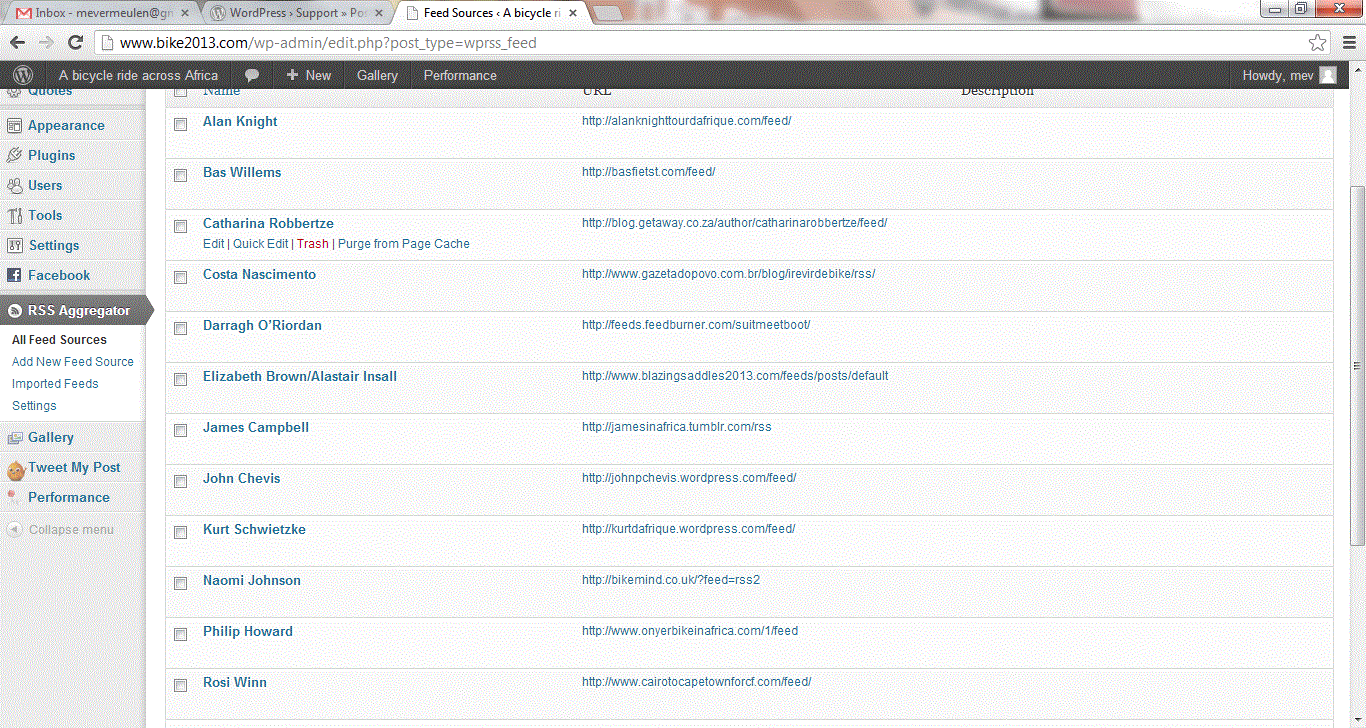
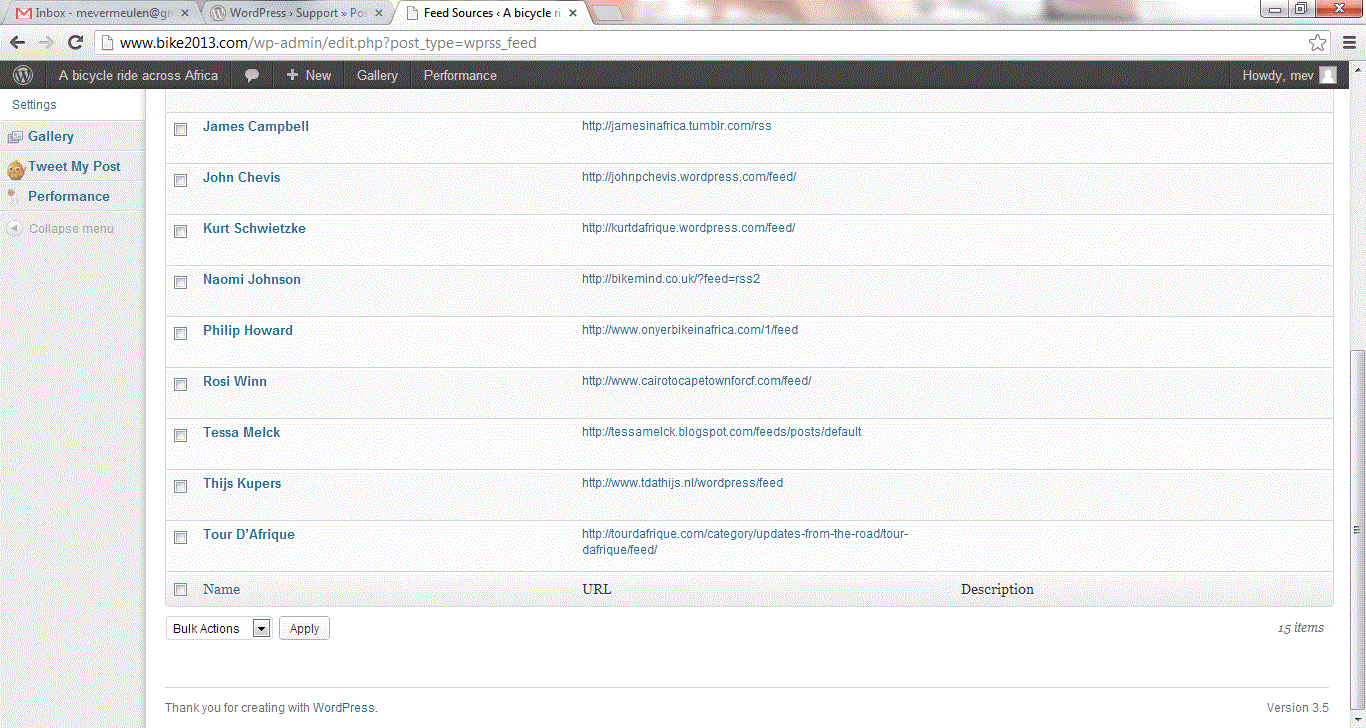
Here are links to my admin page screenshots:
http://www.bike2013.com/wp-content/gallery/debug/feedaggregator.gif
http://www.bike2013.com/wp-content/gallery/debug/feedaggregator2.gifI haven’t done a lot more debugging, but listed above were ones that worked and didn’t work. It seems that later versions from:
failed: http://tessamelck.blogspot.com/feeds/posts/default
are getting picked up, though I still need to watch the other feeds to see when they next post things.
The page displaying the posts is: http://www.bike2013.com/other-blogs/
I am aggregating 15 feeds. I first went and looked at each of the feeds individually, and noticed that there were 9 feeds that worked successfully followed by 1 feed with a bandwidth error followed by 5 feeds that didn’t work:
worked: http://alanknighttourdafrique.com/feed/
worked: http://basfietst.com/feed/
worked: http://blog.getaway.co.za/author/catharinarobbertze/feed/
worked: http://www.gazetadopovo.com.br/blog/irevirdebike/rss/
worked: http://feeds.feedburner.com/suitmeetboot/
worked: http://www.blazingsaddles2013.com/feeds/posts/default
worked: http://www.jamescampbell.com.au/James_Campbell/Blog/rss.xml
worked: http://johnpchevis.wordpress.com/feed/
worked: http://kurtdafrique.wordpress.com/feed/
bandwidth error – http://bikemind.co.uk/?feed=rss2
failed: http://www.onyerbikeinafrica.com/1/feed
failed: http://www.cairotocapetownforcf.com/feed/
failed: http://tessamelck.blogspot.com/feeds/posts/default
failed: http://www.tdathijs.nl/wordpress/feed
failed: http://tourdafrique.com/category/updates-from-the-road/tour-dafrique/feed/I examined worked vs. failed by looking at whether there were posts when I looked at the feed URL vs. whether they showed up as imported feeds (and also in my display above).
I next took the feed that was giving a bandwidth error and moved it to trash. On restarting things, there was now one of the five feeds that also had posts imported:
failed: http://tessamelck.blogspot.com/feeds/posts/default
However, that one was not the next on the list and I couldn’t see anything that said why that one should import and others should not.
I am still going to run an experiment later with each of the four failing feeds and see if they individually import into a test blog where they are the only feed.