averta support

Forum Replies Created
-
Forum: Plugins
In reply to: [Master Slider - Responsive Touch Slider] Distorted Slider on MobileHi,
Thank you for choosing Master Slider.
Please check out this documentation:
http://docs.averta.net/display/mswpdoc/Master+Slider+Responsive+GuidelineI recommend you to create another slider for mobile. To know more about it, you can check out the documentation above.
If you need any further information, please let me know.
Best,
Forum: Plugins
In reply to: [Master Slider - Responsive Touch Slider] Mobile responsivenessHi,
Thank you for choosing Master Slider.
Please enable Auto-height slider on Slider Settings -> General Settings.
Let me know the result.
Best,
Forum: Plugins
In reply to: [Master Slider - Responsive Touch Slider] Plugin Settings to Update ProHi again,
You can use this plugin to add code:
https://wordpress.org/plugins/code-snippets/Or you can visit our support center and create a new ticket. Our support staff are there to give you the best possible assistance:
http://support.averta.net/en/item/master-slider-wordpress-free/
Good Luck!
Forum: Plugins
In reply to: [Master Slider - Responsive Touch Slider] Getting StartedHi,
Sorry for the delay in replying.
I checked out the slide info. It has no problem.
As I mentioned in my previous message, please visit our support center and create a new ticket. Our support staff are there to give you a prompt assistance:
http://support.averta.net/en/item/master-slider-wordpress-free/
Good Luck!
Forum: Plugins
In reply to: [Master Slider - Responsive Touch Slider] Images doesn’t appearHi,
Sorry for the delay in replying.
It seems you removed the page @aferraz1.
If you still have problem, please visit our support center and create a new ticket. Our support staff are there to give you the best possible assistance:
http://support.averta.net/en/item/master-slider-wordpress-free/
Best,
Forum: Reviews
In reply to: [Phlox] Very niceHi,
Thank you for your rating @webgringo!
We will always try to improve Phlox and our aim is to ensure our users receive the highest quality product and services. So it would be great if you could provide us with any additional feedback to help us improve.
We do strive to be user friendly and make our customers fully satisfied 🙂
We take this 4 star rating as a Christmas gift, however, 5* could make us happier!
Please feel free to get in touch in case you need help with anything else.
You can always get assistance from our support agents in case you face any issue.Forum: Plugins
In reply to: [Master Slider - Responsive Touch Slider] Video loopsHi,
Thank you for choosing Master Slider.
Loop option is available for Video Background, and this feature is only available on our pro version.
If you need any further information, please let me know.
Have a great weekend.
Best,
Forum: Plugins
In reply to: [Master Slider - Responsive Touch Slider] Images doesn’t appearHi,
Thank you for choosing Master Slider.
I checked out your website. All of the sliders were working properly.
Could you please explain more about the issue?
Looking forward to hearing from you.
Best,
Forum: Plugins
In reply to: [Master Slider - Responsive Touch Slider] Plugin Settings to Update ProHi,
Thank you for choosing Master Slider.
In order to enable activation tab, please add the following code to
functions.phpfile in active theme folder and then check out Master Slider settings.add_filter( 'masterslider_disable_auto_update', '__return_false', 99 );If you need any further information, please let me know.
Best,
Forum: Themes and Templates
In reply to: [Phlox] Featured image linkHi,
Thank you for choosing Phlox and sorry for the delay in replying.
There are two ways to do that:
1. Add a child-theme and edit the related file to single post template and remove the image’s link. But it may cause some issues.
2. You can add a jQuery in your page. This code will delete the link after the page is loaded.We provide you with the best possible assistance on our support forum. So whenever you need any support, our support agents are there to help you.
Again, I apologize for the belated response.
Best,
Forum: Plugins
In reply to: [Master Slider - Responsive Touch Slider] Using Posts SliderHi,
Thank you for using Master Slider.
You can set background color via style editor for your text layer, like other layers.
Please check out these screenshots:
http://support.averta.net/en/wp-content/uploads/style.jpg
http://support.averta.net/en/wp-content/uploads/bg-color.jpgIf you need any further information, please let me know.
Best,
Forum: Plugins
In reply to: [Master Slider - Responsive Touch Slider] Slider is not populating on pageHi,
Thank you for choosing Master Slider.
There are some errors on your website and I guess it is related to your theme.
So please try to change your theme to default theme and check out if the problem persists.Let me know the result.
Best,
Hi again,
I’m glad it has been resolved.
Please let us know if you have any more issues.Best,
Forum: Plugins
In reply to: [Master Slider - Responsive Touch Slider] Getting StartedHi,
Thank you for choosing Master Slider.
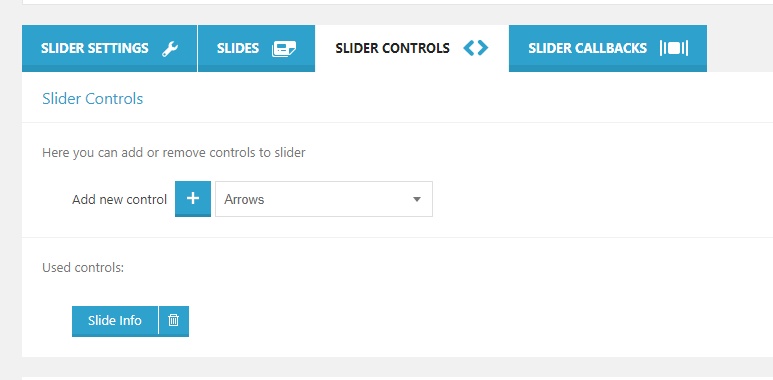
Please make sure you have added slide info on Slide Controls.
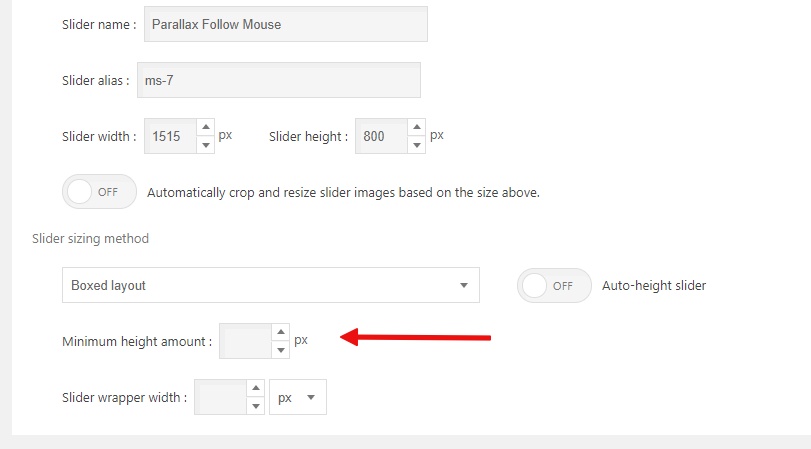
Also, you can set minimum height around.Check out the screenshots:
http://support.averta.net/en/wp-content/uploads/slide-info.jpg
http://support.averta.net/en/wp-content/uploads/min-height.jpgIf the problems persist, please visit our support forum and create a new ticket there:
Free Support Forum (WordPress) :
http://support.averta.net/en/item/master-slider-wordpress-free/Pro Support Forum (WordPress) :
http://support.averta.net/envato/support/item/master-slider-wordpress-plugin/Registration :
http://support.averta.net/envato/registration/JQuery Support Forum :
http://support.averta.net/en/item/master-slider-jquery-version/Have a great weekend.
Best,
Hi,
Thank you for choosing Master Slider.
To disable meta tags, add the below code tofunctions.phpin your theme:/** * Make sure the function does not exist before defining it */ if( ! function_exists( 'msp_remove_class_filter' ) ){ function msp_remove_class_filter( $tag, $class_name = '', $method_name = '', $priority = 10 ) { global $wp_filter; // Check that filter actually exists first if ( ! isset( $wp_filter[ $tag ] ) ) { return FALSE; } if ( is_object( $wp_filter[ $tag ] ) && isset( $wp_filter[ $tag ]->callbacks ) ) { // Create $fob object from filter tag, to use below $fob = $wp_filter[ $tag ]; $callbacks = &$wp_filter[ $tag ]->callbacks; } else { $callbacks = &$wp_filter[ $tag ]; } // Exit if there aren't any callbacks for specified priority if ( ! isset( $callbacks[ $priority ] ) || empty( $callbacks[ $priority ] ) ) { return FALSE; } // Loop through each filter for the specified priority, looking for our class & method foreach ( (array) $callbacks[ $priority ] as $filter_id => $filter ) { // Filter should always be an array - array( $this, 'method' ), if not goto next if ( ! isset( $filter['function'] ) || ! is_array( $filter['function'] ) ) { continue; } // If first value in array is not an object, it can't be a class if ( ! is_object( $filter['function'][0] ) ) { continue; } // Method doesn't match the one we're looking for, goto next if ( $filter['function'][1] !== $method_name ) { continue; } // Method matched, now let's check the Class if ( get_class( $filter['function'][0] ) === $class_name ) { // WordPress 4.7+ use core remove_filter() since we found the class object if ( isset( $fob ) ) { // Handles removing filter, reseting callback priority keys mid-iteration, etc. $fob->remove_filter( $tag, $filter['function'], $priority ); } else { // Use legacy removal process (pre 4.7) unset( $callbacks[ $priority ][ $filter_id ] ); // and if it was the only filter in that priority, unset that priority if ( empty( $callbacks[ $priority ] ) ) { unset( $callbacks[ $priority ] ); } // and if the only filter for that tag, set the tag to an empty array if ( empty( $callbacks ) ) { $callbacks = array(); } // Remove this filter from merged_filters, which specifies if filters have been sorted unset( $GLOBALS['merged_filters'][ $tag ] ); } return TRUE; } } return FALSE; } } add_action( 'plugins_loaded', function(){ msp_remove_class_filter( 'wp_head', 'MSP_Frontend_Assets', 'meta_generator' ); });If you need any further information, please let me know.
Best,