Antonio Candela

Forum Replies Created
-
Hello @angeldavo ,
Can you please try to disable ““Respect Do Not Track and Global Privacy Control?” feature in the Complianz Wizard > General > Security & Consent? Once done, please Save and finish the Wizard again.
Please let me know.
Thanks in advance.- This reply was modified 1 year, 8 months ago by Antonio Candela.
Hello @angeldavo ,
Thank you for reaching out.It seems like you’re using a browser that complies with the DNT policy, such as Brave, while having the “Respect Do Not Track and Global Privacy Control?” feature enabled in the Complianz Wizard > General > Security & Consent.
To see the banner, you can either switch to a browser like Google Chrome or deactivate the mentioned feature.I hope this helps.
Forum: Plugins
In reply to: [Complianz - GDPR/CCPA Cookie Consent] G111 on GCD not showing on websiteHello @simon_a6 ,
Thank you for reaching out.
As stated in our guide, the implementation of the Consent Mode v2 is a premium feature. So you will need the premium version to enable it. At the current state of Complianz we currently support only the above method of injection for the CM v2.
I hope it helps.- This reply was modified 1 year, 8 months ago by Antonio Candela. Reason: typo
Forum: Plugins
In reply to: [Complianz - GDPR/CCPA Cookie Consent] Local language file errorHello @nblund ,
I had the opportunity to test this by creating a site in Danish, and I can confirm the issue. I’m now creating a task for our developers and notifying the team.
Thank you very much for pointing that out.
Hello @webesi,
Thank you for reaching out.
I have replicated your issue on my end, and it seems that you may have thought the “1 year” under “Expiration” was automatically written by default. However, it is just placeholder text. When you click on it, you’ll notice no text is actually written in the label.
Please manually enter “1 year”, save, and complete the wizard. Once done, you should see the changes inside the cookie policy under the Elementor cookies.Let me know, looking forward to hearing you soon.
Hello @alfredo49 ,
I have made an inquiry to our dev team to get an update on this matter.
I will keep you posted.
Forum: Plugins
In reply to: [Complianz - GDPR/CCPA Cookie Consent] Heavy MySQL usageHello @raestanton ,
Thank you for reaching out.
The query you mentioned, flagged as “heavy” by the host, is related to an update of
cmplz_transientsinside thewp_optionstable due to a Cron job. In this case, the query is very light as it only contains abanner_IDandpage_linksthat are related to the generated documents. So, there’s no need for concern.If you’d like, you can modify the Cron job using a plugin like WP Crontrol, but that’s entirely up to you. My personal recommendation would be not to worry about it.
It could be also that your host has a set threshold that defines when a query can be considered “heavy”.I hope this answer helps you to have a clear view of the issue.
Forum: Plugins
In reply to: [Complianz - GDPR/CCPA Cookie Consent] inline cookie scriptHello @quikalex ,
Thank you for reaching out.
Could you please share the site url so I can view the mentioned cookie?
Thanks in advanceForum: Plugins
In reply to: [Complianz - GDPR/CCPA Cookie Consent] issue with vivawallet payment pluginHello @dimcharalampakis ,
Thank you for reaching out.
I’m sorry to hear about the issue. Have you tried putting Complianz in Safe Mode (Tools > Support) to check if there’s any conflict even in that case? If it works, it usually means there’s some incompatibility with a service or plugin. You could start by disabling the WooCommerce integration under Integrations > Plugins.
Please let us know. Looking forward to hearing from you soon.
Forum: Plugins
In reply to: [Complianz - GDPR/CCPA Cookie Consent] Plugin Update RequestHello @kateharris ,
Thank you for reaching out.
I can confirm that our latest version 7.1 is fully compatible with WordPress 6.2.2 (tested today on multiple sites). We’re currently working on the next release of Complianz, which is in the testing phase and will be updated shortly.
Thank you for trusting us!
Hello @janice4summer ,
Thank you for reaching out.
I wanted to provide some context regarding the consent banner’s impact on the Largest Contentful Paint (LCP) metric in the Lighthouse reports. Consent banners generally load after other elements and tend to occupy significant screen space, particularly on mobile devices, often appearing above the fold. The Lighthouse API, which generates these reports, simulates a first-time visitor and captures the banner as part of the page load.
While it’s possible to reduce the banner’s size to improve LCP for this report, it’s worth noting that the Chrome UX Reports, which rely on real-time user data, are less likely to encounter the banner as frequently.
We advise against focusing too heavily on this particular metric unless there are consistent issues observed across real-world user interactions. However, if you’d like to improve LCP, one option would be to reduce the text within the banner, thereby decreasing its size. Keep in mind, though, that minimizing the banner could negatively affect its usability, potentially undermining the intended user experience improvements.
There are alternative methods, such as delaying the banner’s appearance in the viewport to exclude it from Lighthouse reports, but these may not align with best practices. Ultimately, while this metric is important, its relevance grows if the issue persists in actual user behavior.If you decide to proceed with changes, one option is to shorten the consent text to something like: “To provide the best experiences, we and our partners use technologies like cookies to store and/or access device information,” using a smaller font size (e.g., 12px). We recommend evaluating the impact of such adjustments on performance.
In addition, please consider to have a consent banner on your site, since it’s mandatory if you are located in the EU.Please feel free to reach out again if you have any questions or would like further assistance with this.
Forum: Plugins
In reply to: [Complianz - GDPR/CCPA Cookie Consent] Legal hub page is not generatingHello @amithvijayan ,
Thank you for reaching out, and apologies for the delayed response.
Please download the file from this link: https://www.mediafire.com/file/2ke969lahqoui27/legal-hub-template.json/file. To import it, go to Templates > Saved Templates and select “Import Templates” from the top menu bar. Then, choose the file you downloaded from the above link.
We will update the guide shortly to make the file available for everyone.
I hope this helps.
Forum: Plugins
In reply to: [Complianz - GDPR/CCPA Cookie Consent] stop cookies/scripts loading ?Hello @pertinposti ,
Thank you for reaching out.
Yes, our plugin will block most of the commonly used plugins and scripts available on the WordPress platform, including embedded YouTube videos. If this does not happen automatically, you can use our Script Center to customize Complianz to achieve the desired result (https://complianz.io/integrating-plugins/).
Regarding the payment, it is a one-time payment with an annual renewal, you check our pricing here: https://complianz.io/pricing/.
For more information, feel free to check our website at complianz.io.
Hello @ythhj ,
Sorry for the delay in responding.What did Simplero say about this issue? Also, could you please send me a screenshot of how you’ve modified the Simplero cookies? Based on your cookie policy, it seems that they are still under investigation (https://prnt.sc/aQHJF7RNl0P__). It also appears that these cookies are not yet listed in cookiedatabase.org.
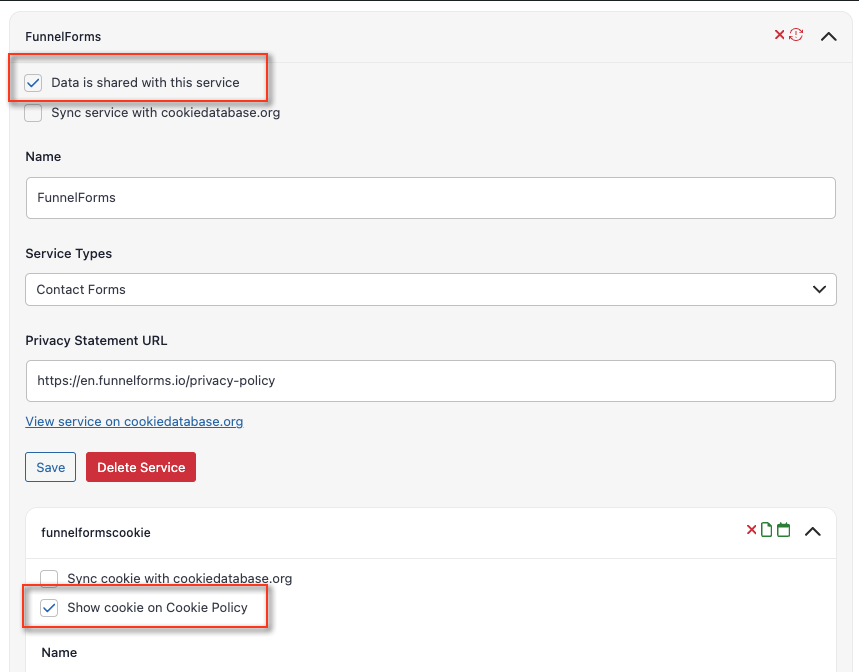
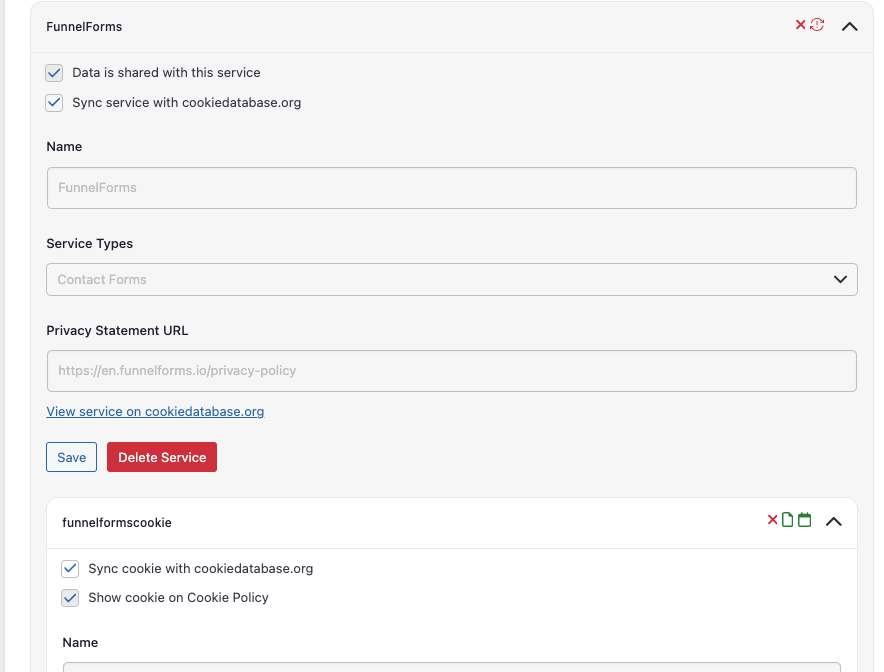
I’ll provide a general explanation on how to create a cookie and sync it with cookiedatabase.org . The tutorial below includes screenshots of a specific service, which are for guide purposes only. Please apply your desired service in the fields.
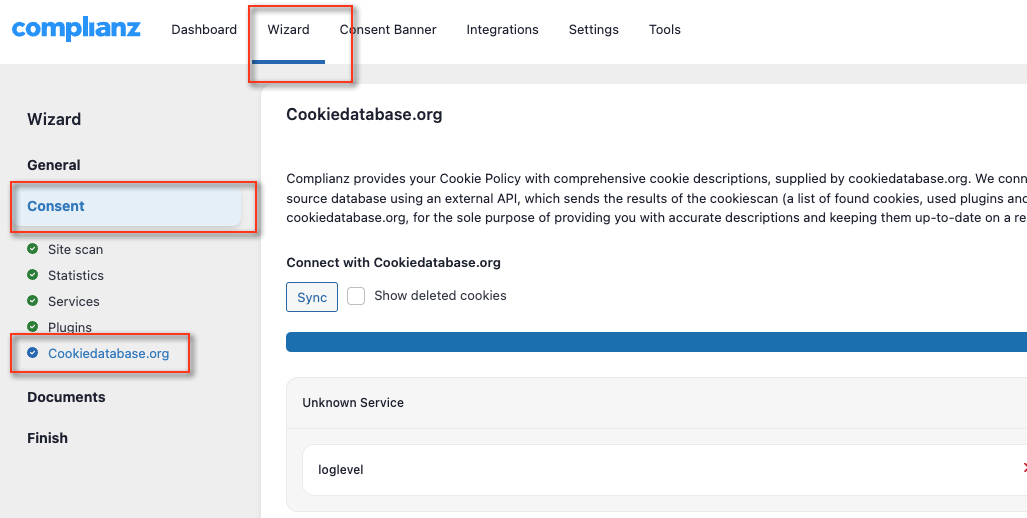
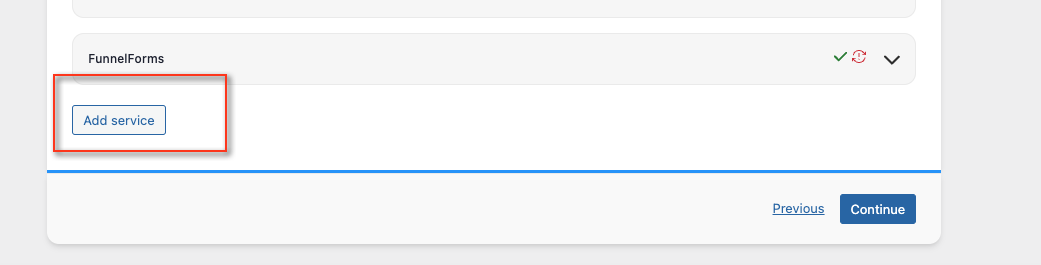
Please follow these steps:- Go to the Wizard menu > Consent section > cookiedatabase.org and click on “Add Service.“
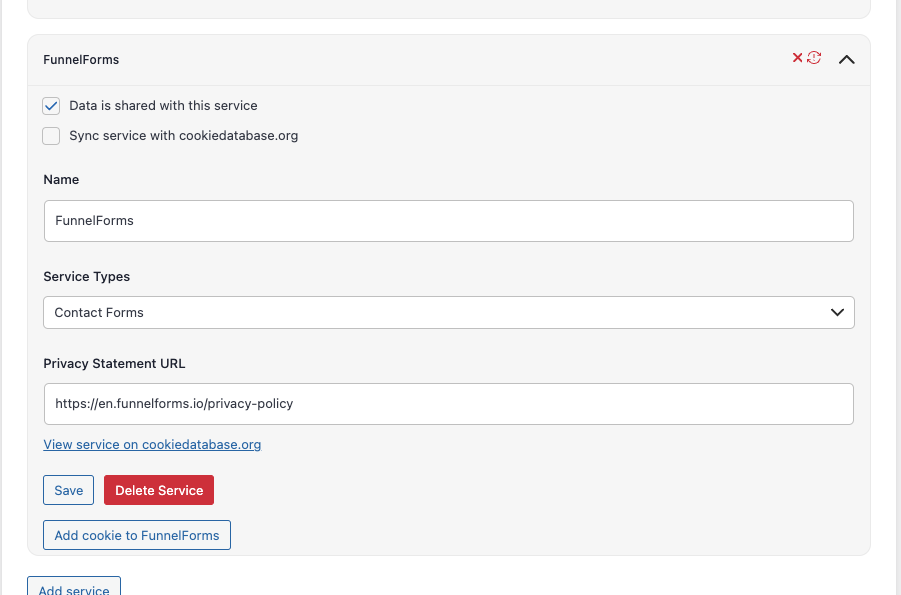
- Fill in the labels as follows(example) with the preferred service:
- Name: yourservice
- Service Types: yourservicetype
- Privacy Statement URL: https://yourservicesite.com/privacy-policy
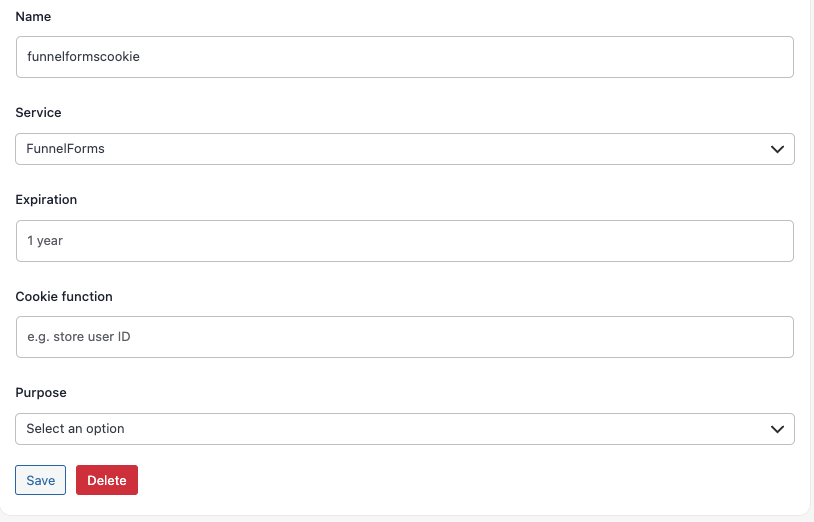
- Once you have filled in the fields, click on “Save.” A placeholder “Add Cookie to FunnelForms” will appear. Click on it and fill in the following fields (example):
- Name: yourservicenamecookie
- Purpose: Your choice
- Click on “Save” and ensure to check both forms:
- “Data is shared with this service”
- “Show cookie on Cookie Policy”
- Finally, click on “Sync service with cookiedatabase.org” on both.
I hope this helps.
Forum: Plugins
In reply to: [Complianz - GDPR/CCPA Cookie Consent] Google Maps Placeholder Not WorkingHello @lostguybrazil ,
Could you please reach out about this through our ticketing system? In this way we can understand how to solve the issue together.