abwaita a11n

Forum Replies Created
-
Hi @mopdog,
Thanks for sharing the System Report with us.
Since I can see that you’re using our WooCommerce Subscriptions plugin, we’d want to proceed and take a closer look at the issue.
Since we’re unable to support paid extensions on the forums, please create a support ticket at WooCommerce.com > My Account > Support. You may need to login to your WooCommerce account before you can access that page.
We will be able to help you further there.
Hi @aklih,
Apologies for the delay here, and thanks for the reminder.
Looking at the plugins you have, I did not see any min-max product quantity plugins. However, I saw that you mentioned:
the only 2 things I’m using that is connected with quantity input is ”
Qty Increment Buttons for WooCommerce” and custom code for max quantity input.In this case, I’d recommend that you first check in the custom code for the max quantity input if there’s such a string. If you find it there, you can directly edit it.
If it’s not there, you’ll want to trace the error manually through a conflict test.
This is whereby you switch to a default WP theme like Twenty Twenty-One and deactivate all plugins apart from WooCommerce then repeat the action that led to this error before. If it’s not present, you’ll want to reactivate the theme/plugins, one-by-one, checking for the one that leads to the issue.
Here’s the conflict test guide for reference – https://docs.woocommerce.com/document/how-to-test-for-conflicts/Let us know how it goes.
Thanks.Forum: Plugins
In reply to: [WooCommerce] Add a Company NameHi @wini0703,
Well, the core WooCommerce plugin does not offer such an option.
However, you can use other plugins that offer the option of creating custom order numbers and specify a certain prefix/suffix in the number. I searched around and found the following third-party plugins:
* https://booster.io/features/woocommerce-custom-order-numbers/
* https://wordpress.org/plugins/custom-order-numbers-for-woocommerce/Be sure to reach the respective plugin authors if you have any questions about the plugins.
Hope this helps.
Thanks.Forum: Plugins
In reply to: [WooCommerce] currency settingYou’re welcome!
If you need help on anything else WooCommerce-related, kindly create a new thread and we’ll be happy to help.
Cheers!
Forum: Plugins
In reply to: [WooCommerce] WordPress Dashboard Times out when WooCommerce is activatedHi @spva,
We’d like to check your case separately.
Could you kindly create a new thread sharing details about it here – https://wordpress.org/support/plugin/woocommerce/#new-topic-0?
Thanks.
Forum: Plugins
In reply to: [WooCommerce] WordPress Dashboard Times out when WooCommerce is activatedHi @forecastit,
We’d like to take a closer look at the issue here.
On the site store.farmpride.com.au when a WordPress user attempts to log in the WordPress dashboard times out
- Just to check, could you share with us the specific error shown on the resulting page? A screenshot will be good. I recommend https://snipboard.io for sharing screenshots – please follow the instructions on the page, then paste the URL in this chat.
- Also, kindly check if there are any relevant error logs in WooCommerce → Status → Logs and share them with us.
I have found that a user will be successfully logged in and can access other parts of the WordPress backend but not the dashboard even if every plugin apart from WooCommerce has been deactivated.
By dashboard, are you referring to the
my accountpage?Good to see that you’re already trying to troubleshoot by disabling other plugins.
I would recommend doing the full conflict test, just to be thorough. It involves switching to a different theme and deactivating the plugins then checking if the issue persists. If it doesn’t, the theme and plugins are reactivated, one by one, checking which one causes the issue to reappear. Here’s the conflict test guide – https://docs.woocommerce.com/document/how-to-test-for-conflicts/
* If nothing comes out of the conflict test, could you please share a copy of your site’s System Status? You can find it via WooCommerce > Status. Select “Get system report” and then “Copy for support”. Once you’ve done that, paste it here in your response.
Let us know how it goes.
Thanks.Forum: Plugins
In reply to: [WooCommerce] Which Customer has purchased x productHi Maggie,
If there was a recall of a product how would you know who had purchased it?
The core WooCommerce plugin comes with a Refund button, but not recall. Thus, I presume that you’d have to do a recall manually or through a plugin/custom code that offers such a capability.
However, in any case, the product will be from a certain order number tied to a specific customer.
Thus, in case you’re doing a recall, I would suggest advising customers to indicate the order number on the product’s package. This will make it easier to tell apart who bought a certain product.
Hope this helps, we’ll be happy to be of further assistance.
Many thanks.Forum: Plugins
In reply to: [WooCommerce] “Add to Cart” button on Shop Page, infinite loopHi @mangoviche,
This behavior seems to be coming from your theme. Just to be sure it the theme, you could try a mini-conflict test and check if the same behavior persists on a default WP theme like Twenty Twenty-One.
Once you confirm with your theme, the theme authors will be best placed helping you further with this.
We could also take a look at it, if you share with us the site’s URL.Thanks.
Forum: Plugins
In reply to: [WooCommerce] no VAT on shipping when products are 0€ totalHi @keebwerk,
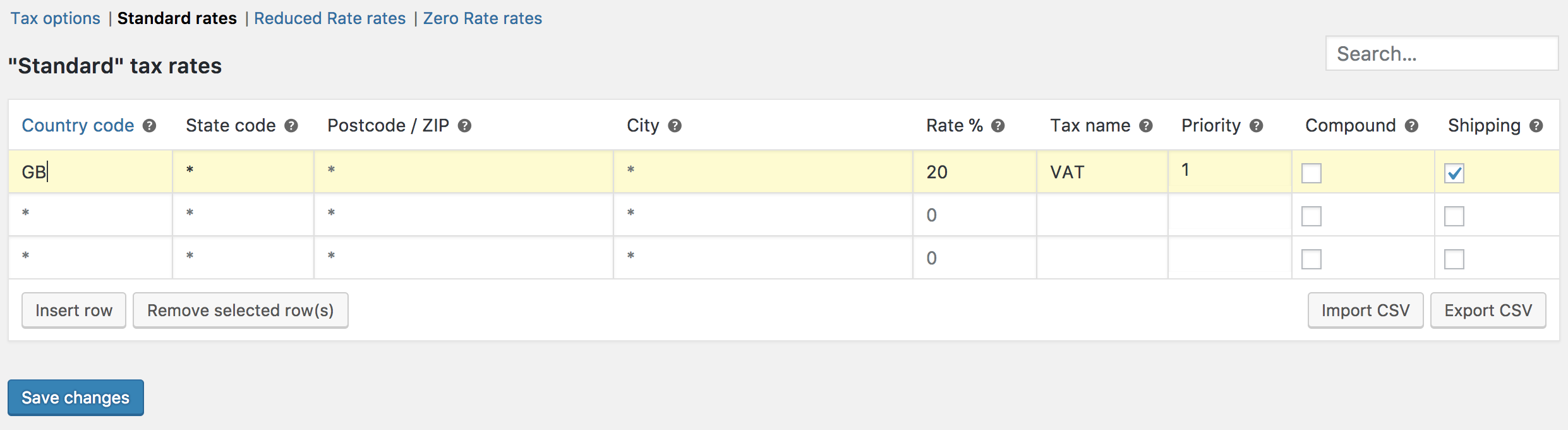
Normally, shipping takes the tax class of the item being shipped, as explained in this guide.
If you’ve set up your tax rates right, you’ll want to check the shipping column for the tax rates to apply to shipping.

Link to image: https://docs.woocommerce.com/wp-content/uploads/2013/02/standard-vat-20.png* You might want to check this button on all tax rates you’ve defined, standard rates above is just one example.
Hope this helps, we’ll be happy to assist further.
Thanks.Forum: Plugins
In reply to: [WooCommerce] remove add to cart hoverHi @jessamca11,
One way to achieve this is through CSS. You could try adding this to your Customizer → Additional CSS:
a.button.product_type_simple.add_to_cart_button.ajax_add_to_cart {
    display: none;
}
The alternative is through custom coding.
You could check for some inputs from the WooCommerce Facebook group or the
#developerschannel of the WooCommerce Community Slack.Lastly, you can get insights on how to do it in this Stack Overflow thread – https://stackoverflow.com/questions/26976296/hide-add-to-cart-button-only-on-woocommerce-shop-category-pages.
* For direct assistance with custom coding, I recommend consulting with the WooCommerce Customizations Partners.
Hope this helps.
Many thanks.Forum: Plugins
In reply to: [WooCommerce] Customize checkout shipping areaHi @hbqalty,
What I want is the default shipping address auto comes out and they are not allowed to change the shipping address.
Thanks for clarifying.
Normally, even when a customer’s address is pulled from their account, they are usually able to edit it. WooCommerce itself does not have an option to prevent users from editing their shipping addresses on the checkout field.
Thus, you’ll want to consider custom coding to implement such a restriction. For that, I would recommend consulting with the WooCommerce Customizations Partners.
Out of curiosity, why do you want to prevent your customers from editing a default shipping address? There may be other approaches we could suggest if you share with us your end goal here.
Thanks.
Forum: Plugins
In reply to: [WooCommerce] variant products stock levels impacted by parent quantityHi,
We’ve not heard back from you in a while, so I’m marking this thread as resolved. Hopefully, the above info was helpful and you were able to find a solution to the issue.If you have further questions, please feel free to open a new topic.
Thanks.
Forum: Plugins
In reply to: [WooCommerce] How to Align Credit Card Icons to the LeftHi,
We’ve not heard back from you in a while, so I’m marking this thread as resolved. Hopefully, the above info was helpful and you were able to proceed as advised.If you have further questions, please feel free to open a new topic.
Thanks.
Forum: Plugins
In reply to: [WooCommerce] How to add payment method in admin area?Hi @sonwander,
Seems we’ve not had additional inputs on this thread. Thus, I encourage you to make use of the above resources.
That said, I’ll go ahead and mark the thread as resolved but please feel free to create a new thread if you have further questions.
Thanks.
Hi,
We’ve not heard back from you in a while, so I’m marking this thread as resolved. Hopefully, the above info was helpful and you were able to proceed as advised.If you have further questions, please feel free to open a new topic.
Thanks.