WP CodeUs

Forum Replies Created
-
Forum: Plugins
In reply to: [WP Proposals] Multiple currenciesHey @quantum_leap,
This is not a feature offered by WP Proposals but it could be accomplished with some custom modifications.
Best,
Kevin W.Hey @dwww,
Thank you for finding this bug. We eliminated ‘wpp_default_options’ in the last update and it looks like we missed a hook that should have been removed as well.
I will be deploying a new update in the next hour or so here that will fix this issue and add a few more updates and improvements!
Best,
Kevin WilgenbuschForum: Plugins
In reply to: [WP Proposals] Editing the greeting in the client emailHey @ruby314722,
Here is the solution to temporary add the correct punctuation to the send proposal email template.
1. Navigate to file send-proposal-metabox.php
2. Line 204 you will see the following:$wpp_client_name = $wpp_client_term_name[0];
3. Replace line 204 with the updated code:if (!empty($wpp_client_term_name[0])) { $wpp_client_name = " $wpp_client_term_name[0]"; } else { $wpp_client_name = ""; }4. After completing that, on line 229 with the class of “email_title welcome”, update the text to the following between the paragraph brackets:
Hello$wpp_client_name,The if statement basically controls whether to put a space between hello and the client name.
As for the client name when we built the plugin we figured most users would set the client name to their liking, but we completely get where you’re coming from.
It wouldn’t be very difficult to add another text field to the send proposal metabox for a custom greeting name and auto-populate the clients’ name by default. This will at least give users the option to customize it if you would like on a per-proposal basis.
If you have any other suggestions, by all means, send them our way!
Best,
Kevin W.- This reply was modified 6 years, 11 months ago by WP CodeUs.
Forum: Plugins
In reply to: [WP Proposals] Editing the greeting in the client emailHey Ruby,
When you select a client for the proposal it will automatically add the clients name after the hello in the send proposal email template.
As for the punctuation, I have made the proper modifications to the plugin and the fix will be included in the next update. We are working on some other features but hope to release the new version very soon.
If you would like, send me your email address and I can send you the updated file in the meantime.
Best,
Kevin W.Forum: Plugins
In reply to: [Ultimate Client Dash] Multisite Compatibility & Features QuestionHey ehong33234,
Sorry for the late reply it looks like the email notification got buried in our backlog.
The free version of Ultimate Client Dash, unfortunately, is not optimized for a multisite setup but it will be included in the pro version which we plan to launch VERY soon.
As for menu items, there is a select list of menu items and capabilities that you can hide from clients but the pro version goes into those sections in more depth.
For example, we have it dynamically collecting all menu items and you can check which menu items you would like to hide from the client. The client capabilities are structured way but it is dynamically collecting all custom user role capabilities and allowing you to enable them for your client.
If you have any other questions just let us know!
Thanks,
Kevin W.Forum: Plugins
In reply to: [WP Proposals] Unable to use any html styling to proposal fields such etcHey @bravestar,
Looking at our feature backlog we do have creating Elementor and Visual Composer elements on there, and we will be integrating it with their built in textarea_html feature.
It’s pretty simple to create those elements since we have the styling all generating so that will most likely be in the launch of the pro-version. These elements will give more control of the overall layout rather than having to use the metaboxes.
Best,
Kevin W.Forum: Plugins
In reply to: [WP Proposals] How to Use Elementor with WP Proposals – the GuideHey @bravestar,
If you’re using Elementor or Visual Composer make sure to set the Post Attributes to Template ‘Default Template’. If you’re using Elementor and if you have the post template set to ‘Elementor Full’ or ‘Elementor Canvas’ you’re telling Elementor to use their page template and not the Proposal page template.
If you want the Elementor section of the proposal to be full width you would change that in the WP Proposal Settings > Design and enable ‘Content Editor Full Width’.
Best,
Kevin W.Forum: Plugins
In reply to: [WP Proposals] changing currencyWith this being a brand new plugin, unfortunately, this is not a built-in feature at the moment. We do have it on our backlog but it will be one of the features included in the pro-version along with many other great features.
Best,
Forum: Plugins
In reply to: [WP Proposals] Unable to use any html styling to proposal fields such etcHey @bravestar,
For security reasons, the meta boxes input fields are designed to strip any code other than HTML hrefs. This is a pretty common practice and is not something we plan on changing in the future, unfortunately.
Best,
Forum: Plugins
In reply to: [WP Proposals] How to Use Elementor with WP Proposals – the GuideHey @bravestar,
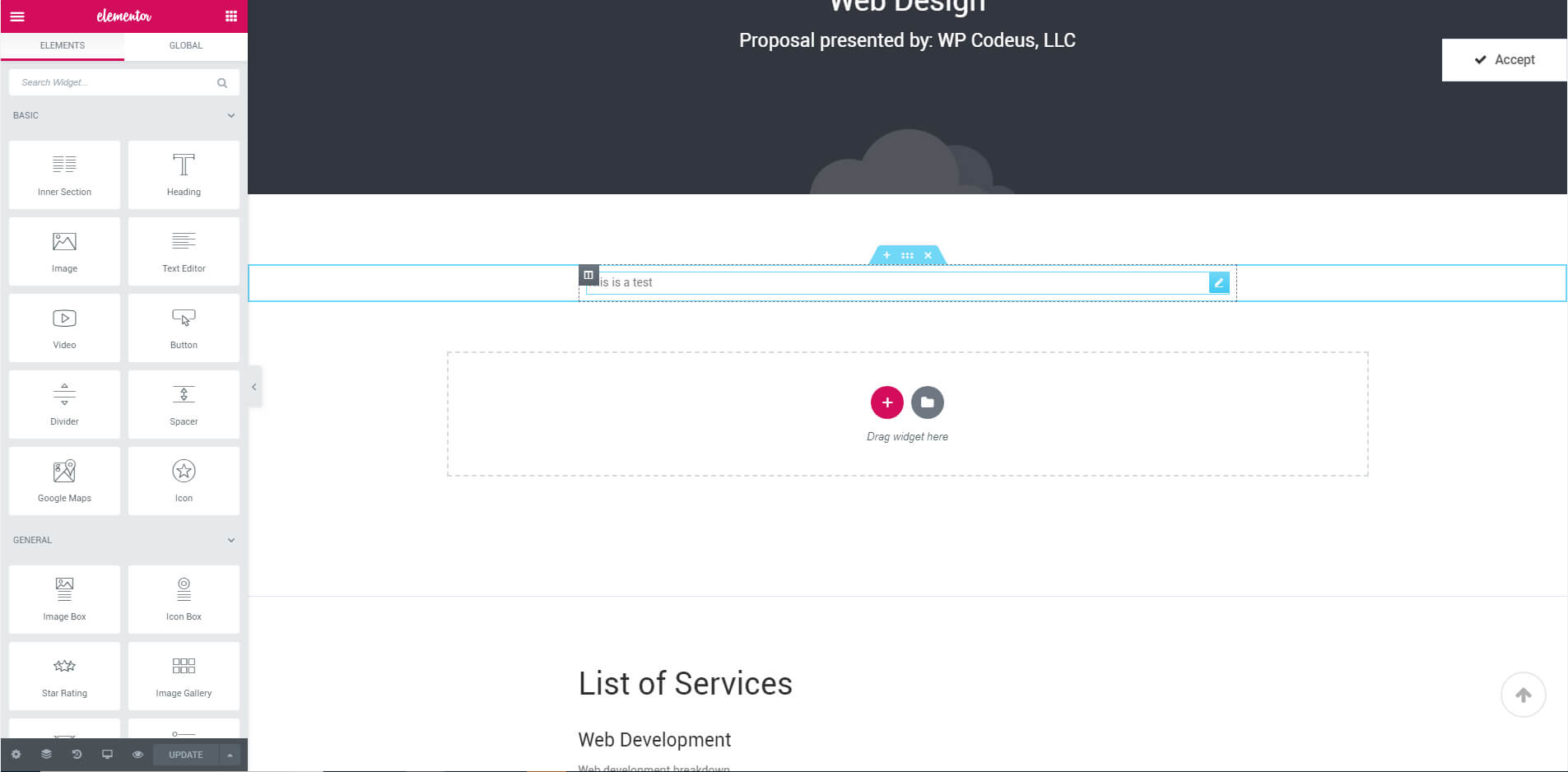
I have tested the following and was not able to duplicate the issue on our end. Please see the attached image: https://wpcodeus.com/wp-content/uploads/2019/04/Elementor-test-v1-1.jpeg
If you would like, please create us a temporary administration login to your site using contact@wpcodeus.com so we can see what might be causing the issue and try to resolve it.
Best,
- This reply was modified 7 years, 1 month ago by WP CodeUs.
Forum: Plugins
In reply to: [WP Proposals] How to send the proposal and…Hey Sweetfoxatl,
We are marking this forum as resolved as your question has been answered in another forum and we are in the works of making a big updated based on your feedback.
Thanks,
Kevin W.Forum: Plugins
In reply to: [WP Proposals] How to Use Elementor with WP Proposals – the GuideHey Bravestar,
Thanks for the kind words and awesome instructions to allows users to use Eliminator on the Proposal custom post type!
We are working on a BIG update for WP Proposals right now based on all of your guy’s awesome feedback. Including things like: more instructions, more fields and details regarding client information, send proposals directly from the dashboard and more. Please feel free to keep sending feedback our way and a review of the plugin will definitely help drive us even more and get the word out about a plugin that is very much needed in the marketplace.
We will include all of this in the new readme.txt but I thought I would also add to this forum on how to allow Visual Composer to be used for the Proposal custom post type as well.
1. From the dashboard hover over WPBakery Page Builder and select ‘Role Manager’
2. Select the Post Type dropdown and choose the option ‘Custom’.
3. Activate all custom post types that you would like to edit using Visual Composer.
3. For best results go to the Proposal Settings and select ‘Full Width Editor’Best,
Kevin W.Forum: Plugins
In reply to: [WP Proposals] How to send the proposal and…Hey Sweetfoxatl,
We appreciate your feedback as this is one of our newest plugins and we’re currently looking for feedback just like yours and testing the market before we develop a pro-version. Below are some answers to your questions:
1. If you have a website building editor, the editor section will simply allow you to create and style your own top section of the proposal. As of right now we have only tested Elementor and Visual Composer. If you’re using a different plugin please tell us which one and we can test in and make any updates in the next version. Also, as the tip on the editor pages says, make sure to go to the settings and set it to full width for best results.
2. Right now the only way to send the proposal is by an email providing the URL to the proposal. The pro-version once developed however will have a styled template that you can send from the backend. What version of the plugin are you using? If you’re getting a login redirect make sure you update to version 1.2.
3. The client area as of right now is designed to be able to filter through proposals. It will also be used to send the proposals from the backend in the pro-version.
4. I would make sure to update to version 1.2 as I believe that was in the update as well.
Hopefully that helped answer any of your questions and if you have any more feedback by all means please send it to us at contact@wpcodeus.com.
Best,
Kevin W.Forum: Plugins
In reply to: [WP Proposals] Sending the finished proposalHey Coboxnyc,
I haven’t heard anytime back for a few days but I just wanted to check in to see if the solution above worked for you? If it did I would like to include the change in the next update.
Best,
Forum: Plugins
In reply to: [WP Proposals] Sending the finished proposalHey Coboxnyc,
Thank you so much for the kind words! We initially built a proposal plugin to use internally, but we saw that there was nothing on the market for other agencies like us. That’s when decided to make a more customizable version and release it to the public. You wouldn’t believe the difference with conversions of landing projects!
As for your redirect issue I think I know what the issue is but since I am not able to duplicate it on my end I may have to have you try something for me. If you don’t want to touch any code feel free to create a temp. admin account for your website and send over the login details to contact@wpcodeus.com and I will do some debugging.
Instructions:
1. Once logged in and at the dashboard go to Plugins>Plugin Editor.
2. Click the dropdown and select WP Proposals.
3. Navigate to include>plugin-functions.php.
4. On line 47 change the Rewrite rule from true to false. It should look like this once done: “rewrite” => array( “slug” => “proposal”, “with_front” => false ),
5. Save your changes and flush your premalinks and that should fix your issue.Please let me know if that worked and I will also include that in the update I am working on this weekend.
Thanks,
Kevin