Wired Impact

Forum Replies Created
-
Forum: Plugins
In reply to: [Wired Impact Volunteer Management] No emails being sent outSince we haven’t heard from you in a while I’m going to mark this thread as resolved. Of course, let us know if any other questions come up.
Jonathan
Forum: Plugins
In reply to: [Wired Impact Volunteer Management] Plugin messes up Menu badSince we haven’t heard from you in a while I’m going to mark this thread as resolved. Of course, let us know if any other questions come up.
Jonathan
Forum: Plugins
In reply to: [Wired Impact Volunteer Management] opportunity listing customizationThanks for reaching out Vick and for your kind words about the plugin. I have a few thoughts on your changes that hopefully will be helpful.
- All the styling you’re referring to, such as the label fonts and colors, the field sizes, etc. are all controlled through your theme’s CSS. Your theme may have options to change those styles within the WordPress admin. If not, you may have to learn and add some CSS on your own.
- In order to change the field label text itself, you’ll want to use the built-in template system within the plugin. You can find the file you’re looking for within
/wp-content/plugins/wired-impact-volunteer-management/templates/opp-single-form.php. You can copy that file to a folder calledwivmwithin your active theme’s folder. At that point you can adjust the labels without causing you to lose those changes when you update the plugin. - The most challenging adjustment for you to make will be the phone extension. The output of the phone number is controlled by the language used for WordPress. You can adjust this, but it would require a decent amount of coding knowledge.
I hope that gives you some direction. Please let me know if any other questions come up.
Jonathan
Forum: Plugins
In reply to: [Wired Impact Volunteer Management] How to change form labels and other textThanks for reaching out @solarcat. There is a template system built into the plugin which I think is exactly what you’re looking for. Within the plugin’s “templates” folder each one of those files can be copied into your theme to a new folder called “wivm”. Then you can adjust each as needed within that folder. That way when the plugin updates you won’t lose any of your changes.
Specifically, if you want to adjust “Open Volunteer Spots”, you’ll want to copy and adjust the following files:
- opp-single-meta.php
- opps-list-flexible.php
- opps-list-one-time.php
For “Express Interest in Volunteering”, you’ll want to adjust only one file:
- opp-single-form.php
I hope that’s helpful for you and let us know if you have any other questions.
Jonathan
Forum: Plugins
In reply to: [Wired Impact Volunteer Management] Group Opportunities by CategoryThanks @thomasrendleman. Can you expand a little on what you mean? We have two shortcodes that you can use with the plugin. If you’re having a separate issue please open another support thread so we can deal with your problem separately.
@iroller, I’m sorry for calling you Susan earlier. I missed that the latest response came from another author. Thanks again for your feedback.
Jonathan
Forum: Plugins
In reply to: [Wired Impact Volunteer Management] Group Opportunities by CategoryI completely agree Susan. I’ve added a note for our team about what you’re looking for and if enough people request we add categorization we’ll hopefully be able to include it.
Thanks a ton for the feedback.
Jonathan
Forum: Plugins
In reply to: [Wired Impact Volunteer Management] Group Opportunities by CategoryThanks a lot Susan! We really appreciate your kind words.
Glad to hear it’ll work out.
Forum: Plugins
In reply to: [Wired Impact Volunteer Management] Display list of volunteer opportunitiesOf course. Happy to help Susan. Let us know if any other questions come up.
Jonathan
Forum: Plugins
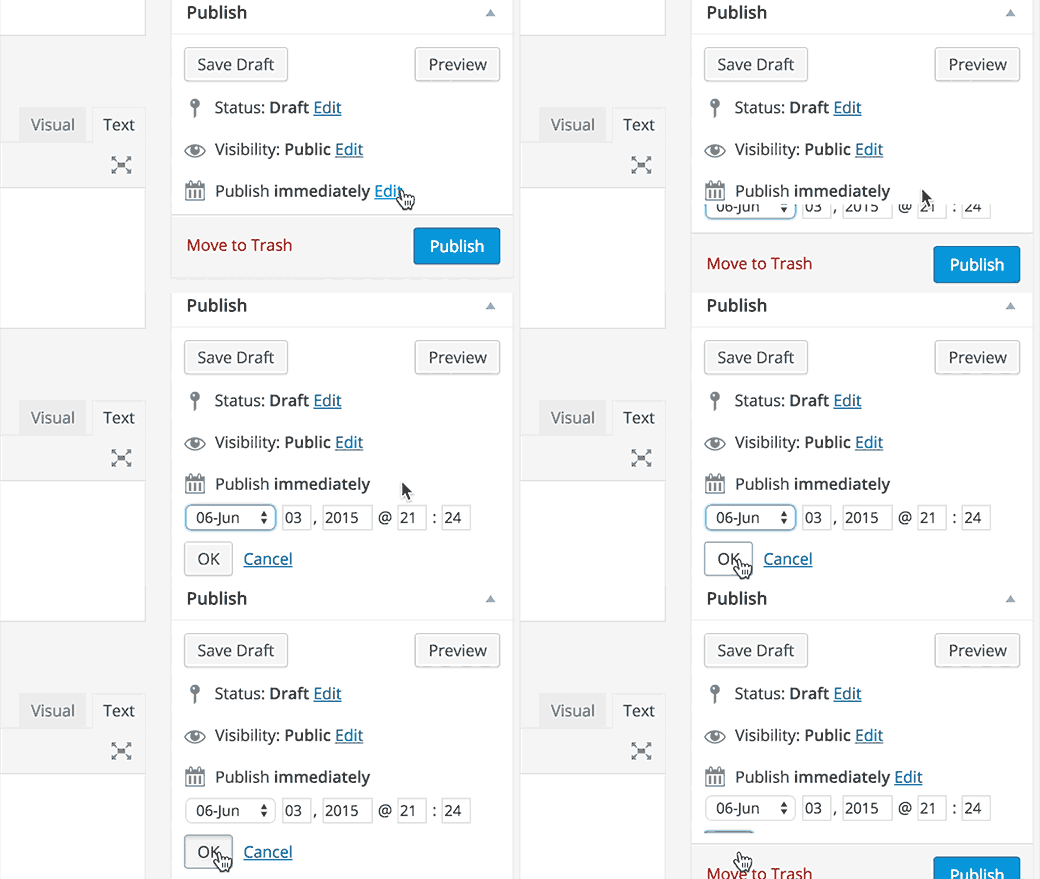
In reply to: [Wired Impact Volunteer Management] Display list of volunteer opportunitiesThanks for clarifying Susan. This is not something that’s built into the plugin, but rather is part of your theme. It’s likely that the links shown in the footer are based on the publish dates of each volunteer opportunity. You can see where you would change those by looking at the image located at http://cdn2.wpbeginner.com/wp-content/uploads/2015/06/edittimedate.gif. I would try messing around with those dates for each opportunity to see if that adjusts the order how you’d want it to display.
Good luck and let me know how it goes.
Jonathan
Forum: Plugins
In reply to: [Wired Impact Volunteer Management] Group Opportunities by CategoryGreat questions Susan. I’ll answer each individually.
I don’t find any means to make categories of volunteer opportunities. We need two distinct categories for volunteers to search: women and men. Have you run into this before, and any solutions to offer? (I didn’t find anything in the support threads)
I’ve considered using two WP PageBuilder’Posts’ modules. Thoughts? Thanks
There isn’t currently a built-in way to categorize the volunteer opportunities. If you’re comfortable with PHP you can add a system to handle this, but it would take some coding.
If you’re looking for a way to handle this manually, the best approach would be to create a page and create links to each opportunity with headings for each “category”. It’s a much more manual process, but would allow you to categorize the opportunities as needed.
On the same question, are there additional shortcodes or ways to modify the ‘flexible opps’ shortcode, such as numbering the items from the list you want to display? [flexible_volunteer_opps ids=”2,5,7″].
Can I get a complete list of your shortcodes? Or where to find them.
There are only two shortcodes, both have been kept simple to make them easy to use. They are
[one_time_volunteer_opps]to display one-time opportunities and[flexible_volunteer_opps]to display flexible opportunities. There currently aren’t ways to customize the output, although that’s something we’re considering doing in the future if more people need that flexibility.I hope that’s helpful. Let me know if you have any other questions.
Jonathan
Forum: Plugins
In reply to: [Wired Impact Volunteer Management] Display list of volunteer opportunitiesThanks for sending over the link Susan. I went to https://avenue.works/volunteer/, but don’t actually see links to see more opportunities or see previously viewed opportunities. Is there somewhere else I should be looking?
Jonathan
Forum: Plugins
In reply to: [Wired Impact Volunteer Management] Display list of volunteer opportunitiesI’m happy to help Susan. Would you be able to send over a link to the page where you’re using the
[flexible_volunteer_opps]shortcode? The issue you’re referring to is usually related to the way the theme displays content, but I’m happy to take a look.Jonathan
Forum: Plugins
In reply to: [Wired Impact Volunteer Management] Restrict This ContentOf course Susan. Good luck with your site and let us know if you have any other questions.
Jonathan
Forum: Plugins
In reply to: [Wired Impact Volunteer Management] Display list of volunteer opportunitiesThanks for reaching out @susan4115. You can definitely display a list of your volunteer opportunities on a page. To do this include the following shortcodes in the page content (Visual Editor): [one_time_volunteer_opps] (for one-time opportunities), [flexible_volunteer_opps] (for flexible opportunities)
It’s important to note, you can’t post both types of opportunities on the same page. Please list only one of the shortcodes on each page.
I hope that’s helpful. Let me know if you have any other questions.
Jonathan
Forum: Plugins
In reply to: [Wired Impact Volunteer Management] No emails being sent outThanks for reaching out @soheilshadi and I’m sorry for the delay in responding.
As far as the problem you’re having, can you try switching to the default Twenty Seventeen theme and disabling all other plugins, then trying one more time? That should let us know if this is a plugin or theme conflict, or if there is something else going on.
Have a good one.
Jonathan