wfmark

Forum Replies Created
-
Hi @jelux, thank you for reaching out.
You can request a free license key for each website.
Wordfence licenses are based on how many WordPress installations you will protect. The amount of domains does not matter since you can have several domain names pointed to the same WordPress installation. To simplify it:
<span style=”box-sizing: border-box; margin: 0px; padding: 0px;”>* If you have a single WordPress site (only one set of WordPress installation files), you only need one</span> license.
* If you have created a network of sites using WordPress multisite (where many WordPress sites share the same set of WordPress installation files) then only one Free license is needed to cover all the sites in the multisite with Free protection. Also, in a WordPress multisite installation Wordfence is installed and configured in the /network admin area and not in the individual subsites.
* If you have several WordPress sites and each has its own set of WordPress installation files, then you would need a Wordfence license for each site.Thanks,
Mark.
Hi @eddievet ,

Apologies for the delayed response.

I couldn’t find your diagnostic report. Please try the below instead:

Navigate to Wordfence > Tools > Diagnostic page and then click the "Export" button. Send the txt file to wftest@wordfence.com. Add your forum username in the subject and respond here once done. Let me know once you have sent the report.

Please try all of our troubleshooting tips centered around this type of error message on your scan log.

https://www.wordfence.com/help/scan/troubleshooting/#scan-process-ended-after-forking

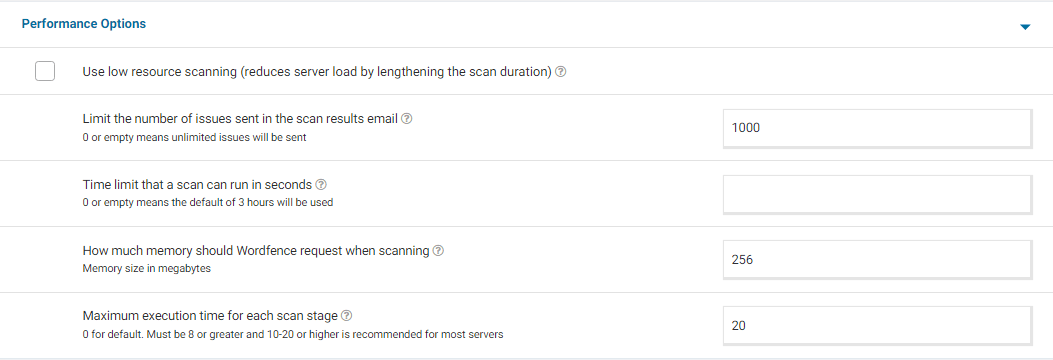
From the error log,  I also noticed you have high value set for the max_execution_time . Sometimes, a higher max_execution_time value has been found to be detrimental to scan speed. We have seen issues arise when this number exceeds 60, although Wordfence will only attempt to use half of this value by default. don’t have some performance options set.

Go to your Wordfence > Scan > Manage Scan and locate the “Performance Options” section. Set “Maximum execution time for each scan stage” to 20. For a screenshot of my recommended Performance setting options – Click Here.

Adding “20” for the “Maximum execution time for each scan stage” tells the scan to pause every 20 seconds and start again where it left off, which makes the scan more performance-friendly for some servers. Once done, go to Wordfence > Scan > Scan Options and Scheduling and check to see if the bottom two options in General Options are disabled. It would be best to have those disabled for now (Scan files outside your WordPress installation, Scan images, binary, and other files as if they were executable)

Additionally, confirm that the Scan Option is set to Standard. Be sure to save your changes in case you make any changes here.

Please try running scan with the updated settings and let me know whether you have any issues.

Thanks,

Mark.Hi @johnleenci , Apologies for the delayed response.
Could you please try deactivating and reactivating Wordfence under the WordPress> Plugins area? This has solved the issue for some customers.
If the issue persists, please send the diagnostic report to wftest @ wordfence.com. You can find the link to do so at the top of the Wordfence > Tools > Diagnostics page. Then click on “Send Report by Email”. Please add your forum username where indicated and respond here after you have sent it.
NOTE: It should look as follows – Screenshot of Tools > Diagnostic > Send by Email
Thanks,
Mark.
Hi @beingbaban , Apologies for the delayed response.
For this specific alert, all the IPs are in the Wordfence blocklist and you don’t need to take any further actions.
Wordfence does all of the important blocking for you automatically so you don’t have to.
Let me know if you have any further questions.
Thanks,
Mark
Hi @corsifotoverona ,
Apologies for the delayed response and thank you for sending the diagnostic report.
It looks like both outbound and inbound connections to and from Wordfence servers are being blocked. You may need to allowlist our IP addresses, which can be found here: https://www.wordfence.com/help/advanced/#servers-and-ip-range
cURL Error 56 also suggests an issue with how TLS is being resolved on your host’s end. If you’re comfortable doing so, try to run the following in the Command Line Interface a few times and share the output with your hosting provider for assistance:
curl -v https://noc1.wordfence.com/
Let me know how it goes.
Thanks,
Mark
Hi @kitka ,
For the administrator role, only two options are available, Optional and Required due to the sensitivity of the role. If an account with administrator level access is compromised, it could cause a lot of damage to the site.If you don’t want 2FA for administrators choose Optional – This means admins can use 2FA, but is not required to enable it. So administrators can use 2FA only if they want to.
Thanks,
Mark
Hello @ibrahimk53 , and thanks for reaching out to us!
Thanks for reaching out. I’m happy to provide you instructions on how to get back in.
If you have lost or replaced your old phone and can no longer access your site(s), and you have misplaced the 2FA backup codes, there are 2 ways to get back into the site.
- Please use FTP/SFTP — or any file manager your web host provides via their administration panel.
- Look inside the /wp-content/plugins/ directory and rename the wordfence directory to wordfence.bak. This will deactivate Wordfence and allow you to login without the 2FA code.
- Once you have logged in to your WordPress admin you can name the folder back to wordfence again.
- Go to your user profile and add 2FA back to your account, making sure to download the backup codes in case of problems in the future.
Let me know if this helps.
Thanks.
Hello @mayaeadie, and thanks for reaching out to us!
I’m happy to provide you with instructions on how to get back into your site. Follow these steps:
- Please use FTP/SFTP — or any file manager your web host provides via their administration panel.
- Look inside the /wp-content/plugins/ directory and rename the wordfence directory to wordfence.bak.
- Once you have logged in to your WordPress admin you can name the folder back to wordfence again.
- Refresh your dashboard and you should be able to see Wordfence Active again. If not, go to the Plugins page and Activate it.
If you are not receiving emails, the unlock emails actually come from your website and not our servers. If you aren’t getting emails then you might want to check:
- The emails (they come from wordpress@yoursitename.com) are getting sent to your junk mail folder by your email client or provider. Make sure and whitelist or add your website to the list of safe domains so you get emails consistently.
- Your web server is having a problem with the email software on it. This isn’t like regular emails you send and receive, but rather server alert messages. Usually, a restart of postfix or sendmail (whichever is installed) can fix it. Your hosting provider may need to help with this.
- Your hosting provider has disabled SMTP from the server for some reason like preventing the server from being used to spam people.
- You have a third party plugin for sending emails with another service, like Gmail, which isn’t working. Reaching out to the plugin author for support can help.
Thanks,
Mark.
Hi @jeriss , thank you for reaching out.
The size of the tables (wffilemods and wfknownfilelist) may be explained by the number of files being scanned. Do the database tables double in size every time a scan runs? If not, you should be good to go if the scans are working.
wp_wffilemodsandwp-wfknownfilelistshould be truncated at the start of new scans. If you visit Wordfence > Tools > Diagnostics > MySQL, are your privileges to INSERT, UPDATE, TRUNCATE etc. here reporting back as OK? It should be safe to empty the tables as it’s meant to happen next time a scan runs, but the size.Thanks,
Mark
Hi @motiveagency, thanks for reaching out to us about this issue.
Which authenticator app are you using? The reason I ask is that when the time offset seems fine, we have seen specific authenticators give different results. Confirming whether another authenticator also fails would be good to determine the cause.
Please try using Google Authenticator, Microsoft Authenticator, Authy, etc. Here is a list of apps we’ve tested: https://www.wordfence.com/help/tools/two-factor-authentication/#how-to-enable-two-factor-authentication
Thanks,
Mark.Hi @mosadekur, thanks for reaching out.
Wordfence licenses are based on how many WordPress installations you will protect. The amount of domains does not matter since you can have several domain names pointed to the same WordPress installation. To simplify it:
* If you have a single WordPress site (only one set of WordPress installation files) you only need one Premium, Care, or Response license.
* If you have created a network of sites using WordPress multisite (where many WordPress sites share the same set of WordPress installation files) then only one Premium or Free license is needed to cover all the sites in the multisite with Premium or Free protection. Also, in a WordPress multisite installation Wordfence is installed and configured in the /network admin area and not in the individual subsites.
* If you have several WordPress sites, each with its own set of WordPress installation files, you would need a Wordfence license for each site.Thanks,
Mark
Hi @kristinubute , Thank you for reaching out.
For the xmlrpc.php login attempt, please confirm that you have selected the option Disable XML-RPC authentication under Wordfence>Login Security> Settings.
When users are blocked by Brute force protection or Rate limiting, blocks normally expire after the amount of time set under WordFence> Firewall> Manage Brute Force Protection > Amount of time a user is locked out or WordFence> Firewall> All Firewall options > Rate Limiting> How long is an IP address blocked when it breaks a rule respectively.
To make the blocks permanent, navigate to Wordfence > Firewall > Blocking. Select the checkbox next to the block associated with the IP address and click on Make Permanent.
However, the attacker may have access to a large pool of IP addresses and hostnames if you block them and change their tactics so they can easily circumvent your blocking rules. Wordfence does all of the important blocking for you automatically so you don’t have to, but if you wish to make your brute force protection settings a little stricter so that they can’t retry as frequently, for example reducing login failures to 3 or 5 instead of the default 20 or increasing the Amount of time a user is locked out, you might find the following links useful to learn some more:https://www.wordfence.com/help/firewall/brute-force/
Let me know if you have any further questions.
Thanks,
Mark.Hi @swervedesigns, Thanks for reaching out.
To change the email address, please navigate to Wordfence > Dashboard > Global Options page on your website in the General Wordfence Options section where it says “Where to email alerts”. Don’t forget to save the changes before leaving the page.
Thanks,
Mark
Hi @johnleenci , thanks for getting in touch.
Could you please check whether you can install the license when Wordfence is the only active plugin on your site? A Javascript conflict with another plugin could potentially stop the key verification from communicating with our servers.
Let me know if it still doesn’t work.
Thanks,
Mark.
Hi @matk33,
Thank you for reaching out and sharing this with us.
We will keep this in mind for any similar issues that come up for customers with a similar setup.
Thanks,
Mark.