petschko

Forum Replies Created
-
Forum: Plugins
In reply to: [PayPal Plus for WooCommerce] Pending payment on several ordersDas ist das was ich meinte, es wäre extrem super wenn der Checkout weniger JavaScript lastig wäre. Gerade ältere Browser haben probleme und wir haben viel arbeit weil Kunden zb mit dem IE nicht zahlen können…
Related: https://wordpress.org/support/topic/javascript-checkout/
Forum: Plugins
In reply to: [PayPal Plus for WooCommerce] PayPal Standard removed on plugin activation@aweissinpsyde thanks for the information! I really appreciate this change!
I hope Paypal don’t do other dubious Business practices here in the future
Forum: Reviews
In reply to: [WooCommerce] good@ypraise
I had the same problem… Apparently this only comes, when you install a Plugins from woocommerce.com…I solved this: https://wordpress.org/support/topic/admin-msg-connect-your-shop-with-woocommerce/#post-11209171
Add this to your Admin-JSIch finde das persönlich auch sehr schlecht, das ist einfach nur falsch und grenzt schon fast an Betrug.
Das Plugin hat nichts an anderen Zahlungsarten zu fuhrwerken! Ihr sagt selbst PayPal und PayPal+ sind 2 verschiedene dienste, also finger weg vom anderen Dienst!Immerhin kann ich niemanden mehr PayPal+ empfehlen, da mein Kunde sich für den mist besabbeln lassen hat, kann er ja die höheren gebühren bezahlen und muss sich damit abfinden, dass solche tollen dinge implementiert werden. Allerdings werde ich jeden davon abraten, der überlegt!
Forum: Plugins
In reply to: [PayPal Plus for WooCommerce] JavaScript CheckoutSehr schade, dass es hierzu keine Antwort gibt…
Forum: Reviews
In reply to: [Gutenberg] Overly complex and not intuitiveAh I see thanks for the tip!^^ I will look into that, but theoretically we don’t use any page builders.
May even test the classic Editor
Thanks for the info, but does this suppress ALL Admin-Notices?
That was my Problem in the first place, I just wanted that ONE message disappear, all other messages (such as database update etc) should be visible, when they are present)^^
Hey,
I solved this issue myself by removing the message via JavaScript (Only this ad-message – not important messages). If anyone want this message removed as well, you can use this JS-Function:
/** * Removes the "Connect your shop with WooCommerce.com" message */ function removeConnectShopMessage() { const search = 'WooCommerce.com'; const removeClass = 'woocommerce-message'; let messageEl = document.getElementsByClassName(removeClass); if(! messageEl) return; for(let i = 0; i < messageEl.length; i++) { if(messageEl[i].innerText.indexOf(search) !== -1) { messageEl[i].style.display = 'none'; messageEl[i].style.visibility = 'hidden'; break; } } }- This reply was modified 7 years, 4 months ago by petschko.
Hey,
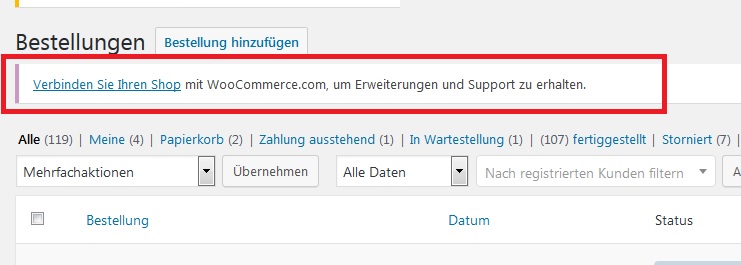
I have the Woocommerce-Plugin activated and installed. I guess you didn’t understand my Problem, I talk about this message inside the Backend:
https://s17.directupload.net/images/190212/olpb8xqz.jpg
This appears after we installed and activated YOUR plugin. We have Woocommerce already activated and installed, else it would not make sense to install your plugin only?
But that message is so annoying and when I hide it with CSS other Woocommerce-Info messages are hidden as well
Forum: Plugins
In reply to: [WooCommerce] Cart does not empty after OrderIt seems the change was made by you!
I played a bit with this Problem. When I change some data or the payment System with the “old Ghost” Product, the old Order in the Backend changes.
So it’s basically the old Order still in the cart. Even played a bit more with it: After you set the Order to Processing the Cart get emptyIsn’t that a bit confusing? Or was it all the time like this and I just didn’t notice?
Forum: Plugins
In reply to: [PayPal Plus for WooCommerce] Schreibzugriff des PluginsMoin,
danke für die Rückmeldung, mit dem Schreibrecht auf dem Log Ordner scheint es nun zu klappen.
Der Ordner “/wp-content/uploads/wc-logs/” muss unbedingt Schreibrechte haben, da man sonst beim Speichern der Daten eine weiße Seite bekommt (crasht).
Allen anderen Plugins & WooCommerce war der Ordner bisher egal, daher hatte er bei uns keine Schreibrechte.Grüße^^
Forum: Plugins
In reply to: [Germanized for WooCommerce] DSGVO und Trustes Shops BewertungserinnerungenMoin,
wir haben das selbe Problem, wir benötigen eine Checkbox, mit der ein Kunde auswählen kann, dass er Bewertungserinnerungen erhalten möchte.
Es gibt hier den Button “Checkbox-Anpassen”, welche dann eine neue Checkbox erstellt, ist diese dann verknüpft (Sieht in der Übersicht der Checkboxen nicht so aus)?
Erhält der Kunde dann auch KEINE Erinnerungsmails, wenn diese NICHT ausgewählt wurde?Bis das geklärt ist, werde ich bei uns der Erinnerungsmails abstellen. Es wäre super klasse, wenn ihr uns hier eine Rückmeldungen geben könntet, das Thema ist ja bereits ein wenig älter aber nicht unwichtig!
Es wäre auch extrem schade, wenn man hier wieder selbst was bauen müßte =/
Forum: Plugins
In reply to: [WooCommerce] Radio-Buttons in Checkout gone?For some reasons it was my fault with the Prio, sorry it works again!
Hm I think you could do a Custom-Checkbox in the Order-Form
/**
 * Add custom Fields to the Checkout page
 *
 * @param array $fields - Checkout-Fields array
 * @return array - New Checkout Fields array
 */
function add_custom_checkout_fields($fields) {
	$fields['billing']['billing_save_data'] = array(
		'type' => 'checkbox',
		'label' => __('Your TEXT for the Checkbox', 'woocommerce'),
		'required' => true,
		'class' => array('form-row-wide'),
		'clear' => true
	);

	return $fields;
}
add_filter('woocommerce_checkout_fields', 'add_custom_checkout_fields', 1, 1);
It’s automatically checked each time on new Orders, thanks for the Reminder, I have to insert this as well!
- This reply was modified 7 years, 11 months ago by petschko.
I’m super unsure what you want to do, but if you want this Code in the Head ONLY when the user allow Cookies, you could implement it like this:
Include this in your function.php (of your active theme/s)
/**
 * Adds the Google-Remarketing-HTML-Code
 */
function add_google_remarketing() {
	?>
	<!-- Google-code voor remarketingtag -->
	<!--------------------------------------------------
	Remarketingtags mogen niet worden gekoppeld aan gegevens waarmee iemand persoonlijk kan worden geïdentificeerd of op pagina's worden geplaatst die binnen gevoelige categorieën vallen. Meer informatie en instructies voor het instellen van de tag zijn te vinden op: http://google.com/ads/remarketingsetup
	--------------------------------------------------->
	<script type="text/javascript">
		/* <![CDATA[ */
		var google_conversion_id = xxxxxxxxxxx;
		var google_custom_params = window.google_tag_params;
		var google_remarketing_only = true;
		/* ]]> */
	</script>
	<script type="text/javascript" src="//www.googleadservices.com/pagead/conversion.js">
	</script>
	<noscript>
		<div style="display:inline;">
			<img height="1" width="1" style="border-style:none;" alt="" src="//googleads.g.doubleclick.net/pagead/viewthroughconversion/xxxxxxxxx/?value=0&guid=ON&script=0"/>
		</div>
	</noscript>
	<?php
}

// Check if user allow this and add the action then
if(cn_cookies_accepted())
	add_action('wp_head', 'add_google_remarketing');