mozzie34

Forum Replies Created
-
Forum: Plugins
In reply to: [hCaptcha for WP] Can’t make plugin livePerfect, thank you! I just could not see it.
Ticket opened now. Thanks.
Thanks, I’ve opened a ticket now in the correct spot. Thanks again.
Ah yes! Thanks. I was using the support link on the top right! Sorry. Will try it again properly.
Thanks, that would be very helpful. I’ve followed the link to Support and my thread is already showing there. Shall I just create a new there?
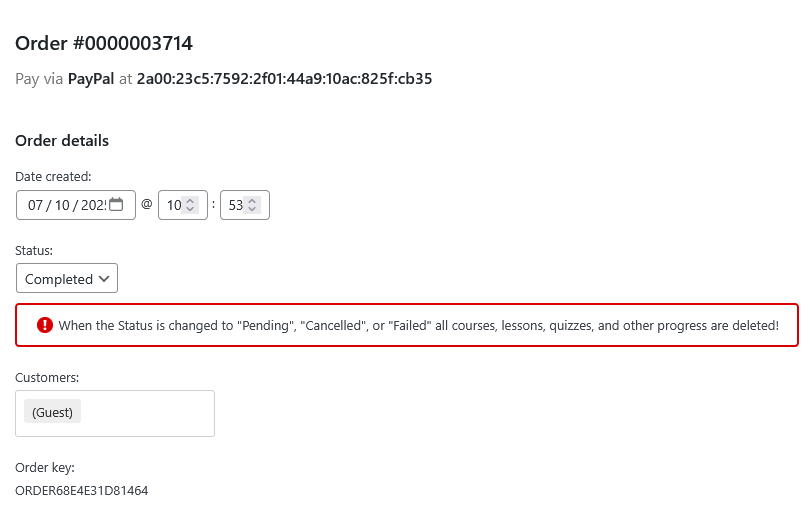
Thanks, it’s just (Guest)
https://i.postimg.cc/3r62SH8k/guest.png
It seems to be happening since we updated.
The registration form doesn’t appear to be a part of the purchasing process.
At the moment, it looks like people have to click the login link, then click on the register link and then make the purchase – which no one seems to be realising. I can’t find any setting to remedy this.Thanks for the reply Brian
Yes, sandbox mode does the same thing.
When someone chooses Buy Now, they are taken to the Course Checkout page.
At the top, it says “Please login to enroll in the course!” – but it’s possible to pay for the course without logging in. This appears to be why they are showing in Orders as (Guest) despite the following settings:
– Settings > General > [x] Anyone can register
– LearnPress > Settings > Payments > General > [x] Enable the registration form in the checkout
Not sure if that helps.@spacedragon Thanks Jamie, that link is a winner!
WooCommerce > Settings > Advanced tab > Features
Turn on Enables WooCommerce Analytics.
You can import your historic orders once it’s enabled:
Analytics > Settings > Import Historical DataNot to worry, I’ve switched to another plugin. Thanks anyway.
Forum: Plugins
In reply to: [Abandoned Cart Lite for WooCommerce] Customer name not showingI’ve changed it to
Hi {{customer.firstname}} so hopefully that has done it.Forum: Plugins
In reply to: [Simple Calendar - Google Calendar Plugin] Critical site error after updateAlso experiencing critical errors after 5.5.1 upgrade. I have a legacy PHP which may be causing it but hoping there is a fix. Has anyone found another plugin that works?
Forum: Plugins
In reply to: [EventCalendar] Non-numeric warning, cannto modify header after upgradeI logged a support ticket and 10web support sorted it out.
Me too. Started after the last update.
Same here. It was working fine until the update to PayPal Checkout Payment Gateway for WooCommerce it seems.
I also see “PayPal error (3): An error (3) occurred while processing your PayPal payment. Please contact the store owner for assistance.” when trying a live purchase.