kilbot

Forum Replies Created
-
I’ve just taken a look at this again and realise that you can not easily add product attributes by adjusting the receipt template. The WooCommerce REST API does not include attributes in the order line_items.
Adding line_item attributes to the REST API order response is not a trivial task. Unfortunately this is beyond the scope of WooCommerce POS support, but if you were interested you should start with the woocommerce_api_order_response filter.
Forum: Plugins
In reply to: [WCPOS - Point of Sale (POS) plugin for WooCommerce] wholesale marketWooCommerce POS is not currently compatible with any dynamic pricing plugins.
In this case you would need to manually adjust the sale_price when adding the third item.
Note: in version 0.5 you can split products into separate line items, this may be useful if you have a ‘buy 2 get 1 free’ situation.
Forum: Plugins
In reply to: [WCPOS - Point of Sale (POS) plugin for WooCommerce] Split paymentI certainly plan to add a split payment feature, but there is no timeframe on when work will commence on this.
Hi, I believe I have already answered this via email, but for the benefit of other users …
IndexedDB errors are usually caused by Privacy Mode, for more information see this FAQ: https://faq.wcpos.com/en/indexeddb-error.html
Forum: Plugins
In reply to: [User Wallet Credit System] Alternatives?Hi, you may want to check out Account Funds. It partially works with WooCommerce POS, ie: you can use account funds at checkout. However, it does not give you the balance in the POS, it will give a ‘payment failed’ if the customer does not have enough funds.
Hi,
Product attributes will be displayed in a tooltip next to the product, eg:
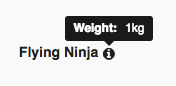
Changing the POS templates is not currently supported so you would need to change the plugin source code to achieve a different display.
The receipt template can be customised to display product attributes.
There is a setting to turn these emails off for POS orders, please read the docs for more information.
Forum: Reviews
In reply to: [WCPOS - Point of Sale (POS) plugin for WooCommerce] This plugin is abadonnedThis plugin is not abandoned. If you check the GitHub repository you will see there have been updates in the last week. In fact, I am working on the plugin as we speak.
The fact is, the plugin does not generate enough money to hire a full-time developer. I work on the plugin whenever I can, but I also need to do other work if I hope to pay rent. Also keep in mind that the plugin generates 10-20 hours of support requests each week – that’s time spent before I can even get to developing.
I can understand you’re frustrated with the lack of updates recently. If you think there are easy bug fixes then please contribute to the project by submitting fixes to the GitHub repo. That would be a lot more helpful than bitching and moaning in a 2 star review.
Forum: Plugins
In reply to: [WCPOS - Point of Sale (POS) plugin for WooCommerce] View POS not foundHi, it seems your server is not set up for URL rewrites. The fix may be as simple as adding rewrite rules to your .htaccess file, however, if your server does not have the rewrite module or is NGINX – then the fix could be more complicated.
Please read the Using Permalinks documentation for more information.
This is not currently possible in WooCommerce POS. It has been requested by other users, but there is no timeframe when this may be added to the plugin.
Hi, this is not currently possible using WooCommerce POS – you would need to create a WordPress multisite and install separate stores on each site.
A multi-inventory feature has been requested by Pro users and it is something I am looking at for future version, however, there is no timeframe when such a feature may be added.
Forum: Plugins
In reply to: [WCPOS - Point of Sale (POS) plugin for WooCommerce] PHP Warning()This looks like a file permissions problem. You will probably need to FTP to the server and remove the plugin manually.
Forum: Plugins
In reply to: [WCPOS - Point of Sale (POS) plugin for WooCommerce] Receipt ModificationPlease see the docs on customising the receipt template: https://docs.wcpos.com/en/receipts.html
Hi Benjamin,
WooCommerce POS does not currently integrate with any card readers. Support for non-encrypting card readers is coming in version 0.5.
Currently you can enter the card details manually, please see the demo site for an example.
The thing to do is install the free plugin and do some tests to determine if the POS is suitable for your needs.
WooCommerce POS uses the
phpversion()function to check your version of PHP, this should return the correct result unless your host has somehow blocked this function.Two things to check:
1. Go to WP Admin > WooCommerce > System Status and check the PHP Version found by WooCommerce.
2. Create a file called version.php and give it the contents
<?php echo phpversion();and upload it to your server. This should display the version of PHP you are running.