kilbot

Forum Replies Created
-
Please read the Receipt documentation: https://docs.wcpos.com/en/receipts.html
Please go to WP Admin > POS > Settings > Tools > Enable legacy server support. For more information on this please view the following FAQ: https://faq.wcpos.com/en/settings-saving.html
Forum: Plugins
In reply to: [WCPOS - Point of Sale (POS) plugin for WooCommerce] POS doesnt find ProductsIt’s possible the local storage has been corrupted somehow. Please go to WP Admin > POS > Settings > Tools > Clear all local data (make sure POS is not open in another tab). This will clear the local data and allow you to access the POS as new.
Forum: Plugins
In reply to: [WCPOS - Point of Sale (POS) plugin for WooCommerce] Payment doesn’t processHi Mario, I’m not too sure what is happening here. The order is either returning an error or timing out, either way it should give a red error dialog with more information.
If you are still experiencing this issue, please contact support@wcpos.com and I’ll take a closer look.
Hi Radim,
You are on the right track looking at the REST API, but you should look at using the ‘woocommerce_api_order_response’ filter. This will allow you to add a custom meta property to the order JSON.
I hope that helps!
Hi,
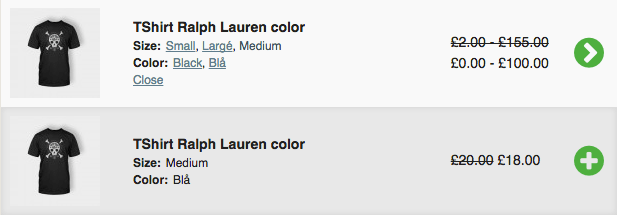
This functionality already exists. If you go to the demo site and click through the variation links you will see some examples of variations which have limited options, eg:
Yes, it is safe to install on WP 4.7.2
Hi Karim, please check out this FAQ: Why aren’t my settings saving?
Forum: Plugins
In reply to: [WCPOS - Point of Sale (POS) plugin for WooCommerce] Receipt copyHi, you can re-print and re-email receipts in WooCommerce POS Pro. To see a demo of this please go to http://demo.wcpos.com/pos and click on the Orders menu item.
- This reply was modified 9 years, 4 months ago by kilbot.
Hi Adam,
I agree this would be a great feature, but it is not something that should be part of a point of sale plugin – this is in the wheelhouse of a different WooCommerce or WordPress plugin.
If you do a search for ‘google cloud print woocommerce orders’ you will find a couple of options that are available.
Forum: Plugins
In reply to: [WCPOS - Point of Sale (POS) plugin for WooCommerce] permission errorHi, please read the docs for POS Access. If necessary you may need to use a plugin such as User Role Editor to ensure the user role has the access_woocommerce_pos capability.
Forum: Plugins
In reply to: [WCPOS - Point of Sale (POS) plugin for WooCommerce] Product Add-Ons SupportHi, sorry for the late response. I don’t check the community forums too often so for the fastest response time please contact support directly.
WooCommerce POS does not support any Product Add-on plugins, however, you can use the Fee button to add miscellaneous item to the order.
Integration for popular plugins, such as Product Add-ons, will be looked at once the core POS features are complete for version 1.0.
Forum: Plugins
In reply to: [WCPOS - Point of Sale (POS) plugin for WooCommerce] POS System questionHi,
Revel and WooCommerce POS are both POS platforms, so you would use one or the other, not both.
WooCommerce POS is still in its beta phase and doesn’t have any features specifically for restaurants. Also, it is intended specifically for users that already have a WooCommerce store … if your restaurant does not already have an online store using WooCommerce, then WooCommerce POS would likely not be your best option.
That being said, if you do have a WooCommerce store, it only takes a few seconds to install the free WooCommerce POS plugin to see if it will be suitable for your needs.
I hope that helps.
Barcode scanning has been improved in version 0.5-beta. If you would like to help test the beta please see the following blog post: http://wcpos.com/2017/01/woocommerce-pos-0-5-beta/
Forum: Plugins
In reply to: [WCPOS - Point of Sale (POS) plugin for WooCommerce] Stripe and SubscriptionsHi Katie, sorry for the late response. I don’t check the community forums too often so for the fastest response time please contact support directly.
In answer to your questions:
1. Access to all WooCommerce gateways, such as Stripe, is only available for Pro users.
2. WooCommerce POS is not currently compatible with WooCommerce Subscriptions.I hope that helps.