

Description
WCPOS turns any device into a point of sale for your WooCommerce store. Same catalog, same stock, same prices — at the counter, on the road, or over the phone. Run it in a browser or as a native desktop, iOS or Android app, with offline product browsing and cart building during connection drops. (WCPOS was formerly known as WooCommerce POS.)
🕒 Install and start taking orders in less than 2 minutes.
🎥 DEMO
You can see a demo of the WCPOS plugin in action by going to demo.wcpos.com/pos with 🔑login/pass : demo/demo
Desktop Apps:
⬇️ Windows
⬇️ Mac (Intel)
⬇️ Mac (Apple Silicon)
Mobile Apps (Beta):
📱 iOS (TestFlight)
📱 Android (Google Play)
✨ FEATURES
- Cross-platform: Accessible via browser, desktop, iOS & Android (mobile apps in beta)
- Offline Storage: Fast product search and order processing
- Flexible Cart: Add products not listed in WooCommerce
- Barcode Support: Scan products directly into the cart
- Receipt Templates: Pick from a built-in gallery — receipts, invoices, quotes, packing slips, gift receipts, kitchen tickets — or design your own
- Thermal Printing: Print directly to 58mm and 80mm thermal printers over network, Bluetooth, or USB
- Customer Tax IDs: Built-in field for VAT, ABN, GST, and other regional tax numbers
- Multilingual: Available in most major languages
- Built-in Support: Access live chat for instant help
🔓 PRO FEATURES
- Stock Management: quickly adjust stock levels, pricing and more
- Order Management: re-open and print receipts for older orders
- Customer Management: create new customers and edit customer details
- Payment Terminals: take in-person card payments with Stripe Terminal and SumUp readers
- Payment Gateways: check out with any WooCommerce gateway — Stripe, PayPal, Square, Mollie and more
- Coupons: apply coupons at the POS with search, coupon pills, and sequential discounts
- Refunds: refund POS orders directly from the till
- End of Day Reports: summarise daily sales, transactions, and cash flow for reconciliation
- Stores: Manage locations with unique tax settings, pricing and receipts
- Priority Discord support: one-on-one support via private chat
Discover all PRO features at wcpos.com/pro
📋 REQUIREMENTS
- WordPress >= 5.6
- WooCommerce >= 5.3
- PHP >= 7.4
Screenshots
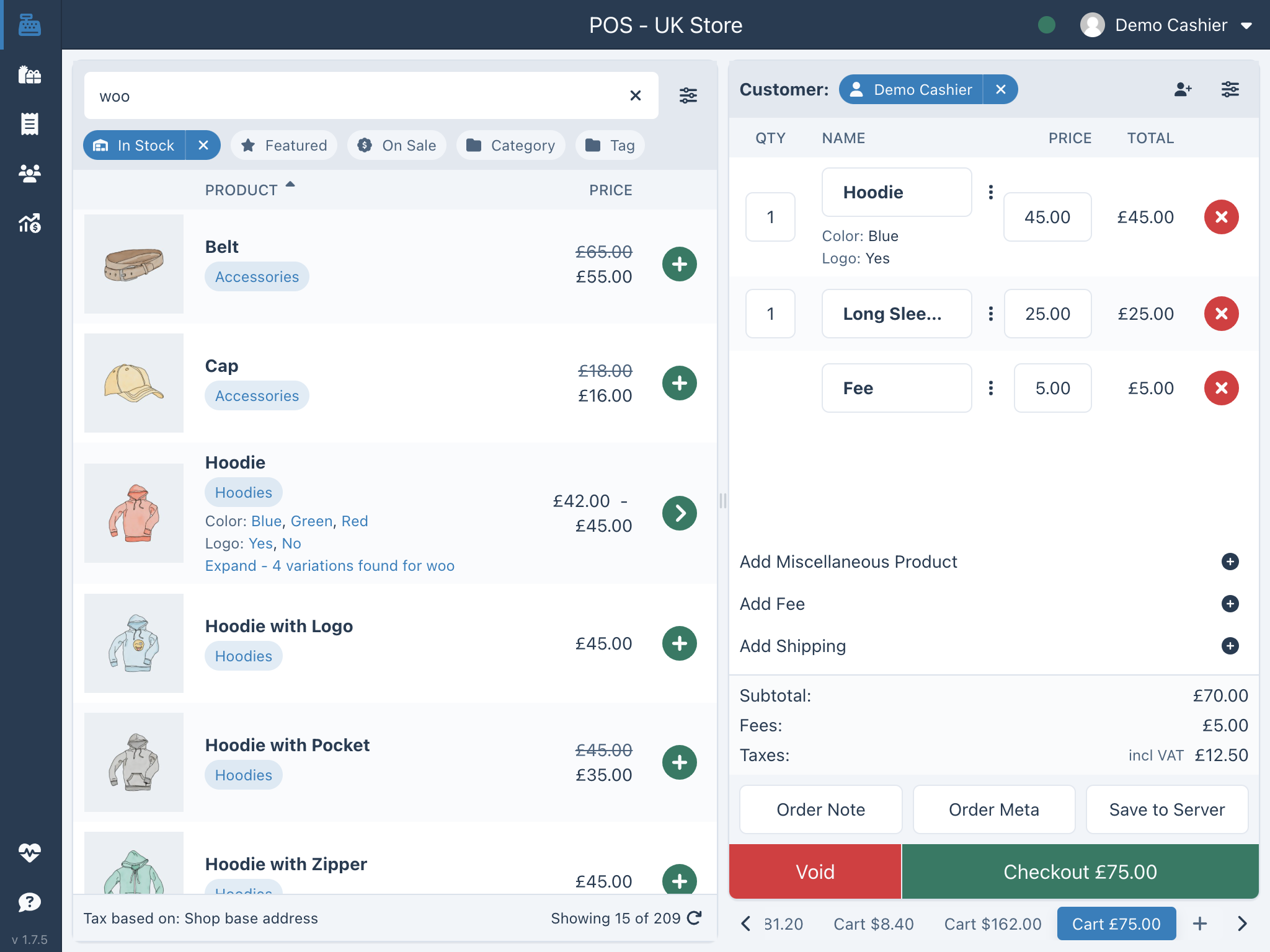
Installation
Automatic installation
- Go to Plugins screen and select Add New.
- Search for “WCPOS” in the WordPress Plugin Directory.
- Install the plugin
- Click Activate Plugin to activate it.
Pro installation
If you have purchased a license for WCPOS Pro please follow the steps below to install and activate the plugin:
- Go to: https://wcpos.com/my-account/
- Under My Downloads, click the download link and save the plugin to your desktop.
- Then go to your site, login and go to the Add New Plugin page, eg: http://<yourstore.com>/wp-admin/plugin-install.php?tab=upload
- Upload the plugin zip file from your desktop and activate.
- Next, go to the POS Settings page and enter your License Key and License Email to complete the activation.
Manual installation
To install a WordPress Plugin manually:
- Download the WCPOS plugin to your desktop.
- If downloaded as a zip archive, extract the Plugin folder to your desktop.
- With your FTP program, upload the Plugin folder to the wp-content/plugins folder in your WordPress directory online.
- Go to Plugins screen and find the newly uploaded Plugin in the list.
- Click Activate Plugin to activate it.
FAQ
-
Is WCPOS really free?
-
Yes. The free plugin is a complete point of sale — unlimited products, orders and customers, with no transaction fees and no per-register charges. Pro adds advanced tools (see below), but you never need it to start selling.
-
Do I need anything besides WooCommerce?
-
No. If you have a WooCommerce store, install WCPOS and you’re taking orders in under two minutes — same catalog, same stock, same prices, at the counter.
-
Which devices does it run on?
-
Any modern browser, plus native desktop apps (Windows, macOS) and iOS & Android apps (mobile in beta). One login, everything stays in sync.
-
Does it work offline?
-
Yes. Products are stored locally for instant search, so you can keep browsing, building carts and saving orders during a connection drop, and your changes sync automatically when you reconnect. Taking payment is the one step that still needs a connection — offline checkout is coming in a future release.
-
What hardware do I need?
-
Whatever you already have. WCPOS works with standard barcode scanners, 58mm and 80mm thermal receipt printers (network, Bluetooth or USB), and cash drawers — no proprietary equipment and no lock-in.
-
Can I take card payments?
-
Cash and manual card payments are built in. WCPOS Pro adds integrated payment terminals (Stripe Terminal, SumUp) so you can take chip-and-PIN payments right from the register.
-
What’s the difference between free and Pro?
-
Free is a full POS for taking orders. Pro lets you run your whole store from the register without opening wp-admin: adjust stock and prices, manage orders and customers, apply coupons and refunds, use supported payment gateways and integrated terminals such as Stripe Terminal and SumUp, and print end-of-day reports. See wcpos.com/pro.
-
Can I try it before installing?
-
Yes — there’s a live demo at demo.wcpos.com/pos (login
demo/demo). -
Where do I get help?
-
Browse the documentation at docs.wcpos.com, or reach the community and Pro priority support on Discord.
-
What data does WCPOS send outside my site?
-
Your products, orders and customers stay in your own WooCommerce database. WCPOS only talks to outside services for a few specific reasons:
- To load the app. The POS interface, its assets and translations are served from a CDN (jsDelivr), like any web app.
- To find and fix bugs — only if you opt in. With your permission, WCPOS sends us anonymous usage data (which features are used, on what kind of setup) and anonymous error reports from the POS and from the WCPOS plugin on your server (what went wrong, on which version and platform). This is how we spot problems before you have to write in, fix them faster, and decide what to build next. It never includes customer details, order contents, prices or your site address, and you can change your mind any time in POS > Settings > General.
- To activate Pro. Your license key, site identifier (
site_uuid) and anonymous identifier (anon_id) are validated with wcpos.com. - To print through the WCPOS Cloud Print relay — only if you use cloud printing. Your site registers with the relay at cloudprint.wcpos.com when you open the Cloud Print settings, and print jobs for relay-addressed printers are passed through it to your printer, so those receipt contents (which include order details) leave your site. Developers can opt out with the
woocommerce_pos_cloud_print_relay_enabledfilter.
Full details are in our privacy policy.
Reviews


Contributors & Developers
“WCPOS – Point of Sale (POS) plugin for WooCommerce” is open source software. The following people have contributed to this plugin.
Contributors
“WCPOS – Point of Sale (POS) plugin for WooCommerce” has been translated into 12 locales. Thank you to the translators for their contributions.
Translate “WCPOS – Point of Sale (POS) plugin for WooCommerce” into your language.
Interested in development?
Browse the code, check out the SVN repository, or subscribe to the development log by RSS.
Changelog
1.10.20 – 2026/09/23
- Checkout no longer reports “Checkout failed” for a sale that reached the store. If the till was busy sending another change, or an earlier attempt had failed, the checkout screen could give up waiting even though the order had been saved. It now hears back as soon as the order is saved, and pressing Checkout again after a failure tries straight away.
- Search repairs a damaged search index instead of failing at every launch. When the saved search index could not be read, search stayed broken with “Failed to initialize search”. The index is now discarded and rebuilt from the till’s records.
- Gateways that take no payment at the till — quotes, invoices, purchase orders — now close the order with the Order Status you set for them. The checkout used to succeed but leave the order at POS – Open. Only gateways with an Order Status saved in POS > Settings > Checkout are affected, and the order is not marked paid.
- Refunds that arrive from a payment gateway now respect your POS customer-email settings. A refund recorded by a gateway’s webhook could email the customer even with POS customer emails switched off; refunds made in wp-admin or at the till were not affected.
1.10.19 – 2026/09/19
- A till no longer loses live records during its startup tidy-up. With the POS open twice on the same device, the tidy-up could mistake live records — including the sign-in row — for damaged ones and remove them. It now leaves alone anything it cannot fully account for. Web merchants receive this through WCPOS plugin 1.10.19, which serves the storage worker; desktop and phone apps carry it in this release.
- A sale that could not be sent because the till was signed out now waits for sign-in instead of being given up on. The cashier is told as soon as it happens, and the sale sends itself once the session is back.
- A refused POS request now says why it was refused. A 401 from the POS routes names the reason in the response and in Health > Logs, instead of only reporting that the request failed.
1.10.18 – 2026/09/18
- A web till with the POS open in more than one tab repairs its local database again. Since the 1.10 storage repairs shipped, every repair on web was refused whenever another tab of the same store could be open, so a damaged record stayed damaged and the same storage errors repeated on every sync. The tab that leads the store now owns the repair and the other tabs follow it. Web merchants receive this through WCPOS plugin 1.10.18, which serves the storage worker; desktop and phone apps carry it in this release.
- Voiding an order the server had refused no longer fails silently. When an order could not be created on the server (for example while the till was signed out) and the cashier then voided it, the void raised an error nothing caught and the order stayed in the cart. The till now removes the order and its failed request locally and confirms the removal; any other failure to void shows an error instead of nothing.
- A till opened from WordPress admin no longer sends an invalid sign-in token on its first requests. A request made before a token was stored carried the word “undefined” as its credential, which the server rejected as an invalid token instead of falling back to the WordPress login session. Such requests now carry no token, and a retry after a token refresh no longer keeps the old token in the request address.
- A plugin update no longer restores cashier permissions the merchant had removed. Every update re-granted every default capability, so a store that had turned off product or coupon editing for cashiers saw it come back after each release. Updates now grant only capabilities that are new since the last update; a deleted cashier role is still recreated whole.
- Product search on the older
wcpos/v1routes splits the typed text the same way as the rest of the POS. Punctuation stays literal and single letters and common words count, so “IT 5012” no longer searches as “5012” and “0,4” is one term. - An order digest write no longer fails on a busy MariaDB. The checkout-lane digest write now retries once on lock contention, as the product and customer digests already did.
- The older order-update route checks order ownership the same way as the current one under HPOS. A role that can edit its own orders but not other people’s is treated the same on both routes. Cashiers are unaffected.
1.10.17 – 2026/09/17
- A till no longer gets stuck at login on “Something went wrong: useStoreSession must be called within an active store session”. A damaged range in the till’s local database made the login write fail and left the cashier on a red banner. The write is now repaired and retried, and if the saved session still cannot be honoured the till returns to the store list with a message instead of the banner. If the site has to be added again, it opens a fresh local database and does not pick up sales still waiting to sync in the old one. Web merchants receive the storage repair through WCPOS plugin 1.10.17, which serves the storage worker; desktop and phone apps carry it in this release.
- A newly connected till no longer misses a stock change made in its first minute. A product set out of stock on the server shortly after a new device, login or reset stayed “in stock” on the till indefinitely. The till now records the server’s position before the first browse, so the change arrives with the next sync.
- A variation whose stock is managed at product level shows the right stock in the variation picker. When the parent product sold out, the picker’s badge and Add to Cart button kept saying “in stock” for up to five minutes. They now read the parent’s stock, the same way the cart does.
- Switching stores no longer carries the previous store into the first requests of the new one. Requests made while a switch was still completing used the outgoing store, so the first products or barcodes could belong to it until the next sync. Pro multi-store only.
- Health > Logs records a screen error the app catches as “Part of the screen failed to load”, and reports it when you have allowed error reporting.
1.10.16 – 2026/09/16
- Cashiers can sell an out-of-stock variation again when “Avoid overselling” is off. The variation picker’s Add to Cart button disabled on stock alone and ignored the store setting, so an out-of-stock simple product could be sold but an out-of-stock variation could not. The button now follows the same rule as the cart: it disables only while the setting is on and the variation is unsellable.
- An idle web POS no longer sits at 30% CPU after the cashier stops. Local database cleanup compacted storage fifty records at a time and rewrote every index between batches, so a till with a large backlog of deleted records churned for minutes. Cleanup now compacts in one batch and rewrites the indexes once. The web app loads its storage worker from this plugin, so web merchants receive this fix through this update.
- Health > Database no longer shows “checking…” forever on a server that reports high load. A host that stamps every response as under high load while answering in a tenth of a second kept the till backed off, and the backed-off checks always started with the same three record types, so the other six never got a turn. Checks now rotate fairly, all record types are probed on each backed-off tick, and a “high load” header on a fast reply no longer counts against the server.
- Health > Performance says what pace the till is keeping with the server, and why. One line at the top of “Your server, over time” reads Normal pace, Easing off (with the factor and the reason), or Paused until a given time.
- Tills stop showing products the store has hidden from the POS. Between 1.10.1 and 1.10.14 the POS product search could return a hidden product (fixed in 1.10.15), and a till that searched during that window kept a copy. Upgrading now writes a fresh removal notice for every hidden product and variation, and every till drops its stale copies on its next ordinary sync, with no reset or manual sync needed.
- The POS Only and Online Only counts above the WooCommerce products list are accurate. They counted trashed and auto-draft products that the view never lists; they now count the same statuses as WordPress’s own “All” view.
- The server no longer reports high load from a guessed CPU count. On hosts that hide
/proc/cpuinfo, the load average was divided by one CPU, so any load above 1.8 read as “high” forever and every till slowed its sync. When the CPU count is unknown, no load is reported. - The connection check can no longer be served from a page cache. The public ping was answered before the cache-control headers were set, so a cached “ok” could mask an outage for the cache’s lifetime. It now sends the same no-store headers as every other POS response.
1.10.15 – 2026/09/15
- Tills no longer grow to gigabytes of memory over a long shift. The product search index was keeping up to a hundred complete copies of itself in memory as it updated. Measured on a test store, memory after cleanup grew from 46 MB to 404 MB in an hour before the fix and from 47 MB to 160 MB after it; this is what took one merchant’s till to 3.2 GB over an eleven-hour shift.
- The Logs screen no longer freezes the app.
- Product search finds a product however you order the words. Searching “blue shirt” and “shirt blue” now return the same results.
- Start-up repair of a damaged local database is safer. Oversized internal change logs are now bounded and recovered without unbounded reads, and the app no longer rewrites bookkeeping records that have not changed. The web app loads its storage worker from this plugin, so web merchants receive this fix through this update rather than through the app bundle.
- A sync refresh that returns the same record twice is rejected instead of being applied against an incomplete snapshot, which could previously prune records that were still present on the server.
- Product search shows every match again. When a search matched more products than fit on the first page, the Products page stopped at that page and scrolling to the end loaded nothing more.
- The product search index repairs itself again. When the app detected that the index had drifted from the product data, the rebuild silently did nothing, so stale or missing search results stayed that way until the app was reinstalled.
1.10.14 – 2026/09/14
- Product search matches what you type as one phrase, in the order you typed it. Searching for two words no longer also returns products with those words reversed, separated, or split between the title and the SKU. Partial and exact SKU and barcode matches work as before, and one- and two-character searches now match anywhere in a word.
- The receipt template dropdown now lists templates in the order you set them, for global templates and Pro per-store templates alike.
- Switching the app language repeatedly no longer holds every previous product search index in memory.
- The WCPOS REST API index no longer errors when a client asks it for route help. Only developers and integrations reading the API index were affected.
1.10.13 – 2026/09/13
- Web: start-up repair of a damaged local database now applies each pending change to the row it belongs to, rather than to that row’s position, and refuses a stale change for a row already holding a newer entry. The desktop and mobile apps received this in 1.10.12; the web app loads its storage worker from this plugin, which still carried the previous copy.
1.10.12 – 2026/09/13
- Cloud print and template reprints: a heading asked to be double-wide printed double-high. The size command carried width and height the wrong way round. Square sizes are unaffected, which is why it went unseen for so long.
- Cloud print: centred headings no longer overrun the paper. Padding on a scaled heading was counted in characters rather than printed columns, so a centred double-width title was pushed right and wrapped onto a second line.
- A product or order carrying an enormous meta value no longer takes down the request. One store was losing about 22 requests an hour to a single record whose meta value serialised to roughly 1.25 GB. The value is now withheld rather than re-encoded, so the record loads instead of the till retrying it all day.
- Star printers: centred headings print centred, and the time prints correctly. Centring padding was emitted as spaces inside a magnified run, so each pad space was as wide as each glyph and a centred double-width heading wrapped. The narrow space in a short time no longer prints as a question mark.
- Switching stores no longer tells the cashier to sign in again for the store they just opened. A sign-in retry still in flight from the previous store could raise the message against the new one.
- A store whose session has expired no longer records an error every minute. The same failure was reported on every check because it was filed under a name the de-duplication never matched.
- Start-up repair of a damaged local database matches each pending change to the row it belongs to, rather than to that row’s position, and refuses a stale change for a row already holding a newer entry.
- Creating a virtual printer no longer fails intermittently with a certificate error.
1.10.11 – 2026/09/11
- The web app’s local database can shrink again after it has grown large. The clean-up that reclaims space failed on every attempt once the file was very large, so it only ever grew and the till could fail to start on it.
- Rows zeroed by a power cut or an unfinished write no longer stop local database clean-up; they are recognised as empty and dropped.
- Stores behind Cloudflare: a security check during connection now reports HOST121 with a link to the Cloudflare guide, instead of “Site does not seem to be a WordPress site”.
- Stores behind Cloudflare see a notice on the POS General settings screen explaining which firewall rule to add so the POS is not blocked.
- Firefox and Safari: cancelling a product search no longer records a SYNC321 error.
- A new order sent to WooCommerce no longer carries stale line ids, which WooCommerce rejected with “invalid item id” when the order had already been acknowledged once.
- Product search no longer loops or crawls on large catalogues. A search with more than 100 matching products could re-request the same pages until the page was reloaded, and every scroll re-fetched the results from the start.
- Search results are no longer capped at 100 products; scrolling loads the rest, one page at a time.
- Product search fills the grid faster on slow hosting: one request per page replaces the previous escalating sequence of four.
1.10.10 – 2026/09/09
- Security: cashiers can no longer change the email or password of administrator or other staff accounts through the POS. POS users can only edit customer accounts.
- Users with more than one role (for example administrator plus customer through the Members plugin) no longer get “forbidden” on every product load and sale, and when access really is denied the error names the missing capability.
- Stores using WooCommerce Tax (TaxJar) keep stable tax-rate IDs on POS saves, so county and city rates no longer swap places on the order.
- Stores using WooCommerce Tax with tax based on the store address send the store’s street to TaxJar, not the customer’s, when a customer shares the store’s location.
- An installed Windows printer no longer hides behind the “no printers yet” screen, and generic Bluetooth printer profiles set up correctly on iOS and Android.
- Tapping the cart quantity on iOS and Android selects the number so typing replaces it, and two-digit quantities no longer clip.
- Fewer stalls on iPad while the till is idle: the background variation check runs as one query instead of one per product.
- The web app repairs a damaged local bookkeeping file instead of logging the same storage error on every sync.
- Faster, safer local saves on iOS and Android: the storage swap file is copied natively and an interrupted write is recovered on the next open.
- The iOS and Android apps report crashes when telemetry is enabled.
- Updated translations.
1.10.9 – 2026/09/07
- A sale with a coupon no longer stays “POS – Open” after it is paid.
- Stores using WooCommerce Tax (TaxJar) get the right tax rates on POS orders, and open POS orders no longer have stale tax lines put back on save.
- Sync skips records that haven’t changed, and a bloated product search index repairs itself.
- Bluetooth printers on iOS and Android reconnect after a failed print instead of staying stuck on a dead link.
- Fewer freezes during the first sync on iOS and Android.
1.10.8 – 2026/09/06
- Printer setup has been redesigned. The till scans for printers, you pick one and print a test page. Network, USB and Bluetooth printers are covered on desktop.
- Printers that need a different character set can be given a receipt language in the printer’s options.
- Copy setup report gathers printer diagnostics for a support request.
- Bluetooth printers on desktop reconnect reliably between receipts.
- A removed variation no longer comes back into the order on the next save.
- Orders no longer fail to sync with an “invalid item id” error after a line was removed on the server.
- Orders no longer show a false “store calculated different totals” warning on stores that keep tax at more decimal places than they display.
- The receipt preview shows after a payment through the order-pay page, and says why when it can’t.
- Product and order search matches every word you type, and exact SKU or barcode matches come first.
- The till works alongside the JWT Authentication for WP REST API plugin.
- Saving an order no longer fails with a “Record has changed since last read” database error on MariaDB stores.
- Less overhead on online-store page loads, and fewer database writes per sale on the till.
- Receipt templates can tell percentage and fixed discounts apart, and a new
woocommerce_pos_receipt_datafilter lets developers adjust receipt data. - The POS footer and the Store health table fit narrow windows.
- Updated translations.
1.10.7 – 2026/09/02
- Paid orders no longer stay open on the till after a gateway payment. Mostly affected stores that don’t use HPOS.
- Orders paid by cheque, bank transfer or a gateway with its own order status now complete on the till instead of staying open.
- The payment-received page only reports success once the order is actually paid.
- A failed order lookup after payment no longer breaks the payment-received page.
- The Logs screen explains “Storage call has not returned” and failed search rebuilds instead of showing a raw message.
- Updated translations.
1.10.6 – 2026/09/01
- Installing WCPOS Pro on a site running the free plugin no longer takes the site down. Affected 1.10.0 to 1.10.5.
- The Orders screen no longer goes blank until reload.
- Search finds accented names — “cafe” matches “café”.
- Search works the moment the till opens instead of wrongly saying “no products found”.
- Variations no longer get stuck loading in the product popover.
- One stalled sync request can no longer stop products from loading.
- The product grid fills its first page on large screens.
- The till now repairs more kinds of local database damage at startup.
- Cloud print: the store logo and the number under the barcode now print on Epson Server Direct Print and Star CloudPRNT receipts.
- Epson Server Direct Print receipts no longer show “?” in the time.
- The cloud print queue shows which receipt template each job used.
- The receipt template gallery opens faster on stores with many templates.
- Optional error reporting — off by default, sent only with your consent — and updated translations.
1.10.5 – 2026/08/30
- Saving products and variations is much faster on large stores.
- Orders load faster on stores that don’t use HPOS.
- Store Health scans are much faster on large stores.
1.10.4 – 2026/08/30
- Sorting products or variations by SKU, barcode or stock now works — and no longer hides items that don’t have one.
- The till repairs a damaged local database at startup instead of getting stuck until site data is cleared.
- The product grid no longer crashes when a search narrows the results.
- A brief network glitch no longer shows “Website is unreachable” or drops the till into offline mode.
- Removing a line from the cart now responds to the first press.
- Logging in no longer fails on stores with a large number of saved sessions.
1.10.3 – 2026/08/30
- Payments work again in the iOS and Android apps.
- Product search no longer matches product descriptions, so searches find the right products again.
- Prevent overselling now holds stock during checkout, so two tills can’t sell the same item.
- Orders save faster.
- Epson receipts print properly again — text size, the order barcode, and where the paper is cut.
- Cloud print no longer prints a receipt twice when a printer briefly loses its connection.
- A blank cloud print no longer reports as printed — the cloud print queue now shows what went wrong.
- The cloud print queue can be cleared, shows every job by default, and lists the newest first.
- “Out of stock” stays set on products that don’t manage stock when decimal quantities are switched on.
- Deleting a product or coupon from the till now sends it to the trash instead of deleting it for good.
- Variations now follow the rules set by your other plugins, such as multilingual and multi-store plugins.
- Changes made at the till now trigger WooCommerce’s own hooks, so your other plugins notice them.
- Store Health now spots when any kind of record needs re-syncing, not just products.
Note for developers: the woocommerce_pos_sync_legacy_revision_grace option and the pre-1.10.0 revision recipes are gone. New extension points: woocommerce_pos_order_pull_ids and woocommerce_pos_invalidate. wcpos/v2 product search matches title, SKU and barcode only. Admin bundles now depend on a new script handle, wcpos-api-fetch-method-param, which rewrites PUT/PATCH/DELETE on wcpos/v* routes to POST + ?_method=. The app now sends wcpos_protocol and wcpos_client with every request.
1.10.2 – 2026/08/26
- Fixed a regression in order save speed for CPT orders — HPOS orders are not affected.
1.10.1 – 2026/08/26
A fix for product variations. In 1.10.0 the POS asked WooCommerce for variations the wrong way, and got back data shaped like a product instead of a variation. If you sell variable products, this release matters.
- Variation names are readable again. On a product with three or more attributes — say Colour, Size and Fabric — every variation row showed the same text, so there was no way to tell them apart at the till. They now read as their own attributes, like “Blue, Large, Cotton”.
- Variation images are back. Variation thumbnails were blank in the product list, and a variation added to the cart carried its parent’s picture onto the order and the printed receipt. Orders already saved with the wrong picture are left alone — reaching into completed orders to correct a thumbnail is riskier than the wrong thumbnail.
- Disabled variations are no longer for sale in the POS. If you untick “Enabled” on a variation in WooCommerce, it now disappears from the POS the same way it disappears from your storefront. Previously it stayed on sale at the till.
- Variations you have hidden from the POS no longer count. The variation list showed “Showing 2 of 3” for a product with a hidden variation, with no way to reach the third. Hidden and disabled variations are now left out of the list, the count, and the totals on Store Health.
- Hiding or showing a product now reaches the tills. Changing POS visibility did not always tell the app anything had changed, so a hidden product could linger on a device. It is announced properly now, and un-hiding brings the product back.
- “Records need attention” clears when it should. The repair checks looked at products the POS is never allowed to see, so a store with hidden products could show a warning that never went away no matter how many times it synced.
Please update. If you sell variable products, 1.10.0 is showing your cashiers the wrong information. After updating, the POS re-syncs your variations once on its own — no action needed.
Note for developers: wcpos/v2 variations are now served by WooCommerce’s own WC_REST_Product_Variations_Controller, so a variation document is the wc/v3 variation shape — a singular image, wc_get_formatted_variation() for name, and none of the product-only fields 1.10.0 included. GET wcpos/v2/variations also accepts a plain collection request and returns X-WP-Total.
1.10.0 – 2026/08/25
A new sync engine. The biggest update since we rebuilt WCPOS in React Native back in 2023. Your store now syncs through a change log — the POS asks what changed since it last checked, instead of re-downloading your catalogue every time. It is the foundation the offline queue and Store Health below are built on.
- Prevent overselling (new, optional). Turn it on in Checkout settings: the POS stops you adding more than you have, and the server refuses the order too, so a stale device can’t oversell either. Backorders are respected.
- Built to survive a dropped connection. Browsing, cart building and saving orders keep working offline, and the new sync engine queues the changes you make and replays them when you reconnect — receipt emails, and customer, coupon and stock edits on Pro. Anything the server rejects is listed with the reason so you can fix and resend it, instead of disappearing silently. Taking payment is the one step that still needs a connection — offline checkout, starting with cash, is the focus of 1.11.
- Barcode scanning, rebuilt. Scan with the device camera on any platform. Support for USB, serial, Bluetooth and Bluetooth LE scanners alongside keyboard-wedge. A setup wizard and a test panel that measures your scanner and tells you what to fix. Optional scan sounds.
- Store Health. New screens showing what’s on the device versus the server, real storage usage, sync performance over time, and a searchable log where every warning links to an explanation.
- Search that finds what WooCommerce finds. Product search now matches inside words, so compound words work (searching “saippua” finds “Kuorintasaippua”). Customer search matches full names.
- Printing. Star cloud printers negotiate their format properly, receipts can be rendered server-side as an image for printers that need it, and auto-print rules can fire on order creation or only once paid. Offline receipts print in the right language.
- Settings redesigned. A calmer, row-based layout with shorter labels. Settings and Store Health now open as panels rather than modals.
- Cashiers can create and edit products by default. Deleting stays opt-in, and catalogue edits are checked against real WordPress permissions — a rejected edit is reverted with the server’s reason shown.
- Fixed dropdowns not opening on iPad, and language changes not reaching every part of the app.
Note for developers: 1.10.0 introduces the wcpos/v2 REST namespace. The POS now uses it for syncing and for the shared POS services that were previously served from wcpos/v1. The wcpos/v1 routes still register but are frozen, and some legacy API\Settings controller methods have been removed. See the full release notes for the complete list of breaking changes.
Please don’t update lightly. This is a major update — update when your store is quiet and you have time to check everything over.
Earlier releases: https://github.com/wcpos/woocommerce-pos/releases