Kel Santiago-Pilarski

Forum Replies Created
-
Forum: Plugins
In reply to: [Gutenberg] Bold & Bullet Point Issues on Front EndHi @shopalian thanks for writing in!
I checked the page you mentioned and the texts after the bullet point are bold like ‘Finding Specific Products’, ‘Convenience’, ‘Quality and Variety’ and so on. How does your page look like in another browser or device?
As for the bullet points indentation, if you want the bullet point to have spacing on the left, so it’s not aligned with the text above “People search for types of retail stores..”, go to the editor. Then select the List block and in the Dimensions settings, add padding so there will be space before the bullet point. Please refer to the guide in How to access dimension settings.
Hi @glanzi I am unable to replicate this. Have you tested this with only Gutenberg plugin active on the site?
I tested Questrial font on my test site, and the texts in bold appear darker in both the editor and the live page.
The bold texts may be subtle, but it’s darker than the non-bold texts. It’s also more visible when the fonts are larger. Forum: Themes and Templates
In reply to: [Twenty Seventeen] Video Header GlitchHello @slp18, thanks for reaching out!
I’ve tested this on a couple of test sites and using a YouTube url works and displays the video in the header, but not when the video file is uploaded.
Looks like you found a bug! I’ve reported my findings here: https://core.trac.wordpress.org/ticket/62117#ticket
You’ve mentioned you prefer the uploaded video, but in the meantime, you can consider using a YouTube video link, or add the video in the front page of the site instead of the header.
Forum: Themes and Templates
In reply to: [Twenty Twenty-Two] Navigation Sub-menu Opening Off PageHi @jennyhp2001 thanks for sharing your screenshot. I see what you mean, I’ve tested this on my site and although the submenu opens, it’s hidden on the right side of the screen. You can then scroll the screen to the right side, to view the hidden or cut off submenu. This shouldn’t be the case, and it looks like you may have found a bug!
I’ve reported this here https://core.trac.wordpress.org/ticket/62116 . Although there’s no time frame when that will be fixed, you can consider these:
- Move the navigation menu to the left side of the site. That way, when the submenu is opened, it won’t be hidden on the right side of the screen.
- Or move Youth to the left, for example, before the Events Calendar.
- Or use another theme in the meantime. Please note that when you change themes, the layout and design will change and when you go back to your previous theme, you may have to re-add your menu, or some elements that have changed.
Forum: Themes and Templates
In reply to: [Twenty Fourteen] Playlist bar too wide for mobile viewHello @brendoon, no worries at all about the screenshot size. It was really helpful in visualizing what’s happening in your mobile site.
It’s no longer sizing to the mobile screen but forces the whole page into a narrow band at the left.
Is there any way this can be fixed?
I’ve taken a look at the site front page and also ‘Shooting from the Shadows’ page and all playlists are resized correctly in both Chrome and Safari mobile.I discovered the player bar also sticks out wide in the edge browser on desktop, though not in chrome.
The player bar looks fine and not sticking out for me in desktop Safari, Chrome, Firefox and Edge browsers.
If you’re still having this issue in both mobile and desktop, check if you have OS and browser updates and update them if needed, and check your site again to see if the issue persists after that. Or use another device to test as well.
Forum: Themes and Templates
In reply to: [Twenty Twenty-Two] Navigation Sub-menu Opening Off PageHi @jennyhp2001, thanks for writing in!
You can explore using an AI tool for CSS. Alternatively, you can share to us here a screenshot how the submenu currently looks like. Can you please elaborate more on what you mean by “but it opens off the side of the page.”? You can also make some annotations to the screenshot to show where you want the submenu to open instead.Forum: Plugins
In reply to: [WordPress Importer] Inquiry About Upcoming Plugin UpdateHi @ahmedrazaabbasi thanks for sharing a screenshot, I see what you mean. The reason for seeing the message on your 6.6.2 site is that the plugin is compatible and tested up to 6.4.5.
Aside from seeing “Warning: This plugin has not been tested with your current version of WordPress.” message, are you experiencing any issues with the plugin?Forum: Themes and Templates
In reply to: [Twenty Twenty-Four] How to change editor width?Hi @donbowman, thanks for getting back to us and sharing more details with a screenshot.
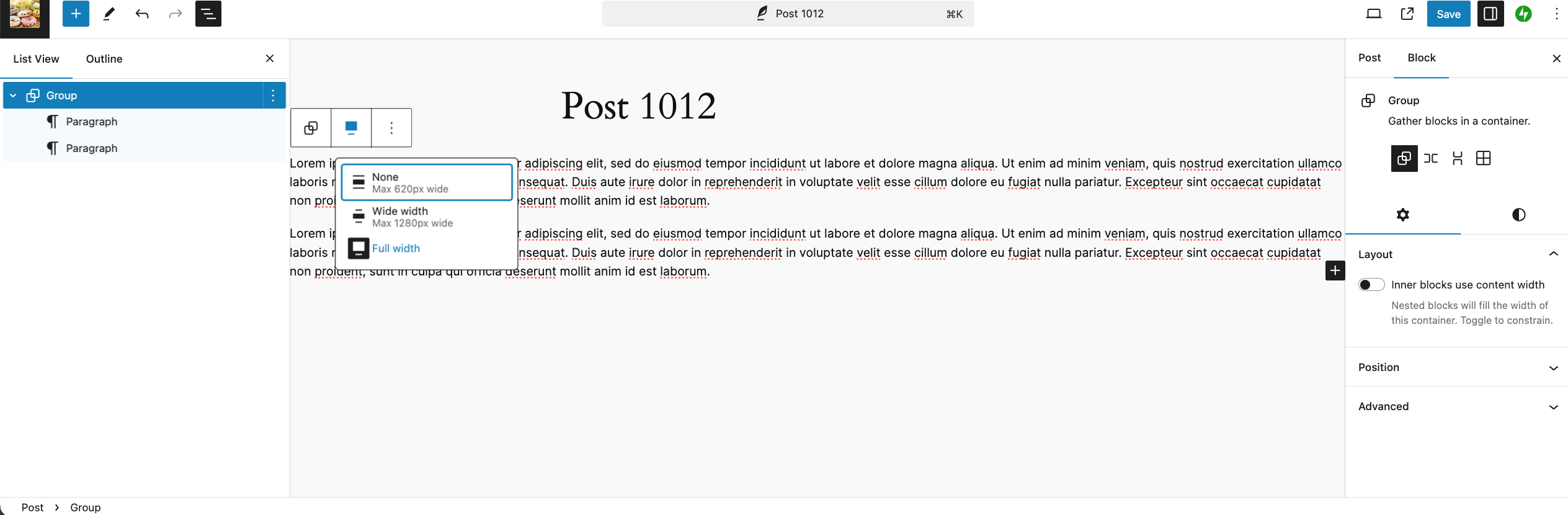
In your screenshot, the texts width is set to None:

And when set to None, it’s expected to not be full width in both the editor and live page, leaving spaces to both sides of the texts.
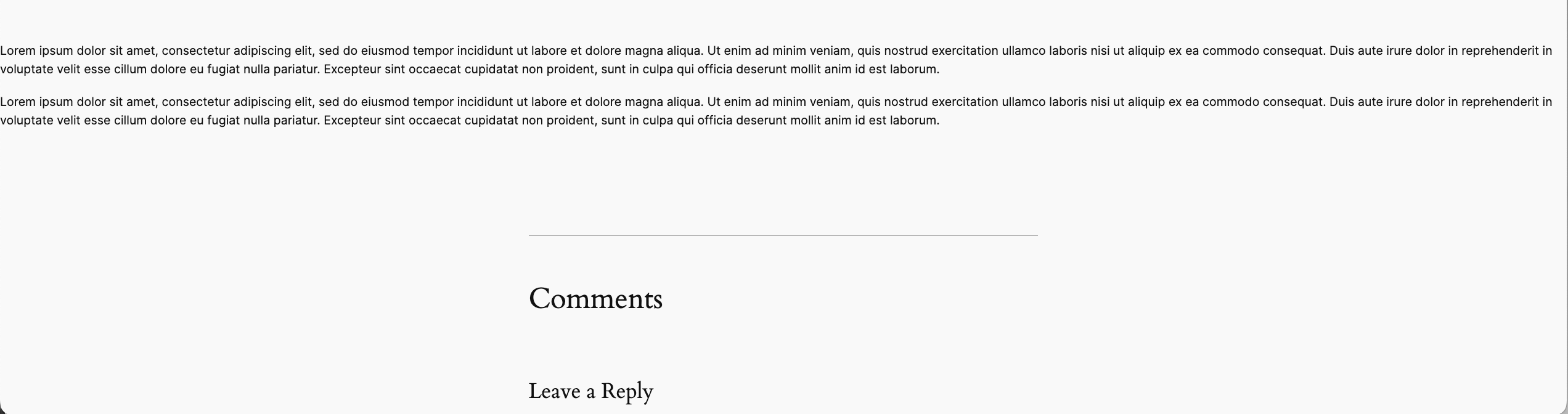
My objective is to make the editor match the published content, but it doesn’t in width. when i have a full width container/group, it shows live but not in editor.
In the editor when you select the texts, in the toolbar above it, select the icon on the left of the 3 dots, then select full width.
On my test site, selecting it to full width adjusts the texts in both the editor and live page to the full width of the space.
Let us know how that goes!Forum: Reviews
In reply to: [Twenty Twenty-One] Sample wpThanks @sergeyieffe, for getting back to us and sharing those details. While we understand that the use of negative space and overall composition can feel challenging for some users when adapting it to business sites (like if the design approach is to fill the space with some info or company details, or perhaps looking for a style with less negative space), it’s worth noting that the theme is quite flexible and can be used for a variety of purposes, including portfolios, business sites, or personal blogs. Here’s an example of a business site using the Twenty Twenty-One theme (at the time of writing). It might just come down to personal/business design preferences and how the theme aligns with your business goals.
However, you can create a child theme and modify it to the spacing and other customizations you prefer. Here are some resources to get you started on that:- Lesson on child themes – intermediate theme developer
- Child themes – developer
- or use this plugin: https://wordpress.org/plugins/create-block-theme/
Thanks again for sharing!
Hi @atalanttore
As we haven’t received a response in over 3 weeks, we assume your issue has been resolved. However, if you’re still experiencing any problems, please feel free to mark the topic as unresolved or start a new one. 🙂
Forum: Themes and Templates
In reply to: [Twenty Twenty-Four] Cannot select image for logoHi @gabrielae
Since we haven’t received a response in over a month, we assume your issue has been resolved. If you’re still experiencing any problems, feel free to mark the topic as unresolved or open a new one.
Forum: Themes and Templates
In reply to: [Twenty Twenty-Four] Change navigation underline colorHi @vastzor
As we haven’t received a response in over a month, we assume your issue has been resolved. However, if you’re still experiencing any issues, please feel free to mark the topic as unresolved or if you have new questions, please start a new topic. Thanks!
Hi @annyzfc
As we haven’t received a response in a month, we assume your issue has been resolved. However, if you’re still experiencing any issues, please feel free to mark the topic as unresolved or start a new one.Forum: Themes and Templates
In reply to: [Twenty Twenty-Four] How to change editor width?Hi @donbowman,
As we haven’t heard back from you in over a month, we assume your issue has been resolved. If you’re still encountering similar issues, feel free to mark this topic as unresolved, or start a new one. Thanks!Hi @minaxi11,
As we haven’t heard back from you in over a month, we assume your issue has been resolved. If you’re still encountering problems, feel free to mark this topic as unresolved or start a new one.