Kel Santiago-Pilarski

Forum Replies Created
-
Forum: Themes and Templates
In reply to: [Twenty Twenty-Four] Block Post comments link – editHi Lucie @ilucie!
While you can use another language in this theme, it’s not fully translated into Czech yet. In the meantime, you can use a translation plugin to help fill with any gaps.
If you’re interested and have some time, you can also contribute to Czech translations. We have a guide to translations here to help get you started as well.Hi Angi @hellblauervogel ,
It’s possible the Template set for the front page does not have the contents like you see in the page you’re editing.To fix that:
- Go to Pages and open the page where you see the contents that you want for the front page.
- Copy all the contents of the page.
- Go to Appearance > Editor > Templates.
- Select the template used for the front page and paste the contents you just copied from the page, and “Save”.
- Then check the front page of the site again to see if the contents appear in the front page.
Hope this helps! 🙂
Hello there! I’ve checked the site link you shared, and I can see the “Watch, Read, Listen” section on both desktop and mobile. If you’re not seeing this section, try clearing your browser cache and checking the site again. Let us know if that helps!
Forum: Reviews
In reply to: [Twenty Twenty-Four] problemHey there!
Thanks for writing in and letting us know, we’re sorry to hear that you’re having problems with the theme. We’d like to understand what specifically isn’t working as expected. Is there something in particular in your post, page or editor that you’re setting up, but encountering issues? We’re happy to help!
Forum: Themes and Templates
In reply to: [Twenty Twenty-Two] Building a header with background imageSo glad to hear that, Andy! Thanks for your kind feedback! Happy to help! 🙂
Forum: Themes and Templates
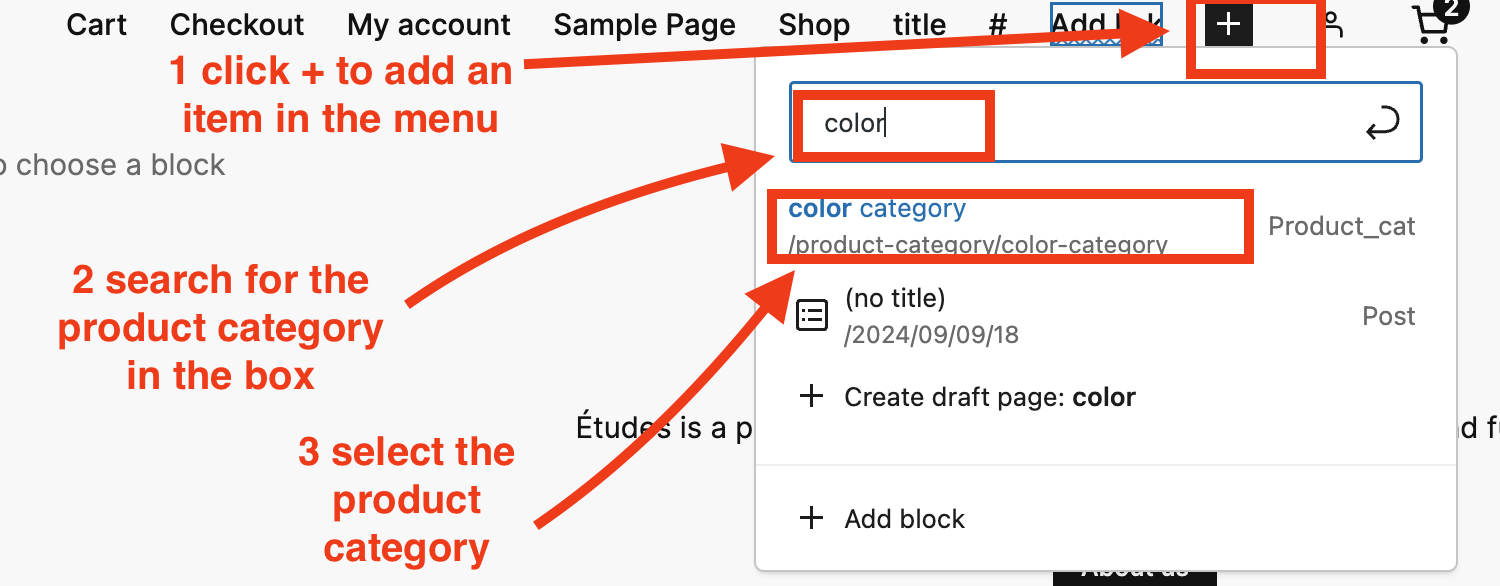
In reply to: [Twenty Twenty-Four] How do I add a product categorie to a menuHey there @studiokannl! In the editor, when you add a navigation block and click +, a search box will appear where you can look for the product category name and select it.
For example, I have a product category called “color”, searching for “that”color” in the navigation will display the product category that I can select and add to the menu. See the example in this screenshot.
I hope this provides the answers you’re looking for. 🙂
Forum: Themes and Templates
In reply to: [Twenty Twenty-Two] Building a header with background imageHello there @akubrin, thanks for reaching out here!
You can add a background image as cover in the header of your site with the Twenty Twenty-Two theme.
- Go Appearance > Editor
- Click the list view ≡ on the upper left
- Look for “Group” and click it
- A toolbar will show. From that toolbar, select Group (2 squares icon).
- Then select Cover from the options
See the screenshot below:

After selecting Cover, a toolbar will appear where you can select “Add Media” to add the image that you want, then click ‘Save’.

Hope this helps! 🙂
Forum: Themes and Templates
In reply to: [Twenty Twenty-Four] Tag Cloud BackgroundHey @terry2124 you can add the CSS code in Appearance > Editor. On the editor upper right, click Styles (round icon) and 3 dots > Additional CSS. Add the CSS code in the box and save. Please check the guide here for that as well: https://wordpress.org/documentation/article/styles-overview/#applying-custom-css
Forum: Themes and Templates
In reply to: [Twenty Twenty-Four] Removing Previous/Next from PostHello @connertmedia !
The Previous and Next links under the post can be removed without using CSS. You can do that by editing the Post template directly:
- Go to Appearance > Editor > Templates and select the template you’re using the posts (for example, Single Post) and click to open it.
- Scroll down the template until you see the Previous and Next, then select them.
- Once selected, delete.
- Then Save to apply the changes.
Hello @pbsbluejay !
From what I understand on your cloned WordPress site, you’re experiencing an issue where the homepage defaults to the Twenty Twenty Four theme instead of the Astra-themed Hosting Home page, despite attempts to resolve it by checking settings, clearing caches, and verifying URLs.
If the Twenty Twenty Four theme is deleted but still shows its layout, it might be retained in the database. Before making any changes to the database, create a backup first.You can check by accessing through FTP and going to the wp-content/themes/ directory if there are no residual files of the deleted Twenty Twenty Four theme. And review any custom code snippets or custom plugins that might unintentionally reference the old Twenty Twenty-Four theme.
Another option is to access the database using phpMyAdmin and look for references to the Twenty Twenty Four theme in the wp_options table and search for “template”. If it’s set to twentytwentyfour, change it to your current theme, astra. You can repeat the search for stylesheet. After making changes, clear your site’s cache again and check. I hope you find this helpful!
Forum: Themes and Templates
In reply to: [Twenty Fourteen] Previous/Next Links Missing on Pages and PostsHi @daboo2u2 Great to hear that Previous and Next links in posts are already showing up! For pages, you can consider installing a plugin that has that feature like: https://wordpress.org/plugins/wpnextpreviouslink/
Hello @saskiaherm thanks for reaching out!
On my test site without plugins, I’ve created a table containing texts in lowercase, but the first letter did not change to uppercase. I also searched for any reported bugs regarding this issue but found none.
Could you please create a test page with tables and lowercase texts to see if the first letter changes to uppercase? Make sure to check if there is a specific plugin enabled that could affect text in tables.
Forum: Themes and Templates
In reply to: [Twenty Twenty-Four] Posts joy showing up on bottom of main pageHi @kmmath I checked the page you shared and the bottom of the home page has two posts under “Watch, Read, Listen”. Do you still need help with this?
Thanks for letting us know! I see your page now has the bold texts more visible. 🙂
Forum: Themes and Templates
In reply to: [Twenty Twelve] Create a front-page (entrance)Hello @nissekarlsson! Are you perhaps referring to a landing page? What content do you want to add to that page? Do you want to make the site password protected, or perhaps display a question on the site before seeing the content? For example, here are some age gate plugins.
Please share more details on what you’d like to do so we can share some suggestions. 🙂