Dat Hoang

Forum Replies Created
-
Hi Jen,
I am seeing that you’ve contacted us via our ticket system and the subscription issue here was resolved.
I am sorry that I did not notice you’re using our paid plans. With that, you can get faster and dedicated support from us. Next times, please contact us via our support contact form.
Cheers, Dat
Hi John,
https://i1.wp.com/syntrum.nl/wp-content/uploads/2017/12/me.jpg?resize=640%2C640
I’ve deleted this.
In the future, please contact us via this form if you’d like to clear other images.
https://jetpack.com/contact-support/?rel=support
However, I recommend reading this great comment and using Photon correctly first
https://wordpress.org/support/topic/delete-images-from-photon/?view=all#post-9751876
Cheers, Dat
Hi there,
If you’ve recently deleted or otherwise removed your website, that would explain why you’re receiving these emails.
Did you disconnect Jetpack and/or disable the Monitor module prior to taking down the site? If not, these messages continue to be sent since the system on our end doesn’t know the difference between a site being down due to hosting problems or if it’s down because you chose to take it down.
I’ve made some changes on our end to stop the notices, so you should no longer receive Jetpack Monitor emails.
Let me know if you have any questions or if we can help further.
Cheers!
Forum: Plugins
In reply to: [Jetpack - WP Security, Backup, Speed, & Growth] Comments don’t work anymoreHi Amely,
It looks good for me when I view this post – screenshot: http://cld.wthms.co/h2yAnT
http://www.your-domain.de/2018/01/25/10-tipps-gegen-plastik/
Please let us know if this is still the issue. Can you please take some screenshots in this case? You can use these free apps:
* https://www.awesomescreenshot.com/
* https://monosnap.com/
* http://imgur.com/upload – you can upload your screenshots on this free serviceHi,
Thanks for your great suggestions.
I’ve added them on our GitHub repo:
https://github.com/Automattic/jetpack/issues/8641
https://github.com/Automattic/jetpack/issues/8640Cheers, Dat
Hi,
Thanks for your feedback.
My link is http://cld.wthms.co/BWfbyi (Due to the privacy issue, this is the shortened link, will be removed in 7 days).
I found out that your current galleries are using the default gallery from WordPress, that’s why there are some HTML element IDs.
In my case, there are no similar IDs – http://cld.wthms.co/qz3xYf
If you go to WP Admin -> Settings -> Media, please select “Display all your gallery pictures in a cool mosaic.”, then Jetpack will override the default gallery from WordPress.
Cheers,
Hi,
Ah, that makes sense. Thanks for updating us.
Please open a new topic if you have any other issues with Jetpack.
https://wordpress.org/support/plugin/jetpack#new-postHave a great day!
Cheers, Dat
Hi there,
Can you disable the plugins for me?and test? the security plugins are not the problem, i disable the plugins but doesn’t work.
Please disable it under your WP Admin Dashboard -> Plugins.
I’ve checked again. It’s still the sync issue as I see here
https://jetpack.com/support/debug/?url=http://copartnerauditorias.com.br/The issue is likely being caused by how Jetpack uses the WordPress cron system. Can you reach out to your host to have them check to see if cron is enabled and working correctly on your site?
Could you also check your site’s wp-config.php file, and let me know if cron is currently disabled? If it is disabled, you’ll see this bit of code somewhere in that file:
define( 'DISABLE_WP_CRON', true );Please remove this if it’s present.
Another thing you might try is installing this plugin:
https://wordpress.org/plugins/wp-crontrol/
… which should let you see if there’s anything wrong with your site’s cron system.
Cheers,
Hi Paola,
Thanks for your effort.
It looks good now https://jetpack.com/support/debug/?url=https%3A%2F%2Fwww.bbpisabelleville.it%2F
…now I’ve deactivated this plugin and I’ve tryied to deactivate and activate jetpack again, but I still not have eu-cookie law widget in my dashboard.
What can I do?You can access a list of all Jetpack modules by following this guide:
https://jetpack.com/support/control-jetpacks-modules-on-one-page/
Once you’re there, please activate the Extra Sidebar Widgets module.
Is there a way to configure jetpack to work together with wp-hide, or should I ask on their forum?
The main point is that the XMLRPC file can be accessed.
They restrict the access to this file due to the macilous login attack.
However, you can rest assured with the Jetpack Protect feature – https://jetpack.com/support/security-features/#protect
As I see, you are enabling this feature on your site as well. So you’re good with this.
Hi Martin,
Thanks for your details.
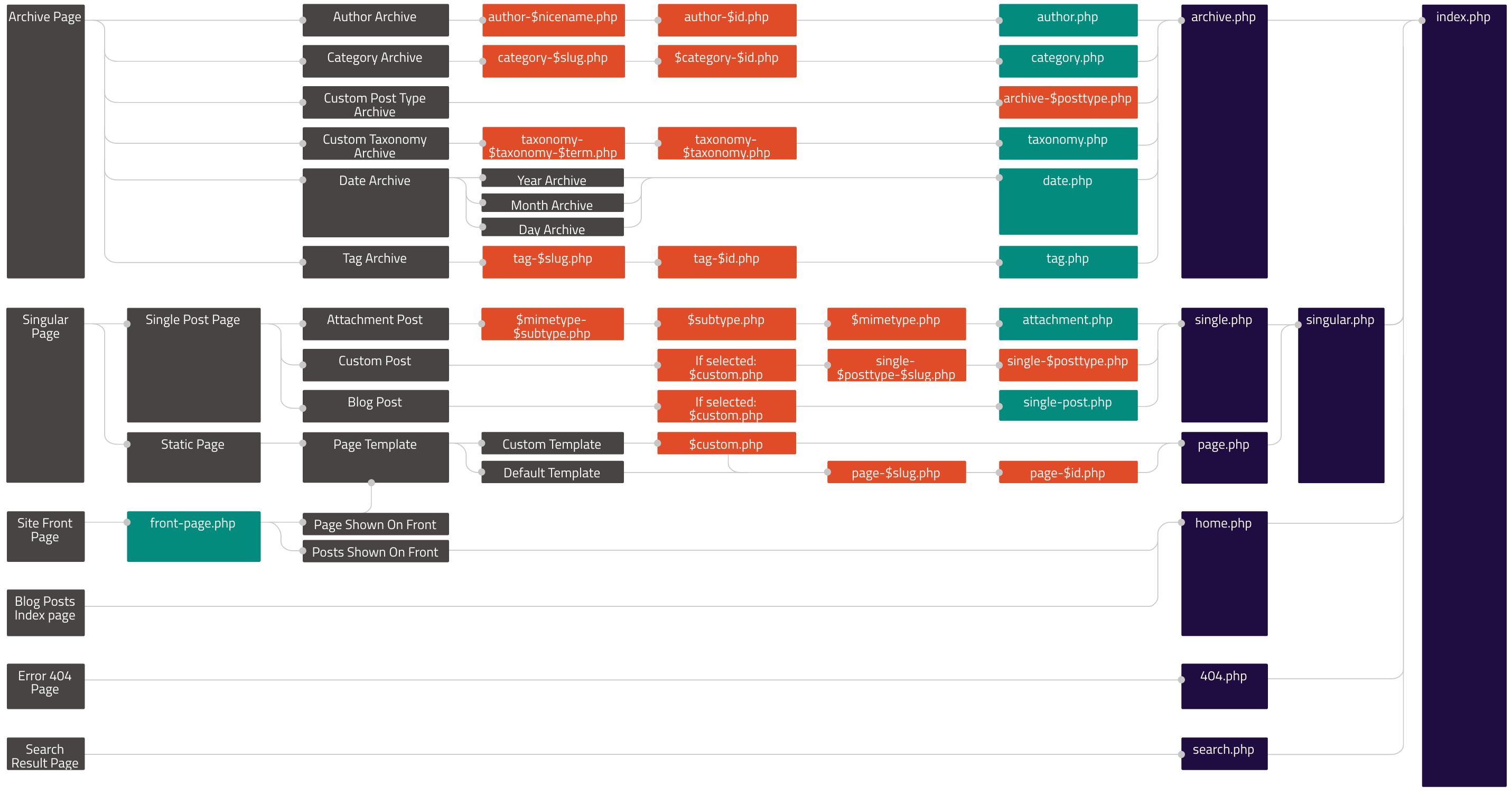
* http://www.mysite.com/project-type/free-themes is a taxonomy term page.
* http://www.mysite.com/portfolio/ is a custom post type archive page.Since they’re different, you need to use different template files.
Based on this illustration and this guide, please use the
taxonomy-jetpack-portfolio-type.phpfile for http://www.mysite.com/project-type/free-themesIt’s working for me – http://cld.wthms.co/cxfjXT
I am sorry I can not share my testing site at the moment. However, if you really need it, please let me know.
Cheers,
Hi,
The new theme is not an issue here. But exporting and importing posts may cause the issue.
I guess you disconnected Jetpack, then re-connected it?
Could you please post your site URL here, so I can have a look?
If you want it to remain private, you can also contact us via this contact form:
https://jetpack.com/contact-support/?rel=support
Thanks!
Hi,
Yes, I can see that the Jetpack Subscriptions feature is active on your site.
https://jetpack.com/support/subscriptions/I’ve tested with my email and it’s working fine
http://cld.wthms.co/iJ357KChecking on your site, your site has only one email subscriber – a Hotmail address. And this address has got the email for your latest post.
It looks like this on our log:
✓ 4 hours ago — [New post] The regions, migration and discomfort with ‘the other’: John Daley on the rise of the minor parties.
Please let us know if this is still the issue for your site.
Cheers,
Hi,
Could you please post your site URL here, so I can have a look?
If you want it to remain private, you can also contact us via this contact form:
https://jetpack.com/contact-support/?rel=support
—
For a quick resolution: You can access a list of all Jetpack modules by following this guide:
https://jetpack.com/support/control-jetpacks-modules-on-one-page/
Once you’re there, you can activate/deactivate any modules you wish. In this case, please try to deactivate “Custom CSS” 🙂
Cheers,
Hi Martin,
I am not quite sure about this part.
It works when you go to the /portfolio/ link, but if you drop in the project type menu link in your menu, then it uses the default archive.php
Basically going to /portfolio/ it uses the override template, but not when you link to a project type.
Can you take some screenshots to show how you configure this?
Please post your site URL here, so I can have a look as well.
If you want it to remain private, you can also contact us via this contact form:
https://jetpack.com/contact-support/?rel=support
Thanks!
Hi,
Please note that Jetpack Photon cache is different from other CDNs. It assumes that you will not change the files. In this case, I suggest editing your filenames.
Please send us a request regarding this via our form and mention this topic.
Contact SupportCheers,