Grof

Forum Replies Created
-
Yes. It works! Thanks.
In meanwhile, I solved this problem with create new item with meta key ‘oib_num’, export all users data, change column name from ‘OIB’ to ‘oib_num’ and import (update) users data back.
After that I erased old item with ‘OIB’ meta key and now all works well.Hello @champsupertramp
I can reproduce the issue and I think that I found the problem! 🙂
So, if you use uppercase letters in meta key name then the issue will arise.
Unfortunately, I’ve used uppercase letters in meta key and now I can not convert in lowercase in the database. Because ‘OIB’ != ‘oib’ I can not simply create new item with lowercase meta key name (it will be empty)
Any suggestion?
No. Just “OIB” with capitals.
- This reply was modified 4 years, 9 months ago by Grof.
Maybe is something wrong with my metakwey?
When I create new custom text box it is reorder successfully, but these one is an old filed what I had to change from number to text box item, and only that makes the problem.
But when I change some properties in it, they are updated successfully. Only reoredering doesn’t save and the item always stay at the end of list in the form.
The latest. v 2.2.2
Now I see that not always reordering doesn’t work. But only on some my custom text boxes.
Forum: Plugins
In reply to: [WP w3all phpBB] new posts in some topic shortcodep.s and what should produce this widget or shortcode? Links or parsed posts?
Parsed posts i assume?Parsed posts, of course 😉
Forum: Plugins
In reply to: [WP w3all phpBB] new posts in some topic shortcodeOK, thanks.
Currently I’m trying to do code for insertion new topic/post from WP into phpBB as part of commenting substitute.Forum: Plugins
In reply to: [WP w3all phpBB] new posts in some topic shortcodeHmm, but I still can not find shortcode to display latest posts from one particular topic. Is it possible or I have to write my own code to do that? 🙂
Ok, I’ll ask a little different:
I need to do something after inserting post with his post_ID. Or, how to get post_ID of just inserted post from submitted form.
I’ve seen list of all filters and actions here:
https://perishablepress.com/action-filter-hooks-user-submitted-posts/But I do not know what parameters these functions pass?
The code for controlling this inside template is:
<?php if (UM()->user()->get_role() =='um_mc-voditelji') echo do_shortcode ('[ultimatemember form_id="form_id_1"]'); else echo do_shortcode ('[ultimatemember form_id="form_id_2"]');Thanks, but never mind.
I did workaround with another user form without this fields and call it inside WP template when I need. 😉I’m using community UM version 2.1.12.
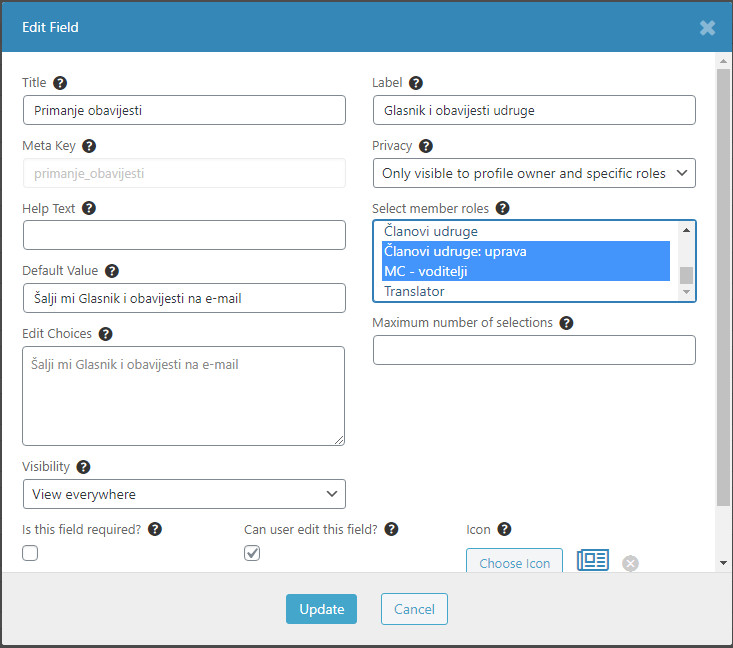
You can see screenshot of one of this fields here
https://i.postimg.cc/dt4G3M30/UM-form.jpgThis is only visible for some roles. So if someone else who not allowed to edit this field edit user profile and update it, then this checkbox field will be reset to unchecked.
Forum: Plugins
In reply to: [Display Widgets] V2.6.2 gives warning errors on siteYes, it’s working. 🙂
Forum: Plugins
In reply to: [Display Widgets] V2.6.2 gives warning errors on siteMy pleasure. 🙂