Sérgio L. a11n

Forum Replies Created
-
Forum: Plugins
In reply to: [WooCommerce] Inventory management with WooCommerceHi @laurencejodoint,
WooCommerce allows you to manage the stock in general. You can set Out Of Stock Threshold and Out Of Stock Visibility for all the product in
WooCommerce > Settings > Products > InventoryGet to know more about it here:https://woocommerce.com/document/configuring-woocommerce-settings/#products-inventory-options
However, you can consider the plugin Custom Stock Status which enables more setting to manage your stock.
Best,
- This reply was modified 4 years, 2 months ago by Sérgio L. a11n.
Forum: Plugins
In reply to: [WooCommerce] Shop Page always only showing two itemsHi @vanwykpretorius,
If this only happened after a plugin update, the best way to determine is to:
- Temporarily switch your theme to Storefront
- Disable all plugins except for WooCommerce
- Check if the products are displaying in 3 columns
If you’re not seeing the same problem after completing the conflict test, then you know the problem was with the plugins and/or theme you deactivated. To figure out which plugin is causing the problem, reactivate your other plugins one by one, testing after each until you find the one causing conflict.
You can find a more detailed explanation on how to do a conflict test here.
Best,
Hi @alchemywithsoul,
Naz tips are definitely helpful! I can also recommend you the following article to get to know more about WordPress optimization:
https://wordpress.org/support/article/optimization/
I’ll now close this topic. Please, feel free to open a new one if you have further questions.
Best regards,
Forum: Plugins
In reply to: [WooCommerce] SRCset – point to non-exsiting URLHi @sellmet,
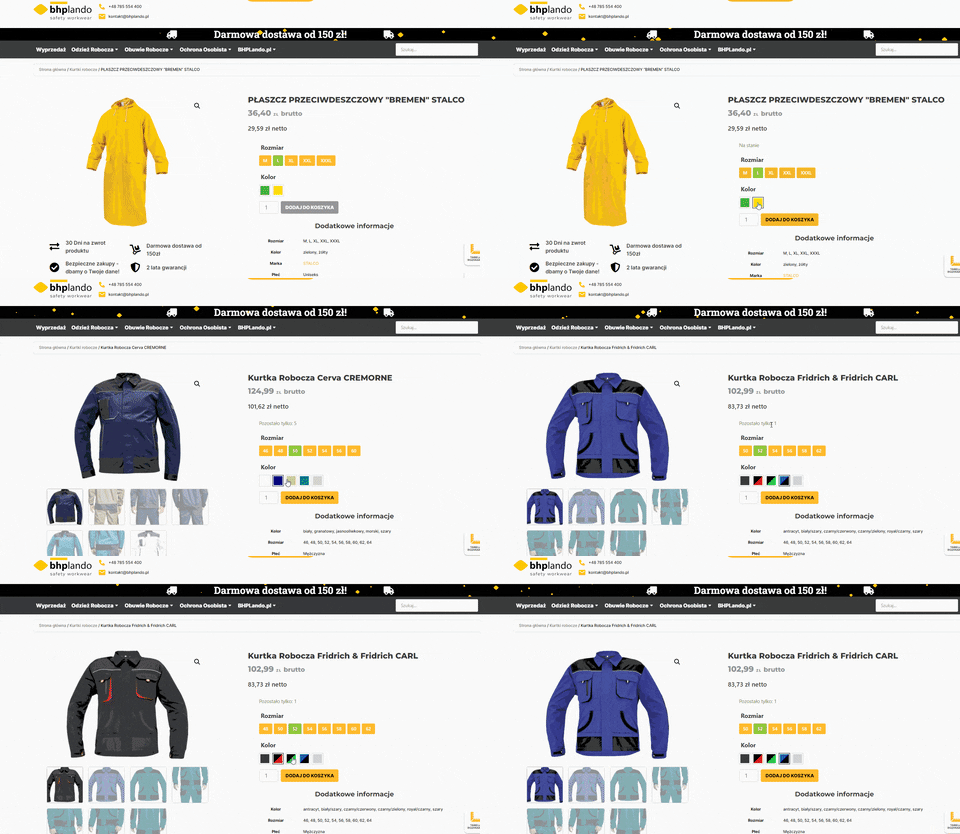
I’ve checked some products on your site and the colors images seems to be working fine. Here, I’ve made a small GIF to show you how it’s working for me: Click here!
If you’re not seeing the same as in the GIF in those specific products, please try:
- An incognito tab
- Clear your browser cache
- Try in a different device
If you’re seeing this in a different product, please send us the URL.
Also, you can regenerate thumbnails and I also recommend you to test for plugin and theme conflictsIf the issue persists after testing for conflicts, please send us the System Status report of your site. You can find your System Status via
WooCommerce > Status. Select “Get system report” and then “Copy for support”. Once you’ve done that, paste it here in your response.I hope this information help.
Best,
Forum: Plugins
In reply to: [WooCommerce] Change table header background colorsHi @myhero,
Can you please send us a screenshot where you see this happening?
For the screenshot, I’d recommend using: https://snipboard.io/Also, to check if we can help with the CSS, if possible, send us the link where you see the white text on white background.
We’ll be waiting.
Best,
Forum: Plugins
In reply to: [WooCommerce] WooCommerce PayPal Payments issueHi @jakwalker,
I can see that you already open a topic in the correct forum:
https://wordpress.org/support/topic/paypal-blank-screen/
I’ll mark this one as solved for now. Feel free to open a new topic if you need further help.
Best,
Forum: Plugins
In reply to: [WooCommerce] on the wordpress board I don’t see woocomerce statusGreat!
Thanks for letting us know how you solved it @neogenny.
Feel free to open a new topic if you need further help.
Best regards,
Hi @noelforge,
No problem! We’re glad you fixed it, and thanks for letting us know how you did it.
Feel free to open a new topic if you have any further questions.
Best,
Forum: Plugins
In reply to: [WooCommerce] Unique product thank you emailsHi @drfletch,
Indeed, this is a complex topic as Naz stated and the solutions he links are definitely a good starting point.
I would just like to add that you can visit the WooCommerce Facebook Community group or the
#developers channelof the WooCommerce Community Slack. We’re lucky to have a great community of open-source developers for WooCommerce, and many of our developers hang out there, as well.Kind regards,
Forum: Plugins
In reply to: [WooCommerce] modify hide out of stock from the catalogHi @visibledeals,
To make sure I understand your request, what you want is that in the product page you can see grape in stock and all the other variables out of stock but in the shop page you can only see Grape. Apple, banana and orange will be hidden from the shop page. Is that correct?
If so, this is a fairly complex development topic. You can visit the WooCommerce Facebook Community group or the
#developerschannel of the WooCommerce Community Slack. We’re lucky to have a great community of open-source developers for WooCommerce, and many of our developers hang out there, as well.Let me know if that’s not what you want to archive.
Best,
Forum: Plugins
In reply to: [WooCommerce] status out of stock for one of the variationsHi @loralora,
The inventory section allows you to manage stock for the product with all variations but you can manage the stock individually. If you choose to do it so, you can then add the product stock, so the other items don’t get “out of stock” or, you can add the stock to each variant.
If you choose to manage the stock for the product, you can do it by editing the product and managing the inventory like this:
https://snipboard.io/GLrTpZ.jpg
However, if you only change the Blue sock L stock, the variations will look something like this:
- Blue Sock L – Sold Out
- Red sock S – 43
- Green sock M – 43
Get to know more about managing products here:
https://woocommerce.com/document/managing-products/
I hope this information help.
Best regards,Forum: Plugins
In reply to: [WooCommerce] archive-product.php showing 3 productsHi @hch04,
My suggestion would be to contact the Ajax Search for WooCommerce (FiboSearch) support, but I can see that you already created a thread with them here:
https://wordpress.org/support/topic/search-results-template-file/
I’ll now close this topic, but please, feel free to open a new one if you need further help from us.
Best regards,
Forum: Plugins
In reply to: [WooCommerce] Filter out of stock variants in the shop page.Hi @skredlemon,
That makes perfect sense. Product filters like stock availability can be added in your site with Product Filters for WooCommerce extension:
https://woocommerce.com/pt-br/products/product-filters/
You may also find other options here:
https://wordpress.org/plugins/search/stock+status+filter/
I hope this helps.
Best regards,
Forum: Plugins
In reply to: [WooCommerce] Import just stock quantities from EtsyHi @jaiji,
Let us know if you have any further questions after checking the documentation Margaret sent.
Kind regards,
Forum: Plugins
In reply to: [WooCommerce] Physical product Order statusHey @moepolska,
You don’t need to know any code to follow @nazreenexe suggestion. He provided the code, and you can add it with Code snippets Plugin.
However, if you want to find out what’s the root of the problem, you can perform a conflict test:
- Temporarily switch your theme to Storefront
- Disable all plugins except for WooCommerce
- Check if the order status is correctly updated
If you’re not seeing the same problem after completing the conflict test, then you know the problem was with the plugins and/or theme you deactivated. To figure out which plugin is causing the problem, reactivate your other plugins one by one, testing after each until you find the one causing the conflict.
You can find a more detailed explanation on how to do a conflict test here.
Best,