Birgit Pauli-Haack

Forum Replies Created
-
Forum: Plugins
In reply to: [Seriously Simple Podcasting] Wrong ‘episode file missing’ message in sidebarYou are very welcome.
Forum: Plugins
In reply to: [Create Block Theme] Cannot Create Blocks Patterns, Pages, Etc.Did you find the instructions on how to create patterns at your other forum post helpful?
Forum: Plugins
In reply to: [Create Block Theme] [Feat. request] WP CLI commandsHi @webdados As “Save changes to theme” is actually a feature of the plugin. Wouldn’t it be also beneficial to have it as a Command for the Command palette rather than the wp-cli command? It probably would get additional feedback if you posted such a feature request to the GitHub Repository.
i can see that a developer accessing the site’s server via ssh and using a proposed wp cli command to get the latest updates from the database saved to the files could make sense. It only could be a snapshot in time of course. Is that what you are envisioning? Are there other use cases?
Forum: Plugins
In reply to: [Create Block Theme] child theme doesn’t show header and footer in editorYeah. There isn’t a way in the plugin to transcribe the child theme to a stand-alone theme. The only way I see is to copy all things from the parent theme and remove the references to the parent theme in the style.css header. Or it’s probably easier to make a copy of the parent theme, rename the folder, update the style.css, and copy in the child theme things.
Sorry, I don’t have an easier answer for you, and you most likely figured it out already.
Forum: Plugins
In reply to: [Create Block Theme] Create a Child of “undefined”Hmm, I tried several times to create a child theme of Twenty-Twenty-Five and couldn’t reproduce the “undefined” occurrence. As this was a while ago, could you do us a favor and try it again? The bug might have been fixes.
If that’s still happening and screencapture might help, or at least the exact steps to reproduce it, and if there are other plugins installed on the site where this didn’t work.
- This reply was modified 8 months, 3 weeks ago by Birgit Pauli-Haack.
Forum: Plugins
In reply to: [Create Block Theme] Theme ChildSo in general the child theme works, but just the CSS code is not applied.
It could be that the CSS you are adding is overwritten by the parent theme. mit might have to do with the CSS specificity
If that’s still a problem, you could share your CSS here and we can help with that.
Forum: Fixing WordPress
In reply to: Blocks QueryYou don’t need a Page or a Post to create a pattern. You can go right into Editor > Patterns > Add new Pattern and add the blocks for your pattern. You decide on should it be a synched or standard pattern. I made you two videos
The plus sign you see when editing a page or a post has one purpose: to open the Inserter so you can add existing blocks or patterns to the canvas or your post or page.
There is another way to save a combination of blocks into a pattern to be reused: via the Block’s Toolbar menu > Create a pattern. This is helpful when you realize that you used the same combination of blocks multiple times. Now you can highlight this group of blocks, click on the 3-dot menu in the block toolbar, and select the menu item “Create a Pattern.” Here is another video.
You’ll find more resources around patterns on the Documentation page: Block Patterns
Forum: Fixing WordPress
In reply to: Blocks QueryThere are two groups of template-related entities.
Templates and patterns. A template part is also a Pattern, that’s why they can be found and managed via the same menu item “Patterns”
From the site editor, you can create Templates from scratch via Editor > Templates > Add Template.

To add a Pattern or Template part go to Editor > Patterns > Add Pattern
https://cloudup.com/i_JvX0ICSqu/f
The drop-down offers you three options:
- Add Patterns
- Add Template Part
- Import pattern from JSON

I am not sure, if I answer your question completely. At least, so I hope, it established a shared understanding of the pieces.
Forum: Plugins
In reply to: [Create Block Theme] Not allowed to access the “Create Block Theme”Probably a plugin conflict, yess.
Have you used Site Health and Troubleshooting plugin? It allows you in WPAdmin to start the Troubleshooting mode without any impact on what the visitor sees. It deactivates plugins and themes for the admin only and then you can enable plugins one at a time and test your site. Detailed instructions on how to use the Troubleshooting feature are available on this page.Forum: Fixing WordPress
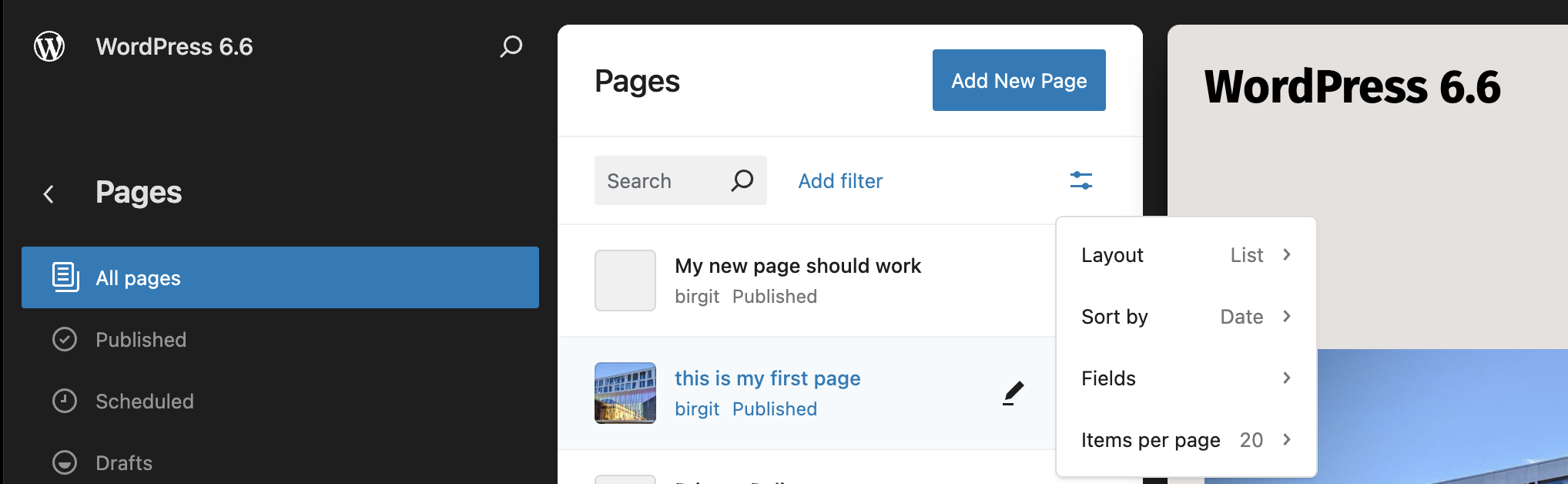
In reply to: Pages (from Dashboard) and Pages (Appearance –> Edit –> Pages)Yes, the middle column is a new way to display a list of pages. When you click on a page to edit it the editor will be loaded in full screen most (unless you disabled it.)
I tested with a clean installation of WordPress 6.6 with no other plugins, and I wasn’t able to replicated the display issue from WP-admin/pages vs. Appearance > Editor > PagesI assume that the error in your template part you mentioned earlier is responsible for the non display in the Site editor.
As you don’t give any other information about your theme, or what your template part looks like. I am bit lost on how to assist you.
If you modified a template part that came with the theme, you can reset it to the original status viaAppearance > Patterns > Template Parts > Edit template part > three-dot-menu > Reset
That would ‘repair’ your template part and make it possible to render the full content of the page in question in the Site editor.
You also mentioned that you renamed the template part, that might also be a reason why the template part renders an error message. You could need to update the template, where the template part is used to the new name of your template part.I know it’s sounds quite complex. And I will be here to help you, but I would need more information about the template part, the theme and the modification you made on the template part.
Forum: Developing with WordPress
In reply to: How to create and add custom schema field?@jcblindia You are certainly welcome
@stephunique you are certainly welcome. And you are right, the problem with theme that add functionality to WordPress, that should normally be built into a plugin, so it stays on the site when a theme is changed.
Forum: Fixing WordPress
In reply to: Pages (from Dashboard) and Pages (Appearance –> Edit –> Pages)open that same page from the list in Appearance –> Edit –> Pages, it shows a template part error,
What is the error message of the template part? Can you provide a screenshot of what you are seeing?
It’s a bit difficult to troubleshoot this without more information.When you look at the page template via
Appearance > Editor > Templates > Page template, can you remove the template part or assign a different template part to the header or footer? You didn’t say which template part this refers to either.- This reply was modified 1 year, 9 months ago by Birgit Pauli-Haack.
Forum: Fixing WordPress
In reply to: Pages (from Dashboard) and Pages (Appearance –> Edit –> Pages)Appearance –> Edit –> Pages has changed.
There is now also an annoying new panel between the menu items on the left panel and the display of a page. That just gobbles up screen estate, and cannot be switched off – or can it? (I can;t find where).
You can change the view of the Page list via the layout options:
https://cldup.com/hHzBHflH8d.pngForum: Fixing WordPress
In reply to: Pages (from Dashboard) and Pages (Appearance –> Edit –> Pages)I’ll answer the last question first: You can only rename template parts that were created by you. Once you created the template part, you can then rename it in the editing screen via the 3-dot menu in the sidebar.
https://wordpress.org/plugins/schema-and-structured-data-for-wp/