Birgit Pauli-Haack

Forum Replies Created
-
Forum: Developing with WordPress
In reply to: How to create and add custom schema field?This section was created by Schema & Structured Data plugin. It is available in the WordPress plugin directory.
Hi @stephunique
It is possible the feature is added by the Buddyx Theme
Forum: Plugins
In reply to: [Create Block Theme] Templates are not recognisedWhen you Install the theme on your site again, it’s like a new theme install, that doesn’t know about your previous association. If you create specific single post and single page templates, those will be automatically assigned.
Forum: Plugins
In reply to: [Gutenberg] Block background doesn’t work on Site Editor sectionHi there, @sergeygabrielyan Are you still having this problem? Or did you eventually figure it out?
If you still need assistance, it would be great to have updated links, for troubleshooting.Currently, there isn’t a way to remove style variations. On the plugin’s GitHub repo, there is an issue with a similar request you might want to chime in on.
Forum: Plugins
In reply to: [Classic Editor] So how about CPT’sThe choices for block editor or classic editor will show up for your Custom post type, when the settings “show_in_rest” is set to true. Could you double-check that it’s the case?
Here is the page with the list of settings for register_post_type() functionForum: Plugins
In reply to: [Gutenberg] About the Table of Contents blockHI @jrmora,
The Table of Content block is still a work in progress. There is no timeline available yet for the block to come out of its experimental stage. As the Gutenberg plugin is by design and early testing ground for new features, using it in production has its risks.
Forum: Plugins
In reply to: [Create Block Theme] Templates are not recognisedHmm, that’s a bit difficult to troubleshoot from the distance.
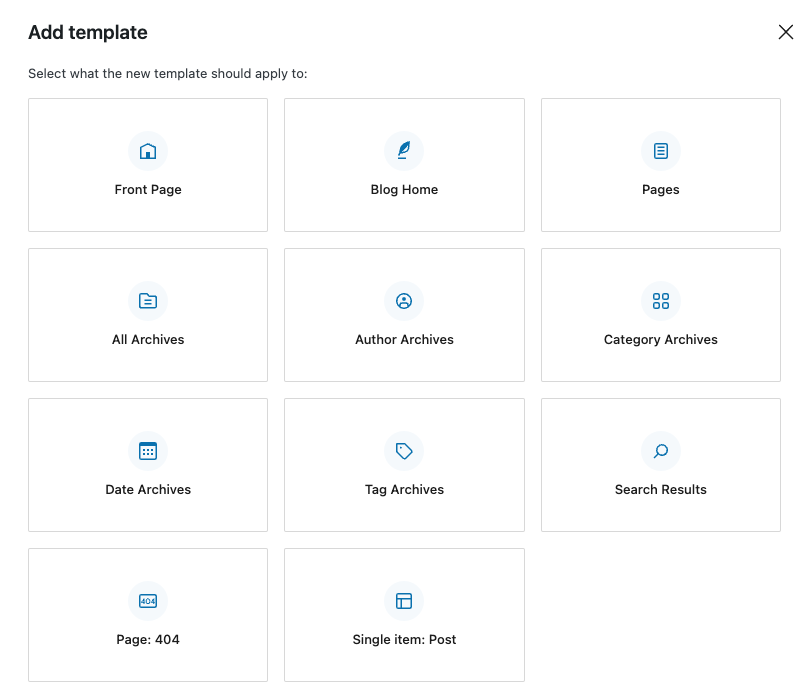
You probably know that WordPress is looking for specific templates to assign to posts and page by default.- A template called single.html would be used by posts
- A template called page.html would be user by pages
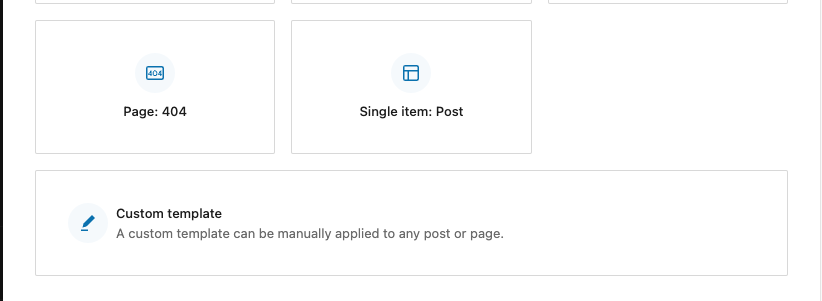
Did you create those, and they weren’t assigned as expected from the Add new template choices?
https://cldup.com/usis7QiqTB.png
Or did you create a Custom template?Forum: Plugins
In reply to: [Create Block Theme] Not allowed to access the “Create Block Theme”Hi there @sharkeyx – Sorry, you have had problems accessing the plugin. Does that still occur with the newest version of the plugin?
If yes, could you please provide which WordPress version and which theme you are using? There could be plugin conflict as well… I’d be happy to assist with troubleshooting this issue with you.Forum: Plugins
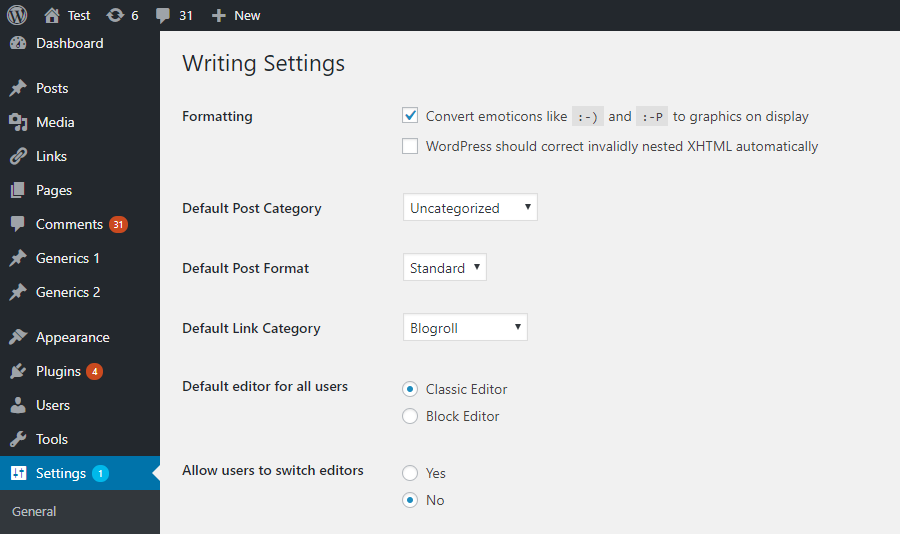
In reply to: [Gutenberg] About RestAPI and posts written via GutenbergHi @cheonmu Is it possible that the classic editor is the default editor? Do you have the classic editor plugin installed? If yes, you might need to test your calls with different settings.
See Screenshot of the Classic Editor pluginForum: Plugins
In reply to: [Gutenberg] ColorPicker not workingYou can also check out the storybook and generate the code via the interface there. https://wordpress.github.io/gutenberg/?path=/docs/components-colorpicker–docs
Forum: Plugins
In reply to: [Gutenberg] Footnote not working in custom gutenberg blockHi there. I only skimmed your block code, and couldn’t find anything obvious that would cause the Footnotes block not to provided you with a text block to enter the information.
I see in your video that you also have additional plugins installed on your site. Did you try deactivating all of them except for the plugin you are testing, and see if you can eliminate possible plugin conflicts? The plugin Health Check & Troubleshooting allows you do troubleshoot your site by deactivating plugins (and themes) only for the Admin user, and leaving the front end intact for your visitors. It’s the fastest way to start eliminating conflicts. Let use know if that makes a difference.Forum: Plugins
In reply to: [WordPress Importer] Escape characters for links or imagesEvery so often it helps, especially with links, to go to ‘Settings > Permalinks and click on the save button twice. (I am aware that it sounds a bit counterintuitive) Try it.
Forum: Themes and Templates
In reply to: [Twenty Twenty-Three] Add max-width to headings/paragraph@andrewcodes404 JSON is definitely something to get used to. I myself are still a novice at handling styling and layout via theme.json. Nevertheless, I noticed a couple of things.
If this works
.b-h2 {max-width: 1160px;margin: 0 auto;}Then you might need to rewrite the json piece:
"core/heading": {
             "css": "max-width: 1160px; margin: 0 auto;"
}
The CSS field in the theme.json takes pure CSS.
In the styles section (first code examples), the elements value needs to be actual HTML tag representation, so they are not “heading” but h1, h2 etc.
You could try something like this…"styles": { "blocks": { "core/heading": { "typography": { "fontWeight": "700", "lineHeight": "1.1" }, "spacing":{ "margin":"0", }, "css": "max-width: 1160px;" }, } }Reading resources, you probably already studied:
Forum: Reviews
In reply to: [Gutenberg] WordPress moves from CMS to site builderBut WordPress is saying it is going away by dropping support for the Classic Editor and Classic Widgets.
There might be misunderstanding of what the Classic Editor plugin does. It gives a user interface to have a site owner and content creator make choices toward the usage of the block editor.
It is basically a GUI using available block filters to disable the block editor. Here is the corresponding DevNote from the WordPress 5.0 release. AFAIK, there are no plans to discontinue these filters as they are also used by core to support, for instance, post types that set the “show_in_rest” to false. It then automatically loads the TinyMCE editor for the Edit screen of the post_type in WP-admin, even if the classic editor plugin is not installed.
Similarly, the Classic Widget plugin is also more meant to support #nocode site owners and site builders providing UI to core filters, agency developer could use directly in their theme’s functions php. The documentation is available her.
Furthermore, AFAIK, no efforts are contemplated to discontinue these filters. They are part of the backwards compatibility promise WordPress makes.I hope this alleviates some uncertainty about the future viability of conventional themes and plugins.
As for disable features in the block-editor the theme.json can also be used in conventional themes to easy the control of the block editor. Here is a post on how this works by a Gutenberg contributor.
- This reply was modified 4 years, 2 months ago by Birgit Pauli-Haack.
- This reply was modified 4 years, 2 months ago by Birgit Pauli-Haack.