averta support

Forum Replies Created
-
Forum: Plugins
In reply to: [Master Slider - Responsive Touch Slider] Images Not LoadingHi again!
Please like this example -> http://support.averta.net/en/wp-content/uploads/callback-4.png
add the below code to slider callbacks -> on slide change start:
jQuery(window).load(function(){
 jQuery(window).trigger( 'resize' );
});
}
Let me know if the problem persists.
Best,
AvertaForum: Plugins
In reply to: [Master Slider - Responsive Touch Slider] Images Not LoadingHi,
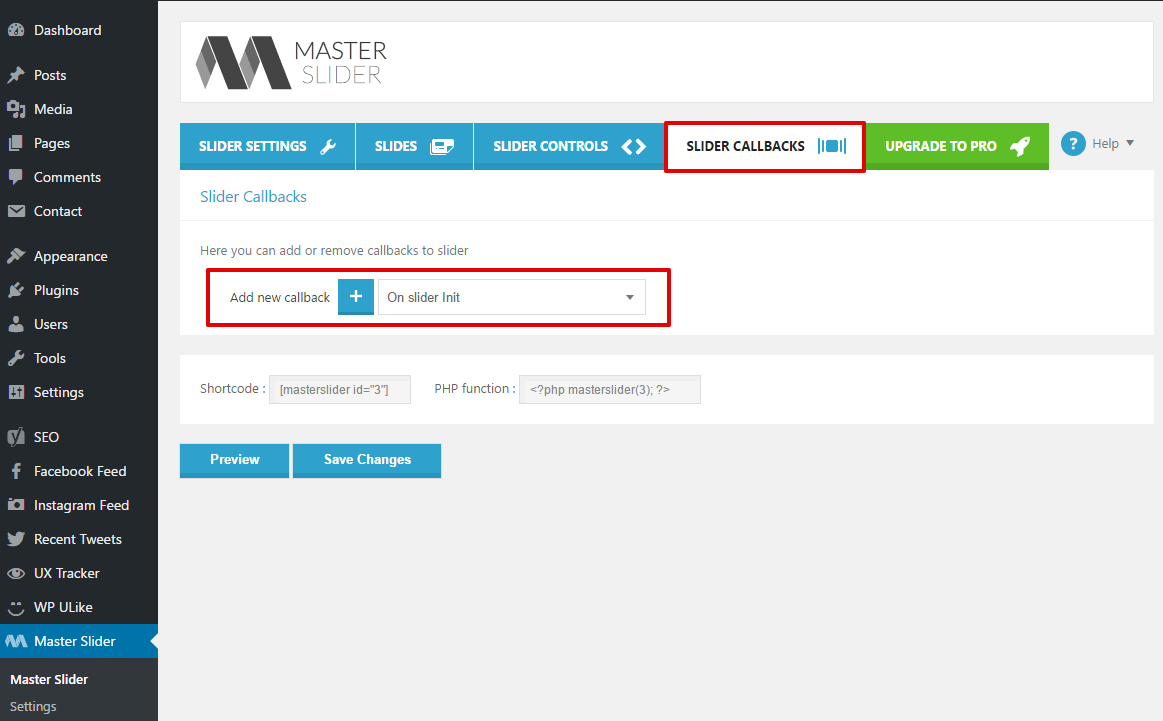
You can find slider callbacks as I show on the below screenshot:
http://support.averta.net/en/wp-content/uploads/Master-Sliders-Callbacks.png
Then choose on slider init and after adding that, put the below code on the opened text box:
 jQuery(window).load(function(){
  jQuery(window).trigger('resize');
});
Also, on Slider Settings tab -> Navigation -> Slide preloading, choose slides in sequence.
If you have any plugins for lazy loading and image optimizing, please disable those plugins and try again.
Best,
AvertaHi,
Please navigate Settings of Master Slider, on your wp admin dashboard:
http://support.averta.net/en/wp-content/uploads/Settings.pngThis option: “Enable cache to make Masterslider even more faster!”, should not be enabled!
http://support.averta.net/en/wp-content/uploads/disable-cache.pngPlease disable it and let me know the result.
Best,
AvertaForum: Plugins
In reply to: [Master Slider - Responsive Touch Slider] Pattern OverlayHi,
For changing the pattern photo, you are able to put the below code on custom style
.master-slider .ms-pattern{
  background-image: url('http://example.site/image.png') !important;
}
But first, you have to add a pattern overlay to your slide, and by using this code, you can change the photo of that pattern.
Please let me know the result.
Best,
AvertaForum: Plugins
In reply to: [Master Slider - Responsive Touch Slider] Images Not LoadingHi,
Thank you for choosing Master Slider.
Please put the below code on slider callbacks -> on slider init
 jQuery(window).load(function(){
  jQuery(window).trigger('resize');
});
Please let me know the result.
Best,
AvertaForum: Plugins
In reply to: [Master Slider - Responsive Touch Slider] Responsive ImagesHi,
You can put the below code on slider callbacks -> on slider init
jQuery('.tabtitle').click(function(){
  jQuery(window).trigger('resize');
});
Please let me know the result.
Best,
AvertaForum: Plugins
In reply to: [Master Slider - Responsive Touch Slider] Master slider in mobile versionHi,
I understood and gave you the best solution for that 🙂
min-height property is different from height. The difference between height and min-height is is used to set the minimum height of an element. This prevents the value of the height property from becoming smaller than min-height.I guess 400 or 500 is best for the min-height.
Please let me know the result.
Best,
AvertaForum: Plugins
In reply to: [Master Slider - Responsive Touch Slider] Slider not visible on websiteUnfortunately, there is no way to make this conversation private.
Please provide me with the link of your page.
I will wait to hear from you.
Best,
AvertaForum: Plugins
In reply to: [Master Slider - Responsive Touch Slider] MS PRO – Averta Support ForumHi,
Your account is not synced with Envato.
Please reset your password on http://support.averta.net/en/wp-login.php?action=lostpassword , then login and sync your profile with Envato, on this link: http://support.averta.net/en/profile
If the problem persists, you can use the form on Envato product page.
Best,
AvertaForum: Plugins
In reply to: [Master Slider - Responsive Touch Slider] Slider not visible on websiteHi,
Thank you for choosing Master Slider.
Please check out the below link:
http://docs.averta.net/display/mswpdoc/Using+Slider+in+WordPress
Let me know if you have any further questions.Best,
AvertaPlease go to Master Slider -> Slider Controls -> Thumblist/Tabs Control Options, and make sure “Change slides on hovering over thumbs/tabs” is enable.
Please let me know the result.
Best,
AvertaHi,
Thank you for using Master Slider.
Could you please provide me with the link of your website?
I will wait to hear from you.
Best,
AvertaI am glad your issue has been resolved and thanks for sharing your experience with us.
If you are satisfied with Master Slider or our support, please give it a review.
We would greatly appreciate it.Have a great time!
Best,
AvertaHi Erik,
Please deactivate all the plugins and use the default theme. Then reactivate plugins one by one. After activating each plugin, check out and see if the issue persists.
In this way, you can find out which plugin is causing the problem.
I will wait to hear from you.
Best,
AvertaForum: Plugins
In reply to: [Master Slider - Responsive Touch Slider] MS PRO – Averta Support ForumHi,
Thank you for choosing Master Slider Pro.
Could you please go to Master Slider page on Envato, and provide me with your email/username?
I will wait to hear from you.
Best,
Averta