droid

Forum Replies Created
-
1) Since JetPack brute force prevention feature is on.
Q:Does it interfere with this plugin brute force feature?Q:Is this a case of one or the other or can the two coexist and work at the same time on the same site without conflict or issue?
2) In the past 48 hours notice some new source of hacking trying to redirect some malware interstitial Ad that highjack redirecting the post
Here is copy of the whole thing that presented itself in this illegal interstitial Ad redirect
[ redacted ]
Q:Will you ensure a accurate correct successful patch to fend against that malware threat for today update?
If so how long time do you need before successfully completed ?Here is actually what happened
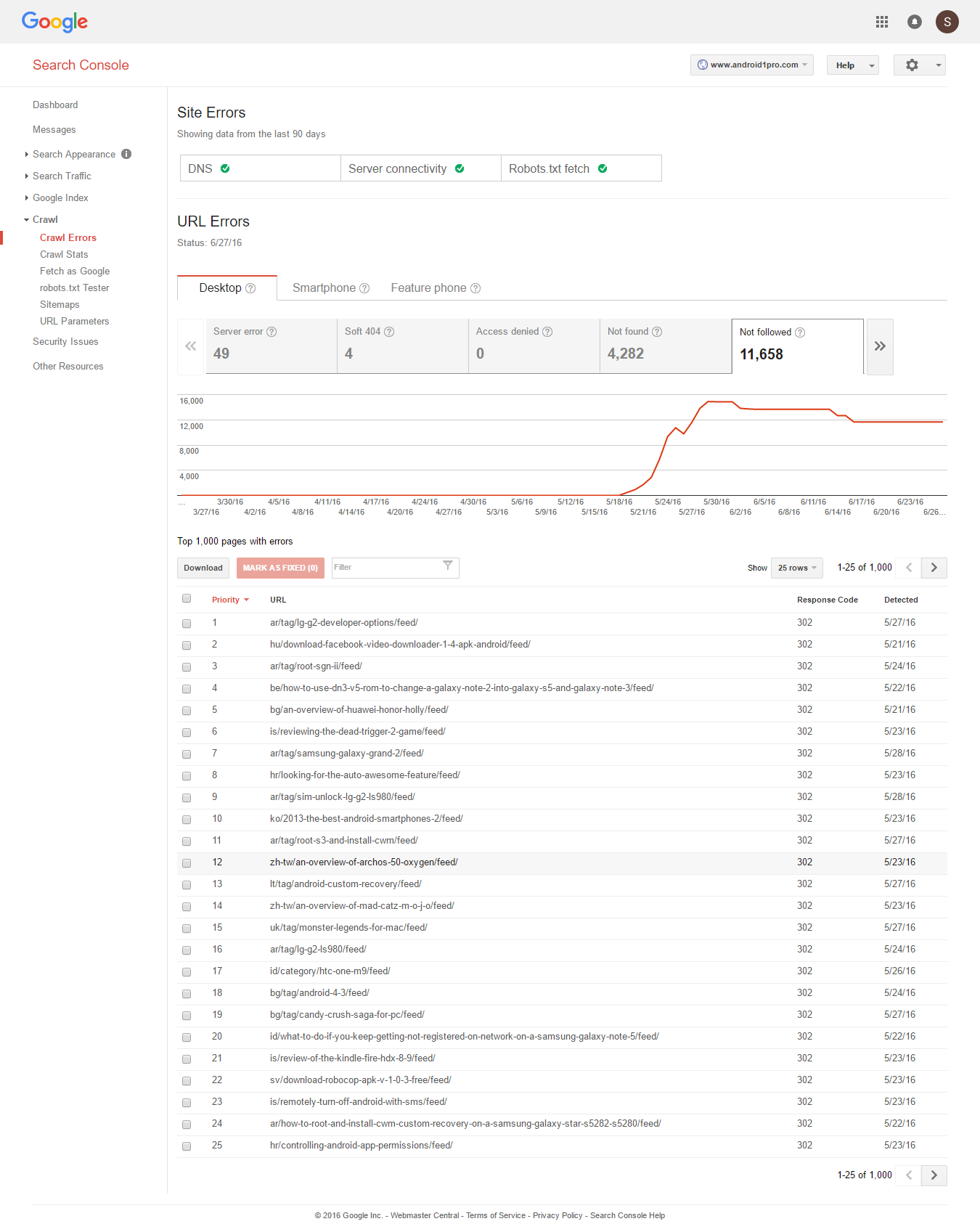
last month 5/19 When moved site to a new server,I was surprised by Google webmaster tools barometer of Not Followed” links to shoot to over 10,000 not followed links error as shown in this screenshot
http://easycaptures.com/fs/uploaded/980/1513778072.pngalmost 99% of those links are RSS FEED
Any way after 6 days on the new server,
I ended up cancelling the move and restoring DNS back to where it was before on the original serverThen to my surprise again I thought that Google console will adjust back to zero “not followed” error links like the way it was before.
Q: Based your past experience with your own sites and other user sites
1) can you tell me your best diagnosis of why this happened ?
2) and if so what is the best remedy solution and how exactly to implement it ?To lower the risk of malfunction by diversifying by having 2 plugin to ensure function of map generation is at best
or will this have the opposite effect of confusing Google bot when finding 2 almost identical maps?
Thank you for the rapid insightful reply
How about using https://wordpress.org/plugins/google-sitemap-generator/
with “All in one Seo” plugin to produce sitemap ?or is your answer would be the same
i.e. to never use two site map generator plugin.I appreciate the concept of showing me how to fish but here there is so many variables to mess up what took you couple of seconds to sort out can take me days because in the end it is your plugin that you created and by now should very much know the ins and out of every issue.
1) Ok so based on example you gave which was
(wp-review-pro/assets/js/, js/jquery/jquery.js)
without () off course
to add in AO’s comma-separated JS optimization exclusion-listthen to exclude the google translation plugin by mimicking the above example,
We can use the following
(google-language-translator/assets/js/, js/jquery/jquery.js)
to add AO’s comma-separated JS optimization exclusion-listCorrect ?
2) Another issue is that the the search box prefetching feature in theme
Meaning when user is on search box entering term it try to provide suitable suggestions for that search term being entered in search box.What is your best fix solution in order to have it translating again like it was before AO got activated?
Do you have couple of lines of code to add in order to fix the issue?
If so where exactly to paste it ?Thanks !
Thanks Frank
I like what AO does in terms of performance as we all working on utilizing its features fully,accurately and correctly.
However,unfortunately
At the moment,
AO also causing issue of Free Google translate plugin
https://wordpress.org/plugins/google-language-translator/not to work properly where when clicking the little yellow box at the lower right hand corner of the page labelled “Translate”
it should give you immediate option with all languages that should be translated where user pick one option and page is translated immediately but that is not the case no more after AO got installed.Can you test the above translation plugin on your side and propose best fix solution?
i.e. What is your best fix solution in order to have it translating again like it was before AO got activated?
Do you have couple of lines of code to add in order to fix the issue?
If so where exactly to paste it ?1) Then the question becomes is it best to use both Yoast in conjunction with
https://wordpress.org/plugins/all-in-one-seo-pack/3) Did you mean to say use
https://wordpress.org/plugins/google-sitemap-generator/
or Yoast to produce sitemap but never together ?4) The author of plugin called WP Review Pro https://wordpress.org/plugins/wp-review/
is telling me that your plugin Auto optimize is causing the issue of review stars showing in black instead of showing in Golden yellow color like they should
see here how the stars are showing in black (instead of golden yellow like they should) in this blog post example
http://android1pro.com/how-to-save-battery-on-android-using-wi-fi-saver-the-wi-fi-manager/I did clear the cache twice but without any positive result
What is your best fix solution?
Do you have couple of kines of code to add in order to fix the issueHi Frank,
Thank you again for the excellent clarification
A few issues that are confusing and needing a clarification
1) How does Auto optimize plugin differ than “All in One Seo” plugin https://wordpress.org/plugins/all-in-one-seo-pack/
and
can Auto optimize work without any issue with “All in one Seo” plugin ?2) or is this an issue of one or the other and never the two together ?
3) Is it best to have both “Google XML Sitemaps” and “Yoast” plugin together or is it case of one or the other as each create Google sitemap ?
Again,
Thanks for the prompt detailed clarification ASAP todayHi Matt,
In all fairness and honesty,it is gross negligence and a cope out for you to say that I ‘m the only one having 50:50 ratio of users on this support ticket saying that is not working is very high failure rate don’t you think ?
Meaning that could be translated into similar results on a larger scale of users which is alarming since the primary function of wordfence is to BLOCK out those bad IP criminal activity.
Matt,
I did exactly what you suggested verbatium step by step and still blocking by host name in advanced blocking and now even blocking by IP is not workingSo instead of blaming the compliant WF users,how about simply fixing wordfence to make it deliver what it is suppose to deliver.
Keep up the good work of having WF working like it should by fixing bugs
Just in case needed,
here is the current critical CSS
http://pastebin.com/rQVseKsdBut what is the exact location?
i.e. where exactly to paste that new part:.logo-wrap,.widget-header {display: inline-block;}
Anywhere ?
Thank you Frank,
A quick clarification wanted regrading critical CSS that was extracted.
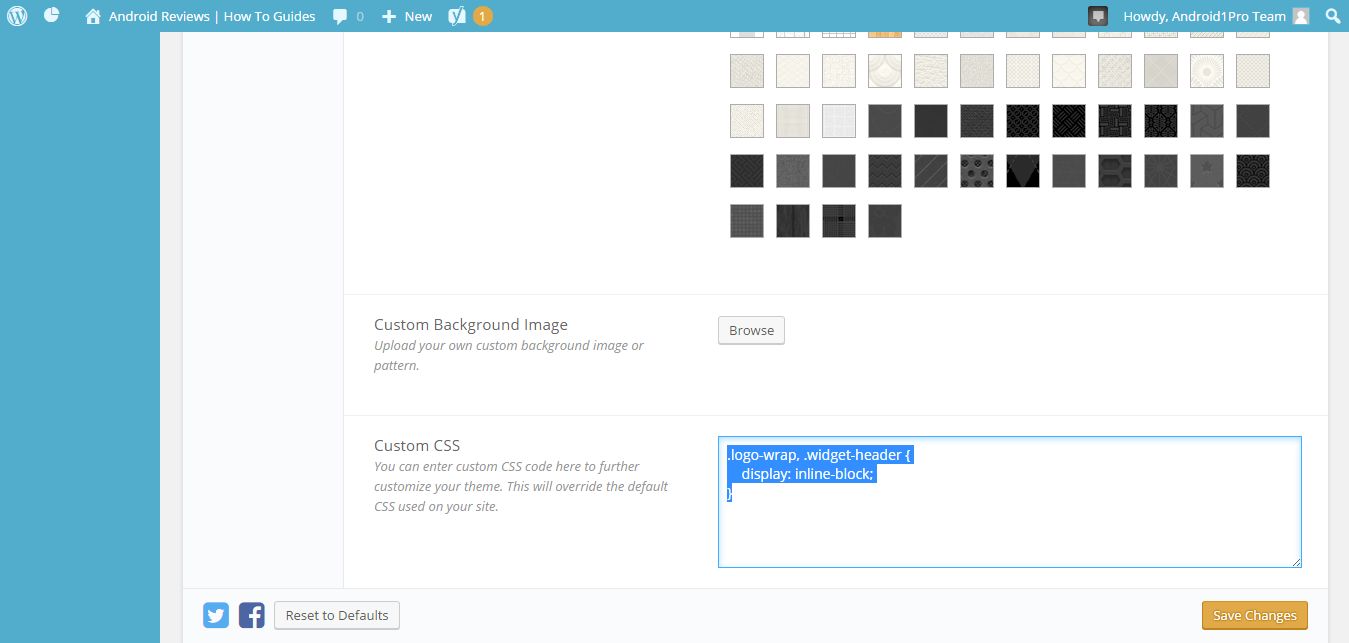
I did make very small minor change in theme to allow site title to be visible instead of uploading a logo.How?
by adding the following in CSS custom box
.logo-wrap, .widget-header {
display: inline-block;
}as shwon here is this screenshot
http://easycaptures.com/fs/uploaded/966/8332740759.jpgSo,
Q1: would this minor change means that the critical CSS is now different and thus must extract the new critical CSS and save it in the AO advanced settings like before ?Q2:
If so and in order to avoid any error in that vital step,
could you show exactly how to accurately correctly re produce the new critical CSS ?something don’t add up here
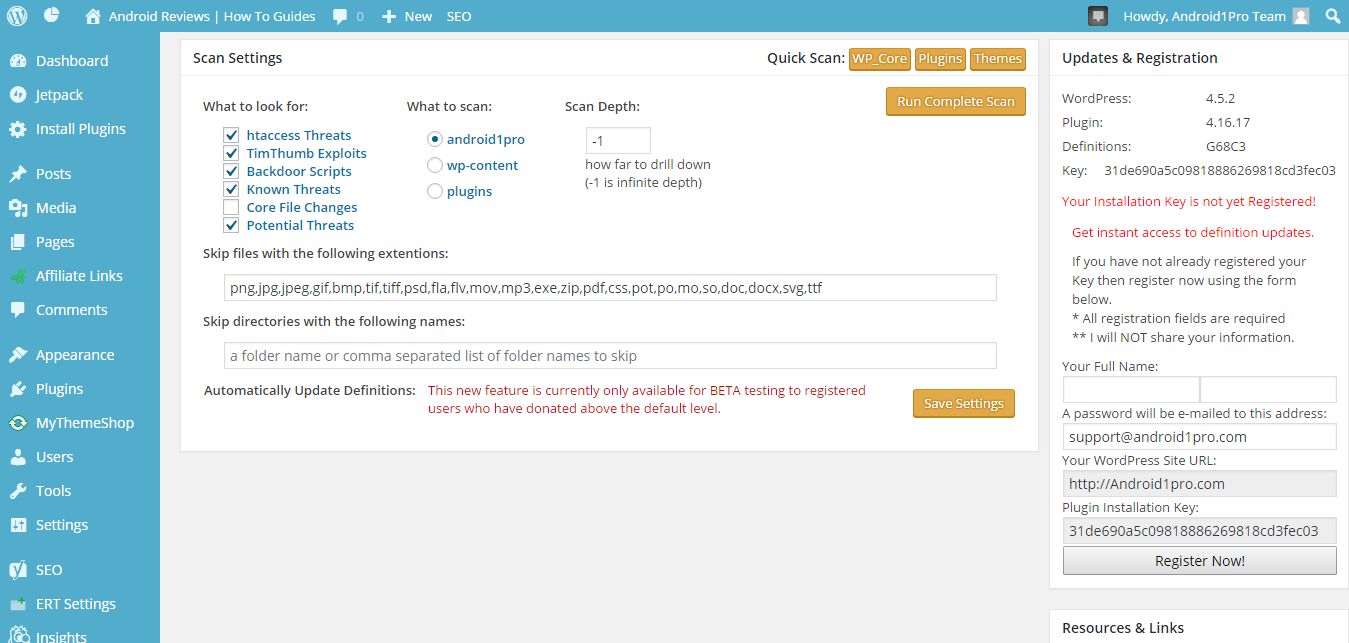
I have been registered now for 8 months and I have changed nothing at all in any settings,
now all of a sudden settings showing
“Your Installation Key is not yet Registered!”as clearly shown in this screenshot
http://easycaptures.com/fs/uploaded/965/9255032278.jpgHow is it possible that the server is not compatible with the .htaccess rewrite rules or the session_start function is not working.
when as clearly shown on the screenshot already given,
it did 100% block access to xmlrpc file.
The blocking of xmlrpc won’t ever happen without plugin effective accurate communication with the server and successfull write of blocking command on .htacess fileThank you Josh,
Unfortunately it is very unclear in instructions article you gave
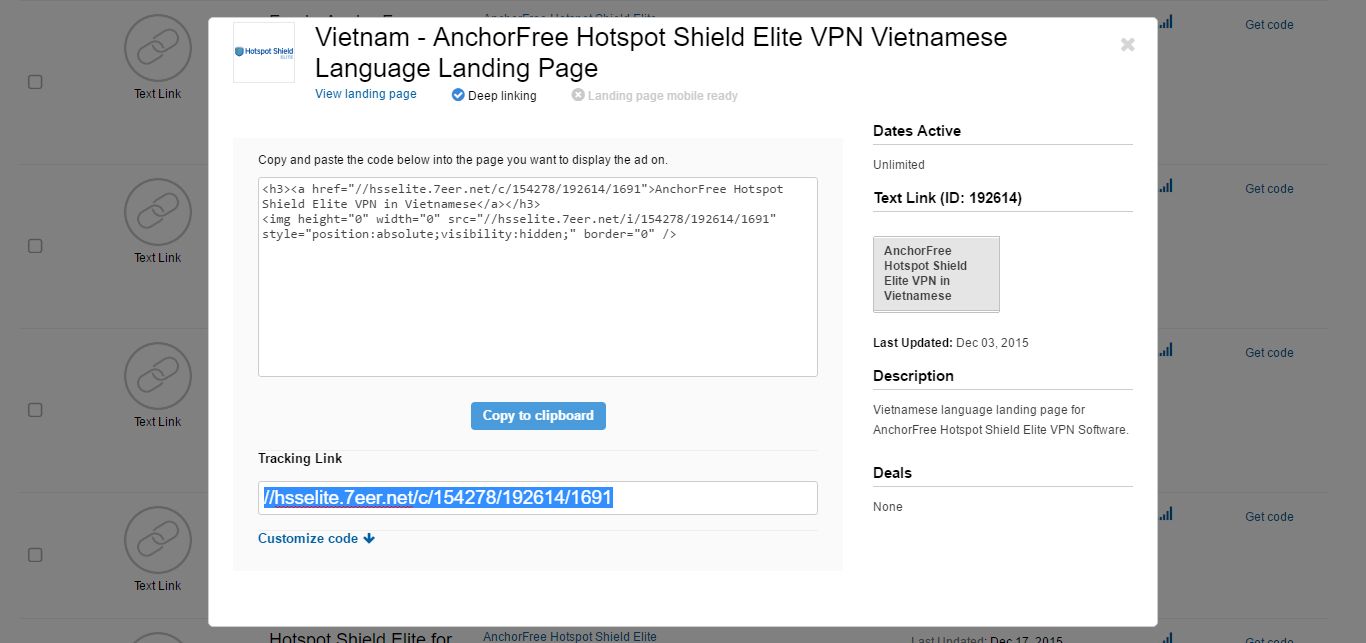
Here is the banner screenshot
http://easycaptures.com/fs/uploaded/961/4221915247.jpgWhere under
Copy and paste the code below into the page you want to display the ad on.<h3>AnchorFree Hotspot Shield Elite VPN in Vietnamese</h3>
<img height=”0″ width=”0″ src=”//hsselite.7eer.net/i/154278/192614/1691″ style=”position:absolute;visibility:hidden;” border=”0″ />Clearly both the first bolded link and second bolded links area identical in this case
which is same as under tracking link//hsselite.7eer.net/c/154278/192614/1691
When pasting second blolded link there is nothing no image to save at all
So how to resolve this issue in order to ensure accurate correct link being placed accurately where it should be
Your prompt reply with detailed solutions and answers will be appreciated