ameliabooking

Forum Replies Created
-
Hello,
An issue with email notifications could be caused by several reasons:
- Your hosting provider is blocking all 3rd party settings and only allowing their SMTP (or other) settings.
- Your website has a PHP version of less than 7.
- The credentials are not correct.
- There’s something else blocking the notifications from being sent.
- If you’re using Gmail, please check out this article for detailed setup instructions.
Forum: Plugins
In reply to: [Booking for Appointments and Events Calendar - Amelia] Problem with servicesHello,
Please check if you can see the booking form on page when you are logged in?
If this is the case then this can be 1 of 3 issues
1. The reason why the form is not visible for non-logged-in users is not in Amelia, but instead in your security settings. They’re either configured in a Security plugin (if you have any), or they’re on your server’s side.
The best option would be to reach out to your hosting provider, send them the link of the booking page and tell them exactly what you told us – you can see the page when you’re logged in as an admin, but you can’t see it from an incognito window (or when you’re logged out). They should be able to lift the block, so admin-ajax calls are sent for non-logged-in users also.
2. You have some page optimizers so turned them off and purge the cache and see if you can see the booking form then
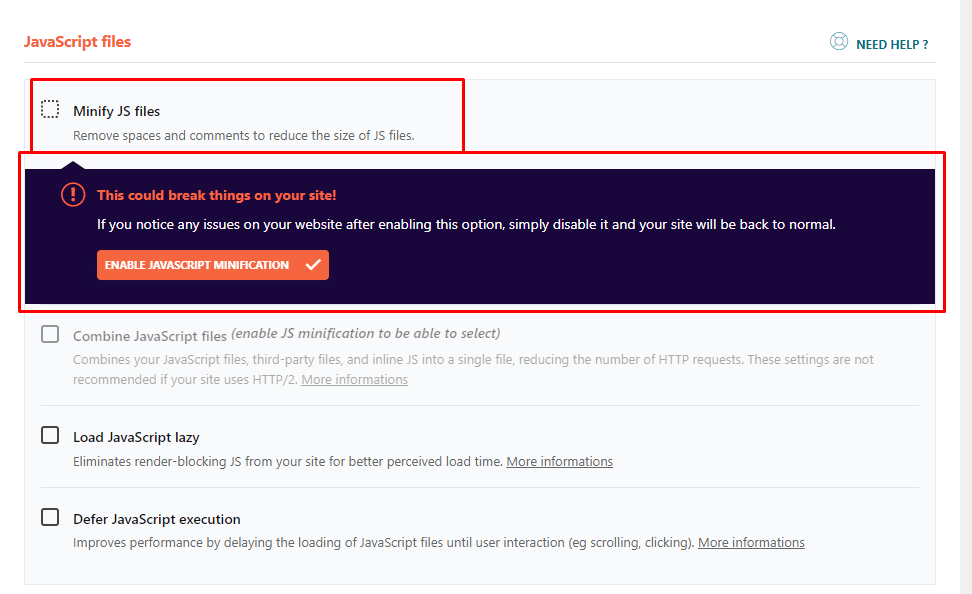
3. The new booking form should be displayed when you clear the cache, if you have a caching plugin or optimize plugin, please disable the minify js files option.
For example, if you have WP Rocket, and you have enabled these JS optimizations, which have a negative effect on our New Step Form, which is based on Vue 3 Framework, the booking form won’t show.
The old Form is based on Vue Framework 2, but the New Form is based on Vue Framework 3;
Once you disable the “minify JS” option in the Optimisations on WP Rocket, or similar, and purge the cache the form should appear.
Also, the issue could be with the Page Optimize plugin. You have these settings

and they should be added to this first input amelia_booking_script_index like this

and then everything will work with the new form.
Hope this helps.
Can you please explain in a bit more detail?
The minimum and the maximum capacity is defined per service, so you can configure the service to have a capacity of 10, but in the “Assigned Services” section of the employee’s profile, you can change that. This, however, can’t impact the ability of the employee to work on two services at the same time.
Adding the possibility for employees to cover multiple services at once is a cumbersome task since our developers would need to revise the code of the plugin and modify it without breaking any current functionalities. We can’t promise that this would be done in the future but we will definitely forward this as a suggestion to our developers.
Hi there and thank you for your review!
Although we can agree that this can be frustrating, the “issue” is not related to the customer or the service, but the availability of your employees. At this time, one employee can provide one appointment, so Employee 1 can’t offer two services at the same time.
A workaround, in this case, would be to create a duplicate employee who would cover Service B at the same time.
Please let us know if that helps!
Hello, our apologies for the previous response.
Since you’re using the Premium version of the plugin, please open a ticket on our official support platform, and we’ll gladly help you there.
Premium products are not supported in these forums.
Thank you for understanding.
Hello, thank you for reaching out to us.
Since you’re using the Premium version of the plugin, please open a ticket on our official support platform, and we’ll gladly help you there.
Premium products are not supported in these forums.
Thank you for understanding.
Hello, our apologies for the previous response.
Since you’re using the Premium version of the plugin, please open a ticket on our official support platform, and we’ll gladly help you there.
Premium products are not supported in these forums.
Thank you for understanding.
Hello, thank you for reaching out to us.
Unfortunately, there is currently no such option with Amelia’s built-in features. You can suggest that feature on the following link: https://features.wpamelia.com/
We carefully follow suggestions from our customers and the more vote the feature gets, the more priority we put on implementing that feature in one of the future updates.
Hello, thank you for reaching out to us.
Unfortunately, there is currently no such option with Amelia’s built-in features. You can suggest that feature on the following link: https://features.wpamelia.com/
We carefully follow suggestions from our customers and the more vote the feature gets, the more priority we put on implementing that feature in one of the future updates.
Hello,
We checked with our developers and there is nothing wrong with Amelia despite WordFence showing warnings.
That line of code is turned on if the “Enable usage for older IE browsers” setting is turned on… That setting has been turned off by default for about 2 years, so it must be turned on manually in order for this allegedly problematic JS to appear on the page. Our developers will work on removing it completely in one of the next updates. We will completely remove the call to that JS polyfill script and that warning should no longer appear.
If you have Enable usage for older IE browsers turned on in settings activations, just turn it off and make sure to purge the cache, and this should not appear anymore. In the event that it continues to appear as you mentioned, there is nothing wrong with Amelia that would harm your site or similar, and in one of the next updates, very possibly in the next one, we hope that our developers will remove that string and this warning should no longer appear. appears
I wanted to bring to your attention that when the settings are turned off, JavaScript (JS) will not be invoked on the page. However, Wordfence will still detect the presence of a supposedly Amelia issue with code, likely based on identifying that specific string. Therefore, even if you have disabled this option, you may still be able to identify the issue. Rest assured, we plan to address this with an upcoming update scheduled for following week, tentatively on Tuesday, where we will ensure that JS is not called to the page. Thank you for your attention to this matter. Best regards.
Forum: Plugins
In reply to: [Booking for Appointments and Events Calendar - Amelia] Multiple daysHello,
Thank you for reaching out.
Currently, the maximum duration for a single service is 24 hours. We understand the need for multi-day services like your three-day event. While we plan to implement multi-day bookings in the future, we don’t have a specific ETA for this feature yet.
In the meantime, you can set up three consecutive single-day services and inform customers to book each day individually. To simplify this, you might provide clear instructions in your service description or assist customers directly after they book the first day.
We apologize for any inconvenience and appreciate your understanding. Please let us know if you need further assistance.
Hello Lamichi,
Thank you for reaching out to us.
Please note that the employees option is not available in the lite version of the Amelia plugin, but you can configure a single employee on the Amelia/Settings/Provider details.
Let us know if you have any other questions.
Hello, thank you for reaching out to us.
Since you’re using the Premium version of the plugin, please open a ticket on our official support platform, and we’ll gladly help you there.
Premium products are not supported in these forums.
Thank you for understanding.
Hello, thank you for reaching out to us.
Since you’re using the Premium version of the plugin, please open a ticket on our official support platform, and we’ll gladly help you there.
Premium products are not supported in these forums.
Thank you for understanding.
Forum: Plugins
In reply to: [Booking for Appointments and Events Calendar - Amelia] FilterHello,
Thank you for reaching out to us.
Unfortunately, there is currently no such option with Amelia’s built-in features. You can suggest that feature on the following link: https://features.wpamelia.com/
We carefully follow suggestions from our customers and the more vote the feature gets, the more priority we put on implementing that feature in one of the future updates.