
Description
Uncanny Automator is the easiest and most powerful way to automate your WordPress site with no code. Build automations in minutes that connect your WordPress plugins, sites and apps together using billions of recipe combinations.
Here’s how Uncanny Automator works:
When something happens, Automator can make other things happen.
When a user buys a product, add them to a membership level, enroll them in a course and pass their information to Google Sheets.
It’s that simple! Here’s a video outlining how it all works.
If you’ve used Zapier, setting things up will be intuitive. And if not, that’s okay too!
E-commerce Automation
Improve customer engagement by having your purchases trigger marketing automation campaigns, award store credit, promote 5-star reviews, schedule time-limited bonus offers and offer profile-driven discounts. Or for advanced reporting and customer service, create WooCommerce automations that send purchase details to Google Sheets, Slack and ActiveCampaign with our native integrations. It all happens automatically!
Google Sheets Automation
Build powerful reports and dashboards based on almost any WordPress activity or data with 1-click Google Sheets integration. Track purchases, course completions, blog post updates, forum posts and more. Not only can you create new rows for reports with Uncanny Automator, but you can update existing records, making it perfect for dashboard reporting.
Webhook Automation
Looking for the most powerful and comprehensive webhook support to connect your WordPress site to other apps? Uncanny Automator has support for security headers, any request method and any data format (including nesting support, JSON, XML, arrays and more). Use our 1-click sample generation and debug records to simplify connecting to other sites and systems, and send unlimited outgoing webhooks with the free version.
LearnDash and E-Learning Automation
Personalize student experiences and deliver better learning outcomes with no-code automations. Notify an instructor when users fail a quiz and enroll them in a remedial course–automatically. Add users to groups based on performance to allow easy collaboration. Automate student outreach when users fall behind in their coursework and offer easy learning interventions.
Social Media Automation
Spend less time sharing your posts and announcements on social media with automatic posting. Automatically post anything you want to Facebook Pages, Facebook Groups, X/Twitter, LinkedIn and Instagram, including with images and links. Sign up for a free account to get 250 credits for social posting; Pro plugin users get unlimited posting.
OpenAI Automation
Connect your new posts and site activity to OpenAI, with full support for ChatGPT and Dall-E models. Use Automator and the OpenAI to generate article summaries, social media posts, SEO descriptions, translations, email campaigns, featured images and more.
Marketing Automation
Integrate your favourite CRM with your WordPress plugins for full marketing automation. Add or remove tags based on course activity, purchases and more, and keep your email lists updated automatically. Or, with Automator Pro and Loops, send emails out in bulk and use Automator as your own CRM.
Free doesn’t mean limited
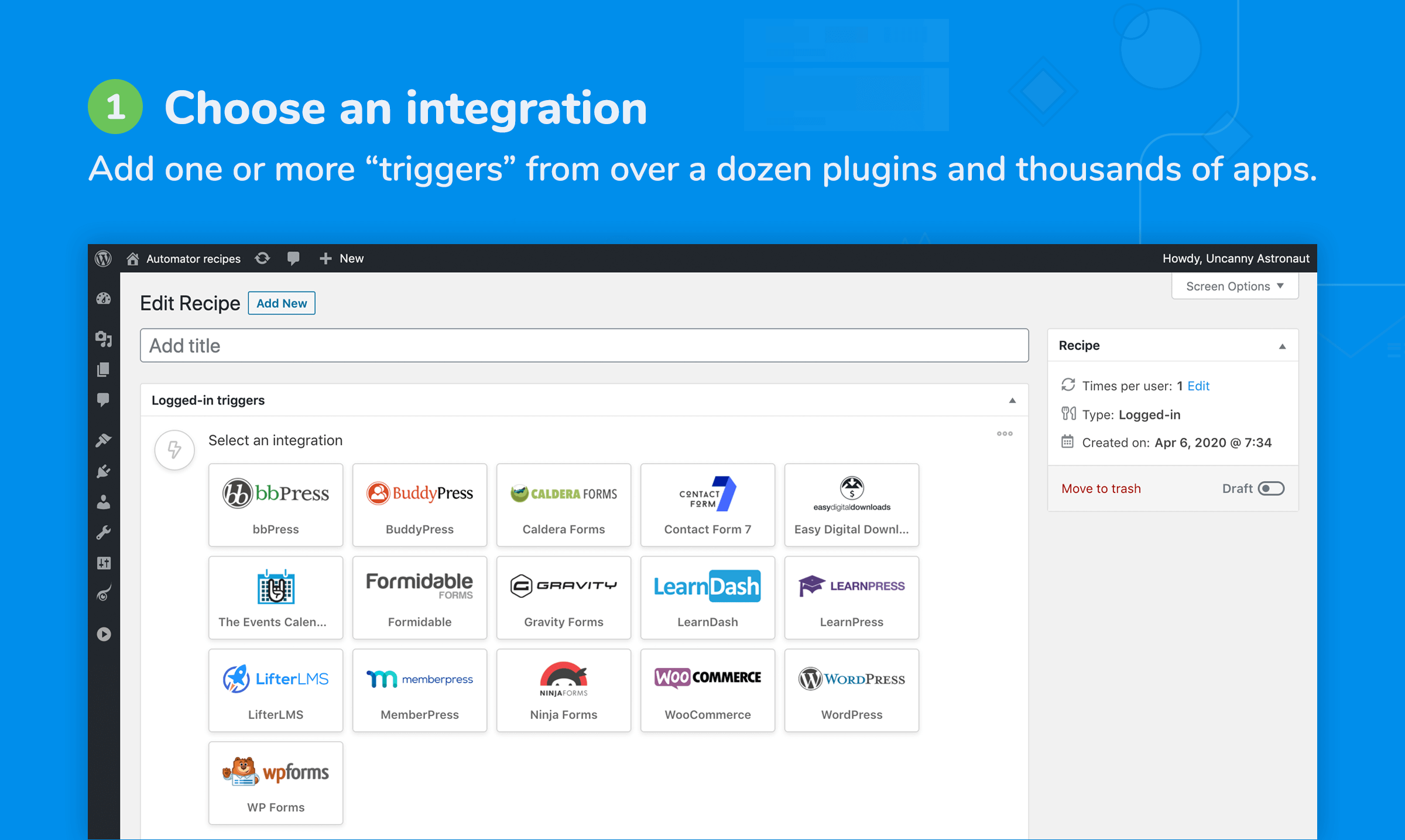
The free version of Automator is incredibly powerful and comes with built-in automation and integration support for all of these popular apps and WordPress plugins:
Supported apps
- ActiveCampaign
- Anthropic
- Asana
- AWeber
- Bitly
- Bluesky
- Brevo
- Campaign Monitor
- ClickUp
- Cohere
- Constant Contact
- DeepSeek (Deprecated)
- Discord
- Drip
- Facebook Groups
- Facebook Lead Ads
- Facebook Pages
- GetResponse
- GitHub
- Google Calendar
- Google Contacts
- Google Gemini
- Google Sheets
- Google Sheets Web App (Pro)
- GoTo Meeting
- GoTo Training
- GoTo Webinar
- Help Scout
- HubSpot
- Keap
- Kit
- LinkedIn Pages
- Mailchimp
- MailerLite (Pro)
- Mautic
- Mistral AI
- Microsoft Teams
- Notion
- Ontraport
- OpenAI and GPT
- Perplexity
- QuickBooks Online (Elite)
- Salesforce (Elite)
- Sendy
- Slack
- Stripe
- Telegram
- Threads
- Trello
- Twilio
- X/Twitter
- xAI
- Zoho Campaigns
- Zoom Meetings
- Zoom Webinars
WordPress Plugins Integrations
- Advanced Ads
- Advanced Coupons
- Advanced Custom Fields (Pro)
- AffiliateWP
- Airtable
- All in One SEO
- Amelia
- ARMember
- Automator Core
- FunnelKit Automations
- BadgeOS
- Beaver Builder
- bbPress
- Bricks Builder
- BuddyBoss
- BuddyPress
- Caldera Forms
- CSV (Pro)
- Custom User Fields (Plus Addon)
- Charitable
- Cloudflare
- Code Snippets
- Contact Form 7
- Custom Action (Pro)
- Date and Time (Pro)
- Database Query (Pro)
- Divi
- Dynamic Content (Elite Addon)
- Duplicator
- Easy Affiliate
- Easy Digital Downloads
- Easy Digital Downloads-Recurring Payments
- Easy Digital Downloads-Software Licensing
- Easy WP SMTP
- Elementor Pro
- Emails
- Events Manager
- Everest Forms
- Fluent Forms
- Fluent Support
- FluentBooking
- FluentCommunity
- FluentCRM
- Formidable Forms
- Formatter (Pro)
- Forminator
- GamiPress
- Generator (Pro)
- GiveWP
- Gravity Forms
- GravityKit (Pro)
- Groundhogg
- H5P (Pro)
- HappyForms
- Heroic Knowledge Base
- IFTTT
- Integrately
- Integromat
- JetEngine (Pro)
- JetFormBuilder
- Jetpack CRM
- JSON (Pro)
- Kadence
- KonnectzIT
- LearnDash
- LearnDash Achievements
- LearnPress
- LifterLMS
- LiteSpeed Cache
- Loop (Pro)
- Logging
- Magic Button (Pro)
- MailPoet
- Mailster
- Make
- MasterStudy LMS
- Memberium For Keap
- MemberMouse
- MemberPress
- MemberPress Courses
- Meta Box (Pro)
- Modern Events Calendar
- myCred
- Newsletter (Pro)
- Ninja Forms
- OptinMonster (Pro)
- Pabbly Connect
- Paid Memberships Pro
- PeepSo
- Plugin Actions (Pro)
- Popup Maker
- Presto Player
- Pretty Links
- QR Code (Pro)
- RafflePress
- Rank Math SEO
- Redirection
- Restrict Content Pro
- RSS feed (Pro)
- Restrict Content (Plus Addon)
- Run Code (Pro)
- Run Now (Pro)
- SaveTo Wishlist
- Schedule (Pro)
- SliceWP
- SeedProd
- Speed Optimizer
- Security Optimizer
- Studiocart
- Sugar Calendar
- SureCart
- SureForms
- SureMembers
- The Events Calendar
- Thrive Apprentice
- Thrive Architect
- Thrive Leads
- Thrive Ovation
- Thrive Quiz Builder
- Thrive Theme Builder
- Thrive Ultimatum
- ThriveCart (Pro)
- Tin Canny Reporting
- Typeform (Pro)
- Tutor LMS
- Ultimate Member
- User Lists (Plus Addon)
- Uncanny Codes
- Uncanny Continuing Education Credits
- Uncanny Groups
- Uncanny Toolkit
- Upsell Plugin
- URL
- UserFeedback
- W3 Total Cache
- Webhooks
- Wholesale Suite
- Wishlist Member
- WooCommerce
- WooCommerce Bookings
- WooCommerce Memberships
- WooCommerce ShipStation
- WooCommerce Subscriptions
- WordPress
- WordPress Multisite (Pro)
- WordPress Download Manager
- Wordfence Security
- WP Activity Log
- WP Admin (Pro)
- WP All Import
- WP Bitly (Pro) (Deprecated)
- WP Courseware
- WP Event Manager
- WP Fastest Cache
- WP Fusion
- WP Fusion Lite
- WP Job Manager
- WP LMS
- WP Mail SMTP Pro
- WP Rocket
- WP Simple Pay
- WP Super Cache
- WP User Manager
- WP Webhooks
- WP-Polls
- WPCode
- WPForms
- WS Form LITE
- wpDiscuz
- wpForo
- XML (Pro)
- Yoast SEO
- Zapier
Over 350 automation triggers and actions are available for the plugins and apps listed above in the free version. There’s straightforward documentation in our Knowledge Base, including some quick and straightforward instructional videos. Developers, there’s robust documentation and code samples for you too!
Beyond the plugin and app integrations, this free version of Uncanny Automator also supports common WP triggers and actions in automations:
- A user views a page
- A user submits a comment
- A user logs in
- A user publishes a post
- Send an email
- Create a post
- Add a WP role
All WP plugin triggers and actions included in Uncanny Automator come with a forever free license, which allows unlimited usage on your WordPress site. By creating a free, optional Automator account, you can unlock 250 credits to try out app integrations. You can use credits on your site to:
- Post new content to Facebook Groups, Facebook Pages, X/Twitter and Instagram
- Pass records to Google Sheets (to generate charts or reports or manipulate data outside of WordPress)
- Notify staff of key events in Slack
- Register customers in Zoom events on product purchase
- Send Mailchimp campaigns when new blog posts are published
- Generate, proofread or translate text with OpenAI and GPT
- and more
Take automation to the next level
Uncanny Automator Pro, our premium plugin, adds even more features and integrations, including the ability to create users and posts, delay and schedule actions, connect multiple sites together, add conditions to actions, and unlock unlimited use of app integrations like Google Sheets and X/Twitter. It also triples the number of available triggers and actions.
Pro also adds features like Run Now and Loops, which allow you to do things like send emails to all users matching certain criteria, tagging users based on site activity, or even generating instant reports in Google Sheets of all users that completed a specific course, purchased a certain product, or anything else you can imagine.
Here are some of the other really cool automations you can create with Automator Pro:
- When a user makes a purchase using WooCommerce on one site, create a user on another WP site, send the user a link to set a new password, enroll the user in a course and add a membership level.
- When a user submits a form, add the user to a mailing list if their email address matches a certain domain, add them to a social group and schedule their trial access to expire in 7 days if they don’t make a purchase.
- When a new course is published, send an email campaign, post to X/Twitter and Facebook with GPT-generated content, post to the BuddyBoss sitewide activity stream and notify instructors in a Slack channel.
- Whenever you want, generate a list of all users in a group that haven’t yet completed a course.
And here are some of the key features in the Pro version that allow incredibly flexible and powerful automations for WP:
- Run recipes for logged out users with Everyone recipes; you can even create and update existing users.
- Have external apps trigger recipes and vice versa.
- Set up buttons and links that can trigger any recipe on click.
- Set custom user and post meta, both individually and in bulk via loops.
- Delay or Schedule an action
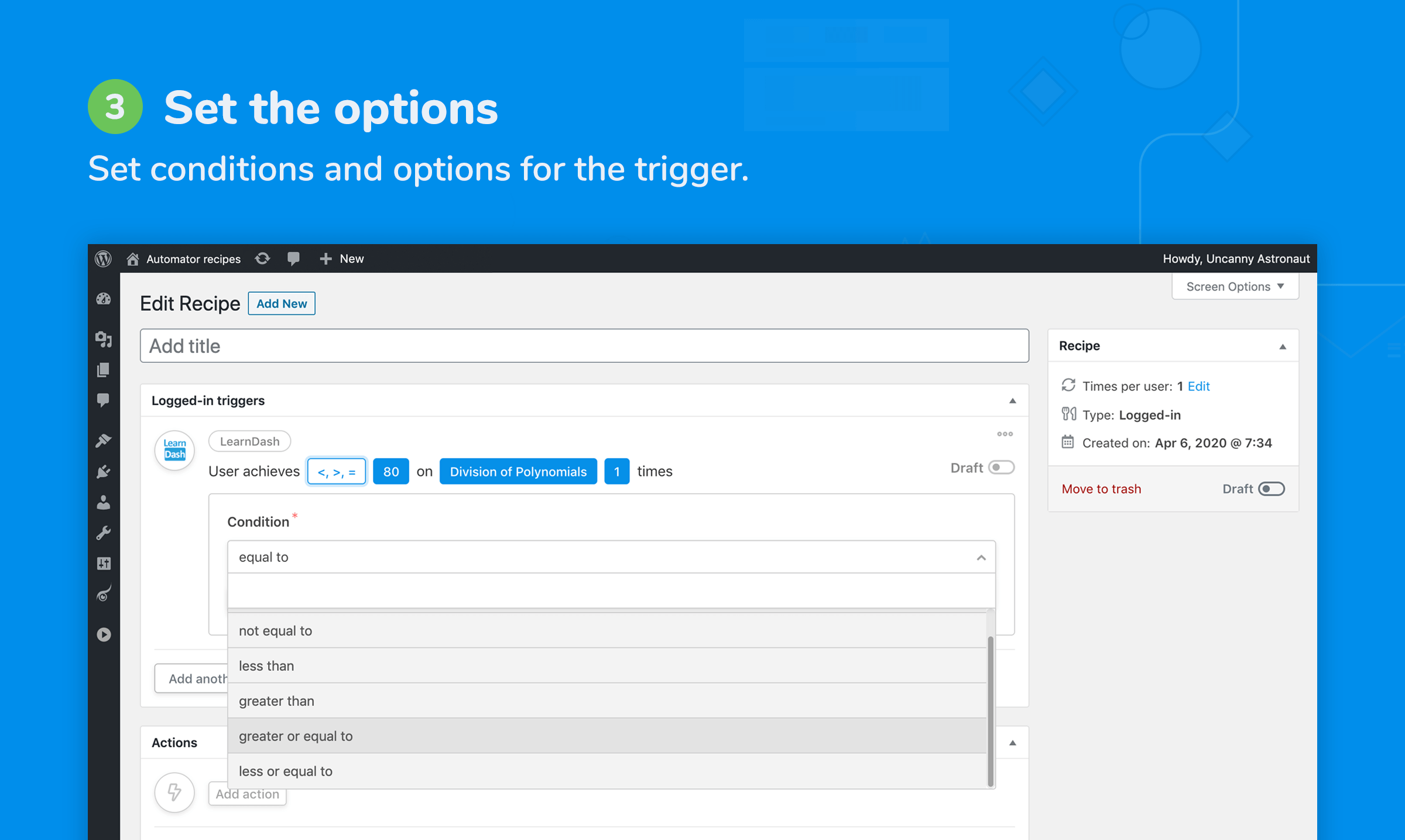
- Filter actions so they only run when conditions are met, like a matching user email domain or WordPress role.
- Run any WordPress hook or call custom functions in your recipes.
- Automatic log pruning to keep log size down.
Plus licenses and higher get access to our Custom User Fields, Restrict Content, and User Lists addons which makes it really easy to create and manage user profile fields in WordPress. Automatically add new fields to user edit pages and connect fields to your recipes and plugins like Advanced Custom Fields.
An Automator Pro license also includes access to our world-class premium support.
For the full list of triggers and actions, make sure to check out this list.
Here’s what other people are saying about Uncanny Automator:
Screenshots



FAQ
Where can I find Automator documentation and more info?
You can learn more about Uncanny Automator on our website at https://automatorplugin.com/ and our Knowledge Base is here: https://automatorplugin.com/knowledge-base/
How do I get started with my first automation?
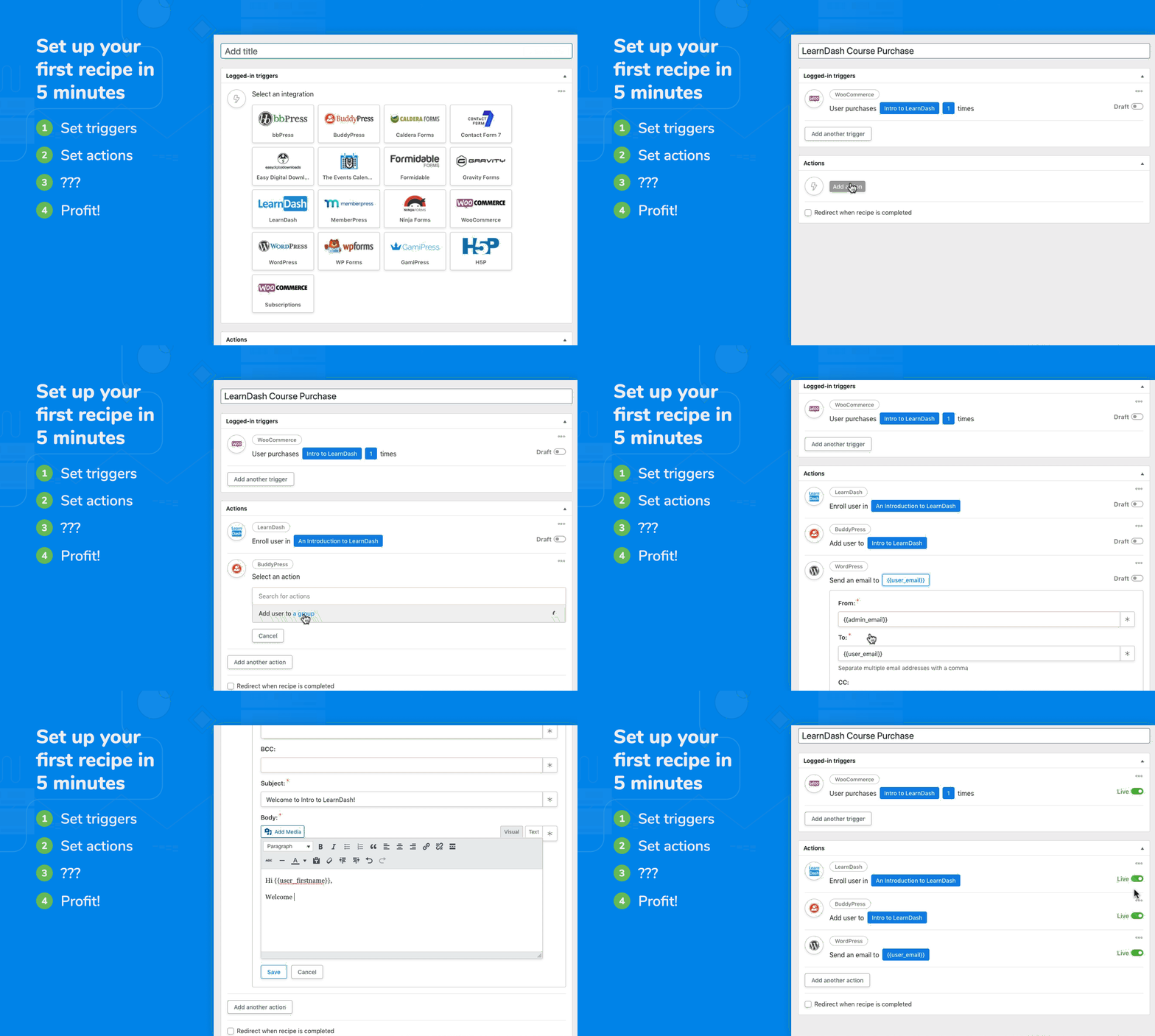
Have a look at https://automatorplugin.com/knowledge-base/creating-a-recipe/. There’s also an onboarding wizard inside the plugin to help you build your first recipe. Hopefully it will be the first of many!
Will Uncanny Automator slow down my website?
Uncanny Automator is built from the ground up for efficiency and performance. Automator adds negligible overhead to WordPress sites and has been rigorously tested across dozens of hosting environments.
What are the limits of your free version?
All integrations, triggers, actions and tokens listed here that don’t have a “Pro” label are available in our free version. For the WordPress plugins listed, we include a forever-free license that allows you to run recipes with these triggers and actions an unlimited number of times. There are also no limits on the number of recipes you can set up or what you can include in each. For recipes that include apps, like X/Twitter and Facebook, you can create a free account to unlock 250 credits to try out these integrations.
Is Automator translation friendly?
Absolutely! The plugin was created with translation in mind and tested with a variety of translation plugins. We will support any translation issues you run into.
How can I request an integration for a plugin?
The best thing you can do is reach out to the creator of the plugin that you want an integration for. Let them know you’re using Uncanny Automator and that they could greatly extend the capabilities of their plugin by helping us develop an integration for it. As more plugin authors become aware of Uncanny Automator and realize its potential for their users, we’ll be able to continue to invest in expanding Uncanny Automator’s capabilities! Also, fill out this form on our site to let us know what you’re looking for.
How can I add an integration for my plugin?
Check out our developer documentation over at https://developer.automatorplugin.com/. Also consider reaching out to our team, maybe we can help or even turn it into an official integration!
Yes. It is easy to set up automation and share content on Social Media platforms. Set up integrations with Instagram, Facebook Pages, Facebook Groups, LinkedIn Pages and X/Twitter by creating a free account to unlock 250 free credits.
Do I need coding skills or help from a developer?
No coding skills are required. Uncanny Automator is built for non-developers to build automations using our intuitive recipe builder.
Does Automator work with LearnDash?
Absolutely! LearnDash is our most popular integration. Automator provides an easy way to build powerful LearnDash activity reports, personalize learning paths, connect LearnDash to live events and more.
How does Automator use OpenAI?
By connecting your recipes to an OpenAI API account, you can send prompts to OpenAI and use the responses in other actions. Generate titles and descriptions, excerpts for social media, translations, new blog posts and more; you can even perform sentiment analysis on submitted text. Automator supports GPT-3.5, GPT-4 and other OpenAI models.
Does Uncanny Automator allow me to customize the look and design of the emails it sends?
Yes, with WordPress’s “Send Email” action, send rich text, plain text and raw HTML emails. Create follow-up emails with your own custom HTML templates.
Why should I consider upgrading to Uncanny Automator Pro?
You can use the free version forever without purchasing the Uncanny Automator Pro version. However, with Uncanny Automator Pro, you’ll get access to more automation triggers and actions, additional features, and unlimited credits for app integrations. Visit our plans page to learn more.
Who is Uncanny Owl?
We’re a Toronto-based WordPress company specializing in elearning and automation solutions for WordPress. We’re behind the popular Uncanny LearnDash Toolkit plugin and we also have a suite of highly-acclaimed commercial LearnDash add-ons.
Reviews


Contributors & Developers
“Uncanny Automator – Easy Automation, Integration, Webhooks & Workflow Builder Plugin” is open source software. The following people have contributed to this plugin.
Contributors


“Uncanny Automator – Easy Automation, Integration, Webhooks & Workflow Builder Plugin” has been translated into 4 locales. Thank you to the translators for their contributions.
Interested in development?
Browse the code, check out the SVN repository, or subscribe to the development log by RSS.
Changelog
7.4.0 [2026-07-14]
New App Integration:
- GoTo Meeting #7993
New Plugin Integrations:
- Beaver Builder #7476
- Redirection #7533
- WP Activity Log #7522
- WP Fastest Cache #7534
- Wordfence Security #7506
New Triggers:
- Beaver Builder – A user submits a contact form #7477
- Beaver Builder – A user submits a subscribe form #7478
- Redirection – A 404 error is logged #7532
- Redirection – A redirect in a group is matched #7529
- Redirection – A redirect is created by the URL monitor #7530
- Redirection – A redirect is deleted #7531
- WP Activity Log – A failed login is logged #7520
- WP Activity Log – An event for an object type is logged #7518
- WP Activity Log – An event is logged #7521
- WP Activity Log – An event of a type is logged #7517
- WP Activity Log – An event with a severity is logged #7519
- WP Fastest Cache – All cache is cleared #7535
- Wordfence Security – A blocking rule is deleted #7513
- Wordfence Security – A login with a breached password is blocked #7509
- Wordfence Security – A user activates two-factor authentication #7510
- Wordfence Security – A user deactivates two-factor authentication #7511
- Wordfence Security – An IP is blocked/throttled #7508
- Wordfence Security – An IP is locked out #7507
- Wordfence Security – An admin/non-admin user logs in #7512
New Actions:
- GoTo Meeting – Create a meeting #7994
- GoTo Meeting – Delete a meeting #7995
- GoTo Training – Add an attendee #7996
- GoTo Training – Remove an attendee #7997
- WP Fastest Cache – Purge all caches #7537
- WP Fastest Cache – Purge the cache for a post #7538
- Wordfence Security – Block an IP address #7514
- Wordfence Security – Remove an IP block #7515
- Wordfence Security – Remove an IP lockout #7516
Fixed:
- Automator review – Added capability and nonce checks to the review settings handler, keeping unauthorized option changes firmly off the guest list. #8159
- Bluesky – Protected post embed URL requests against SSRF, including redirects that tried to take the scenic route somewhere unsafe. #8157
- Credits notifications – Added a capability check so lower-privileged users can no longer dismiss site-wide credit notices. #8161
- Facebook Lead Ads – Added payload validation and optional authorization controls to webhooks, giving unexpected requests a proper ID check. #8155
- Gravity Forms – Blank List fields no longer stop recipes during form submission. Empty lists can now pass quietly without causing a scene. #8019
- HubSpot, Brevo, Constant Contact – Deprecated actions – Prevented deprecated actions from loading when demand-driven loading is enabled. Retired means retired. #8035
- LearnDash – Create a group / Make the user the leader of a group – Fixed legacy option data that prevented the action configuration from opening. #8170
- LearnDash – Restored the missing loopable tokens to the Token Loop, where they belong. #8021
- LearnDash – Triggers – Restored the “Number of times” option for affected triggers. The counter is back on duty. #8168
- Modern Events Calendar – Added authorization and nonce checks to event and ticket AJAX handlers for safer request handling. #8163
- Recipe log – Secured the “View preview” popup against stored XSS by rendering its HTML inside a sandboxed iframe. The preview now stays in its lane. #8165
- WordPress – Restored the missing loopable tokens to the Token Loop. #8028
Security Fixes:
- Google Contacts & Mautic – Added capability and nonce checks to option fetchers, ensuring only authorized requests get through. CVE-2026-15025 #8152
- Forminator and related token reads – Hardened token handling against PHP Object Injection. CVE-2026-15008 #8150
- Loopable integrations (CSV/XML/JSON) – Blocked private-network requests in loopable URL fetchers and hardened token-alias migrations against object injection. #8151
Under the hood:
- Core – Corrected app-credit limits for legacy Pro and Lifetime licenses. The numbers now behave as their licenses intended. #8138
- Divi – Modernized the integrations using the new framework, giving the foundations a well-earned refresh. #7458
- Uncanny Agent – Database select tool – Secured WHERE and JOIN handling with validated predicates and prepared values. Database queries now follow a stricter dress code. #8014
- Uncanny Agent – Secured component requests with encrypted license credentials, request binding, and fail-closed handling. When verification fails, the door stays closed. #8174