wiresplus

Forum Replies Created
-
Forum: Plugins
In reply to: [Contact Form Submissions] cannot find where the data is storedThanks.
Actually, I’m querying the database with a separate app, that’s why I needed the location.The best, and possibly the most correct way, is to provide your child theme with the
template-partsfolder, and edit thesite-info.phpfile in the footer subfolder.Using FTP or whatever suits you best, create a folder in your child theme called
template-parts. Inside this folder, create one calledfooter. Inside that, place a php file calledsite-info.phpthat reads as follows:<?php /** * Displays footer site info * * @package WordPress * @subpackage Twenty_Seventeen * @since 1.0 * @version 1.0 */ ?> <div class="site-info"> <div class="wrap"> [your chosen content goes here] </div><!-- .wrap --> </div><!-- .site-info -->That way, the default footer.php functionality is preserved, yet displays your chosen content.
Forum: Fixing WordPress
In reply to: My website is not getting popularI’m no pro blogger, but the English grammar of the site is low quality. I wouldn’t naturally return to the site again.
If you want to be recognized as a serious contender in the busy news space, consider the following:
1) Who is your target customer?
2) Why should they come to your site instead of others?
3) How are you going to let them know you are there?I’d be looking at google adwords or similar.
Keep trying – you’ve got the general idea, just need to refine it.
Forum: Fixing WordPress
In reply to: different title on a single pageConditional Tags should do the trick for you 🙂
OK, so I fixed this. For those who find this thread and want the answer, here’s what I did:
The image was in uploads/2016/01 and was called ‘LongPad.png’
In my CSS, i added the following code
.site-content {
    margin: 0 auto;
    padding: 40px 0 40px 0;
    max-width: 60%;
    background: url(/wp-content/uploads/2016/01/LongPad.png) repeat-x;
Simple, because WP then loads that image behind any content, but not behind the whole page.
No, I want the background image to entirely cover the screen, then the notepad image to be in front of that, then the page content in front of that. The idea is a floating notepad with text on the pages, but with a big background image too
Forum: Themes and Templates
In reply to: [Twenty Fifteen] Responsive image in site brandingkatarinamh, why not use a percentage instead of a fixed pixel size? then it is responsive.
I’d try adding background-image:on-click url(“your url here”); to make it clickableForum: Plugins
In reply to: [Contact Form 7] Required field option missing on radio buttons generatorI am having the same issue.
To quote @buzztone “The reason Contact Form 7 doesn’t provide “radio*” is because a radio button is a required field by nature”Oh, so why can i ignore the fields altogether and submit the form without error?
I have 8 radio selections which must be mandatory.
What should I do instead?
Hello,
I have used WooCommerce CSV with success. There’s a couple of upgrades too.OK: I did this.
i replaced
margin-right: auto;withmargin-left: 30px;That worked perfectly for me.
As @rossmitchell said, there’s “various margin(left/right) auto things in the css.“
So, hopefully anyone who finds this thread will be able to do something similar.
Cheers all!
OK.
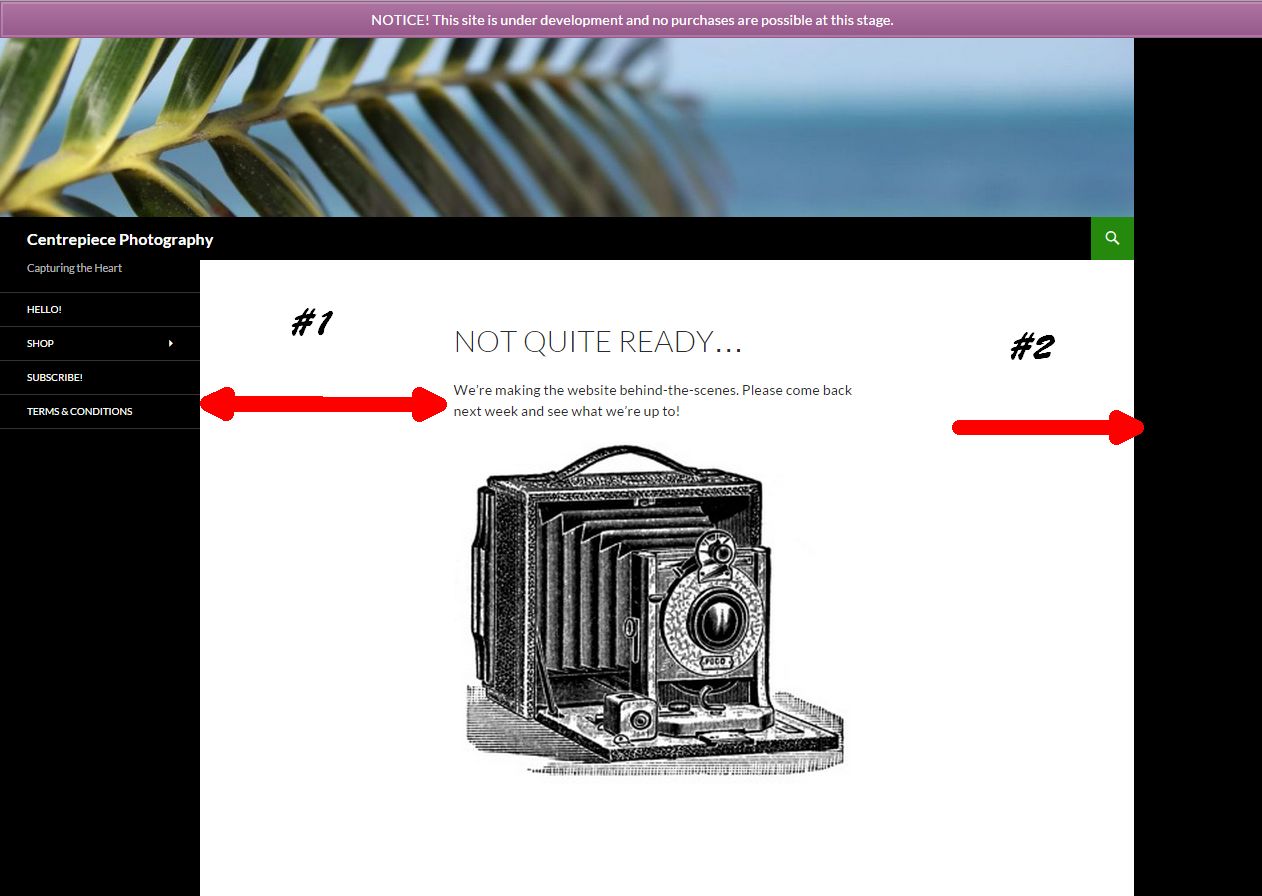
problem #1: site not ‘live’ so difficult to link.Problem 2: using chrome, F12 inspector, all blocks show as full width and I still cannot find the correct spot.
Here is a link: Screenshot-Of-Issue
#1 = The gap in question
#2 = I want to get rid of this black gap tooHope that helps?
OK, but how about sideways? I want to shift the content closer to the left sidebar
Forum: Plugins
In reply to: [Pinpoint Booking System - Version 2] Multiple calendarsForum: Fixing WordPress
In reply to: "HOME" link unwantedly points to original WP installationGlad I could help!