wfmark

Forum Replies Created
-
Hi @beingbaban, Thank you for reaching out to us.
Unfortunately, you cannot block an IP using templates on Wordfence Central. You can only block an IP address from the “Blocking” tab at the top of the “Firewall” page and then use the “Block Type” button that says “IP Address”. Make sure that you know that the IP address is malicious before you block it.
You can also block an IP address on the Live Traffic tool page, with instructions on the documentation page here – https://www.wordfence.com/help/tools/live-traffic/#understanding-a-live-traffic-record
Hopefully we can add this feature in a future release.
Thanks,
Mark
Hi @russellcardiff, Thank you for reaching out to us.
Try clearing cache (site plugins and local browser) and disabling all other plugins except for Wordfence, then trying again to see if there’s a plugin or theme conflict causing the issue. You could also revert to a default theme, such as Twenty Twenty-Three.
If it works as expected, then re-enable your plugins and theme one by one until the issue recurs to help find the cause.
Also, can you send a diagnostic report to wftest@wordfence.com? You can find the link to do so at the top of the Wordfence Tools > Diagnostics page. Then click on “Send Report by Email”. Please add your forum username where indicated and respond here after you have sent it.
Thanks,
Mark.
Hi @sinapars, Thank you for reaching out.
Please confirm that you are not blocking outbound or Inbound requests from your site to our servers. Allow the IPs below on ports 80 and 443.
52.25.185.95
54.148.171.133
35.83.41.128
44.235.211.232
54.68.32.247
54.71.203.174
You may also want to confirm that IP detection on your server is correct. Take note of your IP as displayed on https://www.whatsmyip.org. Please note that this detection can sometimes not be 100% accurate on cellular phone network connections.
Navigate to Wordfence > All Options > General Wordfence Options > How does Wordfence get IPs and reference the area under that section that says Detected IPs and Your IP with this setting. Start from the top and check to see if any settings show the same IP as the site above.
Let me know how it goes.
Thanks,
Mark
Hi @antonb99, Thank you for reaching out.
To rule out any caching issues, could you please try an incognito/private browsing window or a different browser than your default one?
If the issue still persists, are you seeing any errors in your browser console for scripts related to Wordfence?
Thanks,
Mark
Hi @xonnext, Thank you for reaching out.
At the moment,the only way you can customize block pages is by adding a custom message using the option Custom text shown on block pages found in the Brute Force Protection section on the All Options page.
I have added your feedback to the feature request for this, as we have had many requests for this. We can’t provide ongoing updates here on the forums or comment on possible delivery dates, but any features we do add will appear in our changelog when new versions of the plugin are released.
Thanks,
MarkForum: Plugins
In reply to: [Wordfence Security - Firewall, Malware Scan, and Login Security] Scan FailedHi @odommo, thanks for your message.
Have you tried starting scans remotely from the Wordfence > Tools > Diagnostics > Debugging Options section? Does the exact same issue occur? There are other scan troubleshooting tips here: https://www.wordfence.com/help/scan/troubleshooting/
If nothing that I’ve suggested there works and you’re on Cloudflare or Litespeed, there can be other configuration requirements to prevent scans from stopping but the best way for me to determine this would be getting a scan log and diagnostic report from you.
If you could do the following steps for me:
- Go to the Wordfence > Tools > Diagnostics page
- In the “Debugging Options” section check the circle “Enable debugging mode”
- Click to “Save Changes”.
- CANCEL any current scan and start a NEW scan
- Copy the last 20 lines from the Log (click the “Show Log” link) or so of the activity log once the scan finishes and paste them in this post.
Wordfence > Tools > Diagnostic > Debugging Screenshot
This will help me see exactly what is happening when the scan fails.
Then, can you send a diagnostic report to wftest @ wordfence . com? You can find the link to do so at the top of the Wordfence > Tools > Diagnostics page. Then click on “Send Report by Email”. Please add your forum username where indicated and respond here after you have sent it.
NOTE: It should look as follows – Screenshot of Tools > Diagnostic > Send by Email
Thanks,
Mark.
Hi @michael8888, Thank you for reaching out.
Thanks for your message and sorry to see you’re having problems with CPU resources.
Is this happening when running Scans?
Wordfence runs well and unintrusively on the vast majority of ~5m sites it’s installed on despite having to consider many server and plugin/theme combinations. We constantly work on making the plugin faster, perform better, and use less resources but there are not set amounts of RAM, CPU or database queries that we know Wordfence will definitely require in each use-case or hosting environment. The cases of slow-down are small in relation to the quantity of customers using Wordfence, but does crop up from time to time with certain configurations or larger databases/number of installed plugins.
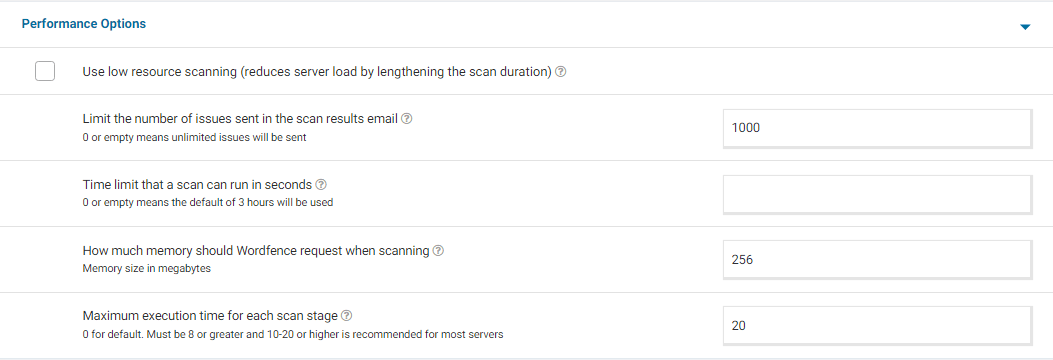
For a screenshot of my recommended Performance setting options – Click Here.
You could also set max_execution_time = 60 in php.ini, Wordfence’s scan only ever attempts to use half of this value by default.
Your WP_MEMORY_LIMIT should be set to 128M or 256M in wp-config.php. WooCommerce, for example, recommend 64M minimum, so if you also have many hits on the site at once especially during a Wordfence scan, a lower limit here could be reached fairly easily. Your PHP memory_limit value could also be adjusted to 128M or 256M to accommodate this change.
Aside from this, if there are any load-balancers or other APIs running on your server such as Litespeed or Cloudflare, you could check if these (or their configuration with Wordfence) are contributing in any way to the slow loading times. Cloudflare for example requires a bespoke Wordfence IP detection option selecting, and whitelisting of your own server’s IP in their settings for scans to run correctly.
Thanks,
Mark.
Hi @hyflex, thanks for reaching out.
Please send a request to lockout@wordfence.com with the email addresses associated with both accounts and the site URL.
They will be able to assist you faster and more efficiently.
Thanks,
Mark.
Hi @emotionsm, thanks for reaching out to us!
This may be caused by:
1) A plugin or custom code to change the load ordering of JavaScript such as deferring the parsing of Javascript.
2) A plugin that combines JavaScript files or minifies JavaScript code.
Do you have such a plugin that has this functionality? It might be in a caching plugin.
Have you added any custom code to your site to change the load ordering of JavaScript such as deferring the parsing of Javascript?
You can also try logging in using another browser with all browser extensions disabled. Please don’t use a private session, disable all browser extensions instead.
Alternatively, you can follow these steps to get back into your site.- Please use FTP/SFTP — or any file manager your web host provides via their administration panel.
- Look inside the /wp-content/plugins/ directory and rename the wordfence directory to wordfence.bak.
- Once you have logged in to your WordPress admin you can name the folder back to wordfence again.
- Refresh your dashboard and you should be able to see Wordfence Active again. If not, go to the Plugins page and Activate it.
If that doesn’t work, you may need to log in using a mobile device (using mobile data if your wifi IP is likely to match the one blocked) and remove your IP from the list in Wordfence > Blocking.
Let me know how it goes.
Thanks,
Mark.
Hi @karlemilnikka, thanks for reaching out to us!
We’re always happy to look into the feasibility of changing or adding features based on customer feedback so I’ve linked this topic to the team for further discussion internally as we had a similar request before. Unfortunately I can’t provide progress reports or potential release schedules here on the forums.
Thanks,
Mark.
Hi @richinberlin99, Thank you for reaching out.
This is most likely caused by the firewall blocking legitimate WP ALL IMPORT plugin requests as being potentially malicious.
You can either add these requests to the allowlist via the Learning Mode feature or from the Tools > Live Traffic page. Both allowlisting methods are detailed in our instructions here: https://www.wordfence.com/help/firewall/learning-mode/
Thanks,
Mark.
Glad I could be of help.
Please do not hesitate to reach out again in case you need further assistance.
Thanks,
Mark.
Hi @djnels, Thank you for reaching out.
The SECURE_AUTH_COOKIE message is generally caused by a plugin or mu-plugin (Must Use plugin) loading WordPress core files out of order, before pluggable functions are loaded. That can trigger parts of Wordfence that should happen later in WordPress’s loading process, because they’re causing parts of WordPress itself to run before they should.
The best way to find which plugin is doing that is disabling them temporarily. If it turns out to be a mu-plugin, it requires temporarily renaming them manually in the wp-content/mu-plugins directory, or turning them off in a plugin’s settings (if another plugin created them and is able to add/remove them.)
If you don’t have a staging site, you could use a maintenance mode plugin so site visitors don’t see a broken site.
Thanks,
Mark.Hi @mark, thanks for reaching out.
Please send a request to lockout@wordfence.com with the email address associated with your account and the site URL.
They will be able to assist you faster and more efficiently.
Thanks,
Mark.
Hi@ ajinkya16051979, Thank ou for reaching out.
A cURL error 7 indicates the communication to our servers and back to your site is unable to happen at all. This error number can be solved from the hosts’ end, so it might be worth checking in with their support channels to see whether they’re able to communicate with Wordfence IPs or whether they are blocked on their end. Our IPs are available here: https://www.wordfence.com/help/advanced/#servers-and-ip-range
If you have a shell on the server (or your host are willing to check for you), you could try running curl -v https://noc1.wordfence.com/ and send us the output here. It may show if the server’s resolver is getting the wrong IP.
Let me know what you find.
Thanks,
Mark.