wfmark

Forum Replies Created
-
Hi @paulproe, Thanks for reaching out.
Unfortunately, our 2FA and ReCAPTCHA features currently only work for the default WordPress and WooCommerce login and registration pages and may not work on custom login and registration pages generated by other plugins or themes.
We have plans to expand our compatibility in the future, although we cannot commit to timelines here on forums.
Thanks,
Mark
Thanks for the update @scruffy1.
Glad to hear that blocking the domain on .htaccess worked for you.I have forwarded your request to the Threat Intelligence team so they can look into it.
Thanks,
Mark
Hi @anafasia,
Thank you for sending the debug log.
To send the diagnostic report, please try the below instead:
Navigate to Wordfence > Tools > Diagnostic page and then click the “Export” button. Send the txt file to wftest@wordfence.com. Add your forum username in the subject and respond here once done.
Thanks,
Mark.
You’re welcome, @binaryfabric .
You could also consider installing a dedicated anti-spam plugin if you’re not currently using one. You can find a few recommended plugins here https://wordpress.org/plugins/search/antispam/
Thanks,
Mark
Hi @alamana , thanks for reaching out.
Can you please confirm the location of the modified files? Depending on the location of the modified files, head over to Wordfence>All Options>Scan Options>General Options and scroll down to confirm that these three options are enabled:
- Scan core files against repository versions for changes
- Scan theme files against repository versions for changes
- Scan plugin files against repository versions for changes
Additionally, make sure you have not included the directories that contain the modified files in the List of directories to exclude from the recently modified file list option under Wordfence>All Options>Activity Report.Please note that the Recently Modified Files section in the Activity report only includes a maximum of the 10 recently modified files at the time the report is sent.
Let me know how it goes.
Thanks,
Mark.
Hi @supervinnie41 , thanks for reaching out.
Could you please do the following steps for me:
- Go to the Wordfence > Tools > Diagnostics page
- In the “Debugging Options” section, check the circle “Enable debugging mode”
- Click to “Save Changes”.
- CANCEL any current scan and start a NEW scan
- Copy the last 20 lines from the Log (click the “Show Log” link) or so of the activity log once the scan finishes and paste them in this post.
Wordfence > Tools > Diagnostic > Debugging Screenshot
This will help me see exactly what is happening when the scan fails.
Additionally, please send a diagnostic report to wftest@wordfence.com. You can find the link to do so at the top of the Wordfence > Tools > Diagnostics page. Then click on “Send Report by Email”. Please add your forum username where indicated and respond here after you have sent it.
NOTE: It should look as follows – Screenshot of Tools > Diagnostic > Send by Email
Let me know if you have any questions!
Thanks,
Mark
Hi @acurran , thanks for reaching out.
Please check and make sure that you have not blocked access to the “wp-admin” directory with a “.htaccess” file or limited access to it via another method. If you have, make sure to allow your server’s IP address to access this directory. Also, check if you have Memcache running on your server. Memcache may have to be restarted twice in order for the object cache to remove the saved Wordfence scan cronkey.
If you have already tried the troubleshooting steps above, please send a diagnostic report to wftest@wordfence.com. You can find the link to do so at the top of the Wordfence > Tools > Diagnostics page. Then click on “Send Report by Email”. Please add your forum username where indicated and respond here after you have sent it.
Let me know if this helps.
ThanksMark.
Hi@webexs , thanks for getting back to us.
The Wordfence firewall has a rule turned on by default in Wordfence > All Options that checks for directory traversal attempts. Directory traversal is prevented by Wordfence matching patterns in URL requests to your site, such as “../../” that are attempts to access the directory and contents of the wp-config file, such as the database connection information that should be blocked.
If you are 100% sure that this is a false positive, you can click on the “ADD PARAM TO FIREWALL ALLOWLIST“ button on the Live Traffic Entry to allowlist it.
Let me know if this helps.
Thanks,
Mark.
Hi @alexliii , thanks for getting back to us and sorry for the late response.
As a workaround, you can enable the “Allow remembering device for 30 days” option so users don’t need to use 2FA every time when they use the same browser to sign in under Wordfence> Login Security> Settings or add the administrator IP addresses under “Allowlisted IP addresses that bypass 2FA and reCAPTCHA”.
I hope this helps.
Thanks,
Mark
Hi@binaryfabric , thanks for getting back to us.
If you haven’t had valid users complain that they have been locked out, you can leave the threshold score at 0.9 for now.
The 2FA and reCAPTCHA functionality only supported for the default WordPress/WooCommerce login and registration pages. For the checkout process, rate limiting would be the best approach.
Thanks,
Mark
Hi @thedetoureffect , thanks for getting back to us.
With Wordfence enabled, please attempt a sign up then head over to Wordfence > Tools> Live Traffic (Expand All Results) and share with us a screenshot of any live traffic entries of the failed sign ups. If there’s nothing there, it may require the Traffic Logging Mode to be changed temporarily to ALL TRAFFIC, and re-attempting the sign up to log it.
Remember to obscure the IP address and hostname on the screenshot you send us.
Thanks,
Mark
Hi@mtnweekly , thanks for getting back to us.
With time, Google should recognize that those paths are not useful to crawl.
If the issue is still persistent, could you please share a few URLs you’re seeing?
Thanks,
Mark.
Hi @jstepak , thanks for reaching out.
Can you please confirm the IP address these attacks are coming from? We have previously seen this when hosts modify core files which is common for most hosting providers.
For context, these blocks are triggered by hitting example[.]com/wp-admin/install.php, which in return generates the blocked by firewall for WordPress New Install File Probing.
These types of attacks are explained in detail here: https://www.wordfence.com/blog/2017/07/wpsetup-attack/
Please note we do not recommend blocking IPs permanently, as Wordfence is already blocking them, and attackers rarely reuse IP addresses. For more information on blocking, please check out the resources below:
https://www.wordfence.com/help/blocking/#ip-address
https://www.wordfence.com/blog/2017/11/should-permantly-block-ips/
Let me know in case you have any further questions.
Thanks,
Mark.
Hello @supervinnie41, and thanks for sharing your thoughts about Wordfence!
Are you using reCAPTCHA on your login pages? I suspect the human/bot threshold score set on your site is too high. Any “Verification Required” messages and emails are related to the message Google will send back when the user fails to be confirmed as human by reCAPTCHA checks.
We don’t receive inside information from Google about why a human may sometimes receive a low enough score to always require verification. The “reCAPTCHA human/bot threshold score” setting in Wordfence > Login Security > Settings is set to 0.5 by default. A higher threshold setting like 1.0 will cause the verification process to be more frequent as it would need to definitely be seen as a human to log in without verification. I recommend setting that to 0.5 and then using the “Run reCAPTCHA in test mode” option below that for a short time to see what sort of scores you see during your logins. You may need to reduce or increase the threshold score slightly after looking at the test mode score.
That said, this could be an issue with plugin/theme conflicts too. Double-check the browser console for red errors that might hint at issues with the reCAPTCHA on this page. If our scripts don’t load properly due to an error earlier in the loading process, this is the most common cause of such behaviour. The best way to test is to run Wordfence as your only enabled plugin and also revert to a default theme such as Twenty Twenty-Three. If you are able to log in, then re-enable your plugins and theme one by one until it breaks again to help find the cause.
Thanks,
Mark.Hi @binaryfabric , thanks for reaching out and sorry for the late response.
Can you please confirm the “reCAPTCHA human/bot threshold score” you have set in Wordfence > Login Security > Settings? The threshold is set to 0.5 by default. A lower threshold setting like 0.3 might allow bots too often, while setting it higher like 0.6 or 0.7 might block them out. Note that sometimes valid users might be blocked out when the threshold is high.
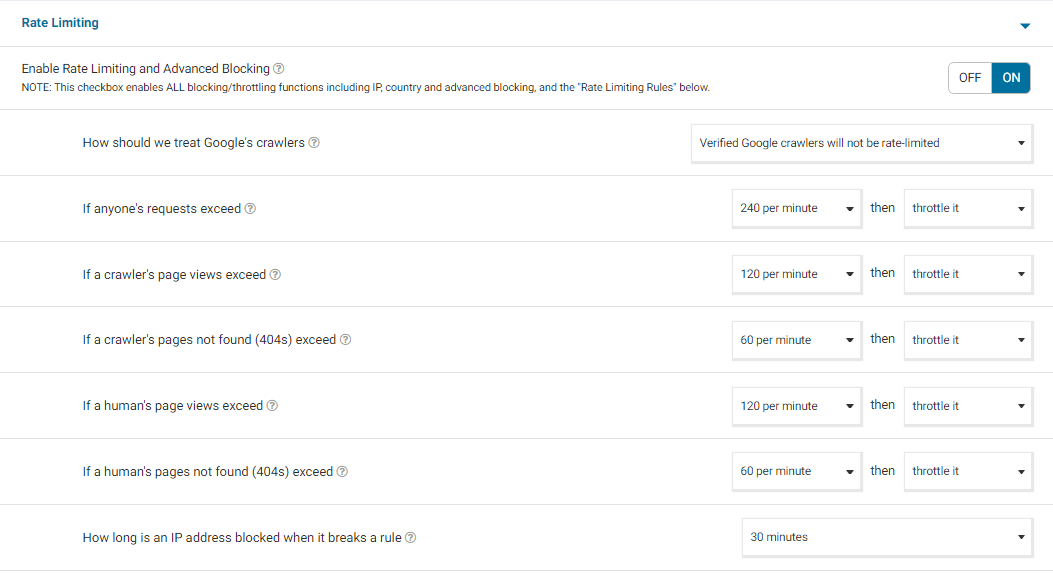
General treatment of bots can also be set in the Rate Limiting section of Wordfence > All Options to limit how many pages visitors and automated crawlers can access your website per minute as described in this article https://www.wordfence.com/help/firewall/rate-limiting/
I would recommend setting Rate Limiting Rules to these values to start with:
It is also worth mentioning that our 2FA and reCAPTCHA features are only supported for the default WordPress/WooCommerce login and registration pages and may not work on custom versions of these pages created manually or by other plugins/themes, that is in case you are using a custom login page.
Thanks,
Mark.