tinuzz

Forum Replies Created
-
Forum: Plugins
In reply to: [Trackserver] "Authentication Required"Cicciopizza,
You have misunderstood how Trackserver works. Please read the FAQ about URL slugs and pay special attention to the WARNING section.
Also, I don’t know what “a connection error” is.
Best regards,
Martijn.Forum: Reviews
In reply to: [Trackserver] Love it!Thanks for your kind words!
Cheers,
Martijn.Forum: Plugins
In reply to: [Trackserver] How to use TrackMeGreat, glad it works. If you like Trackserver, please consider writing a review here on WordPress.org:
https://wordpress.org/support/plugin/trackserver/reviews/
Thank you,
Martijn.Forum: Plugins
In reply to: [Trackserver] How to use TrackMeHi,
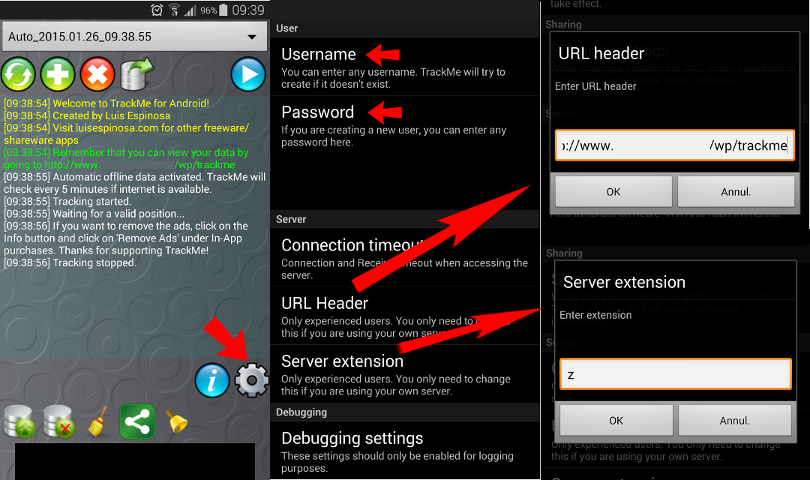
Yeah, this is a problem that has been fixed in Git, but is not in a release yet. Sorry about that. The ‘How to’ links are supposed to open an image in an overlay. The image you are looking for is this one:
https://raw.githubusercontent.com/tinuzz/wp-plugin-trackserver/master/img/trackme-settings.png
TrackMe really is the easiest option for use with Trackserver. OsmAnd is less flexible and OruxMaps is harder to confugure and use.
Best regards,
Martijn.- This reply was modified 9 years, 7 months ago by tinuzz.
Forum: Plugins
In reply to: [Trackserver] Request for Mulit Site SupportHello iro,
Thank you for this report. I have never tried to run WP multisite, and I haven’t tested Trackserver with it, so it’s quite possible things don’t work as expected.
I’ll set up a WP multisite installation and see what’s wrong as soon as possible. Hopefully I’ll get to it this week.
Best regards,
Martijn.Forum: Plugins
In reply to: [Trackserver] Can’t get livetracking workHi,
At least Trackserver seems to be listening on http://www.toni-ev.de/dogorux, but without an account, there isn’t much I can do further to test.
The page with the map IS trying to download and show a track, but it appears there is nothing to show. Do you have any tracks in your database? If live tracking with Orux is not working, try to upload a track some other way, for example upload a GPX via de WP backend. At least that way, you can see if the shortcode is working properly.
My guess is still that you made a mistake in the OruxMaps configuration.
Best regards,
Martijn.Forum: Plugins
In reply to: [Trackserver] Can’t get livetracking workHello,
I would like to help you, but there are some problems:
– http://www.toni-ev.de/dogorux is returning a 404, so if Trackserver is telling you to use this URL, there is a bug in Trackserver, or at least a use-case that I haven’t encountered before
– http://www.toni-ev.de/wo-ist-mein-hund/ does not show anything Trackserver-related, but I guess you are experimenting at the moment…
Not sure what to tell you. If you can give me a WP account, I can have look, but the user would need to have the ‘trackserver_admin’ capability (WP admins only, by default) for me to do anything useful.
Regards,
Martijn.Forum: Plugins
In reply to: [Trackserver] "Authentication Required"Ok, first you need to know the difference between the URL that you use for location tracking (that you configure in OruxMaps) and the pages that display your maps.
See https://nl.wordpress.org/plugins/trackserver/faq/ “What is this ‘slug’ you are talking about?”. Everything is explained there. Do not try to create a page at ‘http://…./mapmytracks/’ because it will not work due to the naming conflict. You will see ‘Authentication Required’.
But you still haven’t answered my question about what Trackserver says is the full custom URL for OruxMaps.
I have no idea why you would get a connection error in OruxMaps, if the URL you configured for MapMyTracks is EXACTLY what it says in Trackserver’s options page, under ‘OruxMaps MapMyTracks settings’, after ‘Full custom URL:’.
Recent versions of OruxMaps have complete support for custom MapMyTracks URL, so live tracking as well as track upload should work.
Best regards,
Martijn.Forum: Plugins
In reply to: [Trackserver] "Authentication Required"However I do suspect that Trackserver is listening for location updates on http://www.baichers.it/mapmytracks (which is the default setting) so trying to view a WordPress page on that URL does not work. That is the naming conflict I was talking about earlier in this topic, as well as in the FAQ.
Regards,
Martijn.Forum: Plugins
In reply to: [Trackserver] "Authentication Required"I can’t help you if you don’t answer all my questions, and ‘without success’ is also not very helpful.
Best regards,
Martijn.Forum: Plugins
In reply to: [Trackserver] "Authentication Required"What is the URL of the page you are trying to use [tsmap] shortcode on?
What does Trackserver tell you is the ‘Full custom URL’ for MapMyTracks on the options page?
Full URLs please, so I can have a look.
Best regards,
Martijn.Forum: Plugins
In reply to: [Trackserver] Duplicate Timestamps in GPX fileCan you post more information about the tracebacks that you got? I did a quick test uploading a hand-crafted GPX with duplicate timestamps, and I had no problems uploading.
Regards,
Martijn.Forum: Plugins
In reply to: [Trackserver] Locus Maps works!Can’t help you, I don’t have the pro version. If you donate some money, I can buy it.
Regards,
Martijn.Forum: Plugins
In reply to: [Trackserver] "Authentication Required"The “Authenrication required” issue is in the FAQ. You have a page name conflict.
The question about no live tracking I don’t understand, I need more information.
Regards,
Martijn.Forum: Plugins
In reply to: [Trackserver] Manage Tracks -> Upload Tacks button not workingHi Ben,
That’s silly. I fixed a similar issue with the username select box some time ago, but it seems I didn’t realize that the upload button had the same problem.
It is fixed now on Github, and will be part of the next release.
In case you want to have the fix right away: you would need these two files:
- https://github.com/tinuzz/wp-plugin-trackserver/blob/master/trackserver-admin.js
- https://github.com/tinuzz/wp-plugin-trackserver/blob/master/tracks-list-table.php
Best regards,
Martijn,