Thobie

Forum Replies Created
-
Forum: Themes and Templates
In reply to: [GeneratePress] „Nach oben“-ButtonThank you.
Forum: Themes and Templates
In reply to: [GeneratePress] „Nach oben“-ButtonThank you very much.
With the parent theme activated, the up button now works.
And with your CSS code, the slideshow and website title/subtitle fit and fill the header of the site.
Forum: Themes and Templates
In reply to: [GeneratePress] „Nach oben“-ButtonTHIS is the website with the child theme activated.
I have now activated the parent theme. Now look again at the website with the changed header.
Forum: Themes and Templates
In reply to: [GeneratePress] „Nach oben“-ButtonNo, the slideshow should not cover the entire browser window. It should cover the entire width of the container. In other words, according to the width of the navigation below and the white container.
Forum: Themes and Templates
In reply to: [GeneratePress] „Nach oben“-ButtonI had set up the child theme several years ago because I was unable to integrate the slideshow in the center of the parent theme to fill the width of the container. I succeeded in the child theme, which is why I am now keeping the child theme, but I can no longer reconstruct why this was not possible in the parent theme.
Forum: Themes and Templates
In reply to: [GeneratePress] „Nach oben“-ButtonThe note on the documentation at GeneratePress for creating a child theme is a help for developers, for me personally there are too many specifications with code. But I’m interfering too much with the theme and I don’t have enough previous knowledge for that.
As far as I know, the only difference between the parent theme and the child theme is the slider in the header. Unfortunately, I can’t remember where I set it to appear format-filling and centered. It does not do this in the parent theme.
I will therefore stick with the child theme and dispense with the up button, as this website is very little frequented anyway. Thank you for your help.
Forum: Themes and Templates
In reply to: [GeneratePress] „Nach oben“-ButtonThe functions.php file is very short and contains only 20 lines of code from the plugin I used to create a child theme from the parent theme. No other code was manually inserted into functions.php.
Forum: Themes and Templates
In reply to: [GeneratePress] „Nach oben“-ButtonHow do I find out what is causing the error in the child theme? No other plugins are active in the child theme and there is no additional CSS code that would only be available in the child theme.
How do I find the error?
Forum: Themes and Templates
In reply to: [GeneratePress] „Nach oben“-ButtonIt is due to the child theme.
When the parent theme is activated, the up button appears.
Should I still deactivate all plugins and switch to the parent theme?
Forum: Themes and Templates
In reply to: [GeneratePress] „Nach oben“-ButtonI have removed the small popup button of the Complianz plugin using CSS code. The problem still exists.
Forum: Themes and Templates
In reply to: [GeneratePress] „Nach oben“-ButtonThere is no conflict with a plugin. The problem still exists with deactivated plugins.
Forum: Plugins
In reply to: [Max Mega Menu] Line spacing of flyout menu itemsThank you.
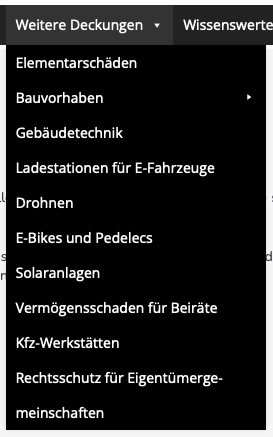
As part of the relaunch of the site, all menu entries have been shortened so that they are all single-line and there are no longer any double-line entries.
Forum: Themes and Templates
In reply to: [Property Builder] Error messageForum: Plugins
In reply to: [Max Mega Menu] Line spacing of flyout menu itemsHello, Tom,
unfortunately, this does not work.
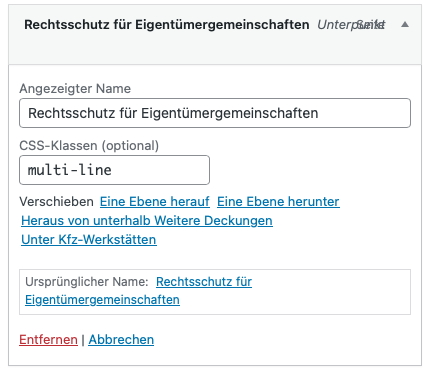
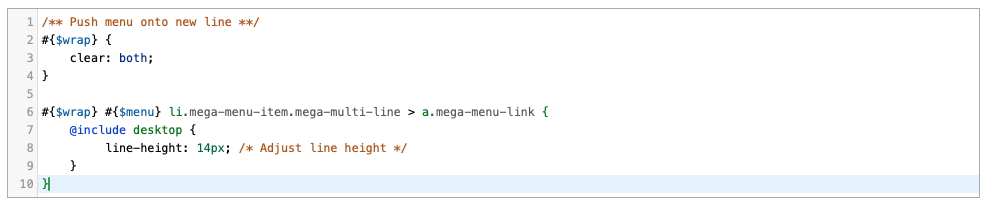
See the screenshots:
https://www.kreativ-schmie.de/Downloads/css_class.jpg
https://www.kreativ-schmie.de/Downloads/individual_styling.jpg
https://www.kreativ-schmie.de/Downloads/menu_item_at_the_bottom.jpg
I have tried it with the values: 1.0, 14px, 10px, 14pt, 10pt, 100%, 80%.
Forum: Themes and Templates
In reply to: [Sydney] Issue at update of versionThe problem with the nonsensical heading “Archive” has been fixed with the last update of the theme from 2.39 to 2.40. CSS code is no longer necessary.