ozviewer

Forum Replies Created
-
Thanks for the reply. Is there any way I can auto send an email when the order is delivered?
Forum: Plugins
In reply to: [PDF Invoices & Packing Slips for WooCommerce] Comment field in Packing SlipYordan, thank you so much for your patience and help. Comparing the two snippets I now understand (I think) but the main thing is your suggested snippet works!
Outstanding support.Forum: Plugins
In reply to: [PDF Invoices & Packing Slips for WooCommerce] Comment field in Packing SlipYordan, thanks for your reply. I actually want the custom field to apply to each order and for it to appear on the Packing Slip. My custom field group and post type can be seen here
I also tried this code snippet and it also didn’t work:
add_action( 'wpo_wcpdf_after_item_meta', 'wpo_wcpdf_show_product_location', 10, 3 );
function wpo_wcpdf_show_product_location ( $template_type, $item, $order ) {
	if (isset($item['product']) && !empty($location = $item['product']->get_meta('location'))) {
		echo '<div class="product-location">Location: '.$location.'</div>';
	}
}
I noticed on doing an FTP inspection of my files I have the standard PDF Invoices installed template and a custom template. How do I know which one is being used?
I really appreciate your help.
Forum: Plugins
In reply to: [PDF Invoices & Packing Slips for WooCommerce] Comment field in Packing SlipYordan, I made some progress by adding the custom field using ACF and the field appears on the admin order page but entering text does not appear on the packing slip. I had already added the code snippet:
add_action( 'wpo_wcpdf_after_item_meta', 'wpo_wcpdf_show_product_location', 10, 3 );
function wpo_wcpdf_show_product_location ( $template_type, $item, $order ) {
	if (isset($item['product']) && !empty($location = $item['product']->get_meta('location'))) {
		echo '<div class="product-location">Location: '.$location.'</div>';
	}
}
I couldn’t find any reference to ‘location’ as a choice in ACF so I think the snippet I added had no effect. Sorry, I am out of my depth.
Forum: Plugins
In reply to: [PDF Invoices & Packing Slips for WooCommerce] Comment field in Packing SlipYordan, thanks so much for your prompt and comprehensive reply. As soon as I have digested the information I will try it out. It looks very promising.
Forum: Plugins
In reply to: [Advanced Shipment Tracking for WooCommerce] Cannot access email settingsThat explains why I can’t open the settings. 😁 Perhaps you could remove the cogwheel in a future update?
OzForum: Plugins
In reply to: [Advanced Shipment Tracking for WooCommerce] Cannot access email settingsZorem,
Many thanks for the upate, Updated Tracking emails are now being sent. However I still cannot access the settings in Settings/Fulfillement. This is not a high priority but I thought I should mention it.
Thanks again,
OzviewerForum: Plugins
In reply to: [TablePress - Tables in WordPress made easy] Insert link into imageThanks Tobias. I previously added Insert Link which did not work. I tried your suggestion but I cannot find the “Link target” field.
Forum: Plugins
In reply to: [WooCommerce] 5.4.1 update kills site – database connection errorTried again 2 days later and no problem.
Forum: Plugins
In reply to: [WooCommerce] Orders page, select all checkbox not working.Yes, deactivating Woocommerce services solved the problem. When I couldn’t work out why I had WCS in the first place, I deleted it with no apparent ill effects on my e-commerce store.
Forum: Plugins
In reply to: [WooCommerce] Orders page, select all checkbox not working.I have the same problem with WP + Woocommerce. Select all doesn’t work.
Forum: Plugins
In reply to: [PDF Invoices & Packing Slips for WooCommerce] Critical errorSorry, I posted the wrong log. Woocommerce PDF Invoices & Packing Slips was removed by Wordpdress. I tried re-installing, but I couldn’t because I got an error message that the file already exists. However, I cannot de-activate and remove because there is no plugin to execute these commands.
[Edit] I have manually renamed the plugin folder by FTP and installed the plugin. Seems to be working okay. Is it safe for me to deleted the old renamed plugin folder?
- This reply was modified 5 years, 9 months ago by ozviewer.
Forum: Plugins
In reply to: [Advanced Shipment Tracking for WooCommerce] Customizer not saving changesThanks zorem, the problem is fixed.
Forum: Plugins
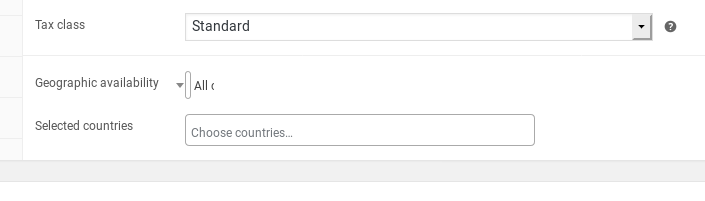
In reply to: [Country Based Restrictions for WooCommerce] Select box not showing properlyI have the same issue in Firefox screenshot This issue is absent in Chrome.
Forum: Plugins
In reply to: [PW WooCommerce Gift Cards] Cannot customise card imageI figured it out. Three or four steps needed:
- Copy the directory wp-content/plugins/pw-woocommerce-gift-cards/templates/woocommerce/emails to wp-content/themes/yourtheme/woocommerce/
- At the new location, delete the directory plain
- At the new location you should now just have the file customer-pw-gift-card.php
- Edit the php file by inserting, within the section <div class=”pwgc-gift-card-container”> the following (thanks austriker27)
<div class="gift-card-image"><img src="<?php echo get_stylesheet_directory_uri(); ?>/woocommerce/emails/gift-card.jpg" /></div> - You now need to upload your image to the email directory and call it gift -card.jpg