Alvaro Degives-Mas

Forum Replies Created
-
Forum: Plugins
In reply to: Do stats stop working when wp-super-cache is installed?WP Super Cache works fine with WP Stats (and other popular stats plugins).
Forum: Plugins
In reply to: Access to the Admin SSL beta (1.5-b1 )It’s right there on the author’s plugin page. Search for “development version (1.5-b1)” and click on “development version”.
If you prefer to suck the files off the SVN trunk instead, go here.
Forum: Plugins
In reply to: Embarrassed to ask, need answer about shopping cart pluginIf they’re really offering a custom-order development of a “deep integration” plugin (i.e. using common login and user data) then I suppose “thousands of dollars” isn’t exactly exaggerated, for the amount of hours likely involved to do that.
(Of course, just pointing out the obvious: there are some shopping cart / e-commerce solutions out there that already offer great WP integration support… Caveat emptor / YMMV and all that jazz, but if running WP ranks high on your list of priorities, then investigate that alternative route, first; bonus is, you can spend a sensible fraction of “thousands of dollars” on donations to equally grateful and deserving plugin and theme developers, plus you’ll have a site which looks like a million bucks to boot.)
Forum: Fixing WordPress
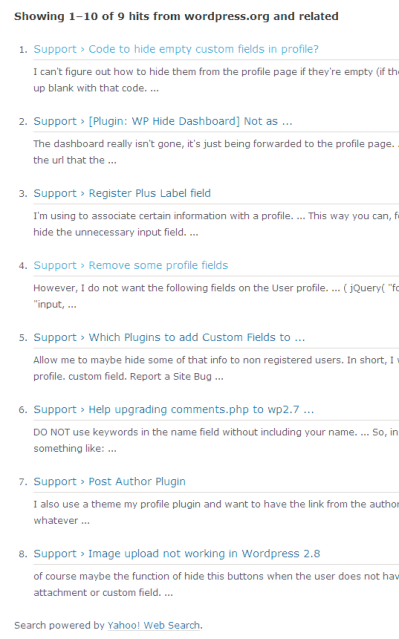
In reply to: Can’t find anything that is relevant here (no thanks to Yahoo)But wait, there’s more: I just now searched for something and got eight (8) results listed. Great. Except, the results are presented as “Showing 1–10 of 9 hits from wordpress.org and related” – never mind what “and related” means…
Don’t believe me? Here’s a snap.
Powered by Snafoo!
Forum: Plugins
In reply to: [Plugin: User Photo] Conflict with Akismet / Bad Behavior?(comment self-deleted; I didn’t see you were referring to a third plugin, namely User Photo, so my observations were pointless here)
Forum: Plugins
In reply to: [Plugin: Status Updater] Group Pages Not workingFB group pages aren’t supported by the plugin, as mentioned on the plugin’s page here.
Moreover, FB has once again changed its interface, so odds are FB connectivity is on the fritz altogether.
Forum: Plugins
In reply to: Customising new user email contentJust for completeness’ sake… There’s an alternative: Sean Barton’s Welcome Email Editor plugin. They have comparable feature sets, both run fine on the current WP release, as of this date WP 2.9.2, and both are great solutions for your purposes.
As an aside: kudos to your work for MSF – one of my fave NGOs!
How to create one? See the following information which you can find on this page:
For information on building your own plugins, see:
If you’re looking for help on setting up your site with WP for a particular purpose, e.g. without knowing which plugin to use, you’d be much better off posting your request in the generic How-To and Troubleshooting forum, instead of asking, as you did, here in the specific plugin support forum.
Good luck!
Forum: Plugins
In reply to: [Plugin: AmR Users] feature requestIf MailPress includes its custom field in the regular WP user meta table there shouldn’t be any problem; it should just appear in the list of available fields. Else, set up a custom field for that.
On a side note: this is really an awesome plugin; it’s indeed extremely useful to export maillists to other (external) apps. Thanks Anna-Marie!
Forum: Plugins
In reply to: [Plugin: NextGEN Gallery] WatermarkUse a .png (make the area surrounding the object in the image transparent, unless you want the entire image) or a .gif instead.
Forum: Your WordPress
In reply to: BlueHostWell, this is unexpected…
This weekend (!) Bluehost unilaterally changed access policy to the control panel as well as changed all passwords. Without prior warning, they reset all passwords for all their hosting accounts, and emailed a new one via plain text (!) email (!) to the “administrative” email they have on file.
This is particularly lousy in the case of sites of organizations, where the “technical” admin and the “executive” admin are in separate hands – as is highly recommendable – because the unilaterally changed password won’t be available until… next Monday, when everybody is back in office.
How they can unilaterally just change passwords without any advance warning, without checking to ensure that the email address on file is current or appropriate, and in the middle of a weekend, is just beyond me.
The issue with the unexpectedly (no prior warning) control panel redirection is similarly boneheaded: while in principle, it is understandable that they want to enforce single session access (meaning, you can’t be simultaneously logged into several control panels of several sites) what they have done is to blindly redirect you to the “current” session site control panel, even when you type in a different domain name!
Say, you’re working on a site via http://www.example.com/cpanel and then move on to the next site, by typing in http://www.domain.com/cpanel (which is how you typically access control panels with shared hosters) you’re STILL redirected to the control panel of http://www.example.com – because typically people don’t bother logging out, that means that you could do all sorts of damage without realizing it. The only clue you have is looking at the title bar of the browser, where it (at the very end) gives the domain name. And this, of course, affects site admins who have more than one hosting account with Bluehost; if you have just one smaller site, you’re none the wiser.
Two great examples that show how Bluehost is applying a hamfisted, dumb approach to all its customers.
These unthinking “changes” have led me to completely reconsider Bluehost. Actually, to decide to leave them. Which is a pity, because their tech support has always been quick to respond, personable and highly skilled. It’s their upper management that sux big time.
To top it off: when I called about an hour ago to complain, I was essentially told to go stuff myself.
Well, there’s a simple way I can accommodate that: by letting my wallet do the talking. They’ve lost my business; next Monday I’m moving my sites over to a more professionally managed hosting company that at least knows to treat its customers with respect.
I now strongly recommend against hosting with Bluehost: since they’re apparently so hard pressed by incompetent amateur customers – forcing them to change passwords – and treating customers like they’re idiots, I’d rather be in better company.
Bye bye Bluehost, don’t let the draft of the revolving door of other leaving customers cause you to catch a bad cold.
Amateur site owners who also are the admin of their single site with little interest in security: please go and host your business with Bluehost.
Oh – and Bluehost: please don’t even bother to try and get in touch with me. You’re over and done with.
Forum: Your WordPress
In reply to: BlueHostI regularly (not routinely) upload fairly large media files, and the only practical limit I run into there is my own upstream bandwidth.
Again: if you have smart cache settings (I have Super Cache and the new W3 used on different sites, and Gzip / deflating works nicely) and also apply sound compacting and optimization (e.g. consolidating local CSS and JS files, minify where possible, and keep external loads / DNS lookups to a minimum) your bottleneck is mostly downstream. I know that’s obvious but I’ve had a few complaints from people who I later discovered were on… dial-up. Yeah.
Just keep your expectations on a realistic level: it’s still shared hosting, and if you’re running a massive CPU resource hog you are going to be throttled.
Forum: Plugins
In reply to: [Plugin: NextGEN Gallery] WatermarkSee if the “hard” watermark really has been applied, checking the image.
Also, don’t apply “zooming” effects in the slideshow or the watermark will be cut off the visible portion.
http://wordpress.org/extend/plugins/the-events-calendar/other_notes/
Copy over the files you need, edit them to at least point the calls to the pertinent CSS files to their “new” location (inside your templates folder) and you’re all set, upgrade-proof.
Forum: Plugins
In reply to: [Plugin: PollDaddy Polls & Ratings] Restricting voting: once per user IDYay! Thanks in advance – and also for replying. 🙂