NextScripts

Forum Replies Created
-
Forum: Plugins
In reply to: [NextScripts: Social Networks Auto-Poster] Auto post to Facebook not working1. Please make sure your cron is fine.
2. Please publish a new post, than check your Log/History page and let me know what do you have there.
That message just means that is.gd site was down at this time.
Forum: Plugins
In reply to: [NextScripts: Social Networks Auto-Poster] URL not authorisedPlease just follow our very detailed and illustrated with many screenshots step-by-step instructions:
https://www.nextscripts.com/instructions/facebook-native-api-social-networks-auto-poster-setup-installation/URL blocked: This redirect failed because the redirect URI is not white-listed in the app’s client OAuth settings.
This message means that you skipped or done step 1.9 incorrectly.
1.9. Click “Settings” under “Facebook Login” in the left side menu. Please enter the URL of your SNAP Plugin “Accounts” page to the “Valid OAuth redirect URIs” field. Click “Save changes”.
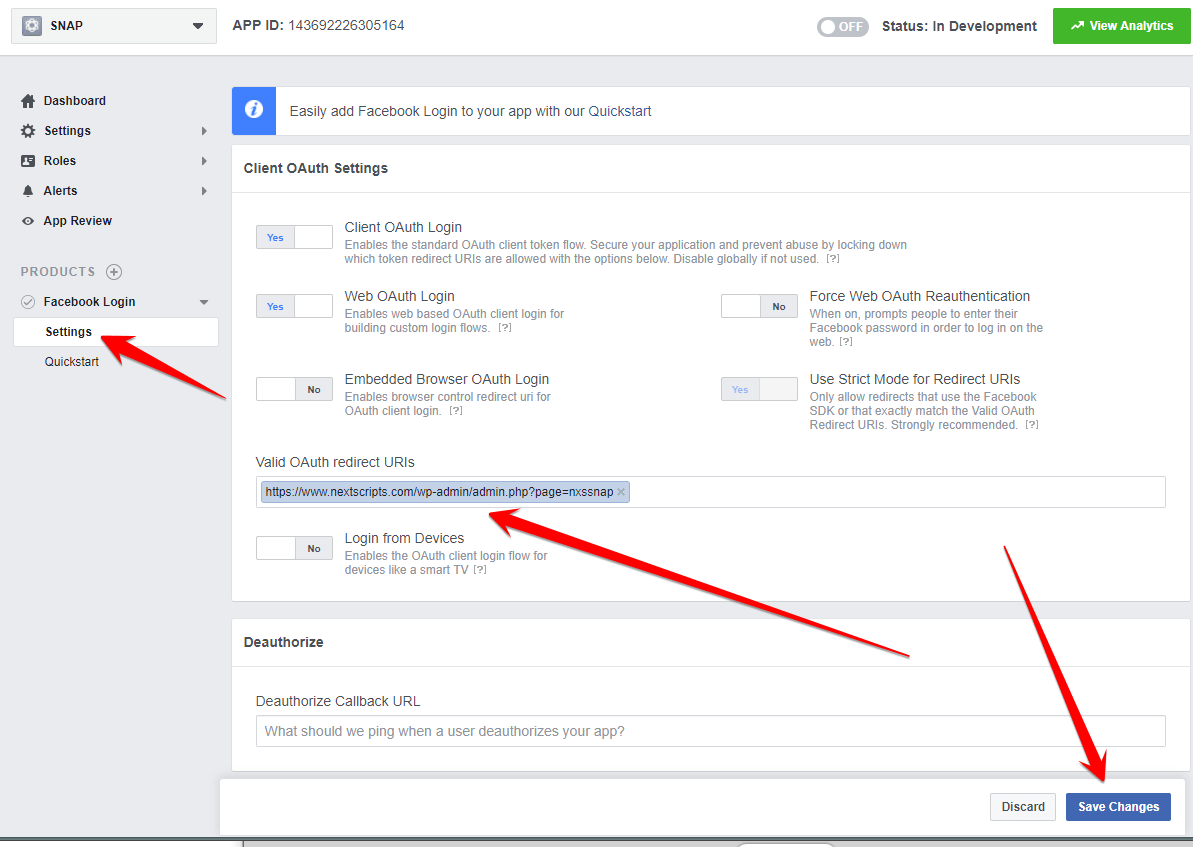
FAQ: What is “URL of your SNAP Plugin “Accounts” page” and how to find it?
Please go to your WP Admin panel and click on “Accounts” under the SNAP|Autoposter in the left side menu. The URL of that page is the “URL of your SNAP Plugin “Accounts” page”
 Forum: Plugins
In reply to: [NextScripts: Social Networks Auto-Poster] Is Vkontakte working?Every network that currently included in the plugin is working. Vkontakte is working fine.
Please just follow our very detailed and illustrated with many screenshots step-by-step instructions: https://www.nextscripts.com/instructions/setup-installation-vkontakte-social-networks-auto-poster-wordpress/
Forum: Plugins
In reply to: [NextScripts: Social Networks Auto-Poster] Problem With FlickrPlease contact support directly. https://www.nextscripts.com/support/
Forum: Plugins
In reply to: [NextScripts: Social Networks Auto-Poster] Custom account via PHPSure, just drop two files to /inc-cl/ folder and plugin will pick them up.
Please update to the latest version 4.2.8. This problem has been fixed there.
Forum: Plugins
In reply to: [NextScripts: Social Networks Auto-Poster] compatibility erros with phpSNAP is 100% compatible with all PHP 7.X versions. We are even using PHP 7.2 on our own servers.
That checker is not so good. It can’t properly analyze the code and generates a lot of false positives.
There are already several threads on this forums that explaining the issue with this checker in some details
Example:
https://wordpress.org/support/topic/php7-compatibility-49/What is your plugin version. I am pretty sure this issue was fixed several months ago.
Forum: Plugins
In reply to: [NextScripts: Social Networks Auto-Poster] How do I get an Facebook APP IDPlease just follow our very detailed and illustrated with many screenshots step-by-step instructions:
https://www.nextscripts.com/instructions/facebook-native-api-social-networks-auto-poster-setup-installation/Unfortunately there isn’t any explanation.
The link to those instructions is located in the top right corner of on the configuration page:

This is possible in the “Pro” version.
1. Duplicate account by clicking “Duplicate” button.
2. Set “Filters” for the original account only to ‘post’;
3. Set “Filters” for the duplicate account only to your custom post type;
4. Set different message formats for each account.Forum: Plugins
In reply to: [NextScripts: Social Networks Auto-Poster] Facebook Authorization IssuesForum: Plugins
In reply to: [NextScripts: Social Networks Auto-Poster] Telegram post send image separateSome how WP cut the most essential part.
2. Add this to the beginning of message format:
<a href="%IMG%"></a>This the most IMPORTANT part. It MUST BE IN THE BEGINNING OF THE MESSAGE.
- This reply was modified 7 years, 7 months ago by NextScripts.
Forum: Plugins
In reply to: [NextScripts: Social Networks Auto-Poster] Facebook Won’t AuthorizeFacebook made this change a year ago (Oct 2017). The solution is included in our instructions.
There is also a separate post with the solution:
Forum: Plugins
In reply to: [NextScripts: Social Networks Auto-Poster] Telegram post send image separateThis “other” plugin is just attaching image instead of “Web preview”. You sure can achieve that in SNAP.
1. Uncheck “Attach Image to the Post” to prevent separate image post. Do not uncheck “Enable Web Preview”.
2. Add this to the beginning of message format:
That will replace “Web Preview” and include image instead of it.