John Havlik

Forum Replies Created
-
Forum: Plugins
In reply to: [Breadcrumb NavXT] Split titles in breadcrump trailIf you don’t want HTML tags to come through in your breadcrumb titles, you have a couple of options. You can remove HTML tags from all titles per post/taxonomy type by changing instances of
%htitle%with%title%in the breadcrumb templates. Otherwise, if you want to only do this for a single post, you can use thebcn_breadcrumb_titlefilter to modify the title yourself.- This reply was modified 6 years, 4 months ago by John Havlik.
Forum: Plugins
In reply to: [Breadcrumb NavXT] data-vocabulary.org schema deprecatedUnfortunately, I do not speak German.
As mentioned above, you will need to:
- Update calling code in theme to be: `<div class=”breadcrumbs” typeof=”BreadcrumbList” vocab=”https://schema.org/”>
<?php if(function_exists(‘bcn_display’))
{
bcn_display();
}?>
</div>` - Reset Breadcrumb NavXT Settings: https://ps.w.org/breadcrumb-navxt/assets/screenshot-6.png?rev=1058520
Forum: Plugins
In reply to: [Breadcrumb NavXT] Support to the Events Calendar (renewed)Using Query Monitor, it should tell you what theme file is being loaded for that page. Check that theme file for a call to
onepress_breadcrumb()orbcn_display()if it does not have a call to either, that may be the problem.One thing that looks odd is you are nesting your breadcrumbs in the HTML which isn’t the way the markup should look for Schema.org BreadcrumbList. Also, if you’re hand coding a trail, you need to make sure to replace
%position%with the appropriate position of the breadcrumb within the trail.Forum: Plugins
In reply to: [Breadcrumb NavXT] Showing Breadcrumbs Only On PagesThere are two options you can try. You can wrap your call to
bcn_display()with a check onis_page(), or you can only place the callbcn_display()code in your theme’s page.php.Forum: Plugins
In reply to: [Breadcrumb NavXT] data-vocabulary.org schema deprecatedIt’s likely you are using out of date breadcrumb templates and need to update the HTML tag that wraps your call to
bcn_display(). Please see this thread for more information: https://wordpress.org/support/topic/data-vocabulary-org-schema-deprecated-3/Forum: Plugins
In reply to: [Breadcrumb NavXT] version 6.4When I checked the link in Google’s Structured Data Testing Tool, it didn’t complain about the BreadcrumbList. However, it only found a single element because you specified “Schema.org BreadcrumbList (microdata)” in the widget settings and only the last element complies with that format. The rest of the breadcrumbs are using the RDFa formatted Schema.org BreadcrumbList data. You will need to decide which format you want (microdata vs RDFa), and make sure all of your breadcrumb templates follow the same format.
- This reply was modified 6 years, 4 months ago by John Havlik.
Forum: Plugins
In reply to: [Breadcrumb NavXT] Support to the Events Calendar (renewed)You can use something like Query Monitor to tell you what theme file is being loaded on a page. From there, you will want to check that theme file for a call to
bcn_display().- This reply was modified 6 years, 4 months ago by John Havlik.
Forum: Plugins
In reply to: [Breadcrumb NavXT] data-vocabulary.org schema deprecated@newbee_sue After resetting the options, you will still need to update the wrapping HTML element that the Breadcrumb NavXT output is contained. See the “Default” calling code presented in this article: https://mtekk.us/archives/guides/calling-the-breadcrumb-trail/ for a reference of what the wrapping HTML element needs to look like.
Forum: Plugins
In reply to: [Breadcrumb NavXT] Menu instead of headlinesLinked in my first reply, the Breadcrumb NavXT documentation covers the what gets passed into the
bcn_breadcrumb_titlefilter, and has a link to an article with an example on how to use the filter. The gist of what a filter would need to do is take the passed in$idand$typeparameters and use them to find the corresponding item in the menu. From there, you just replace the$title(which the filter must return) with the title from the menu item.- This reply was modified 6 years, 4 months ago by John Havlik.
Forum: Plugins
In reply to: [Breadcrumb NavXT] Support to the Events Calendar (renewed)After re-reading that thread, it appears the posted code only worked on the calendar archive pages (month, list, or day). I haven’t looked into that plugin in years so I can’t provide an exact answer at the moment. However, for the single event pages, check to ensure Breadcrumb NavXT is actually getting called. Single event pages may have their own theme template file (I’m assuming they are CPTs), or something else funky may be going on.
Forum: Plugins
In reply to: [Breadcrumb NavXT] Contradiction in the breadcrumbAre these all posts (of any post type)? Or, are these pages taxonomy term archives (e.g. categories)? My guess is that for some of the pages, which are likely a post of some sort, they either do not have a parent post set. Or, if the post type is set in Breadcrumb NavXT to use a taxonomy hierarchy, the post does not have any terms of that taxonomy type.
Forum: Plugins
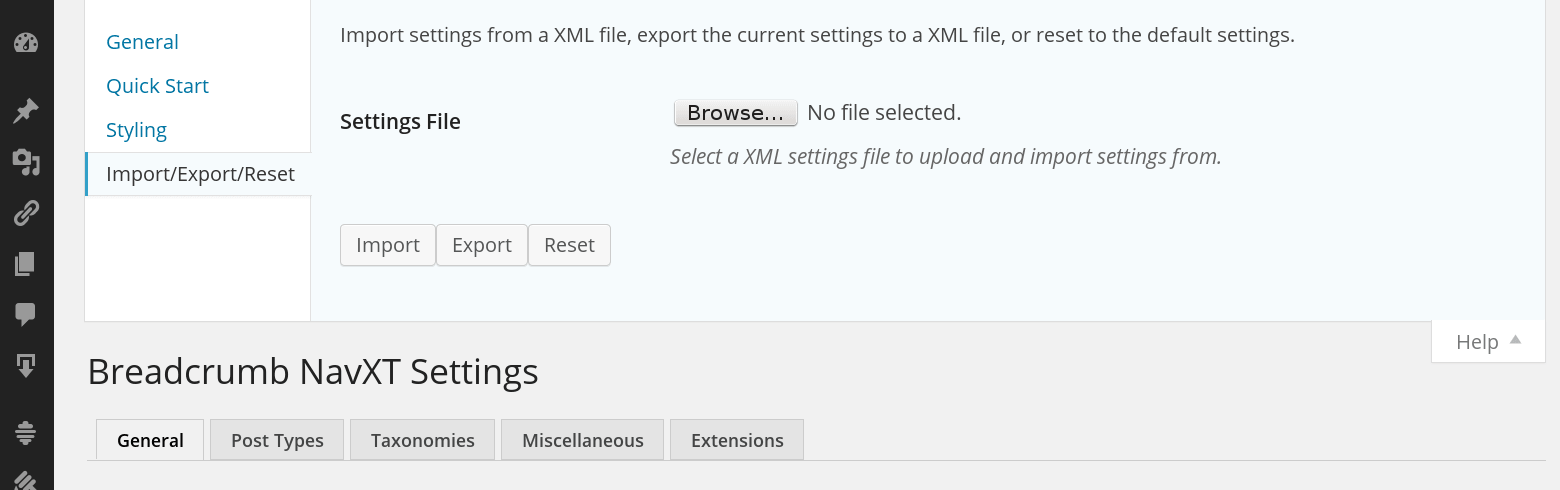
In reply to: [Breadcrumb NavXT] data-vocabulary.org schema deprecatedUninstalling and reinstalling effectively does the same thing, though I recommend using the reset method instead. The reset button under Help > Import/Export/Reset will reset your settings (see the following screenshot: https://ps.w.org/breadcrumb-navxt/assets/screenshot-6.png?rev=1058520).
Forum: Plugins
In reply to: [Breadcrumb NavXT] data-vocabulary.org schema deprecatedBreadcrumb NavXT has shipped with the Schema.org breadcrumbList markup since 5.3.0 (released over 4 years ago). You will need to update your calling code to the recommended calling code and change your breadcrumb templates to be schema.org compatible. If you haven’t modified your Breadcrumb NavXT settings, or have only modified a couple of them, the easiest way to update the breadcrumb templates is to do a settings reset from within the help menu in the Breadcrumb NavXT settings page.
It looks like an errant
itemscopeis being added to the wrappingdiv. This will happen when you select “Schema.org BreadcrumbList (microdata)” instead of “Schema.org BreadcrumbList (RDFa)” in the widget’s “Output trail as” setting. Since your templates are for the RDFa version of BreadcrumbList, you should set the “Output trail as” in the widget options to “Schema.org BreadcrumbList (RDFa)”.