losvincent

Forum Replies Created
-
Forum: Plugins
In reply to: [LiteSpeed Cache] No available Cloudflare zone@asfly Thanks,solved by using the “WordPress” template now!
- This reply was modified 2 weeks, 6 days ago by losvincent.
Forum: Plugins
In reply to: [LiteSpeed Cache] No available Cloudflare zone@asfly hello,
Last Report Number: XOZVPFYM
Last Report Date: 04/15/2026 08:39:30Forum: Plugins
In reply to: [LiteSpeed Cache] js delay cause slider and nav-menu issuei found that sticky function not work too when js delay is on,but works on wp rocket when js delay is on
Forum: Plugins
In reply to: [LiteSpeed Cache] js delay cause slider and nav-menu issue@qtwrk Thank you. Will this result in completely disabling the delay for Elementor, thereby affecting the speed to a certain extent? Additionally, I have consulted Elementor Pro’s customer support, and they stated that this is an issue with the third-party plugin and advised me to contact the plugin developer.
By the way, could you add automatic exclusion support for Elementor’s Nav Menu in future versions? For the JS delay feature of WP Rocket installed on my other websites, it automatically excludes the Nav Menu, so the issue of it not displaying never occurs.

- This reply was modified 5 months, 2 weeks ago by losvincent.
Forum: Plugins
In reply to: [LiteSpeed Cache] js delay cause slider and nav-menu issue@qtwrk yes,i’ve tried add this to js exclude list but still not work
swiper.min.js
smart-menus.min.js
mega-menu-stretch-content.480e081cebe071d683e8.bundle.min.js
nav-menu.8521a0597c50611efdc6.bundle.min.js
mega-menu.82093824ddb3f5531ab4.bundle.min.js
frontend.min.jsForum: Plugins
In reply to: [LiteSpeed Cache] js delay cause slider and nav-menu issueand also the reviews elements shows not correct when js delay is on,how to exclude it self?

@bycrik hello,added this line,is this right?
and cleared all cache,but still not work,min quantity should be 10,not 1(but when switch on js defer not delay,it works and shows 10)
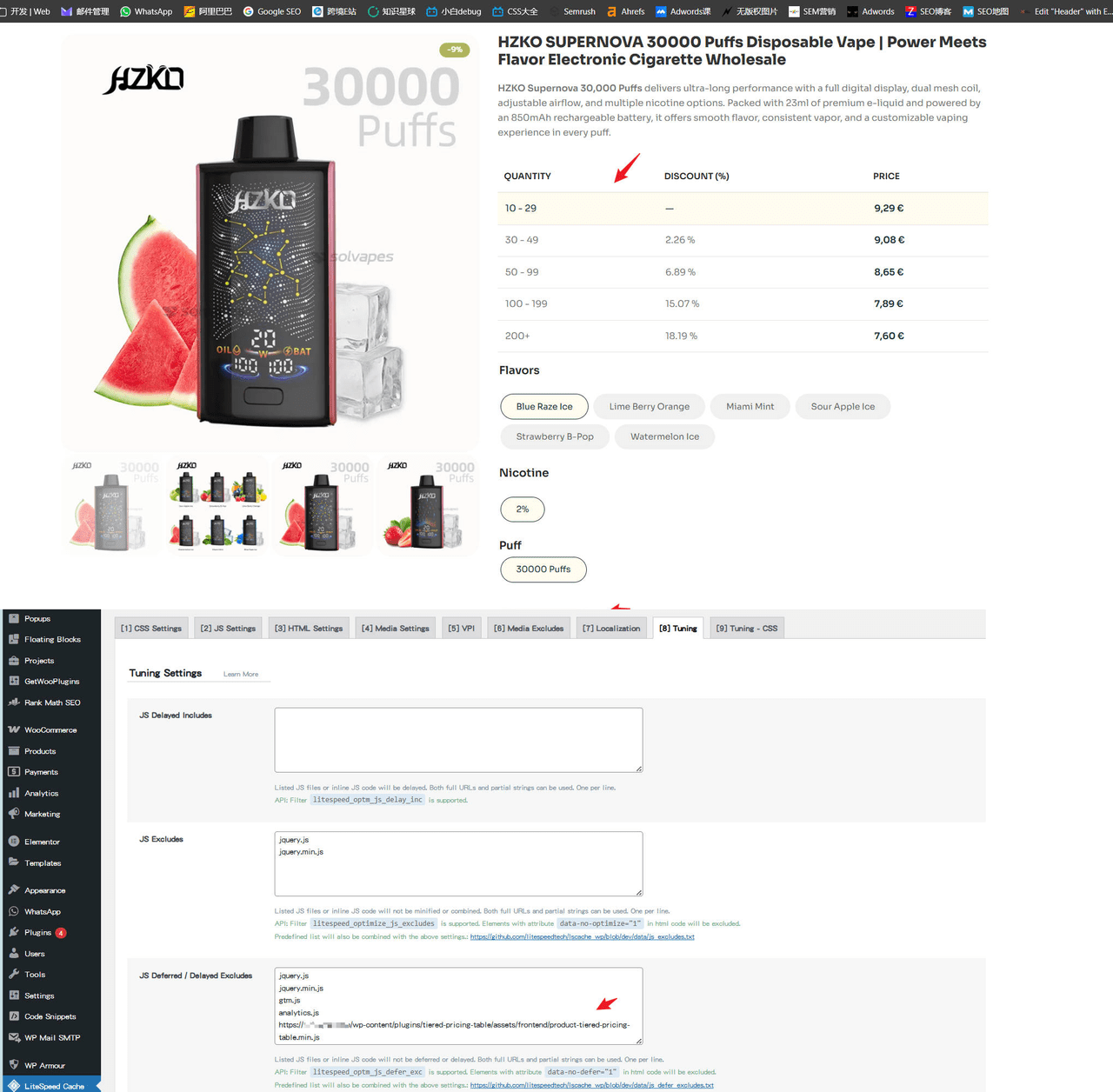
@himanshusharma20 thanks!i’ll add this to exclude list
- This reply was modified 5 months, 3 weeks ago by losvincent.
emm,seems cache issue,now works fine in front after clear all cache,but i still wanna know how to exclude this for future issue solution,thanks!
Forum: Plugins
In reply to: [LiteSpeed Cache] Adminbar disappear and shows blank@qtwrk you’re right,it caused by esi cache,works fine now after turn off Enable ESI settings.thanks!
by the way,If there are future scenarios where ESI caching needs to be used, is there an idea on how to exclude the admin bar from ESI caching?
@dcsupport hello,resent again,pls check
@dcsupport Hello, the email has been sent. Please check.
@dcsupport hello,wp rocket is re-disable now,and could you share me a email,and i’ll send my site account to you directly,you can login in background and test
I apologize, but my form submissions are being intercepted as spam. I’m worried that customers may also be blocked, so I’ve temporarily paused the WP Armour plugin.
Hello,Is there a way to resolve this? The caching plugin cannot be disabled and needs to be used long-term. The file
/wp-content/plugins/honeypot/includes/js/wpa.jshas already been added to the JS defer and JS delay exclude lists in WP Rocket. Both the website cache and Cloudflare cache have been cleared. Please test again.