katering

Forum Replies Created
-
@champsupertramp checked it today.
Plugins disabled, except Ultimate Member: Login ok
All plugins disabled: No login possibleI can send you screenshots if needed.
best, kate
Thanks @champsupertramp. Need to check this in detail, will post a follow-up the next days.
I am using the current version UM 2.2.5.
The issue occurs when UM is disabled.
Thanks for your answer.
Best, kate
Solved it by myself by flushing the cache. 🙂
Sorry for any inconvenience.
We use Wordfence too.
Our cache is Lightspeed as recommmended by our hoster. Their servers are optimized for Lightspeed.
Hope that helps,
kateYippiee it works now! 😀
Maybe it does so since the latest update a few days ago. Maybe it was a caching issue, no matter what it was it just makes my day. I just stumbled upon it by checking some other things on my live site. https://adjumed.com/members/
This issue is fixed for me but I am not the originator of the thread and I do hope that it is fixed for the other guys too.
Thanks a lot for your help.
Thank you very much for your answer.
I am using Ultimate Member 2.0.20. The settings for uploads are unchanged as far as I can remember. There are no empty fields … I just checked it.
Unfortunately I cannot add a screenshot here. 🙁
Ok, found it by myself 😉
You can adapt the admin-email address pretty easy. Go to:
Ultimate Member>Settings>Email
scroll down to the bottom of the page. The setting is the first one after the list of system mails.Thanks @kmeronuk for your input.
I tried your tweak but unfortunately it didn’t help with my issue.Encountered the same problem. Please advice.
Thanks in advance,
kateForum: Plugins
In reply to: [Image Photo Gallery Final Tiles Grid] Lightbox is covered by navigation menuHi Diego
How would you do that?
kate
Forum: Localhost Installs
In reply to: Image permissions w localhost and MAMP> Are you sure the group r/w permission was applied to that specific parent directory?
Yupp, just double-checked again. All permissions are set for htdocs and it’s subsequent directories.> Did you confirm _www is really the user used by your Apache install?
Mine is apache2.conf for MAMP. There is an httpd.conf in /private/etc/apache2 from the MacOS X installation that is not used.I verified the apache2.conf from MAMP and detected that it runs as
User kate
Group #-1
Ups.. this is embarassing. Because user kate is me. I am the administrator and I do have all necessary -rwx permissions on all needed directories. So does _www. 🙁
> These are the only things I know of that cause such errors: wrong user, wrong group, or wrong permissions.
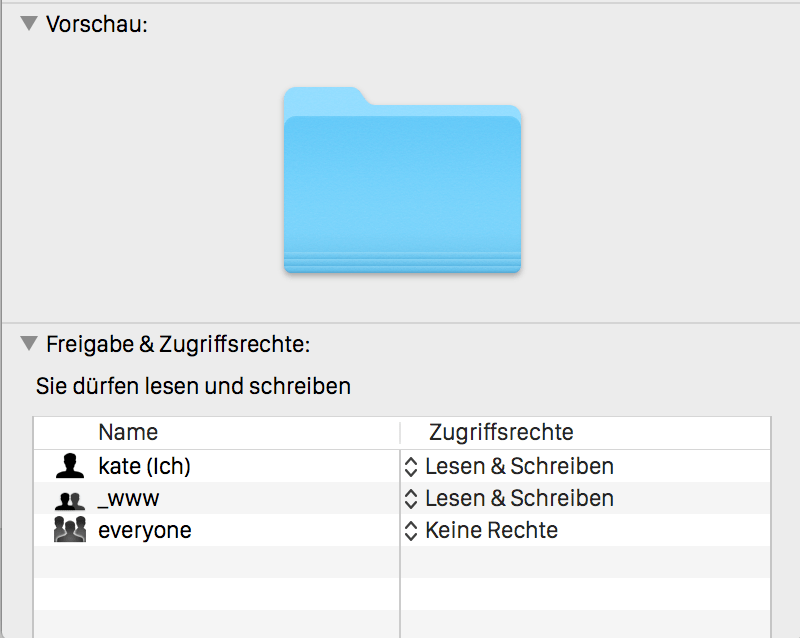
Definitely no clue how to improve that further.> Unrelated to the problem, I wondered why uploaded images are are going to /2015/08 instead of /2016/12.
My assumption is that WP is throwing just a wrong error message here. Usually it should open a new directory /2016/12 or likewise, shouldn’t it? To be honest this message scares me a bit but I haven’t found any evidence for that problem while researching that via Google.- This reply was modified 9 years, 4 months ago by katering.
Forum: Localhost Installs
In reply to: Image permissions w localhost and MAMPHmm … I performed all changes accordingly, rebooted the system and I still get the same error message.
Status is now:
. group _www created and user _www added to that group
. adapted r/w permissions to all subdirectories of htdocs
example of one directory: drwxrwx— 5 kate _www 170 28 Dez 21:38 uploadsI still get the same error: “Unable to create directory wp-content/uploads/2015/08. Is its parent directory writable by the server?”
Where am I wrong?
Forum: Localhost Installs
In reply to: Image permissions w localhost and MAMPThank you very much for your quick reply,sounds all very reasonable. I will apply it asap but I do need some time to research the details as I’m a newbie to these admin-tasks.;)