JohnnyScience

Forum Replies Created
-
Hello, anything on my last post?
Thank you.
Forum: Fixing WordPress
In reply to: After Logging in to WordPress, website redirecting to home page.Ok thanks for the help!
Forum: Fixing WordPress
In reply to: After Logging in to WordPress, website redirecting to home page.Well doing that did seem to fix the problem.
Now it’s going to take forever going through the plugins one by one and then logging in & logging out.
Any idea on a faster/easier solution?
All of the plugins that I have installed and active I absolutely need for all of the functions of my website that I want.
So if and when I do find the culprit plugin, I don’t know what I will/can do since I will also need that particular plugin for my website.
Ok I have a problem with the alternative Category drop-down option.
Since this isn’t an official “Taxonomy” it doesn’t show up as a normal post category & therefore doesn’t activate the real category and therefore doesn’t show up in my Source list for populating my Essential Grid.
So how can I utilize the Category Taxonomy, yet get a multiple option drop down, radio button, check box or anything?
I only need 5 specific Categories to populate, I do not want all of the categories registered to populate in this user chosen drop-down?
The only way to get them to populate is to select the “Tag” I added, but I can’t rely on users to enter the proper tag and that’s why I need them to pick a certain category that I pre-fill in the drop-down.
Thanks!
- This reply was modified 6 years, 11 months ago by JohnnyScience.
- This reply was modified 6 years, 11 months ago by JohnnyScience.
- This reply was modified 6 years, 11 months ago by JohnnyScience.
Nevermind, I seemed to have gotten to verify finally.
But I still don’t know where do I enable the .png icon I uploaded for the default map pins?
Hello @shamalli I’ve purchased the Pro upgrade and I’m having trouble verifying the plugin & keep getting this error message:
License verification did not pass!
Envato: Unauthorized operation – please use a valid token with the required permissions. Reason scope required purchase:verifyI’ve created a token and given it access to all of the options:
Here’s a screenshot of all of the required permissions I gave it after the default single permission didn’t work either:
And I’ve added the proper purchase code
Any idea what I’m not doing right?
- This reply was modified 6 years, 11 months ago by JohnnyScience.
- This reply was modified 6 years, 11 months ago by JohnnyScience.
Does not using the proper Category Field and this drop down replacement, affect whether posts that are tagged under these manual Categories will show up like normal when you use category attributes elsewhere in WP?
And currently all new Form Posts are created with the URL of ohiocannabis.com/newpost
Is it possible to have these specific Form created Posts be created with a different URL to keep them separated from the rest of my posts?
So say http://www.ohiocannabis.com/patientreviews/newpost
Is it possible to do this?
Thank you!
Ahh ok, the drop down category solution worked, thank you!
Question, these Attributes look like a very basic HTML list with bulletpoints – do I need to turn a feature on to make these Attributes look visually appealing or is it all CSS?
I would like these particular Attributes to stand out with colorful buttons/tags so the user can easily and quickly identify certain attributes by seeing colorful buttons/tags
I am also allowing users to upload photos for these Patient Reviews, so I’m looking for ways for them to do that easily and then also populate it in a visually appealing way with a grid or tiles or something within the post.
I’ve added the “Image Upload” field to the Post and I like the functionality of it. But is there a way to add arrows to the images so a user can easily cycle through them when the lightbox is open? Otherwise you have to go back to see the next image instead of just cycling through them with navigation arrows.
However, now with 2 image upload options with this and the Featured Image, it seems a bit cumbersome.
Is there a way for the Image Upload option to default one of the images to the Featured Image for the Post?
Ok thank you, I will try that later this morning.
What about a way to display all of the posts in a grid/gallery so it’s visually pleasing and compact on the space?
I think I have a grid solution that will work if there isn’t something already built into the plugin.
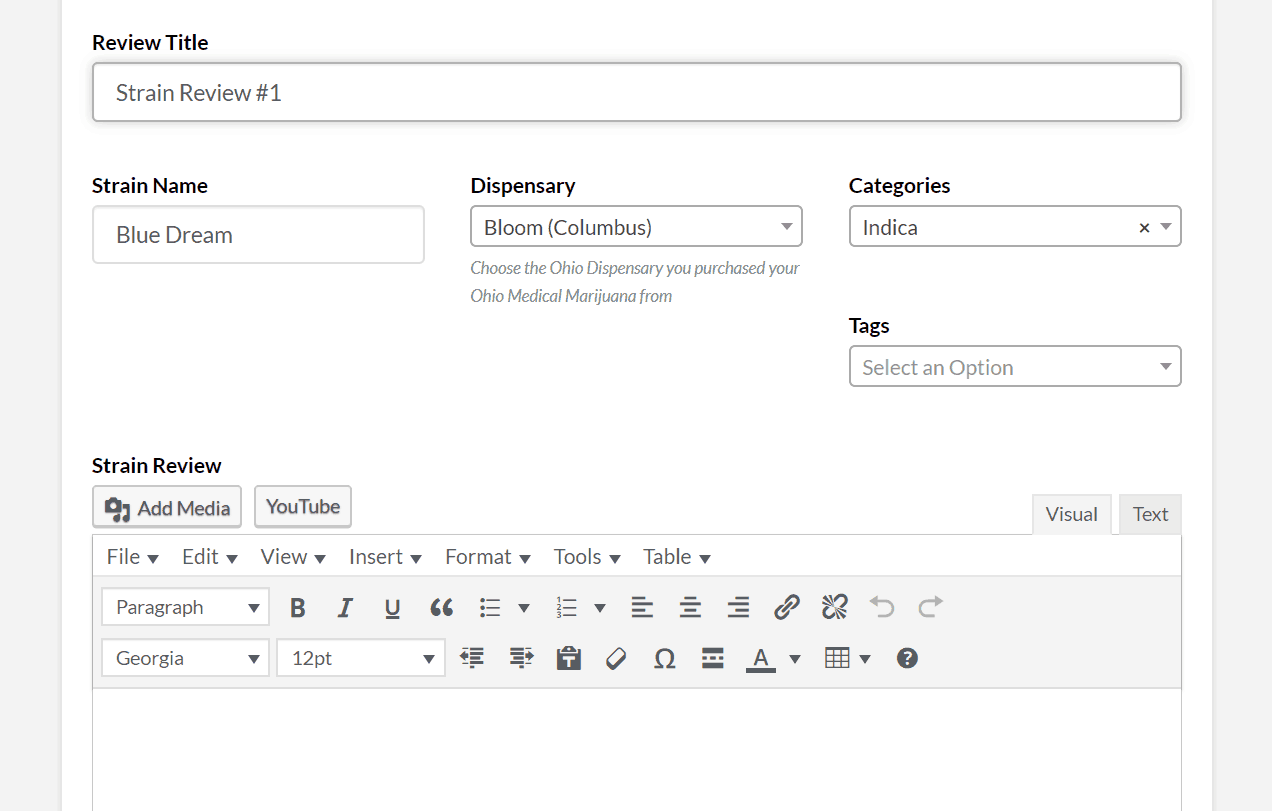
Is it possible to have the attributes like Categories & other drop down boxes show within the actual published post so other users can see that particular info when they’re reading the patient reviews too?
All of the info I that needs to be entered here should also be shown/visible within the post/review.
Here’s a screenshot of all of these Attributes I’d like to have populate in the published post:
https://www.ohiocannabis.com/wp-content/uploads/2019/08/Untitled000.png
Ok thank you for all of those answers! Let me chew on that for a bit and play around with it and I’ll let you know if I have any more questions.
Thanks again!
Ok so then where do I enable the .png icon I uploaded for the default map pins?
Ok I plan on upgrading to Pro, this is really a great plugin and I’m happy to support and get all of the functionality I need.
I tried following that walk-thru and uploading my own .png
public_html>wp-content>plugins>web-directory-free>resources>images>map icons>icons>rxlogo.png
But when I try to pull it up under the Default Map Marker Icon inside of Maps & Addresses, it does not show up.
Any idea what I could be missing?
Thank you!
Hello @shamalli I was wondering if you could please answer my last question
And also, I need to create 2 separate directories, is that possible with your plugin?
Thank you!