joeco

Forum Replies Created
-
Forum: Plugins
In reply to: [bbPress - Moderation Tools] whitelist approved usersHello,
Please respond, resolving this issue is very important for us.
Thank you!
Forum: Plugins
In reply to: [Edit Flow] No editorial change notifications in 0.9How can this be fixed?
Forum: Plugins
In reply to: [Edit Flow] No editorial change notifications in 0.9Here is the error:
editorial-comments.js?ver=0.9:26 Uncaught TypeError: $ is not a function
at Object.init (editorial-comments.js?ver=0.9:26)
at HTMLDocument.<anonymous> (editorial-comments.js?ver=0.9:2)
at i (load-scripts.php?c=1&load[]=jquery-core,jquery-migrate,utils&ver=5.0.3:2)
at Object.fireWith [as resolveWith] (load-scripts.php?c=1&load[]=jquery-core,jquery-migrate,utils&ver=5.0.3:2)
at Function.ready (load-scripts.php?c=1&load[]=jquery-core,jquery-migrate,utils&ver=5.0.3:2)
at HTMLDocument.K (load-scripts.php?c=1&load[]=jquery-core,jquery-migrate,utils&ver=5.0.3:2)
init @ editorial-comments.js?ver=0.9:26
(anonymous) @ editorial-comments.js?ver=0.9:2
i @ load-scripts.php?c=1&load[]=jquery-core,jquery-migrate,utils&ver=5.0.3:2
fireWith @ load-scripts.php?c=1&load[]=jquery-core,jquery-migrate,utils&ver=5.0.3:2
ready @ load-scripts.php?c=1&load[]=jquery-core,jquery-migrate,utils&ver=5.0.3:2
K @ load-scripts.php?c=1&load[]=jquery-core,jquery-migrate,utils&ver=5.0.3:2Forum: Plugins
In reply to: [Edit Flow] No editorial change notifications in 0.9Editorial comments are no longer working for me. When I click on the blue “respond to” button the page refreshes and the blue button disappears
Forum: Plugins
In reply to: [Edit Flow] Normal "Post Status" not showing upFrom one of the editors — I see exactly the same thing, but apparently she [a writer] clicks the save button and the assignment is saved (although the status cannot be changed, so you cannot really assign it to a writer automatically); the problem I have is that I click save, receive no error message, but then when I go to the general Posts, the file that I just saved is nowhere to be found
- This reply was modified 8 years, 10 months ago by joeco.
Forum: Plugins
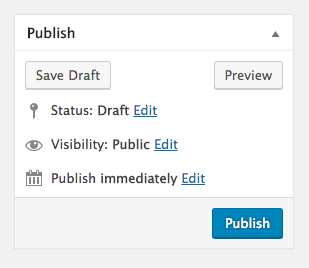
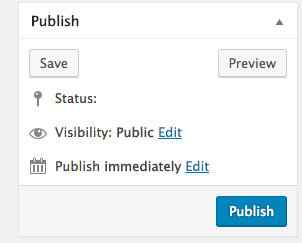
In reply to: [Edit Flow] Normal "Post Status" not showing upOn a post page, the status edit option only shows for 2 seconds and then disappears again.
I deactivated all plugins and the problem goes away, but the only options are draft or pending review.
When I enabled the edit flow plugin, the status edit link goes away again.
The (disappearing status edit link) issue is also present when I went to the default WP theme.
screenshots:
https://ancavasculitisnews.com/wp-content/uploads/2017/07/without-editflow.png
https://ancavasculitisnews.com/wp-content/uploads/2017/07/with-editflow.pngForum: Plugins
In reply to: [XML Sitemap & Google News] News sitemap not workingWordPress.
I have this on a test server. I would be happy to send you sudo credentials if you could be so kind as to SSH in and look closer. Please send me instructions to PM them to you.
Thanks again.
Forum: Plugins
In reply to: [XML Sitemap & Google News] News sitemap not workingThis config works when I use the default permalinks setting: /?feed=sitemap and /?feed=sitemap-news.
Forum: Plugins
In reply to: [XML Sitemap & Google News] News sitemap not workingHello RavenH,
thanks for responding. Here is the nginx config with the
include snippets/sitemap-ssl-params.conf;line commented out and replaced by the contents of the include file.Please take another look and see if you see something I should change.
Thx!
server {
        listen 80;
        listen [::]:80 ;
        root /var/www/html;
        server_name mydomain.com www.mydomain.com;
        location ~ /.well-known {
                allow all;
        }

        return 301 https://$server_name$request_uri;
}

server {
        listen 443 ssl http2;
        listen [::]:443 ssl http2;

#        include snippets/sitemap-ssl-params.conf;

######## here is the content of include snippets/sitemap-ssl-params.conf ####

ssl_certificate /etc/letsencrypt/live/always-https.com/fullchain.pem;
ssl_certificate_key /etc/letsencrypt/live/always-https.com/privkey.pem;

ssl_protocols TLSv1 TLSv1.1 TLSv1.2;
ssl_prefer_server_ciphers on;

ssl_ciphers "EECDH+AESGCM:EDH+AESGCM:ECDHE-RSA-AES128-GCM-SHA256:AES256+EECDH:DHE-RSA-AES128-GCM-SHA256:AES256+EDH:ECDHE-RSA-AES256-GCM-SHA384:DHE-RSA-AES256-GCM-SHA384:ECDHE-RSA-AES256-SHA384:ECDHE-RSA-AES128-SHA256:EC$

ssl_ecdh_curve secp384r1;
ssl_session_cache shared:SSL:10m;
ssl_session_tickets off;
ssl_stapling on;
ssl_stapling_verify on;
resolver 8.8.8.8 8.8.4.4 valid=300s;
resolver_timeout 5s;
add_header Strict-Transport-Security "max-age=63072000; includeSubdomains; preload";
add_header X-Frame-Options SAMEORIGIN;
add_header X-Content-Type-Options nosniff;

ssl_dhparam /etc/ssl/certs/dhparam.pem;

############# /include snippets/sitemap-ssl-params.conf; ##########

        client_max_body_size 256M;
         autoindex off;

       root /var/www/html;
        index index.php index.html;

        server_name mydomain.com www.mydomain.com;

        location / {
                  try_files $uri $uri/ /index.php?$args;
        }

        location ~* ^.+\.(flv|pdf|avi|mov|mp3|wmv|m4v|webm|aac|ogg|ogv|svg|svgz|eot|otf|woff|mp4|ttf|css|rss|atom|js|jpg|jpeg|gif|png|ico|zip|tgz|gz|rar|bz2|doc|xls|exe|ppt|tar|mid|midi|wav|bmp|rtf)$ {
                expires max;
                log_not_found off;
                access_log off;
                add_header Access-Control-Allow-Origin *;
                add_header Pragma public;
                add_header Cache-Control "public";
                 try_files $uri =404;
        }

        location ~* ^/wp-includes/.*(?<!(js/tinymce/wp-tinymce))\.php$ {
                internal;
        }

        location = /robots.txt {
                try_files $uri $uri/ /index.php?$args;
                access_log off;
                log_not_found off;
        }

        location ~* /(?:uploads|files)/.*\.php$ {
                deny all;
        }

        location ~* ^/wp-content/.*\.(md|exe|sh|bak|inc|php|pot|po|mo|log|sql)$ {
                deny all;
        }
        location ~ /\.(ht|svn)? {
                deny all;
        }

        location ~ /.well-known {
                allow all;
        }

        location ~ \.php$ {
               include snippets/fastcgi-php.conf;
                fastcgi_pass unix:/run/php/php7.0-fpm.sock;
        }

}
Forum: Plugins
In reply to: [XML Sitemap & Google News] News sitemap not workingI’m getting 404 errors instead of /sitemap.xml or /sitemap-news.xml
Here is my nginx config file. Please let me know how to solve this.
Thank you!
server {
        listen 80;
        listen [::]:80 ;
        root /var/www/html;
        server_name mydomain.com www.mydomain.com;
        location ~ /.well-known {
                allow all;
        }

        return 301 https://$server_name$request_uri;
}

server {
        listen 443 ssl http2;
        listen [::]:443 ssl http2;
        include snippets/sitemap-ssl-params.conf;
        client_max_body_size 256M;
         autoindex off;

       root /var/www/html;
        index index.php index.html;

        server_name mydomain.com www.mydomain.com;

        location / {
                  try_files $uri $uri/ /index.php?$args;
        }

        location ~* ^.+\.(flv|pdf|avi|mov|mp3|wmv|m4v|webm|aac|ogg|ogv|svg|svgz|eot|otf|woff|mp4|ttf|css|rss|atom|js|jpg|jpeg|gif|png|ico|zip|tgz|gz|rar|bz2|doc|xls|exe|ppt|tar|mid|midi|wav|bmp|rtf)$ {
                expires max;
                log_not_found off;
                access_log off;
                add_header Access-Control-Allow-Origin *;
                add_header Pragma public;
                add_header Cache-Control "public";
                 try_files $uri =404;
        }

        location ~* ^/wp-includes/.*(?<!(js/tinymce/wp-tinymce))\.php$ {
                internal;
        }

        location = /robots.txt {
                try_files $uri $uri/ /index.php?$args;
                access_log off;
                log_not_found off;
        }

        location ~* /(?:uploads|files)/.*\.php$ {
                deny all;
        }

        location ~* ^/wp-content/.*\.(md|exe|sh|bak|inc|php|pot|po|mo|log|sql)$ {
                deny all;
        }
        location ~ /\.(ht|svn)? {
                deny all;
        }

        location ~ /.well-known {
                allow all;
        }

        location ~ \.php$ {
               include snippets/fastcgi-php.conf;
                fastcgi_pass unix:/run/php/php7.0-fpm.sock;
        }

}
Forum: Plugins
In reply to: [Contact Form 7] Not possible send mail on Google App EngineOh yeah, use the WP-Mail-SMTP plugin to connect Sendgrid to WP.
Forum: Plugins
In reply to: [Contact Form 7] Not possible send mail on Google App EngineSending email on GCE requires the use of a third party service employing port 2525. Google recommends Sendgrid.
http://sendgrid.com/partner/google?mbsy=gHNj
Before you can use SendGrid, you must first sign up for the service from SendGrid’s Google partner page.* When signing up, provide the domain and email address from which you would like to send email messages. This may or may not be the same domain and email you used to sign up for Google Compute Engine.
If you use an email account that doesn’t match your specified domain e.g. a Gmail account, you will need to provide more information to SendGrid before they can provision your account. Complete the sign up process and SendGrid will contact you for more information, if necessary.
*If you sign up for SendGrid without using the partner page linked above, the free usage tier has much lower limits of 200 messages per day (approximately 6,000 messages per month).